
Driver Genius is a driver management utility designed to streamline the process of identifying, updating, backing up, and restoring device drivers on Windows PCs. This software aims to improve system performance and stability by ensuring all drivers are current and functioning optimally. This review delves into the features, performance, and user experience of Driver Genius, examining both its strengths and weaknesses.
Speedy Scanning and Driver Updates: The Core Functionality
Driver Genius’s primary function is the rapid scanning and updating of outdated or corrupted drivers. The software boasts a swift scanning process, typically completing within a minute, providing users with a clear, easily understandable report of their system’s driver status. This report highlights outdated drivers, allowing users to selectively update individual drivers or opt for a bulk update of all identified outdated drivers. The intuitive interface makes the process user-friendly, even for those without extensive technical expertise. A simple click of the “Driver Update” button initiates the scan, and the results are presented in a well-organized format, simplifying the identification of problematic drivers. The speed of the scan and the clarity of the results are key strengths of the application, differentiating it from some of its competitors which can be significantly slower or present results in a less user-friendly manner.
Backup, Restore, and Driver Management: Comprehensive Control
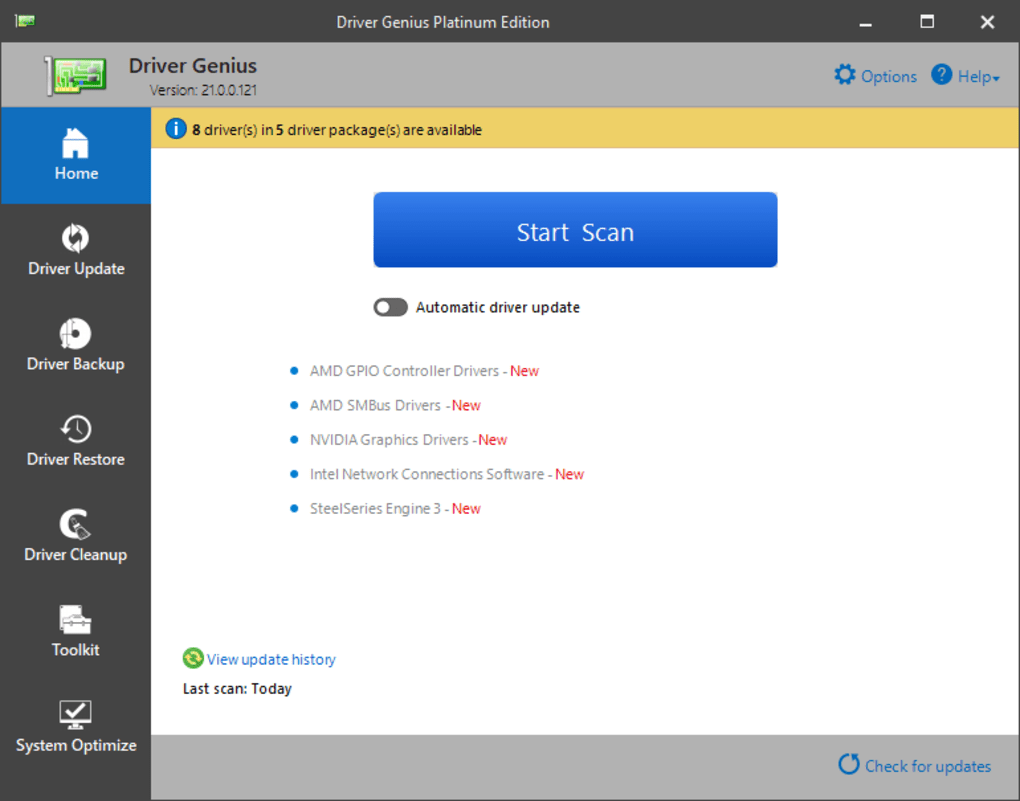
Beyond updating drivers, Driver Genius offers a robust set of driver management features. Crucially, it provides the ability to back up all current drivers. This backup functionality serves as a critical safety net, allowing users to revert to their previous driver versions if an update causes unexpected problems or system instability. This is a valuable feature, mitigating the risk associated with driver updates, which, while generally beneficial, can occasionally lead to unforeseen complications. The restore functionality is equally straightforward, enabling users to seamlessly revert to the backed-up drivers should the need arise. The ability to select a specific system restore point for retrieving driver backup files further enhances this feature’s reliability. Manual browsing of the computer is also supported, providing flexibility in locating and restoring drivers.
In addition to backup and restore capabilities, Driver Genius includes a driver cleanup function. This tool identifies and removes invalid or obsolete driver entries, potentially freeing up disk space and further improving system performance. Like other processes in the software, the cleanup function is relatively quick and efficient, adding to the overall efficiency of the software package. The inclusion of this feature demonstrates Driver Genius’s commitment to comprehensive driver management, going beyond simple updates and addressing potential issues with orphaned or corrupted driver files.
Beyond the Basics: Advanced Features and Capabilities
While its core functionalities focus on driver updates and backups, Driver Genius offers a range of additional features that enhance its overall utility. These advanced features include automatic driver detection, scheduled scans, and notifications for newly released drivers. This proactive approach allows users to maintain optimal driver versions without constantly monitoring their system. The automatic driver detection functionality is particularly beneficial for users who are unfamiliar with identifying specific drivers or those who prefer a hands-off approach to system maintenance.
The ability to schedule driver scans adds another layer of automation, allowing users to set regular scans to automatically identify and address any potential driver issues. This functionality significantly enhances the software’s usefulness, reducing the need for manual intervention and promoting continuous system optimization. Similarly, the notification system ensures that users are promptly informed of any newly released drivers that could benefit their system, facilitating timely updates and maintaining optimal performance.
User Experience and Interface: Ease of Use and Navigation
Driver Genius emphasizes ease of use through a clean and intuitive interface. The software’s design avoids unnecessary complexity, making it accessible to both novice and experienced users. The main dashboard presents essential information and functions in a clear and concise manner, streamlining navigation and minimizing the time required to perform tasks. The clear visual cues, logical organization of menus, and simple button designs contribute to the overall positive user experience. This user-friendly design is a significant advantage, allowing users to effectively utilize the software’s features without needing extensive training or technical knowledge.
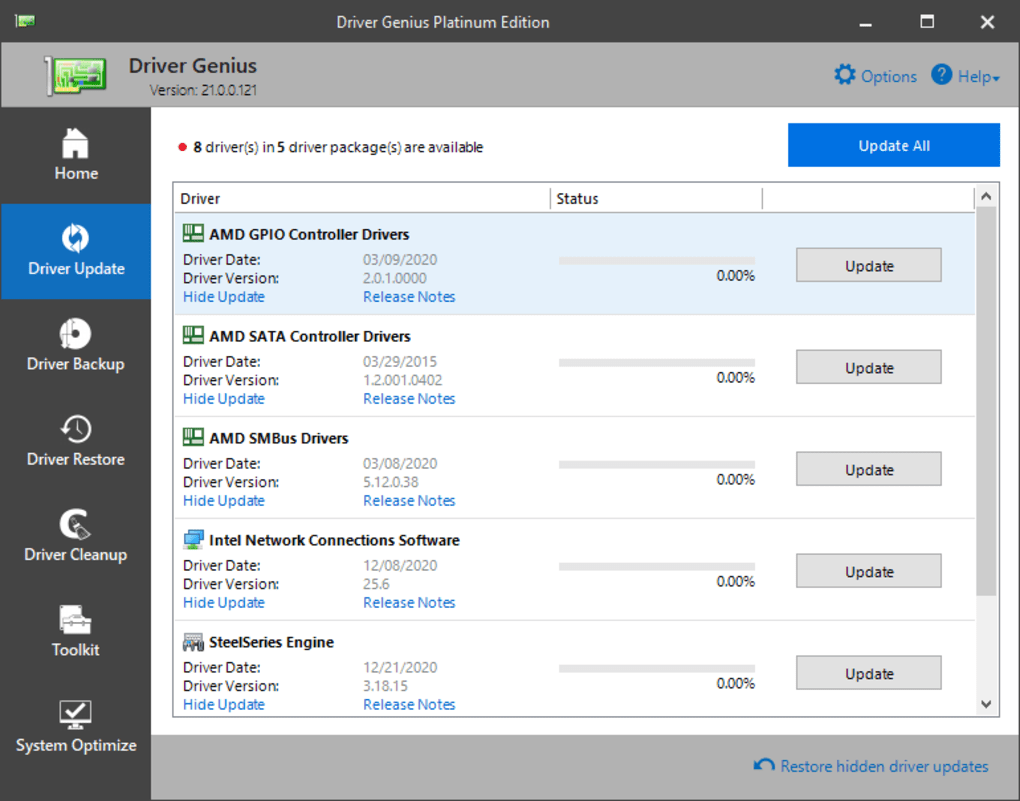
However, while the interface is generally well-designed, some users might find the layout slightly cluttered, especially with a large number of outdated drivers detected. This minor criticism doesn’t detract from the overall user-friendliness, but it highlights a potential area for improvement in future iterations.
Performance and System Requirements: Efficiency and Resource Usage
Driver Genius is designed to be efficient and minimize resource consumption. The software performs its tasks with minimal impact on system performance, preventing it from slowing down or interfering with other applications. The quick scan times and rapid driver update processes further demonstrate the software’s efficient design. This efficient performance is critical, ensuring that users can maintain their system’s drivers without experiencing any significant performance bottlenecks or resource exhaustion. This efficient performance allows the software to be used even on machines with relatively modest specifications.
The relatively low system requirements ensure wide compatibility across various systems, catering to a broad spectrum of users.
Comparison with Competitors: Unique Advantages and Disadvantages
Driver Genius competes with a number of driver update utilities available on the market. While many competitors offer similar core functionalities, Driver Genius distinguishes itself through its speed, ease of use, and comprehensive driver management capabilities. Some competing software may offer a more extensive driver database or additional features, but the combination of speed, efficiency, and user-friendliness makes Driver Genius a compelling choice for many users. The comprehensive nature of Driver Genius, encompassing backup and restoration capabilities in addition to simple updates, is also a key differentiator. A direct comparison with other popular driver update tools, such as Driver Booster, Driver Easy, or DriverUpdate, would be necessary to fully assess the relative advantages and disadvantages of each software.

User Reviews and Feedback: Real-World Experiences
User reviews provide valuable insights into the real-world experience of using Driver Genius. While many users report positive experiences, praising the software’s speed and ease of use, some users have reported encountering issues, such as the software missing some outdated drivers or the “Update All” feature causing problems in specific situations. These discrepancies highlight the importance of careful consideration before using the “Update All” feature, emphasizing the need for user discretion and potentially manual verification of updates. Such reviews underscore the importance of considering individual system configurations and potential incompatibilities, even with seemingly reliable software.
Conclusion: A Solid Choice for Driver Management
Driver Genius is a capable driver update utility that effectively balances speed, ease of use, and comprehensive driver management capabilities. Its swift scanning process, intuitive interface, and integrated backup/restore features make it an attractive option for users seeking to improve their system’s performance and stability. While some minor limitations exist, such as potential occasional issues with the “Update All” function and the possibility of missing some drivers, these drawbacks are outweighed by the software’s overall efficiency and user-friendliness. Driver Genius serves as a reliable tool for managing device drivers, allowing users to maintain optimal system performance with minimal effort. However, users are advised to exercise caution when using the “Update All” feature and to consider the potential need for manual verification of driver updates, particularly in more complex or sensitive system configurations.
File Information
- License: “Trial version”
- Latest update: “September 9, 2024”
- Platform: “Windows”
- OS: “Windows 7”
- Language: “English”
- Downloads: “627.8K”
- Size: “24.26 MB”


