
Driver Magician is a comprehensive and user-friendly utility designed for managing device drivers within the Windows operating system. It simplifies the often-complex process of backing up, restoring, and updating drivers, eliminating the frustration and potential technical challenges associated with these essential system components. This powerful tool offers a range of features aimed at streamlining driver management, minimizing downtime, and enhancing overall system performance.
Streamlining Driver Backup and Restoration
One of the core functionalities of Driver Magician lies in its efficient and reliable driver backup capabilities. The software intelligently identifies all hardware components within your system, meticulously extracting their corresponding drivers directly from your hard drive. This process ensures a complete and accurate backup, preserving all the necessary files for seamless restoration. Users can choose a preferred storage location for their driver backups, providing flexibility and control.
The backup process is not limited to just drivers. Driver Magician allows you to back up other crucial system files and data, like the contents of your “My Documents” folder and registry settings. This comprehensive approach safeguards essential user data alongside drivers, ensuring a complete system recovery in the event of a reinstall or system failure. This proactive approach minimizes data loss and reduces the time spent manually recreating configurations after a system refresh.
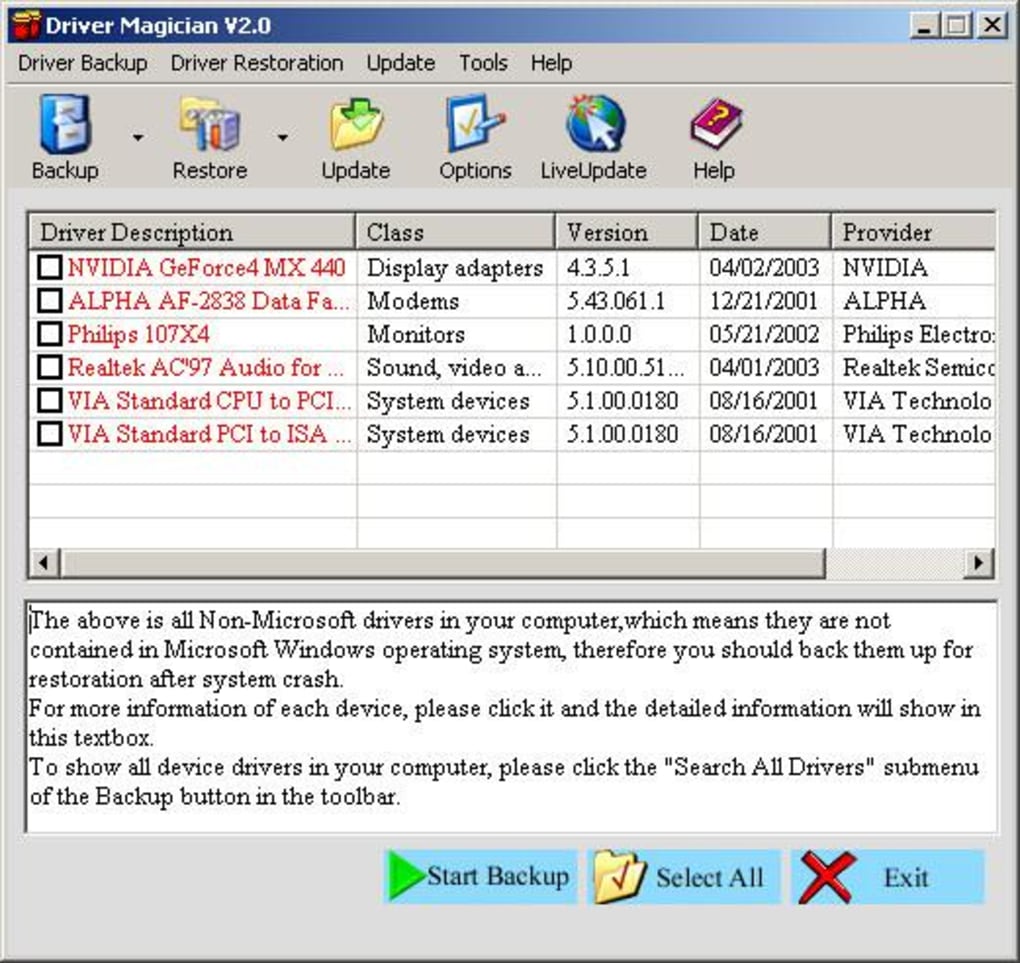
Driver restoration is equally straightforward, achieved with a single click. After a system reformat, reinstall, or upgrade, users simply restore their backed-up drivers, effectively reinstalling them as if they were using the original installation disks. A single system reboot is all that’s required to fully integrate the restored drivers, quickly returning your PC to full operational capacity with minimal user intervention. This significantly reduces the time and effort involved in troubleshooting driver-related issues after a major system change.
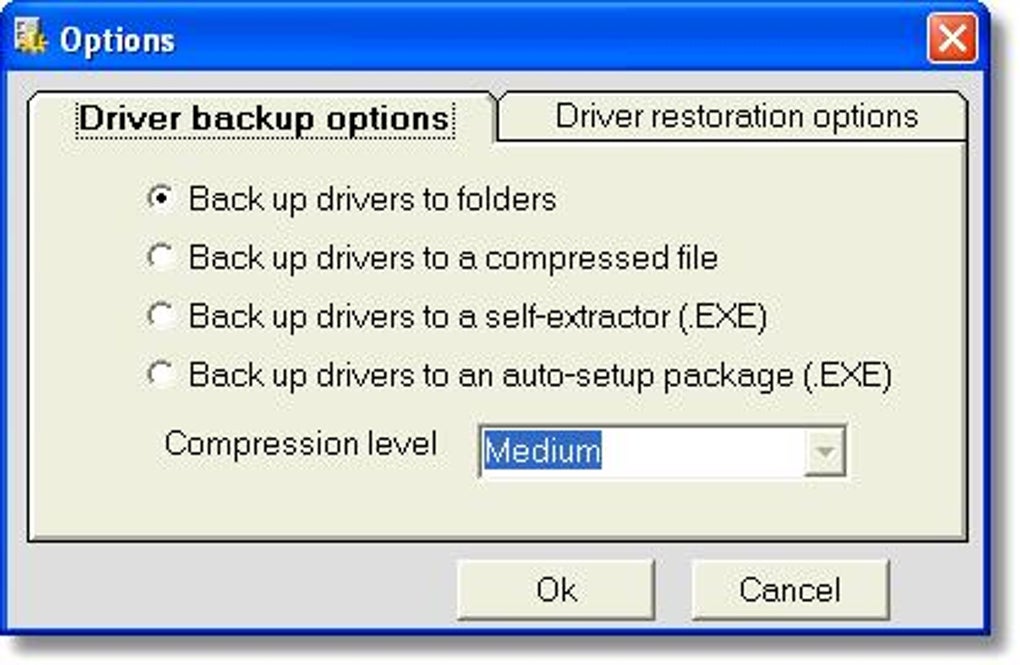
Driver Magician offers multiple backup modes, granting users flexibility based on their individual needs and technical expertise. This caters to a wide user base, from novice users seeking a simple, straightforward solution to more experienced users who may prefer fine-grained control over the backup process. The various options ensure that the user experience remains intuitive and efficient regardless of technical skill.
Effortless Driver Updates for Enhanced Performance
Beyond backup and restoration, Driver Magician boasts a robust driver update functionality. This feature plays a crucial role in maintaining optimal system performance and stability. Outdated or corrupted drivers can lead to system instability, compatibility issues, and diminished performance. Driver Magician’s integrated database and online update capabilities address this issue by providing access to the latest driver versions available.
The software proactively checks for updated drivers, notifying users of any available upgrades. This proactive approach ensures that your system is always running with the most current drivers, maximizing hardware performance and system stability. By consistently updating drivers, users can experience smoother operation, improved compatibility with new software and hardware, and enhanced overall system responsiveness.
The benefit of mature drivers is often overlooked, but it significantly influences system performance. Driver Magician’s update function prioritizes the use of these mature and fully tested drivers, guaranteeing stability and avoiding potential conflicts. The emphasis on stability and tested drivers distinguishes Driver Magician from other driver update solutions that might prioritize speed over dependability.
Advanced Features and Capabilities
Driver Magician extends its capabilities beyond basic backup, restoration, and updates, offering several advanced features designed to simplify and enhance the driver management process:
- Live Update Database: The driver database is constantly updated, ensuring access to the latest driver versions. This ensures that users always have access to the most current and compatible drivers.
-
Unknown Device Detection: The software actively identifies and pinpoints any unknown devices connected to the system. This feature helps diagnose hardware issues and provides the necessary information for acquiring the proper drivers.
-
Detailed Hardware Driver Information: Driver Magician provides detailed information about each driver, including the manufacturer, version number, and date of release. This granular level of information allows users to make informed decisions about driver updates and management.
-
Auto-Setup Package Creation: The software can create an auto-setup package (.EXE) containing all drivers. This allows for effortless driver restoration even without Driver Magician installed on the target system. This feature significantly streamlines the recovery process and eliminates the need for installing additional software.
These advanced features collectively offer a comprehensive and efficient driver management solution, addressing a wide range of user needs and technical skills. The software strives for ease of use while providing the depth of functionality required by more experienced users.
Comparison with Alternative Solutions
While Driver Magician stands as a robust and reliable solution, it’s beneficial to compare it to alternative driver management utilities available in the market. Many other tools offer similar functionalities, but Driver Magician’s strengths lie in its user-friendly interface, comprehensive feature set, and its ability to handle both backup and update tasks seamlessly within a single application. Other solutions might specialize in driver updates or backups, but Driver Magician excels in unifying these functionalities for a streamlined workflow.
Competing tools may offer more advanced features such as automated scheduling or cloud-based backups, but Driver Magician prioritizes a balance between simplicity and functionality. Its focus on ease of use makes it accessible to users of all technical levels, eliminating the steep learning curve sometimes associated with more feature-rich alternatives. Therefore, the choice between Driver Magician and other solutions often depends on individual preferences and priorities. Users prioritizing simplicity and a combined backup/update solution may find Driver Magician the most compelling option.
Conclusion: A Reliable and User-Friendly Solution
Driver Magician provides a comprehensive solution for all your Windows driver management needs. Its user-friendly interface, powerful features, and straightforward workflow empower users of all technical levels to confidently back up, restore, and update drivers. The ability to comprehensively back up and restore drivers, along with the integrated driver update functionality, sets it apart from many other utilities in the market.
The tool’s combination of simplicity and advanced capabilities, coupled with its proactive approach to driver updates, makes Driver Magician a valuable asset for both novice and experienced computer users. Whether you’re dealing with a simple driver update or a complete system reinstall, Driver Magician simplifies the process and minimizes the potential for complications. Its reputation for reliability and efficiency makes it a dependable choice for ensuring optimal performance and stability within the Windows environment. The focus on user-friendliness and a clear, intuitive interface ensures that driver management becomes a straightforward process, reducing frustration and minimizing downtime.
File Information
- License: “Trial version”
- Version: “3.68”
- Latest update: “April 18, 2012”
- Platform: “Windows”
- OS: “Windows Vista”
- Language: “English”
- Downloads: “56.6K”
- Size: “4.17 MB”


