
Driver Talent is a user-friendly application designed to simplify the often complex process of managing and updating hardware drivers on your Windows computer. It streamlines the identification, updating, backing up, and even restoring of drivers, eliminating the need for manual searches and potentially risky installations. This comprehensive guide delves into the features, functionalities, and overall effectiveness of Driver Talent, providing a detailed overview for both novice and experienced users.
Streamlining Driver Updates: Ease of Use and Functionality
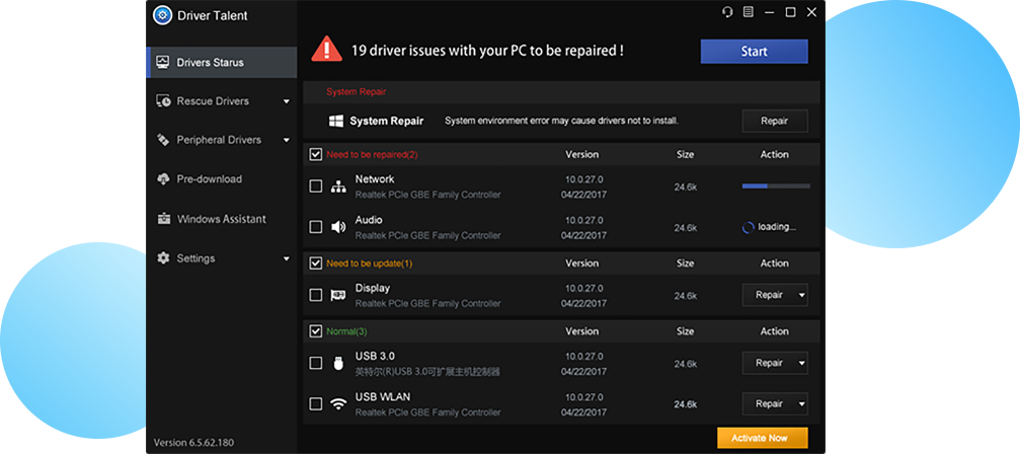
One of the primary advantages of Driver Talent is its intuitive interface and straightforward operation. The software’s core function is to scan your system for outdated, corrupt, or missing drivers. This scanning process is remarkably comprehensive, covering a broad range of hardware components, including:
- Graphics/Video Cards: Ensuring optimal performance and visual fidelity.
- Motherboards: Maintaining stability and communication between hardware components.
- Network Adapters: Facilitating smooth and reliable internet connectivity.
- USB Devices: Ensuring proper recognition and functionality of external peripherals.
- Sound/Audio Cards: Enabling clear and uninterrupted audio playback and recording.
- Mice and Keyboards: Maintaining precise input and responsiveness.
- Network Printers: Enabling seamless printing operations.
- Webcams: Ensuring clear and crisp video capture.
- Scanners: Maintaining accurate and efficient document scanning.
- Bluetooth Devices: Enabling seamless connections with wireless peripherals.
- DVD Players: Ensuring proper DVD recognition and playback.
- Gamepads: Ensuring accurate and responsive game controller functionality.
Upon completion of the scan, Driver Talent presents a clear and concise report detailing identified issues and available updates. Users can then choose to update individual drivers or opt for a one-click solution to update all identified drivers simultaneously. This simplified approach significantly reduces the time and effort typically involved in manual driver management. The program’s efficiency in identifying even the less common hardware drivers is a significant advantage.
Beyond Updating: Backup, Restore, and Driver Selection
Driver Talent goes beyond simple driver updates, providing critical backup and restore capabilities. This feature is invaluable for users who want to maintain a record of their driver versions or need to revert to previous versions if problems arise after an update. The ability to create a complete backup of your current drivers allows for a quick and easy restoration to a known stable state, minimizing downtime and potential system instability.
Furthermore, Driver Talent allows users a level of control over the update process often absent in other driver management tools. While the software automatically suggests the latest driver versions, users can review detailed information about each driver, including its file size, release date, and version number. This granular control empowers users to make informed decisions about which driver versions to install, ensuring compatibility with their specific hardware and software configurations. The option to choose a specific, non-latest version is particularly useful for users facing compatibility issues with newer driver releases.
Addressing Potential Drawbacks and Limitations
While Driver Talent offers many advantages, it’s important to acknowledge some potential drawbacks:
- Potential for Non-Compatible Drivers: Although Driver Talent strives for compatibility, there’s always a small risk that it might download a driver that isn’t fully compatible with your specific hardware. While this is rare, it’s crucial to exercise caution and carefully review the details of any driver before installing it. Always check the manufacturer’s website for the latest drivers as a secondary confirmation.
- Lack of Bulk Download Support: While the program can manage numerous drivers effectively, it doesn’t offer a bulk download option. This means you must queue individual driver downloads, which can be a small inconvenience with many drivers that need updating.
- Occasional Server Stability Issues: Like any online service, Driver Talent may occasionally experience server stability issues that can affect download speeds or access to the driver database. This is usually a temporary problem, and the developers actively work on maintaining the service stability.
- Inflexible Automatic Scanning Schedule: Driver Talent offers automated scanning, but unfortunately, users cannot customize the frequency of these scans. This lack of scheduling flexibility could be a minor drawback for users seeking more precise control over the software’s operation.
Comparison with Alternative Driver Updater Tools
Driver Talent exists in a crowded market of driver updater applications. To put the software’s capabilities and drawbacks into perspective, a comparison with its most popular competitors is beneficial. Several key contenders include:
-
Driver Easy: This is a popular and well-regarded alternative that offers similar functionality to Driver Talent. It often boasts a larger driver database and may offer faster download speeds. However, its free version might have limitations compared to Driver Talent’s free version. A direct comparison of the features and capabilities of each software’s free and paid versions is crucial for informed decision-making.
-
Driver Update: Driver Update provides another alternative for updating drivers. Its features are comparable to Driver Talent, with a focus on ease of use. The major differentiator here is likely to be the size and quality of each tool’s driver database, the user interface, and any additional features that are unique to each.
-
Driver Toolkit: This tool also focuses on driver management, but it sometimes adopts a more aggressive approach to driver installations. This may appeal to experienced users but could potentially lead to issues for less tech-savvy individuals.
A careful consideration of the strengths and weaknesses of each software, including user reviews and independent benchmarks of download speed and accuracy, is crucial in making an informed decision.
Conclusion: A Valuable Tool for Simplified Driver Management
Driver Talent offers a user-friendly and effective solution for managing hardware drivers on Windows systems. Its intuitive interface, comprehensive scanning capabilities, and driver backup/restore features significantly simplify a potentially complex task. While some limitations exist, such as the lack of bulk download support and the inflexible scanning schedule, these drawbacks are largely outweighed by the significant time and effort saved through using this tool. Ultimately, Driver Talent is a valuable asset for users seeking a hassle-free approach to maintaining their computer’s hardware drivers, whether they’re experienced users or complete novices. The software empowers users to keep their systems running smoothly and efficiently by providing a robust and streamlined system for driver management.
File Information
- License: “Free”
- Latest update: “July 8, 2025”
- Platform: “Windows”
- OS: “Windows XP”
- Language: “English”
- Downloads: “83K”
- Size: “83.78 MB”


