
In the digital age, a computer’s performance and longevity are intrinsically linked to the meticulous maintenance of its core components, both hardware and software. Among the most critical software elements are drivers – the small but powerful programs that enable your operating system to communicate with your hardware devices. Without proper drivers, your graphics card won’t render visuals correctly, your sound card will remain silent, and your network adapter might fail to connect you to the internet. This is where tools like DriverHive step in, serving as indispensable aids in the often-overlooked yet vital task of driver management.
DriverHive, a focused system maintenance utility available through platforms like PhanMemFree.org, is designed with a singular, crucial purpose: to ensure your PC’s drivers are not only present but also fully up-to-date and functioning optimally. For many users, manually tracking and updating drivers across numerous hardware components can be a tedious, time-consuming, and often confusing endeavor. DriverHive simplifies this process, offering a user-friendly and efficient solution to a common computing challenge.
The fundamental operation of DriverHive is remarkably straightforward, mirroring its commitment to ease of use. Upon launching the program, the user is presented with an intuitive interface. A simple click on the “Scan” button initiates a comprehensive sweep of your system. This scan meticulously identifies all installed hardware devices and cross-references their current driver versions against an extensive database of the latest available drivers. Within moments, DriverHive generates a detailed report, clearly indicating any drivers that are either missing entirely or have become outdated.
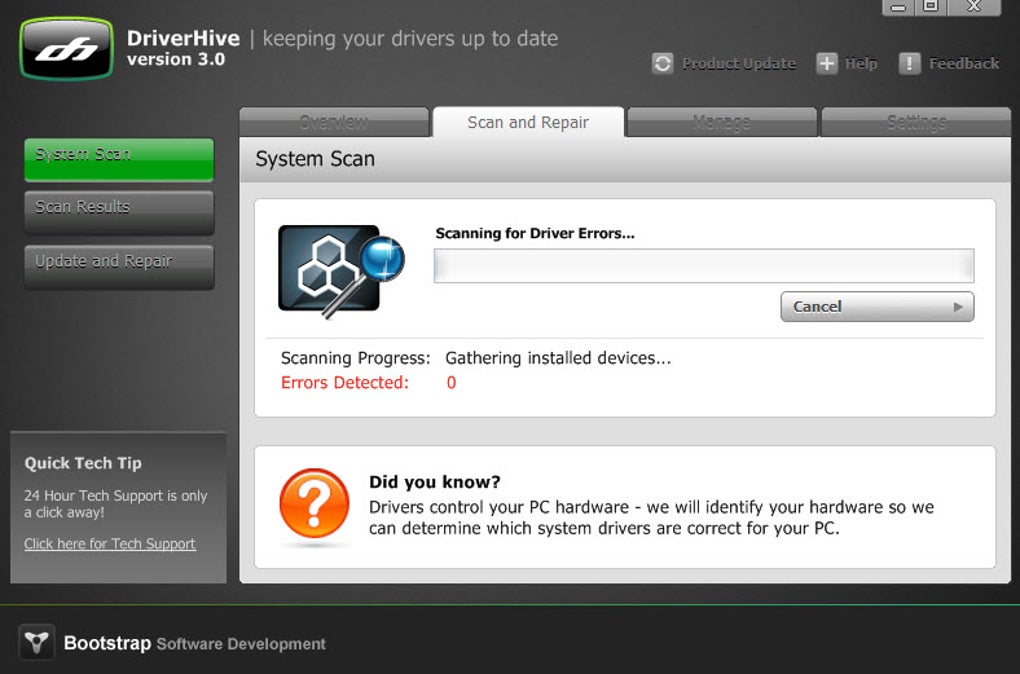
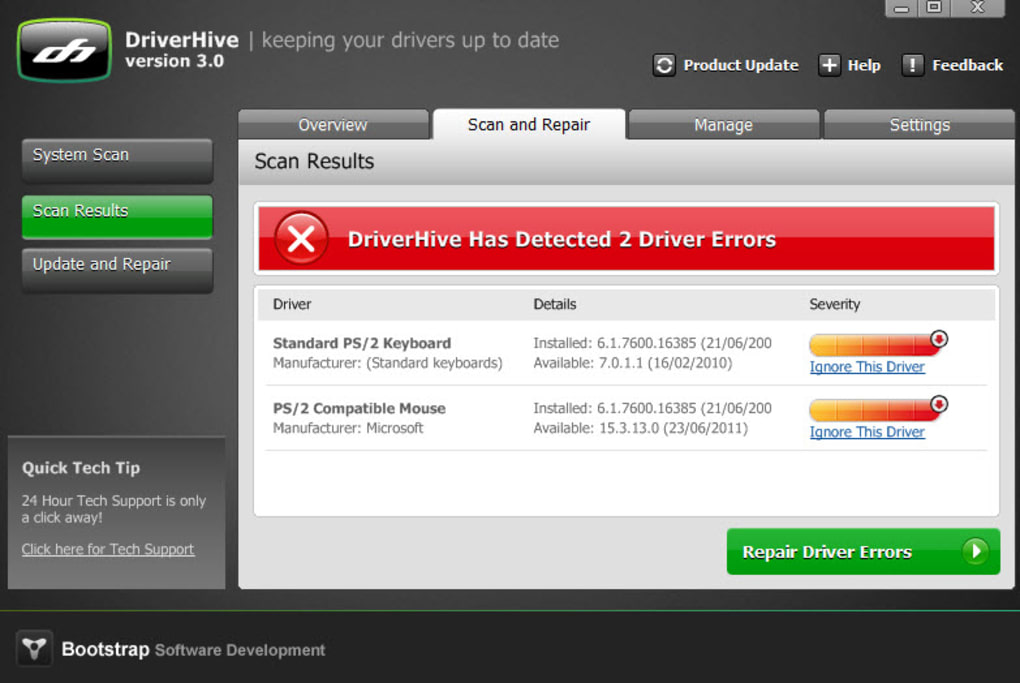
This reporting mechanism is one of DriverHive’s key strengths. Instead of vague alerts, the program provides actionable information. For each listed driver, users can typically see the version currently installed on their system and, crucially, the most current version available. This transparency empowers users to make informed decisions about which drivers to update. Whether you prefer to selectively update specific drivers that you know are causing issues, or opt for a blanket update to bring your entire system into alignment, DriverHive accommodates both approaches with dedicated buttons on its interface. This streamlined update process transforms what could be hours of manual searching, downloading, and installing into a few clicks, significantly reducing the effort and expertise required to keep a PC running smoothly.
The benefits of maintaining up-to-date drivers extend far beyond mere convenience. A PC running on current drivers is inherently more stable, less prone to crashes, and experiences fewer compatibility issues. Outdated drivers are frequently the culprits behind system freezes, blue screens of death, and unexpected application closures. By diligently updating these foundational software components, DriverHive helps prevent such disruptive problems, contributing directly to a more reliable and enjoyable computing experience. Furthermore, updated drivers often introduce performance enhancements, unlocking the full potential of your hardware, be it a faster graphics card rendering, more stable Wi-Fi connectivity, or clearer audio output. In essence, DriverHive does precisely what it promises: it keeps your drivers current and your PC performing as it should, making it a valuable tool, especially if you’re grappling with persistent PC problems that might stem from driver-related issues.

Understanding the Landscape of Utilities & Tools
DriverHive resides within the expansive category of “Utilities & Tools,” a segment of software designed to enhance the functionality, performance, and maintenance of computer systems. This broad classification encompasses a diverse array of applications, from system optimizers and diagnostic tools to file managers and data recovery solutions. In the context of modern computing, where systems grow increasingly complex and hardware evolves rapidly, such utilities are not just convenient; they are indispensable.
The sheer volume of software and hardware interactions on a typical PC means that without dedicated tools to manage these processes, users would quickly become overwhelmed. Utility software acts as a digital Swiss Army knife, providing specialized functions that address specific pain points in system management. DriverHive, with its laser focus on driver updates, exemplifies this principle perfectly. It tackles a task that, if neglected, can lead to a cascade of problems across the entire system.
Beyond driver management, the ecosystem of utilities includes applications for disk cleanup, which frees up valuable storage space by removing temporary files and unnecessary data; registry cleaners, which attempt to fix errors in the Windows registry; and startup managers, which allow users to control which programs launch automatically with the operating system, thereby improving boot times. While DriverHive specifically addresses drivers, its utility highlights the broader importance of proactive system maintenance. A truly optimized PC is often the result of using a combination of these specialized tools, each contributing to the overall health and efficiency of the system.
The Critical Role of Security & Privacy in Driver Management
The discussion of system utilities, especially those dealing with core components like drivers, cannot overlook the paramount concerns of security and privacy. In today’s interconnected world, an unprotected or poorly maintained system is an open invitation for malicious actors. Driver management, often perceived solely as a performance booster, plays a surprisingly critical role in a computer’s overall security posture.
Outdated drivers are a common vector for security vulnerabilities. Software and hardware manufacturers continuously identify and patch security flaws in their drivers. If these patches are not applied through updates, the system remains exposed to potential exploits. Malicious actors can leverage these known vulnerabilities to gain unauthorized access to a system, install malware, or compromise sensitive data. For instance, a flaw in a network card driver could allow an attacker to intercept network traffic, or a vulnerability in a graphics driver could be exploited to execute arbitrary code. By ensuring drivers are current, DriverHive indirectly acts as a shield, helping to close these potential security gaps.
PhanMemFree.org, recognizing the paramount importance of digital safety, offers a dedicated section for “Security & Privacy” tools, including “Antivirus” software, “Firewalls,” and “VPNs.” While these tools directly combat threats, their effectiveness is often predicated on a stable and secure underlying operating system and hardware environment. Drivers are foundational to this environment. An antivirus program might struggle to function optimally if its interactions with the system’s core are hampered by an archaic or buggy driver. Similarly, a firewall’s ability to regulate network traffic relies on the integrity of the network adapter drivers. Therefore, the consistent use of a tool like DriverHive complements a comprehensive security strategy, reinforcing the defensive layers of your PC. By reducing potential entry points for threats, driver updates contribute significantly to a safer computing experience, protecting not just your system but also your personal data and privacy.
Boosting Your Productivity with Optimized Drivers
The pursuit of productivity is a universal goal for individuals and businesses alike. In the digital realm, a significant determinant of productivity is the efficiency and reliability of one’s computing equipment. Here, too, optimized drivers facilitated by tools like DriverHive play a pivotal, though often unacknowledged, role. A computer that runs smoothly, without inexplicable crashes or performance bottlenecks, is a productive computer.
Imagine working on a critical presentation, only for your graphics driver to suddenly fail, causing your display to flicker or, worse, your application to crash, leading to lost work. Or consider a scenario where your external hard drive, critical for storing project files, is intermittently disconnected due to an outdated USB controller driver. These frustrating interruptions, born from driver malfunctions, are significant time sinks that erode productivity. By preventing such issues, DriverHive directly contributes to an uninterrupted workflow.
Up-to-date drivers ensure that hardware components operate at their peak efficiency, translating into faster application load times, smoother multitasking, and more responsive overall system performance. For professionals utilizing “Office Suites,” engaging in “Document Management,” or coordinating “Project Management” – categories prominently featured on PhanMemFree.org – a responsive system is not a luxury but a necessity. The difference between waiting seconds for an application to respond versus instant feedback can accumulate into hours over a workday, ultimately impacting output and efficiency.
Furthermore, the “Fast” attribute of DriverHive itself is a productivity gain. Manually identifying, searching for, downloading, and installing drivers for multiple components can be a monumental task, consuming valuable time that could otherwise be spent on core work. DriverHive automates and streamlines this process, freeing up users from a tedious chore and allowing them to focus on tasks that truly matter. In essence, by minimizing downtime, enhancing system stability, and ensuring hardware operates optimally, DriverHive acts as an enabler of productivity, making the digital workspace more efficient and less frustrating.
Beyond DriverHive: Exploring Related Software Ecosystems on PhanMemFree.org
While DriverHive excels in its specialized domain, it exists within a much broader universe of software, a landscape meticulously curated and presented by platforms like PhanMemFree.org. This digital marketplace offers users access to a vast array of applications, spanning everything from everyday utilities to niche development tools, demonstrating a holistic approach to meeting diverse computing needs. Understanding DriverHive’s place within this larger ecosystem provides valuable context for users seeking comprehensive solutions.
PhanMemFree.org, as a comprehensive software repository, doesn’t just list individual applications but categorizes them to help users navigate. For instance, in addition to driver tools, the platform features a range of “Alternative apps” for various functions, allowing users to compare DriverHive with other driver management software if they desire. The “Top downloads” section provides insight into popular choices among the user base, reflecting current trends and trusted solutions in the utilities space. This interconnectedness means a user discovering DriverHive might also find other essential tools they need to optimize their system or enhance their digital life.
The impact of well-maintained drivers extends into numerous other software categories. Consider “Games”: whether “Action,” “Racing,” or “Simulation,” high-performance gaming relies heavily on the latest graphics and audio drivers. Outdated drivers can lead to lower frame rates, graphical glitches, or even render some games unplayable. Similarly, in “Multimedia,” applications for “Audio,” “Video,” and “Graphic & Design” demand robust and current drivers for optimal functionality, especially for tasks like video editing, 3D rendering, or high-fidelity audio production. Even basic “Internet & Network” connectivity, essential for “Download Managers” and “File Sharing,” depends on stable network adapter drivers. DriverHive’s role, therefore, is foundational to the performance of many other applications that users download and enjoy from PhanMemFree.org.
Moreover, PhanMemFree.org’s extensive “Best Products” section, which includes categories like “Best VPN,” “Best Antivirus,” and “Best Image Editors,” implicitly relies on the premise of a healthy, driver-optimized system. Even the “Best PC Games” will underperform without the correct underlying drivers. This broader view highlights that specialized tools like DriverHive are not isolated solutions but rather integral components of a robust and efficient digital environment. The platform also offers resources like “Google Chrome Extensions” and “Wordpress” plugins, showing its breadth across different computing environments and user needs, all of which benefit from a well-maintained base system.
A Glimpse into the Future: AI in System Maintenance
As technology advances at an unprecedented pace, the integration of Artificial Intelligence (AI) into various software domains is transforming how we interact with our computers. While DriverHive represents the current state of effective driver management, a glimpse into the future suggests that AI could revolutionize system maintenance, offering even more sophisticated and proactive solutions. PhanMemFree.org’s inclusion of categories like “AI Audio,” “AI Chat,” “AI Coding,” and “AI Productivity” underscores the growing relevance of AI across the software landscape.
In the realm of driver management, AI could move beyond simple scanning and updating. Imagine an AI-driven system that not only identifies outdated drivers but also anticipates potential conflicts between drivers before they even occur, based on extensive knowledge bases and real-time system monitoring. Such a system could offer predictive maintenance, alerting users to a driver that is likely to cause instability in the near future and suggesting an update or an alternative, rather than waiting for a crash to happen.
Furthermore, AI could significantly enhance the troubleshooting process. When a system crash occurs, an AI-powered utility could perform deep diagnostics, correlating crash data with driver versions, system logs, and even specific hardware configurations to pinpoint the exact driver at fault with unprecedented accuracy. This would go beyond DriverHive’s current reporting, providing more nuanced insights into complex interactions. AI could also automate the process of finding the “best” driver, not just the “latest,” considering system stability, specific hardware models, and user-reported performance metrics to recommend the most suitable version.
Beyond drivers, AI’s potential in broader system maintenance is vast. “AI Productivity” tools are already helping users automate tasks and optimize workflows. In system utilities, AI could manage resource allocation more intelligently, dynamically adjusting system settings for optimal performance based on active applications. It could learn user habits to optimize startup programs or even predict hardware failures based on sensor data. While DriverHive focuses on the practical task of driver updates today, the future of system utilities, undoubtedly influenced by AI, promises a landscape of smart, self-healing, and truly anticipatory computing environments, further reducing the burden of maintenance on the end-user.
DriverHive’s technical specifications reflect its design as a reliable and accessible tool. Offered as a “Trial version,” it allows users to experience its functionality before committing. The application is specifically developed for the “Windows” platform, supporting operating systems up to Windows 8 and beyond. With a lean size of “3.80 MB,” it downloads quickly and has a minimal footprint on system resources. Version 3.0, last updated on “September 29, 2010,” showcases its maturity, though users should always check PhanMemFree.org for the very latest release. Developed by Bootstrap Development, DriverHive has garnered positive “User reviews,” achieving a respectable 4.5 out of 5 stars from users who appreciate its “Easy to use,” “Effective,” and “Fast” attributes, despite its “Limited use” focus.
PhanMemFree.org’s commitment to a global audience is evident in the availability of DriverHive and countless other applications in multiple languages. From “Español” and “Français” to “日本語” and “中文,” the platform ensures that users worldwide can access and understand software solutions in their native tongue, broadening the reach and utility of tools like DriverHive to a truly international user base.
In conclusion, DriverHive stands as a testament to the value of focused, effective utility software. In a world where computer performance is paramount, keeping drivers up-to-date is not a luxury but a necessity for stability, security, and productivity. While its primary focus is on driver management, its role is foundational to the optimal functioning of a myriad of other applications and system operations. Available through comprehensive platforms like PhanMemFree.org, DriverHive offers a user-friendly and efficient way to maintain one of your PC’s most critical components. For anyone seeking to ensure their computer runs at its best, DriverHive provides a straightforward and powerful solution, allowing users to spend less time troubleshooting and more time achieving their digital goals. Explore PhanMemFree.org today to discover DriverHive and a vast ecosystem of other valuable software tools designed to empower your computing experience.
File Information
- License: “Trial version”
- Version: “3.0”
- Latest update: “September 29, 2010”
- Platform: “Windows”
- OS: “Windows 8”
- Language: “English”
- Downloads: “6.3K”
- Size: “3.80 MB”


