
In the intricate ecosystem of personal computing, drivers serve as the unsung heroes, silently facilitating communication between your operating system and the myriad hardware components that make up your device. From your graphics card to your printer, every piece of hardware requires a specific software driver to function correctly. While often overlooked until a problem arises, the health and currency of these drivers are paramount to a stable, efficient, and secure computing experience. This is where a dedicated utility like DriverIdentifier steps in, offering a straightforward yet powerful solution to one of computing’s most pervasive, and often perplexing, challenges: identifying and managing outdated or missing drivers.
Developed with a focus on simplicity and effectiveness, DriverIdentifier has carved out a niche as a reliable diagnostic tool for Windows users. It addresses the fundamental need to regularly check the status of a system’s drivers, providing a clear roadmap for maintenance without overwhelming the user with unnecessary complexities. As we delve deeper into this comprehensive review, we will explore the critical role drivers play, how DriverIdentifier simplifies their management, its key features, and why it remains a valuable asset in any PC owner’s digital toolkit.
The Critical Role of Drivers in PC Performance
To truly appreciate the utility of a tool like DriverIdentifier, one must first grasp the foundational importance of drivers within a computer system. They are not merely ancillary files; they are the bedrock upon which stable hardware operation and optimal system performance are built.
Understanding Driver Functionality
At its core, a driver is a piece of software that enables your operating system (like Windows) to interact with a specific hardware device. Imagine trying to speak to someone who only understands a different language – a translator is needed. In the world of computers, the driver is that translator. When you click your mouse, type on your keyboard, listen to music through your sound card, or view an image on your screen, a driver is actively working in the background, translating the commands from the operating system into instructions that the hardware understands, and vice-versa.
Each hardware component, whether it’s an internal motherboard component, a dedicated graphics card, a Wi-Fi adapter, or an external peripheral like a printer or webcam, comes with its own unique set of instructions and functionalities. Manufacturers develop specific drivers to ensure that their hardware can communicate seamlessly with various operating systems. These drivers are continuously refined, updated, and optimized to improve performance, fix bugs, introduce new features, and enhance compatibility with evolving software and operating system versions.
Without the correct drivers, or with outdated ones, your hardware simply cannot perform as intended. In some cases, a device might not work at all; in others, it might operate inefficiently, leading to subpar performance, instability, or even system crashes. The sheer diversity of hardware components from countless manufacturers, combined with the regular updates to operating systems, creates a dynamic environment where driver management becomes a perpetual, albeit often unnoticed, task.
The Perils of Outdated or Missing Drivers
Ignoring the status of your drivers is akin to neglecting routine maintenance on a complex machine – eventually, something is bound to go wrong. Outdated or missing drivers are a surprisingly common culprit behind a wide array of computer problems, ranging from minor annoyances to critical system failures.
One of the most immediate impacts of an outdated driver is performance degradation. A graphics card with old drivers might struggle to run modern games or video editing software smoothly, leading to choppy frame rates or visual glitches. Similarly, an outdated network adapter driver could result in slow Wi-Fi speeds or frequent disconnections. Audio issues, unresponsive peripherals, and even system boot problems can often be traced back to a driver conflict or an old driver struggling to keep pace with the rest of the system.
Beyond performance, system instability is a significant concern. Outdated drivers can lead to conflicts within the operating system, causing unexpected freezes, crashes, and the dreaded “Blue Screen of Death” (BSOD) on Windows systems. These issues not only disrupt your workflow but can also potentially lead to data loss if critical applications crash before you can save your work.

Furthermore, security vulnerabilities are an increasingly important consideration. Just like operating systems and applications, drivers can contain security flaws that malicious actors can exploit. Hardware manufacturers regularly release driver updates that patch these vulnerabilities, making timely updates crucial for maintaining a secure computing environment. Neglecting these updates leaves your system exposed to potential exploits, compromising your data and privacy.
Finally, compatibility issues can arise when new software or operating system features are introduced. A driver that worked perfectly with an older version of Windows might not be fully compatible with a newer one, preventing certain hardware features from functioning or causing overall system instability. This is particularly relevant with major Windows updates, which often require corresponding driver updates from hardware manufacturers.
Given these potential pitfalls, the ability to quickly and accurately identify which drivers are outdated or missing becomes an indispensable part of routine PC maintenance. DriverIdentifier provides this crucial first step, empowering users to proactively address these issues before they escalate into more significant problems.
Introducing DriverIdentifier: A Simple Solution for Complex Problems
In a world filled with complex software and bewildering technical jargon, DriverIdentifier stands out for its elegant simplicity and direct approach to driver management. It recognizes that for many users, the primary goal is not to become a driver expert, but simply to ensure their system is running optimally without unnecessary hassle.
Effortless Driver Scanning and Identification
The cornerstone of DriverIdentifier’s appeal is its user-friendly scanning process. Upon installation, the application presents a clean and intuitive interface, effectively removing any intimidation factor often associated with system utilities. Users aren’t confronted with a labyrinth of options or obscure settings. Instead, the process is streamlined to a single, clear action: click “Scan.”
Once initiated, the software diligently goes to work, performing a comprehensive scan of your entire system. It meticulously checks every piece of detected hardware, comparing its current driver version and status against its extensive online database. This database, maintained by the developers, contains a vast repository of driver information for a multitude of hardware components from various manufacturers. The scanning process is remarkably swift, completing its task in a matter of moments rather than minutes, and importantly, it does so without placing a significant burden on your machine’s processing power or network resources. This efficiency ensures that even users on older hardware or with limited bandwidth can utilize the tool without disrupting their current activities.
The speed and low resource consumption are critical advantages. Many system diagnostic tools can be resource hogs, ironically slowing down the very system they are trying to optimize. DriverIdentifier avoids this pitfall, demonstrating that powerful functionality doesn’t have to come at the cost of system responsiveness. Its unobtrusive nature makes it a practical tool for regular checks, encouraging proactive maintenance rather than reactive troubleshooting.
The Clear and Concise Scan Results
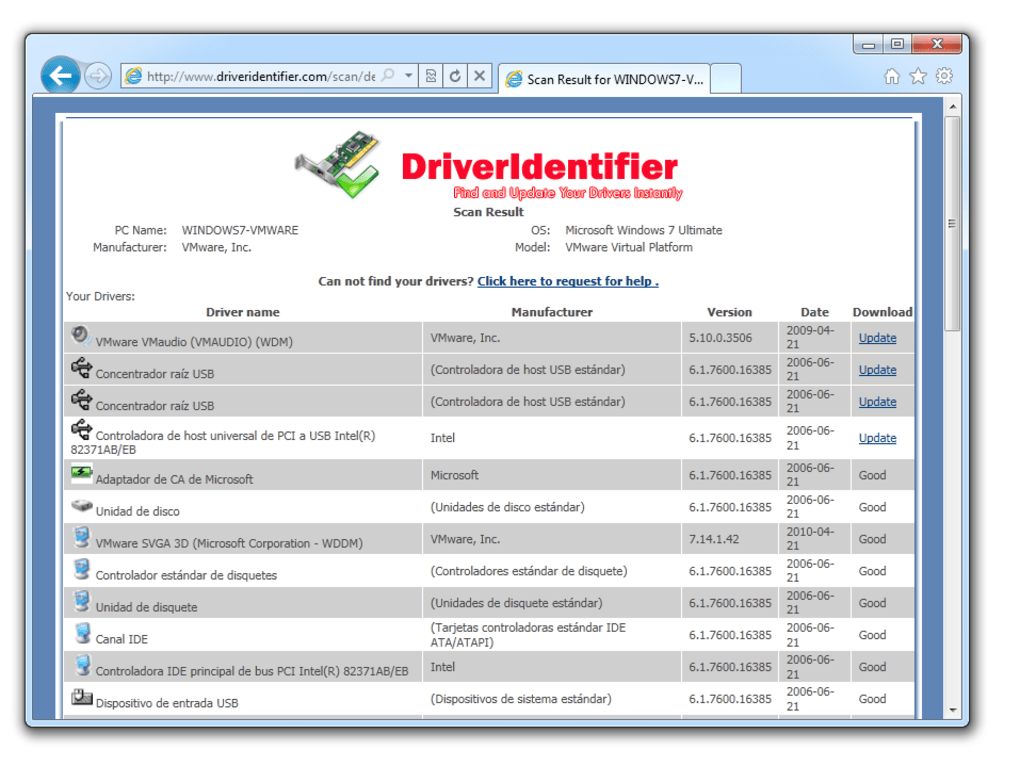
After the scan is complete, DriverIdentifier presents its findings in an accessible HTML format. While some users might prefer a direct in-app display or automated update function, the HTML output serves its purpose remarkably well by prioritizing clarity and information. The results are meticulously organized, typically listing each hardware component detected on your system. For each component, DriverIdentifier identifies the currently installed driver and, crucially, indicates whether an update is available or if a driver is missing entirely.
The beauty of this presentation lies in its straightforwardness. Users can easily see which devices have outdated drivers highlighted, often with a clear indication of the recommended new version. This makes it incredibly simple for users to pinpoint the exact drivers that require attention. The HTML format allows for easy saving, printing, or sharing of the scan results, which can be particularly useful for troubleshooting or for users who prefer to manage their driver downloads manually.
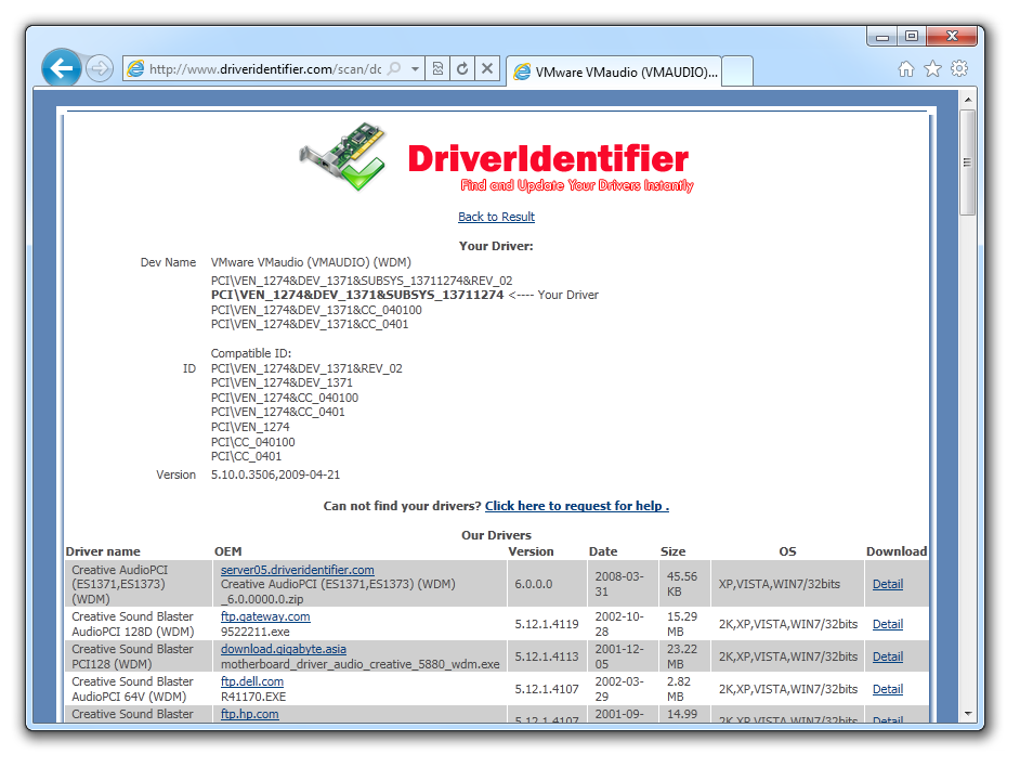
While the output format might be considered a “con” by some due to the lack of an integrated “update” button, it also represents a deliberate design choice that empowers the user. Instead of blindly trusting an automatic updater, DriverIdentifier provides the information needed to make informed decisions. Users can then visit the official manufacturer’s website or other trusted sources to download the specific drivers identified, ensuring they get the correct and most secure versions. This approach caters to users who prefer a hands-on approach, giving them control over what gets installed on their system and from where.
Ultimately, DriverIdentifier excels at its primary function: accurately identifying the status of your drivers and clearly presenting this information. It acts as an intelligent diagnostic assistant, giving you the precise knowledge needed to keep your system’s hardware operating at peak efficiency.
Key Features and User Experience
DriverIdentifier isn’t about flashy interfaces or an abundance of convoluted features; it’s about delivering a focused, effective solution to a common problem. Its design philosophy centers around efficiency and clarity, ensuring that even novice users can benefit from its capabilities.
Speed and Resource Efficiency
One of the standout characteristics highlighted by users and observed during testing is DriverIdentifier’s remarkable efficiency. In an era where software can often feel bloated and demanding, this utility remains refreshingly lightweight. The scanning process, which is the core function of the application, completes in a blink. This swiftness is not just a convenience; it’s a testament to optimized code and an intelligent approach to system interrogation. It doesn’t hog CPU cycles or consume excessive amounts of RAM, meaning you can run a driver scan in the background while performing other tasks without experiencing any noticeable slowdowns.
Furthermore, its minimal impact on network resources during the scanning phase is another significant advantage. While it does communicate with its online database to compare driver versions, this communication is highly optimized. This makes DriverIdentifier a viable tool even for users with slower internet connections or those concerned about data usage, ensuring accessibility across a broad spectrum of user environments. The commitment to resource efficiency underscores its practicality as a tool for regular, proactive maintenance rather than an occasional, heavy-duty operation.
What DriverIdentifier Excels At
DriverIdentifier’s strength lies in its ability to do one thing exceptionally well: accurate driver identification. It solves the frustrating problem of “unknown devices” in Device Manager or the nagging suspicion that your hardware isn’t performing optimally due to out-of-date drivers.
- Pinpoint Accuracy: The tool is highly effective at identifying the exact hardware components and their corresponding driver statuses. This eliminates guesswork and provides a precise list of items requiring attention.
- Ease of Use: As noted, the “Scan and view HTML results” workflow is incredibly simple. There’s no learning curve, making it accessible to users of all technical proficiencies.
- Troubleshooting Assistant: For those experiencing specific hardware issues, DriverIdentifier can quickly narrow down potential causes by highlighting problematic drivers. This significantly reduces troubleshooting time.
- Proactive Maintenance: Its quick scan enables users to integrate driver checks into their regular PC maintenance routine, helping to prevent issues before they arise.
- “Small is Beautiful” Philosophy: The application’s small footprint (approx. 6.91 MB) and efficient operation align with a philosophy of lean software design, which is appreciated by users who value system performance.
Navigating the Limitations
While DriverIdentifier shines in its core functionality, it’s also important to acknowledge its specific design choices, which some users might perceive as limitations depending on their expectations.
- HTML-Only Results: The fact that results are displayed solely in an HTML file rather than an interactive in-app interface is often cited. While clear, it requires opening a web browser to view the information. This isn’t a functional impediment but might be less convenient for users accustomed to fully integrated solutions.
- No Integrated Update Function: DriverIdentifier is a diagnostic tool, not an updater. It identifies what needs updating, but it does not automatically download or install the drivers for you. Users must manually obtain the drivers from official sources (e.g., hardware manufacturer websites) based on the information provided in the scan report. For some, this manual step is a “con,” as they prefer one-click, automated solutions.
- Requires Basic Computer Ability: As mentioned in a user review, “It is simple and requires some computer ability, not having all the automatic download/install and backup features of other software in this class.” This means users need to understand how to download a file from a website and typically how to run a driver installer. For tech-savvy individuals, this offers greater control and ensures drivers are sourced from trusted origins. For complete novices seeking an “install and forget” solution, this might be a slight barrier.
These “limitations” are, in many ways, deliberate design choices. By separating identification from installation, DriverIdentifier empowers users with knowledge and control, allowing them to verify sources and ensure driver integrity. For those who prioritize security and a hands-on approach to their system’s health, this model can be seen as a strength rather than a weakness. It serves as an excellent starting point for driver management, informing the user without making irreversible changes without explicit consent.
Beyond the Scan: Why DriverIdentifier Stands Out
In a crowded market of system utilities, DriverIdentifier manages to distinguish itself through its commitment to core functionality, user empowerment, and a philosophy that prioritizes valuable information over automated convenience. Its approach resonates with a segment of users who appreciate transparency and control over their computing environment.
Community Acclaim and Trust
A significant indicator of any software’s value is its reception within the user community. DriverIdentifier, despite its humble nature, has garnered positive feedback, particularly from users who appreciate its no-nonsense functionality. A notable user review on PhanMemFree.org highlights several key aspects:
- Meeting a Specific Need: The user, having dealt with a Trojan and needing to update numerous drivers, found that many other “driver scanner programs” failed, either by locking up the computer, struggling with network proxies, or demanding payment before any downloads. DriverIdentifier, in contrast, “worked after two minutes of installation and contacting their Driver Library, offering free drivers for the download.” This speaks volumes about its reliability and accessibility compared to competitors.
- Simplicity and Effectiveness: Phrases like “It is quick and simple,” and “It works as advertised” underscore its core strengths. In an age of over-engineered software, DriverIdentifier’s directness is refreshing.
- No Mysterious Processes: The review notes, “It doesn’t have any mysterious processes,” which contributes to user trust. Users can understand what the software is doing, fostering confidence rather than suspicion.
- Improved System Stability and Security: The reviewer also emphasizes the broader benefit of driver management: “Updated computers are much less virus prone, and are more stable.” This reinforces the crucial role that tools like DriverIdentifier play in overall PC health.
This kind of organic, positive feedback from real-world usage scenarios speaks more powerfully than any marketing claims. It illustrates that DriverIdentifier isn’t just a theoretical solution; it’s a practical tool that genuinely helps users maintain their systems effectively.
A Free and Accessible Solution
Perhaps one of the most compelling aspects of DriverIdentifier is its “free” license. In an ecosystem where many driver management tools operate on a “freemium” model – offering a free scan but demanding payment for actual driver downloads – DriverIdentifier stands apart. It delivers its core value of driver identification completely free of charge. The user review even mentions it as “Free, donation optional,” suggesting a business model built on goodwill rather than mandatory monetization of essential functionality. This approach makes it incredibly accessible to anyone who needs to diagnose their driver situation, regardless of their budget.
The availability of a truly free and functional tool for a critical aspect of PC maintenance is a significant boon for the average user. It removes financial barriers to proactive system care, ensuring that more individuals can keep their computers stable and secure without having to invest in potentially expensive software subscriptions. This commitment to accessibility is a powerful differentiator in the utilities market.
A Proactive Approach to System Health
DriverIdentifier embodies a proactive approach to computer maintenance. Instead of waiting for a system crash or performance hit to trigger an investigation, it encourages regular, quick checks. Just as you might run an antivirus scan weekly, a quick DriverIdentifier scan can become part of a healthy PC routine.
By providing clear, actionable information, it empowers users to take control. This contrasts with purely automated solutions that might download drivers without user oversight or from potentially less reputable sources. With DriverIdentifier, the user remains the decision-maker, ensuring that every driver update is a conscious choice based on accurate diagnostic data. This level of transparency and control is invaluable for users who wish to understand and manage their systems rather than simply offloading the responsibility to a black-box application. It’s an educational tool as much as it is a diagnostic one, helping users understand the components of their PC and the software that drives them.
Expanding Your Driver Toolkit: Alternatives and Related Utilities
While DriverIdentifier offers a robust solution for identifying driver issues, it’s also important to understand its place within the broader landscape of driver management tools. Depending on specific needs, users might explore other options, or combine DriverIdentifier with complementary utilities for a comprehensive approach to system maintenance.
Exploring Other Driver Management Solutions
The market for driver update and management software is quite diverse, with various tools offering different features, levels of automation, and pricing models. DriverIdentifier’s strength lies in its diagnostic clarity and free access to identification. Other tools often extend into automated downloading, installation, and backup functionalities, albeit sometimes with a cost or a more complex interface.
Some notable alternatives and related utilities mentioned by PhanMemFree include:
- DriverFinder (Trial version): This tool aims to update your PC with the latest Windows drivers, often offering more automation.
- DriverUpdate (Free): Presented as an all-in-one driver updater tool, it might include features for automated downloading and installation.
- Snaildriver (Free): Billed as a program that makes updating device drivers easy, suggesting a focus on user-friendliness in the update process.
- DriverMax (Free): A free and simple driver updater, often praised for its ability to back up existing drivers before updates.
- Device Doctor (Free): Another free tool designed to update drivers, typically focusing on older and obscure hardware.
- Unknown Device Identifier (Free): This utility is particularly useful for identifying hardware components that appear as “Unknown Device” in Windows Device Manager, providing crucial vendor and device IDs.
- Snappy Driver Installer (Free): A powerful, offline driver installer that comes with a large database of drivers, ideal for installing drivers on freshly installed Windows systems without an internet connection.
- DriverPack Solution Online (Free): A popular tool that efficiently manages Windows drivers, often bundled with additional software, offering a comprehensive but sometimes more aggressive approach to driver management.
Each of these alternatives offers a slightly different take on driver management, from full automation to detailed identification. DriverIdentifier occupies a valuable space by offering highly accurate diagnostics without the often-associated bloat or cost of fully automated solutions. For users who prefer to be in control of the download and installation process, DriverIdentifier provides the essential information needed to proceed with confidence. For those who prioritize convenience above all else, some of the more automated solutions might be appealing, though it’s always wise to exercise caution and ensure drivers are sourced from reputable channels.
The Broader Landscape of PC Utilities
Beyond driver-specific tools, maintaining a healthy computer involves a suite of other utilities that work in concert. DriverIdentifier is one piece of a larger puzzle. For instance, tools for data recovery (in case of system failure caused by driver issues or otherwise), file compression for efficient storage, file managers for organizing data, screen capture tools for documenting issues, and printer & fax utilities for managing peripherals are all part of a comprehensive PC maintenance strategy.
Utilities like 3uTools for Apple device management, GS Auto Clicker for task automation, TinyTask for lightweight automation, and X-Mouse Button Control for mouse customization, while not directly related to drivers, speak to the broader need for tools that enhance productivity and user experience. Similarly, antivirus software and VPNs are crucial for security, complementing the stability provided by well-maintained drivers.
DriverIdentifier fits seamlessly into this ecosystem as a foundational diagnostic tool. By ensuring that the underlying hardware communication is sound, it lays the groundwork for all other software and utilities to perform optimally. A system with outdated or problematic drivers is like a house with a shaky foundation – no matter how well-decorated the rooms, the underlying structure will always pose a risk.
In conclusion, DriverIdentifier stands as a testament to effective, focused software design. It addresses a critical need in PC maintenance with simplicity, efficiency, and unwavering accuracy. For users seeking a clear, free, and non-intrusive way to identify driver issues and maintain optimal system performance, DriverIdentifier remains an indispensable tool, empowering them to take charge of their PC’s health. Its role, while simple, is fundamental: ensuring the silent, critical backbone of your computer system – its drivers – are always in prime condition.
File Information
- License: “Free”
- Latest update: “September 19, 2024”
- Platform: “Windows”
- OS: “Windows 7”
- Language: “English”
- Downloads: “201.7K”
- Size: “6.91 MB”


