
DriverStore Explorer is a free, open-source utility designed to simplify the management of the Windows driver store. This powerful yet lightweight tool offers users a straightforward way to interact with the complex world of device drivers, providing capabilities far beyond simple viewing. Its intuitive interface belies its advanced functionality, making it accessible to both novice and experienced users alike. This article delves into the features, benefits, and usage of DriverStore Explorer, exploring its potential for optimizing your Windows system.
Understanding the Windows Driver Store and its Importance
Before diving into the specifics of DriverStore Explorer, it’s crucial to understand the role of the Windows driver store. The driver store, a core component of the Windows operating system, acts as a central repository for all device drivers installed on your system. These drivers are essential pieces of software that enable your computer to communicate with and utilize hardware components such as printers, graphics cards, network adapters, and more.
A well-maintained driver store ensures optimal system performance and stability. Outdated or corrupted drivers can lead to a range of issues, from system crashes and blue screen errors to poor performance and hardware malfunctions. Conversely, a clean and up-to-date driver store contributes to a smoother, more efficient computing experience. However, managing the driver store manually can be a tedious and technically challenging task, prone to errors if not done correctly. This is where DriverStore Explorer steps in.
Key Features and Functionality of DriverStore Explorer
DriverStore Explorer provides a comprehensive set of tools for managing the Windows driver store. Its core functionality includes:
-
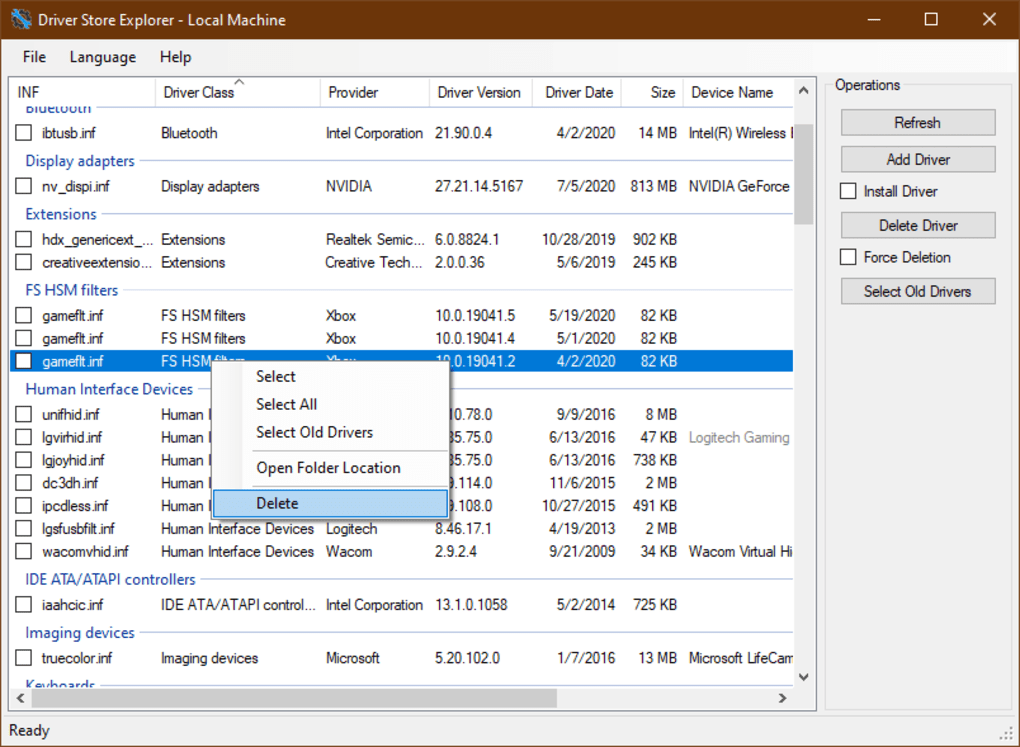
Driver Enumeration: The program begins by presenting a detailed list of all driver packages currently residing in your system’s driver store. This list includes essential information such as the driver’s name, version, publisher, and other relevant details. This clear overview provides a foundation for effective driver management.
-
Driver Package Addition and Installation: DriverStore Explorer allows users to easily add new driver packages to the store. This is particularly useful for installing drivers obtained from external sources or for updating existing drivers. The process is streamlined and intuitive, guiding users through the necessary steps.
-
Driver Package Deletion: Removing outdated or problematic drivers is a critical aspect of maintaining a healthy driver store. DriverStore Explorer facilitates the deletion of unwanted driver packages with a simple click, eliminating the risk of manual errors that could potentially compromise system stability.
-
Force Removal of Driver Packages: In some cases, a driver package may become stubborn and refuse to be uninstalled through conventional methods. DriverStore Explorer’s force removal function tackles this issue, providing a robust solution for removing even the most persistent drivers. This powerful feature, however, should be used with caution, as incorrect application could lead to unexpected complications.
-
Batch Operations: The program efficiently handles multiple driver packages simultaneously. This capability dramatically reduces the time and effort involved in managing numerous drivers, particularly beneficial when dealing with a large number of outdated drivers.
-
Export to CSV: For those needing a record of their driver store contents, DriverStore Explorer allows exporting the entire driver list to a Comma Separated Values (CSV) file. This feature is invaluable for backup purposes, record-keeping, or for sharing driver information with others.
-
Intuitive Interface: Despite its powerful features, DriverStore Explorer boasts a user-friendly interface designed for accessibility. The program is straightforward to navigate, even for users with limited technical experience.
Using DriverStore Explorer: A Step-by-Step Guide
To effectively utilize DriverStore Explorer, you’ll need to ensure your system meets the prerequisites. The program requires .NET Framework 4.0 or later to be installed. Furthermore, administrative privileges are essential for full functionality. Without these privileges, many features will be disabled, limiting the program’s capabilities.
Once the prerequisites are met, launching DriverStore Explorer reveals the comprehensive list of driver packages. From there, users can explore several options:
- Selecting Drivers: Users can select individual drivers or multiple drivers for various actions. The program facilitates the selection of multiple drivers for batch operations, enhancing efficiency.
-
Adding Drivers: The ‘Add’ function allows users to import new drivers into the driver store. This feature supports various driver package formats, ensuring broad compatibility.
-
Installing Drivers: Once a driver is added, users can proceed with the installation process. DriverStore Explorer handles the installation process seamlessly, ensuring the new drivers are integrated correctly into the system.
-
Deleting Drivers: The ‘Delete’ option removes selected driver packages from the driver store. The program provides a confirmation prompt to avoid accidental deletions, improving safety.
-
Force Removal: This powerful function is reserved for stubborn drivers resistant to conventional removal methods. Users must exercise caution when employing this function, as it could potentially cause issues if misused.
-
Exporting Data: The ‘Export’ function allows users to create a CSV file containing detailed information about all drivers listed in the program. This feature aids in record-keeping and backup purposes.
Benefits of Using DriverStore Explorer
The advantages of employing DriverStore Explorer are numerous and significant:
- Simplified Driver Management: The program significantly simplifies the process of managing the Windows driver store, eliminating the complexities of manual operations. This ease of use is a key advantage for both technical and non-technical users.
-
Improved System Performance: By removing outdated or corrupted drivers, DriverStore Explorer contributes to improved system performance and stability. A clean driver store optimizes system resources and minimizes the risk of conflicts.
-
Increased Storage Space: Removing obsolete driver packages frees up valuable disk space, which can be beneficial for users with limited storage capacity. This feature contributes to a more efficient use of system resources.
-
Enhanced System Stability: A well-maintained driver store is critical to system stability. DriverStore Explorer aids in maintaining this stability by ensuring the removal of potentially problematic drivers.
-
Open-Source and Free: The program is freely available and open-source, eliminating the costs often associated with similar commercial software. This free accessibility makes it a valuable resource for users on any budget.
Conclusion: DriverStore Explorer – An Essential Tool for Windows Users
DriverStore Explorer emerges as an invaluable tool for Windows users seeking to optimize their system’s performance and stability. Its user-friendly interface, combined with its powerful features, makes it accessible to a wide range of users, from novices to seasoned professionals. By providing a simple yet effective method for managing the often-complex world of Windows drivers, DriverStore Explorer empowers users to maintain a clean, efficient, and stable computing environment. Its open-source nature and free availability further cement its position as an essential utility for any Windows system. While caution should always be exercised when manipulating system drivers, DriverStore Explorer’s intuitive design and robust functionality mitigate risks and enhance the user experience significantly. Its ability to easily add, install, delete, and even forcefully remove drivers provides unparalleled control over the driver store, ultimately leading to a more streamlined and optimized Windows experience.
File Information
- License: “Free”
- Latest update: “June 23, 2025”
- Platform: “Windows”
- OS: “Windows 8.1”
- Language: “English”
- Downloads: “8.3K”
- Size: “1.03 MB”


