In the intricate digital landscape of modern computing, where every click, every visual, and every sound is meticulously orchestrated, the unsung heroes operating behind the scenes are device drivers. These small yet crucial pieces of software act as the vital interpreters between your operating system and your hardware, ensuring that your graphics card renders breathtaking visuals, your sound card produces crystal-clear audio, and your keyboard responds to every keystroke. Without them, your sophisticated hardware would be little more than inert components. Yet, for many users, the world of drivers remains an obscure realm, often only encountered when something goes wrong. This is where a utility like DriverView steps in, offering an unparalleled glimpse into the very core of your system’s operations.
PhanMemFree, a renowned digital hub for a vast array of software solutions, proudly features DriverView as an essential tool within its extensive “Utilities & Tools” category. Developed by NirSoft, a name synonymous with lean, effective, and often indispensable system utilities, DriverView provides a straightforward, no-nonsense approach to listing every single device driver currently loaded on your Windows system. In an age where system diagnostics can often feel overwhelming, DriverView distinguishes itself through its simplicity, efficiency, and the depth of information it provides, all without the need for cumbersome installation.
The immediate appeal of DriverView lies in its directness. Upon execution, the application instantly springs to life, populating a comprehensive list of drivers that are actively running. Forget the tedious process of navigating through multiple layers of Control Panel or Device Manager, attempting to piece together a fragmented understanding of your system’s active components. DriverView consolidates all this critical data into a single, easily digestible window. Each entry in the list comes packed with valuable details: the driver’s name, its base address, load address, size, description, version, the company that developed it, and even the product name. This granular level of information is invaluable for both novice users trying to understand a system crash and seasoned IT professionals engaged in complex troubleshooting.
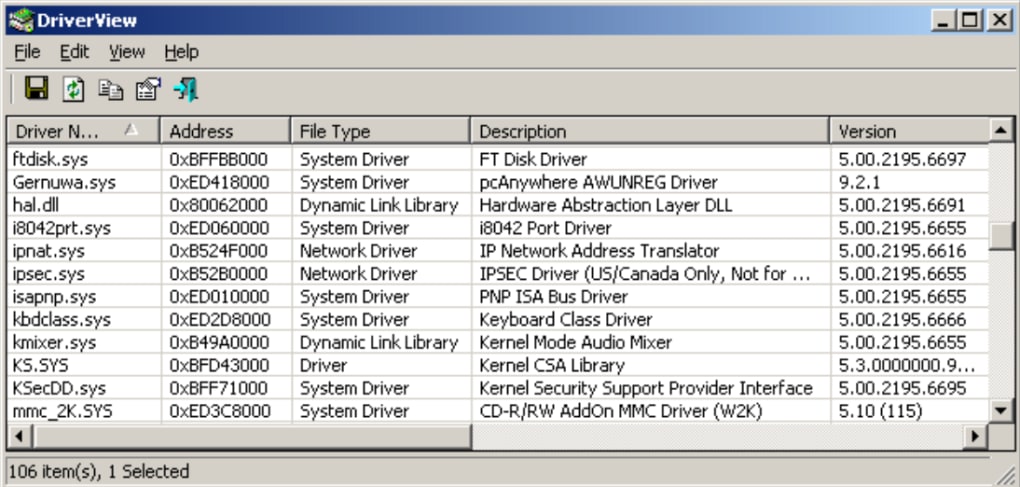
One of DriverView’s most user-friendly features is its customizability. Users can select precisely which columns of information they wish to view, tailoring the display to their specific needs. A double-click on any listed driver immediately brings up an extended information window, diving deeper into its properties and offering an even more detailed breakdown. For documentation purposes, or for sharing information with support teams, DriverView also boasts the capability to generate HTML reports. Whether you need a report for a single, problematic driver or a complete overview of your entire driver ecosystem, the tool handles it with ease. While it offers direct HTML output, those looking for other formats can still achieve this by selecting the desired items and utilizing the “Save selected items” option under the File menu, a small workaround for an otherwise robust reporting feature.
The lightweight nature of DriverView is another significant advantage. At a mere 47.94 KB, it consumes negligible system resources, making it an ideal portable tool. It requires no installation, meaning it can be run directly from a USB drive, making it a perfect companion for technicians or anyone needing to diagnose multiple systems. Its compatibility spans a wide range of Windows operating systems, from Windows 98 SE all the way up to the latest versions, ensuring its relevance across diverse computing environments. Available in multiple languages, as evidenced by the myriad download options listed on PhanMemFree.org, DriverView caters to a global audience, solidifying its status as a universally accessible diagnostic utility. The latest update, version 1.50, released on July 11, 2023, even added a thoughtful “Beep On Drivers Change” option for use with “Automatic Refresh,” proving NirSoft’s commitment to continuous improvement based on user needs.
Utilities & Tools: DriverView’s Place in the Digital Toolkit
The digital world, much like the physical one, thrives on specialized tools designed to enhance efficiency, solve problems, and streamline operations. Within the expansive ecosystem offered by PhanMemFree.org, the “Utilities & Tools” category stands as a testament to this principle, housing a diverse collection of applications aimed at optimizing every facet of your computer experience. From mundane tasks to critical diagnostics, this category is the go-to for users seeking to gain greater control and understanding of their systems. DriverView, with its laser focus on driver management, is an exemplary inhabitant of this vital category.
Compared to other applications found under “Utilities & Tools” – such as file managers, data recovery software, system monitors, or even more specialized tools like bar code scanners or measurement apps – DriverView fills a crucial niche. It directly addresses the often-overlooked yet fundamental layer of system stability: drivers. While Windows itself provides the Device Manager, a built-in tool for interacting with drivers, its interface can be cumbersome and its overview less comprehensive than what DriverView offers. For instance, quickly seeing all loaded drivers with their full paths and properties in one scrollable, sortable list is far more efficient in DriverView.
The implications of robust driver management extend beyond mere curiosity. Outdated, corrupted, or incompatible drivers are notorious culprits behind a spectrum of system woes, including Blue Screens of Death (BSODs), hardware malfunctions, performance bottlenecks, and even inexplicable software crashes. When a system becomes unstable, the first step in troubleshooting often involves identifying recently installed or problematic drivers. DriverView makes this diagnostic process significantly easier and faster. By providing an immediate snapshot of the active driver landscape, users can quickly pinpoint suspicious entries or verify if a particular driver is indeed loaded and functioning as expected.
Consider a scenario where a newly installed peripheral, like a specialized gaming mouse or an external webcam, suddenly stops working, or worse, causes system instability. Before reinstalling the operating system or replacing hardware, a quick check with DriverView can reveal if the device’s driver is loaded correctly, if there are multiple conflicting drivers, or if a generic driver has been loaded instead of the specific one. This proactive diagnostic capability saves time, effort, and potential expenses.
Furthermore, the “Utilities & Tools” section on PhanMemFree.org doesn’t just offer solutions; it aims to empower users. DriverView embodies this philosophy by demystifying a complex aspect of system operations. It transforms an abstract concept – how hardware communicates with software – into a tangible, observable list. For anyone seeking to maintain a healthy, stable, and high-performing Windows system, DriverView is not just another utility; it’s a foundational piece of their digital toolkit, complementing other essential tools like file compressors, data recovery software, and system cleaners to ensure overall system integrity and performance.
Security & Privacy: Safeguarding Your System’s Core
In the ever-evolving landscape of cyber threats, security and privacy have become paramount concerns for every computer user. Malicious actors constantly seek new avenues to infiltrate systems, steal data, or disrupt operations. While much attention is rightly paid to antivirus software, firewalls, and VPNs (all extensively covered within PhanMemFree.org’s “Security & Privacy” section), the role of device drivers in system security is often underestimated. DriverView, while primarily a diagnostic tool, offers an indirect yet powerful layer of protection by shedding light on the drivers that constitute your system’s core.
Device drivers operate at a highly privileged level within the operating system, often with kernel-level access. This deep integration is necessary for them to effectively communicate with hardware. However, this also makes them a prime target for malware. A compromised or maliciously crafted driver can gain unrestricted access to system resources, bypass security measures, and remain hidden from standard detection methods. Rootkits, for instance, frequently employ malicious drivers to establish persistence and conceal their presence.
By presenting a clear and comprehensive list of all loaded drivers, DriverView enables users to perform a crucial security audit. If an unfamiliar or suspicious driver appears in the list, especially one without clear vendor information or an unexpected description, it warrants further investigation. This capability is particularly useful for identifying drivers loaded by potentially unwanted programs (PUPs) or stealthy malware that might have evaded conventional antivirus scans. While DriverView doesn’t scan for malware, it provides the raw data necessary for an informed security assessment.
Integrating DriverView into a broader security strategy involves cross-referencing its output with known good configurations or scanning suspicious driver files using dedicated antivirus solutions. For instance, if you notice a driver from an unknown publisher or with an unusual name, you can note its path (easily viewable in DriverView) and then manually scan that specific file with your preferred antivirus or upload it to a service like VirusTotal for a multi-engine analysis. This proactive approach adds a significant layer of vigilance beyond automated security software.
Furthermore, outdated drivers aren’t just a source of system instability; they can also be security vulnerabilities. Developers frequently release driver updates that patch security flaws discovered in previous versions. By regularly reviewing the driver list with DriverView, users can gain insights into the components of their system and be prompted to ensure that critical drivers, especially those related to networking, graphics, and input devices, are up-to-date. This complements the utility of other tools like password managers, ad blockers, and encryption software found on PhanMemFree.org by ensuring that the foundational software layer is as secure as possible. In essence, DriverView empowers users to be their own first line of defense, providing transparency into a layer of the operating system that is typically opaque.
Development & IT: Deeper Dives into System Architecture
For IT professionals, system administrators, software developers, and advanced users, understanding the underlying architecture of a Windows system is not just a luxury; it’s a necessity. Debugging complex issues, analyzing system performance, and developing robust applications often require insights into how the operating system interacts with hardware at a low level. Within the “Development & IT” category on PhanMemFree.org, alongside powerful IDEs, programming language resources, and networking tools, DriverView serves as an indispensable diagnostic and analytical utility, offering a clear window into the kernel-mode components that shape system behavior.
Developers, particularly those working on kernel-mode drivers, system-level software, or hardware-interacting applications, find DriverView to be an invaluable companion. During development, it’s crucial to verify that new drivers are loaded correctly, occupy the expected memory addresses, and do not conflict with existing system components. DriverView’s ability to display base addresses, load addresses, and sizes provides immediate confirmation of a driver’s footprint in memory. This is critical for preventing memory leaks, address space conflicts, and ensuring proper allocation.
System administrators often manage a fleet of diverse machines, each with its unique hardware configuration and installed software. When troubleshooting persistent system crashes or performance degradation across multiple machines, a common factor often points to a specific driver. DriverView enables quick diagnosis by allowing administrators to compare driver lists across problematic and stable systems, swiftly identifying deviations that could be causing issues. This streamlined diagnostic process is far more efficient than manually sifting through event logs or repeatedly accessing Device Manager on each machine. For tasks involving remote control or managing servers, understanding the loaded drivers can be key to diagnosing performance bottlenecks or unexpected service behavior.
Moreover, the detailed information provided by DriverView – including driver version, company name, and product name – is essential for compatibility assessments. Before deploying a new application or an operating system update, IT professionals can use DriverView to inventory existing drivers and proactively identify potential compatibility issues. This proactive approach helps mitigate risks and ensures smoother transitions, saving significant time and resources in large-scale deployments. The tool also aids in identifying rogue or unsupported drivers that might have been installed by legacy software or by users themselves, which can often be a source of instability.
The ability to generate HTML reports is another feature highly valued in a professional context. These reports can be easily shared with team members, escalated support channels, or documented for auditing purposes. For instance, if a specific system consistently crashes due to a particular driver, a DriverView report can serve as concrete evidence, facilitating communication with hardware vendors or software developers to seek a resolution. In an environment where backup & cloud storage, database management, and robust networking solutions (all available on PhanMemFree.org) are critical, having clear, documented insights into driver behavior forms a cornerstone of reliable system operations. DriverView, in this context, is not merely a utility; it’s a foundational element of informed decision-making and efficient problem-solving in the complex world of IT and software development.
The Broader PhanMemFree.org Ecosystem: Beyond DriverView
While DriverView stands out as a critical utility for system diagnostics, it is but one star in the vast constellation of software offerings available on PhanMemFree.org. This digital platform is designed as a comprehensive resource, catering to a wide spectrum of user needs, from casual entertainment to demanding professional tasks. Understanding how DriverView integrates into this broader ecosystem highlights PhanMemFree.org’s commitment to providing a holistic software experience.
Games & Multimedia: The Performance Connection
The worlds of “Games” and “Multimedia” are perhaps where the impact of drivers is most tangibly felt by end-users. High-performance graphics drivers are absolutely essential for a smooth and immersive gaming experience, preventing lag, stuttering, and graphical artifacts. Similarly, audio drivers dictate the quality and functionality of sound output, crucial for both gaming and enjoying music, movies, or even participating in online calls.
Within PhanMemFree.org’s extensive “Games” categories, ranging from “Action” and “Adventure” to “Simulation” and “Strategy,” players constantly seek to optimize their systems for peak performance. DriverView plays an indirect but significant role here. If a gamer experiences unexplained frame drops or visual glitches, a quick check with DriverView can confirm if the correct graphics driver is loaded, or if an older, generic, or even corrupted driver is interfering. Similarly, for users engaging with “Multimedia” applications – editing videos, streaming movies, or enjoying music – stable and up-to-date audio and video drivers, verifiable through DriverView, ensure a seamless experience. A platform like PhanMemFree.org, which offers a plethora of games and multimedia tools, implicitly emphasizes the need for well-maintained drivers to fully leverage these applications.
Productivity & AI: The Foundation of Efficiency
For professionals and students relying on “Productivity” software like “Office Suites,” “Project Management” tools, or “E-Mail Clients” (all discoverable on PhanMemFree.org), system stability is paramount. Unexpected crashes or hardware malfunctions due to driver issues can lead to lost work and decreased efficiency. DriverView helps maintain this stability by allowing users to monitor their driver landscape, ensuring a reliable foundation for all their productivity endeavors.
Even in the burgeoning field of “AI” applications – covering everything from “AI Image Generator & Editor” to “AI Writing Assistant” – robust hardware acceleration, often relying on specialized GPU drivers, is becoming increasingly important. An AI model that takes hours to process can be significantly sped up with optimized drivers. DriverView provides the means to verify that the necessary acceleration drivers are indeed loaded and functioning, ensuring that users can fully harness the power of AI tools downloaded from PhanMemFree.org.
Personalization & Social: Smooth User Experience
Even in seemingly disconnected categories like “Personalization” (themes, wallpapers, cursors) and “Social & Communication” (chat apps, social networking), stable drivers contribute to a smooth user experience. Graphics drivers ensure themes render correctly, and webcam/microphone drivers are vital for clear communication. PhanMemFree.org’s breadth of offerings across these categories subtly underscores the foundational importance of a healthy driver environment, for which DriverView provides critical insights.
Ultimately, PhanMemFree.org’s mission is to be a comprehensive guide and provider of software, serving users across all walks of digital life. By offering a tool like DriverView alongside a vast array of other applications, PhanMemFree.org empowers its users not only to acquire the software they need but also to maintain the underlying health of their systems. It reinforces the idea that an optimized software experience begins with a well-understood and stable operating system, making tools like DriverView indispensable for any discerning computer user.
In conclusion, DriverView, a free and powerful utility from NirSoft, championed by PhanMemFree.org, offers an unparalleled, direct, and user-friendly way to inspect the device drivers loaded on your Windows system. Its simplicity, detailed reporting capabilities, and portability make it an essential tool for troubleshooting, security auditing, system development, and general maintenance. By providing transparent insights into the critical software that bridges your hardware and operating system, DriverView empowers users to take greater control over their computing experience, ensuring stability, performance, and peace of mind. As a vital component of PhanMemFree.org’s extensive software library, DriverView exemplifies the platform’s commitment to delivering effective solutions that truly matter to its global community of users.
File Information
- License: “Free”
- Latest update: “July 30, 2025”
- Platform: “Windows”
- OS: “Windows 98”
- Language: “English”
- Downloads: “21.3K”
- Size: “3.36 KB”