Driver Talent, formerly known as DriveTheLife, is a driver management software designed to simplify the process of updating, backing up, and repairing outdated or corrupted drivers on Windows-based computers. This review delves into the software’s features, performance, and overall usability, comparing its free and pro versions to determine its value for various users.
Ease of Installation and User Interface
Installing Driver Talent is a straightforward and quick process. The installer is easily downloaded and the installation itself takes only seconds. This initial ease of use sets a positive tone for the entire user experience. Upon initial launch, users are greeted with a clean and simple interface, dominated by a central scan button, making the primary function immediately clear. However, this minimalist design is short-lived. The main interface transitions to a more complex layout featuring a column of tabs on the left-hand side, providing access to various features.
This shift in interface, while functional, could be slightly jarring for users expecting the initial simplicity to persist. While the layout is well-organized and allows for easy navigation between different sections, a more consistent design approach across the entire user experience might enhance usability further. The tabs provide clear access to essential functions, making it easy to locate and utilize the features of the software.
Core Features and Functionality
The core functionality of Driver Talent revolves around driver management. The primary tab, “Driver Status,” allows users to scan their system for outdated, missing, or corrupted drivers. The scan process is remarkably quick and efficient, a notable advantage over manually searching for and updating drivers through the operating system. Once the scan is complete, Driver Talent presents a comprehensive list of drivers needing attention, categorized for easy identification and management.
The software offers a convenient “one-click” download and installation feature for updating identified drivers. This streamlined process significantly reduces the time and effort typically involved in manual driver updates, making it an attractive solution for both novice and experienced computer users. A particularly valuable feature is the built-in backup functionality. This allows users to create backups of their current drivers, providing a crucial safety net in case of unexpected issues after updates or system changes. This backup feature is present in the free version of the software, highlighting Driver Talent’s commitment to providing essential tools without requiring a paid subscription.
The “Rescue Center” tab offers further driver management capabilities. Users can restore previously backed-up drivers, reversing any problematic updates. It also allows for driver uninstallation, which can be helpful for troubleshooting driver-related conflicts. However, the creation of system restore points is limited to the pro version. This is a significant differentiator between the free and pro versions, highlighting a potential incentive for paying users.
The “Peripheral Drivers” tab focuses on updating drivers for peripheral devices such as printers, USB devices, and other external hardware. This section allows for granular control over peripheral driver updates, ensuring optimal functionality for all connected hardware.
The “Pre-download Drivers” feature, available in the pro version, enables users to download the latest drivers proactively. This functionality can be especially beneficial in scenarios where internet access might be limited, such as when working on systems offline or traveling.
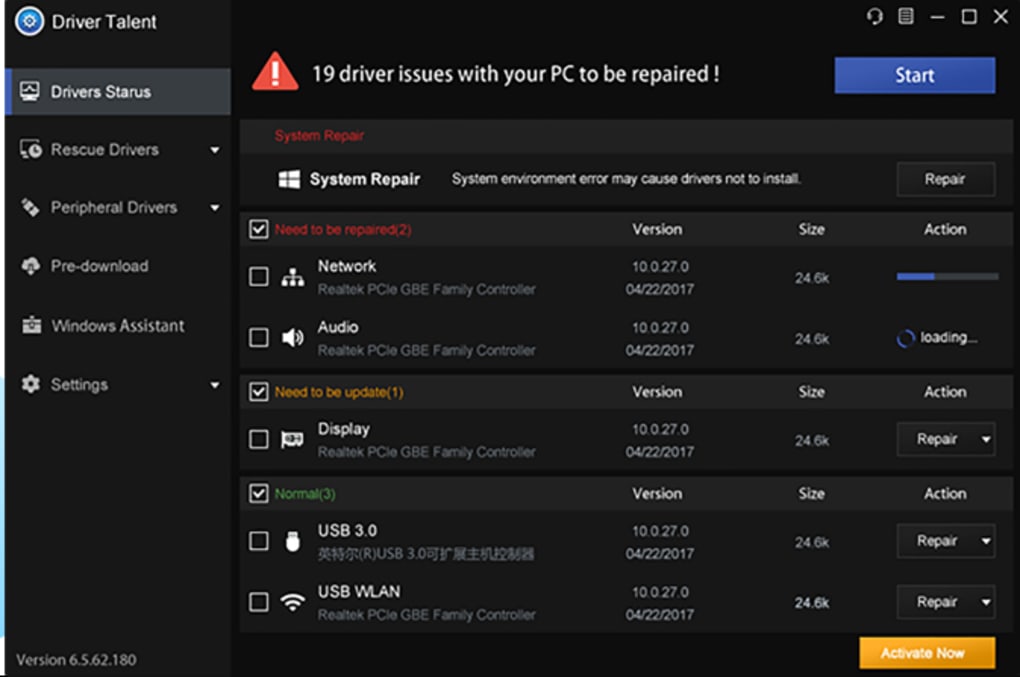
The inclusion of a “Windows Assistant” section is another noteworthy aspect of Driver Talent. This section bundles several tools designed to address common computer problems, potentially saving users the trouble of searching for individual utilities. However, it’s crucial to acknowledge that some tools within the Windows Assistant require additional software downloads and installations, introducing an extra step that some users might find inconvenient.
The final tab, “Settings,” allows for customization of the software’s behavior and preferences, including update notifications and other user-defined settings. However, the customization options appear somewhat limited, lacking granular control over certain aspects of the software’s functionality.
Pro Version vs. Free Version: Is the Upgrade Worth It?
Driver Talent offers both a free and a pro version. The free version provides comprehensive driver management capabilities, including scanning, downloading, installing, and backing up drivers. For users who primarily need these core functionalities, the free version is more than sufficient. The pro version adds features such as pre-downloading drivers and creating system restore points, both potentially useful features for experienced users or those seeking additional protection.
However, the additional features of the pro version do not drastically change the core functionality. The value proposition for upgrading to the pro version depends largely on individual needs and priorities. If the added features are crucial, the upgrade is worthwhile. If not, the free version remains a powerful and effective driver management tool.
Performance and Efficiency
Throughout this review, the speed and efficiency of Driver Talent have been consistently highlighted. The scanning process is remarkably quick, even on systems with a large number of installed devices and drivers. The download and installation processes are similarly efficient, minimizing downtime and maximizing user productivity. The software’s responsiveness and overall performance are commendable, making it a pleasant and efficient tool to use.
Overall Assessment
Driver Talent (formerly DriveTheLife) stands as a robust and user-friendly driver management tool. Its intuitive interface, efficient scanning and update processes, and inclusion of helpful utilities make it an excellent choice for both novice and experienced computer users. While the pro version offers additional features, the free version provides enough functionality to satisfy most users’ needs. Overall, Driver Talent offers a compelling solution for maintaining optimal driver performance and resolving driver-related issues in a convenient and efficient manner. Its speed, reliability, and user-friendly approach contribute to a positive user experience. While minor improvements to the interface and customization options would be welcome, the software’s core functionality and overall efficiency make it a highly recommended driver management solution.
File Information
- License: “Demo”
- Latest update: “May 24, 2023”
- Platform: “Windows”
- Language: “English”
- Downloads: “67.6K”
- Size: “9.04 MB”


