
Droid Transfer is a premium utility tool developed by Wide Angle Software, designed to streamline the management of Android devices from a personal computer. This software acts as a comprehensive device manager, providing users with a straightforward method to transfer files, back up data, and access various aspects of their Android experience directly from their desktop. Similar to competing applications like Moborobo and AirDroid Desktop, Droid Transfer grants users extensive control and access to their Android device’s content, offering a centralized hub for managing various data types. While a limited free version is available for initial exploration, users seeking full functionality will need to opt for a one-time purchase to unlock all features.
Streamlining Android Data Management: Functionality and Features
In the era of constantly increasing mobile data, managing storage space on Android devices is a perpetual challenge. Users frequently find themselves needing to delete files or transfer them to a PC to free up storage. While enabling mass USB storage offers a rudimentary solution, the process can be cumbersome and lack organization. Droid Transfer addresses this issue by providing a more structured and intuitive approach to accessing and managing Android data.
Instead of navigating complex folder structures, Droid Transfer automatically scans and categorizes the phone’s contents, greatly simplifying navigation. The software organizes data into nine distinct sections, offering comprehensive access to various aspects of the device. These sections include media files like photos, videos, and music; contact information; call logs; messages; calendar entries; various files; installed apps; and even the clipboard, allowing access to recently copied text.
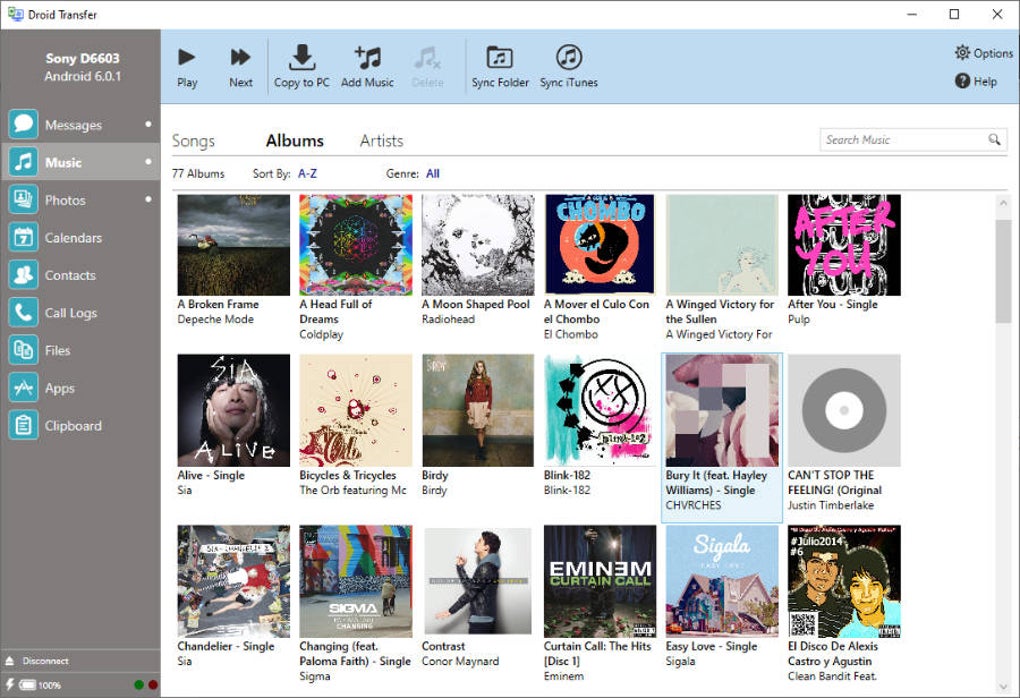
This centralized management system simplifies tasks like transferring photos from your phone to your PC, backing up important messages, or managing your contacts. The software allows for bulk transfers, enabling you to quickly move large quantities of data between your phone and your computer. Furthermore, the ability to access and manage your call logs directly from your PC can be incredibly useful for keeping a record of important calls or identifying potential spam calls. The integrated calendar access allows you to view and manage your schedule from your computer, enhancing productivity and simplifying scheduling tasks.
User Interface and Experience: Strengths and Limitations
While Droid Transfer’s functionality is robust and its data organization system significantly improves the user experience compared to manually navigating Android folders, some aspects of the software could benefit from improvement. The most notable area for potential enhancement is the user interface (UI). While functional and generally easy to navigate, the design is noticeably dated and could benefit from a modern redesign to align with contemporary design aesthetics and user expectations.
The free version also presents significant limitations. The free tier restricts users to backing up only 5 messages and 50 media files, severely restricting its utility for most users. This limitation makes the free version more of a demonstration than a practical solution for everyday Android management. While this encourages users to purchase the full version, the restricted functionality may deter some users from exploring the software’s full potential.
Despite these limitations, the software’s core functionality remains impressive. The speed and reliability of file transfers are noteworthy, and the breadth of supported files and data types is extensive. The ability to seamlessly integrate with various data formats further enhances its usefulness, making it a versatile tool for various user needs. For example, the ability to export contacts to popular formats like VCF allows for easy import into other contact management systems. Similarly, the ability to save call logs in multiple formats provides flexibility in managing and archiving this critical data.
Detailed Feature Breakdown and Use Cases
Let’s delve into a more detailed examination of Droid Transfer’s key features and how they cater to diverse user needs:
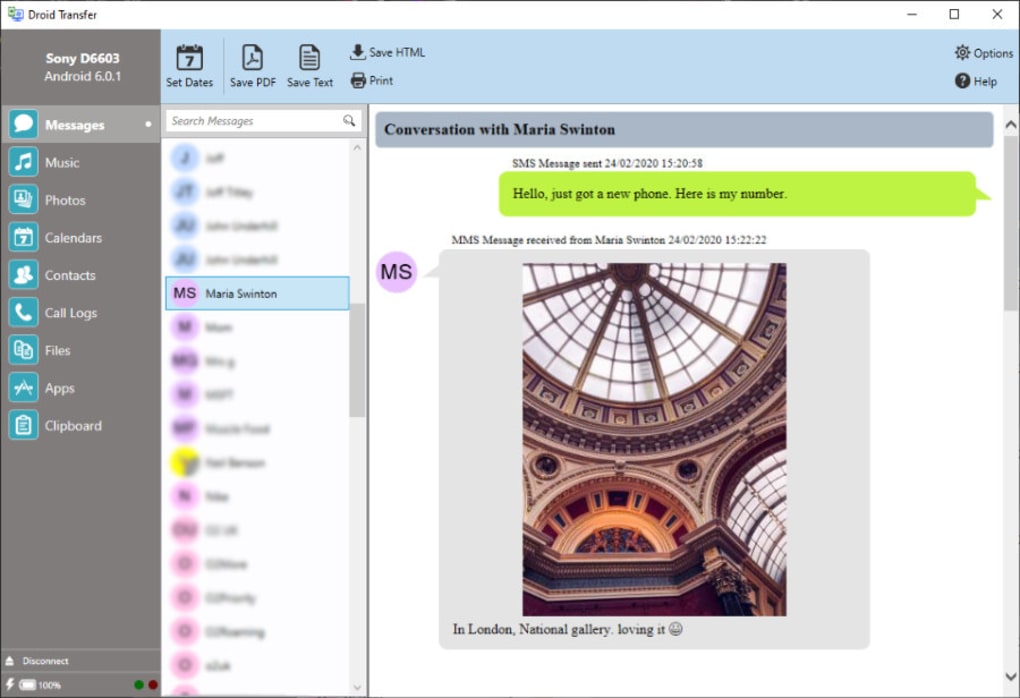
SMS Management: Droid Transfer offers robust SMS management capabilities. It allows users to transfer SMS messages to their PC, saving them in various formats like PDF, HTML, or text. This feature is invaluable for archiving important conversations or creating backups of crucial communication. Furthermore, it allows for easy printing of messages directly from the PC, eliminating the need for cumbersome screenshots or manual transcription.
Music Management: Managing music collections is streamlined with the ability to transfer music to and from the Android device and the PC. Users can view their music library on their PC, facilitating playlist creation or organizing their digital music collection. The software also supports wireless streaming of music from the phone to the PC, extending the versatility of the music management functions.
Photo and Video Management: Droid Transfer simplifies photo and video management by enabling wireless copying of images and videos from the Android device to the PC. This functionality ensures safe storage of valuable photos and videos, protecting them from potential loss or damage on the phone. The software also allows viewing photos in full size on the PC, providing a more convenient way to appreciate captured moments. Selecting and deleting photos directly from the PC adds further convenience to the overall photo and video management workflow.
Contact Management: Efficient contact management is a key feature. Droid Transfer supports exporting contacts from the Android device to Windows Contacts, Microsoft Outlook, or as a standard VCF file. This universal file format ensures compatibility with a wide range of contact management applications.
Call Log Management: The software displays call logs from the Android device, organized by caller. Users can see details of calls made to and from each contact. Saving call logs to the PC in various file formats or directly printing them is readily possible, making record-keeping more efficient.
Calendar Management: Droid Transfer facilitates calendar management by allowing quick and easy export of calendars to the PC for import into desktop calendar applications. This integration simplifies schedule management and allows for seamless synchronization across devices.
Comparison with Alternative Solutions and Conclusion
Droid Transfer holds its own against competing Android management software. While applications like AirDroid Desktop offer similar functionality, Droid Transfer’s specific strengths lie in its organized data presentation and its straightforward interface (despite its dated design). Other applications may excel in specific areas, such as specialized backup features or cloud integration. However, Droid Transfer provides a balanced solution, addressing a broad spectrum of Android management needs in a single package.
In conclusion, Droid Transfer offers a valuable solution for managing Android devices from a PC. Despite its outdated UI and the limitations of the free version, its robust functionality, ease of use (once the initial learning curve is overcome), and comprehensive data management capabilities make it a compelling choice for those seeking improved control over their Android experience. The software’s strengths in data organization and efficient transfer mechanisms outweigh its aesthetic limitations, making it a viable option for both casual and power users. The one-time purchase model offers long-term value for those who frequently transfer data between their Android device and their PC, making the investment worthwhile for many. Ultimately, the choice depends on individual needs and priorities, but Droid Transfer undoubtedly deserves consideration within the landscape of Android management tools.
File Information
- License: “Trial version”
- Latest update: “January 14, 2025”
- Platform: “Windows”
- OS: “Windows 8”
- Language: “English”
- Downloads: “36.1K”
- Size: “3.20 MB”


