
DS Clock is a free, highly customizable desktop clock application for Windows operating systems. It goes beyond simply displaying the time, offering a range of features designed to personalize your digital timekeeping experience and integrate seamlessly with your workflow. This comprehensive guide delves into the functionalities, customization options, and overall user experience of DS Clock.
Key Features and Functionality
At its core, DS Clock provides a clear and easily readable digital clock display. However, its strength lies in its extensive customization capabilities. Users can tailor the clock’s appearance and functionality to match their preferences and needs. Key features include:
-
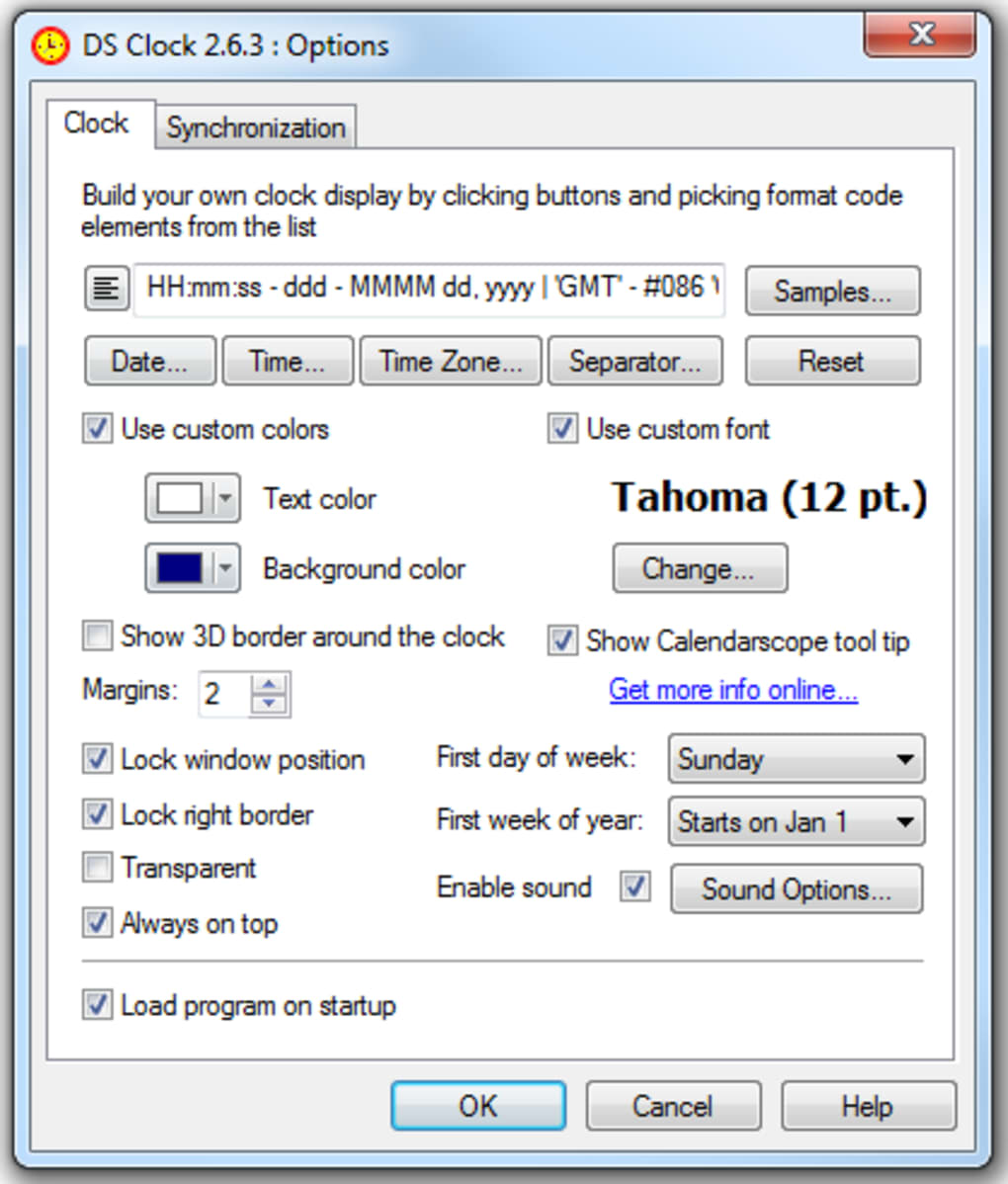
Highly Customizable Display: DS Clock allows users to define the exact format of the displayed information. This goes beyond simply choosing between 12-hour and 24-hour formats. Users can select any combination of date, time, and time zones, incorporating specific elements like day of the week, month, year, seconds, and even milliseconds. The program allows for extensive formatting options, allowing for a precise control over the display of information. This level of customization ensures the clock’s appearance perfectly complements the user’s desktop environment.
-
Flexible Formatting Strings: The heart of the customization lies in the use of format strings. These strings allow users to specify precisely which elements of date and time are displayed and in what order. The program provides clear documentation on the format codes available, enabling users to create truly unique time displays. This degree of control is uncommon in many simpler clock applications, making DS Clock a powerful choice for users who value precise control over their desktop environment.
-
Multiple Time Zones: DS Clock supports the display of multiple time zones simultaneously. This feature is particularly useful for individuals working across different geographical locations or who need to keep track of appointments or events in various time zones. The ease with which users can add and manage multiple time zones within the same clock display is a significant advantage for users with global schedules.
-
Customizable Appearance: Beyond the display format, DS Clock allows for significant aesthetic customization. Users can select their preferred fonts, font sizes, and colors for both the time and date displays. This flexibility allows users to match the clock’s visual style to their desktop themes or personal preferences, ensuring a harmonious and visually appealing experience.
-
Customizable Sounds: The program also allows users to select custom sounds to play at the top of each hour. While some users might prefer the traditional Westminster chimes, others may opt for personalized sounds that better suit their individual tastes and work environments. This feature adds a personalized auditory element to the clock experience, enhancing its engagement with the user.
-
Atomic Clock Synchronization: A standout feature of DS Clock is its ability to synchronize the displayed time with atomic clocks. This ensures that the time displayed is always accurate, eliminating any potential discrepancies caused by variations in the computer’s internal clock. This feature significantly boosts the reliability and accuracy of the clock, particularly important for individuals who rely on precise timekeeping. The automatic synchronization feature ensures that users don’t need to manually adjust the clock, simplifying the experience.
Installation and Usage
DS Clock boasts a straightforward installation process, typical of most Windows applications. Users download the installer from the official website, run the executable, and follow the simple on-screen instructions. The process is typically quick and hassle-free.
Once installed, the application launches seamlessly. The program’s user interface is remarkably intuitive, requiring minimal learning curve. Users can easily access the settings and customization options through a clearly laid out menu system. The customization options are logically organized, allowing users to readily find and modify any setting they desire.
Customization Options: A Deep Dive
DS Clock shines in its deep and granular customization capabilities. The flexibility extends far beyond simple color or font choices. Let’s explore these options in more detail:
-
Format String Editor: The format string editor is the heart of DS Clock’s customization. Users can specify the exact elements of the date and time to be shown, using a specific syntax to combine different components. For instance, they can choose to display the year in four digits or two, include the day of the week, show seconds, or add custom text. The possibilities are virtually limitless, allowing users to craft a time display perfectly matched to their needs.
-
Font Selection: Users are not limited to a pre-defined set of fonts. Instead, DS Clock allows access to the entire system’s font library, granting ultimate flexibility in choosing a font that aligns with their desktop theme or personal preferences. The ability to adjust font size further enhances this customizability.
-
Color Palette: The color customization options extend beyond simple background and text colors. Users can fine-tune the hues of various elements in the clock display, allowing for a visually personalized experience. This granular level of color control ensures that the clock blends perfectly with the overall aesthetic of the desktop environment.
-
Sound Selection: The choice of hourly sounds is equally personalized. While default chimes are available, users can select custom audio files from their system’s library, making it possible to replace the standard sounds with personalized audio cues.
Comparison with Alternative Clock Applications
While several alternative desktop clock applications are available, DS Clock distinguishes itself through its extensive customization options and atomic clock synchronization. Many competing applications offer basic time and date displays with limited customization. DS Clock’s precise format strings, granular color control, and multiple time zone support place it in a league of its own in terms of user control and flexibility.
The ability to synchronize with atomic clocks sets DS Clock apart from numerous free desktop clock utilities. This feature eliminates the need for manual adjustments and ensures the time displayed is always accurate. This is a significant benefit for users who require precise timekeeping, particularly in professional or academic contexts.
Conclusion
DS Clock excels as a free, feature-rich desktop clock for Windows users. Its intuitive interface, coupled with its extensive customization capabilities and atomic clock synchronization, makes it an exceptional choice for those seeking a more personalized and accurate timekeeping experience on their desktop. Whether you need a simple yet accurate clock or a highly customized time display, DS Clock offers the flexibility and precision to meet your needs. Its remarkable customization allows users to create a truly unique and personalized timekeeping solution, seamlessly integrating with their workflow and desktop aesthetic. The ease of use, combined with the powerful customization options, positions DS Clock as a top choice in the field of desktop clock applications.
File Information
- License: “Free”
- Latest update: “July 11, 2023”
- Platform: “Windows”
- OS: “Windows 8”
- Language: “English”
- Downloads: “31.8K”
- Size: “2.49 MB”


