
The DS3 Tool, also known as MotioninJoy DS3, aims to bridge the gap between PlayStation controllers and the PC gaming world. This software acts as an intermediary, allowing users to connect their DualShock 3 (and sometimes other controllers) to their computers and use them to play PC games. While the core functionality is attractive to gamers seeking a more familiar control scheme, the DS3 Tool’s execution leaves much to be desired, presenting a significant contrast between its potential and its actual user experience. This review delves deep into the software’s strengths, weaknesses, alternatives, and ultimately, whether it’s a worthwhile tool for the average PC gamer.
How Does the DS3 Tool Work?
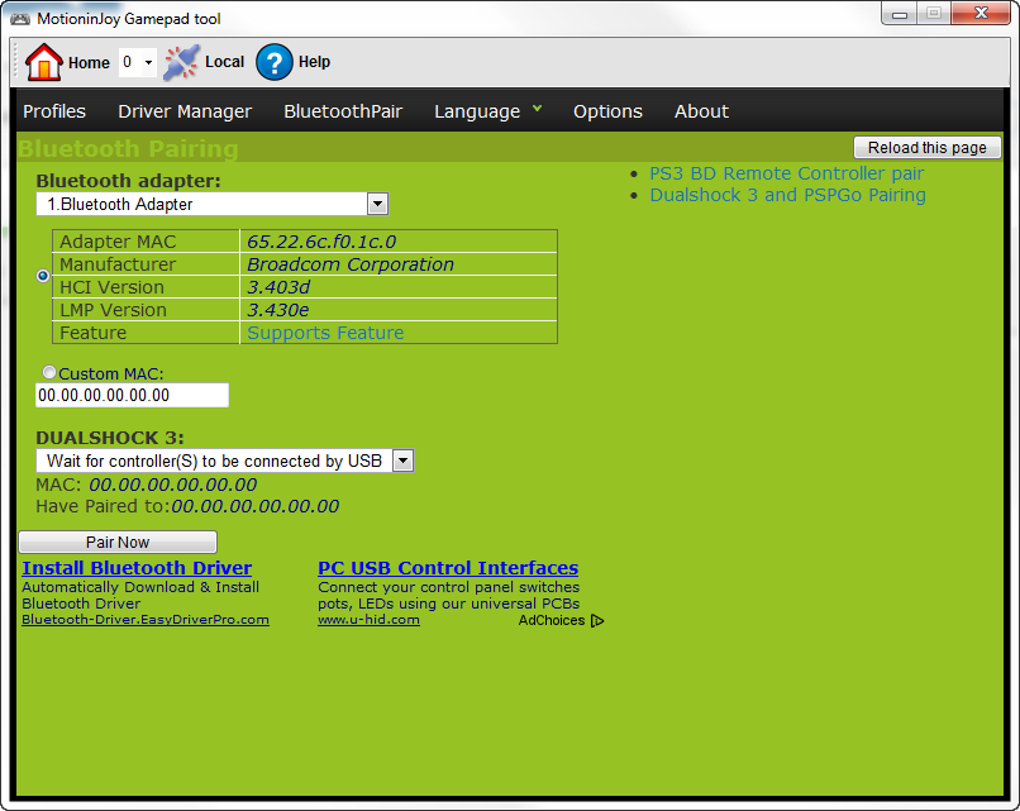
The DS3 Tool’s primary function is remarkably simple: connect a PlayStation controller (primarily the DualShock 3, but sometimes others with varying degrees of success) to a Windows PC. This is achieved through a combination of drivers and software emulation. After downloading and installing the software, users simply plug in their controller via USB or Bluetooth. The tool then recognizes the controller and provides options for configuration and calibration.
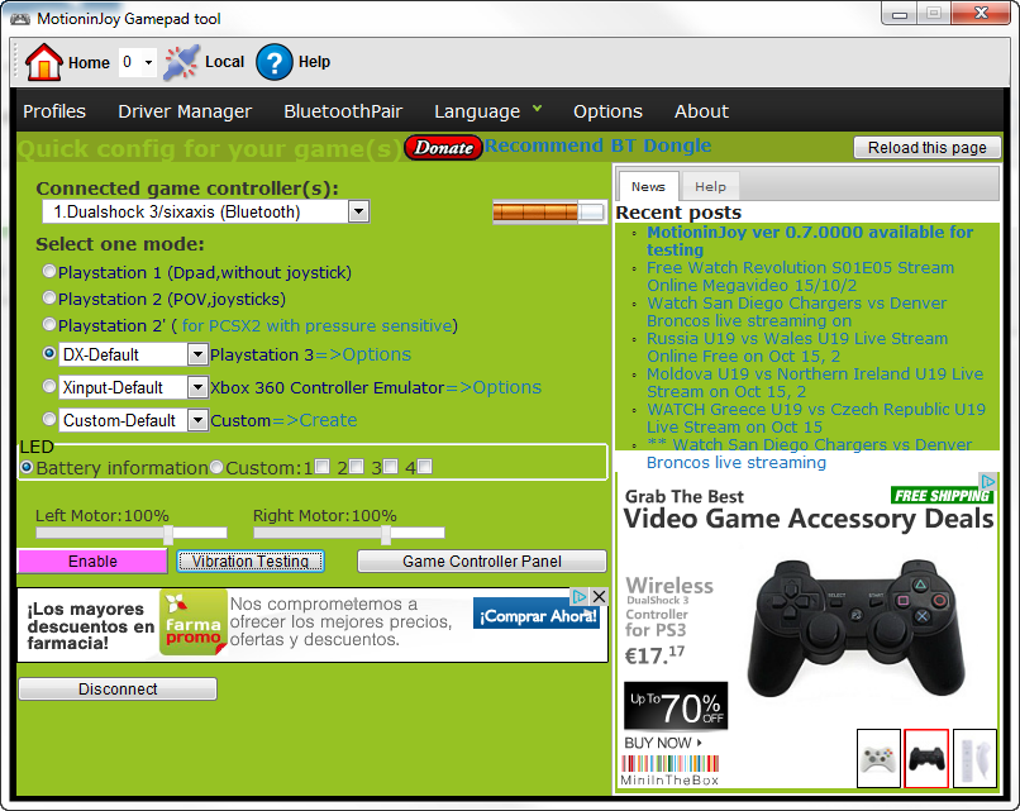
The software’s interface, however, immediately reveals one of its major shortcomings. It displays a series of options and settings that can be overwhelming for a novice user. While advanced users might appreciate the fine-grained control, the sheer volume of options, combined with the outdated and cluttered design, creates a steep learning curve. The initial screen is cluttered with ads and lacks clear instructions. Users need to navigate through various menus and submenus to properly configure the controller for specific games.
A built-in “Vibration Test” feature allows users to verify their controller connection and functionality. If the controller vibrates when this button is pressed, it indicates a successful connection and that the software is properly communicating with the gamepad. However, this simple test is often the only reliably smooth part of the user experience.

What Are the Advantages of Using the DS3 Tool?
The primary benefit of the DS3 Tool is its ability to enable the use of PlayStation controllers on a PC. For many gamers, the familiar feel and ergonomics of a gamepad provide a significant advantage, especially in genres like action games, racing games, and fighting games. Using a DS3 controller can greatly enhance the immersion and enjoyment of playing these titles on a PC. The software eliminates the need for expensive third-party adapters or specialized PC controllers. This cost savings is a significant factor for budget-conscious gamers.
The Drawbacks and Issues with the DS3 Tool
Despite its core functionality, the DS3 Tool suffers from a multitude of problems that significantly detract from the user experience. These issues often outweigh the benefits, making the software frustrating and unreliable.
The most glaring issue is its user interface. The design is dated and cluttered, with intrusive advertisements that significantly hinder navigation. Finding specific settings or options often feels like searching for a needle in a haystack. This makes initial setup and ongoing adjustments an unnecessarily complex process. The overwhelming number of settings and options, poorly organized and explained, are a common source of user frustration.
Furthermore, the software is prone to lags, errors, and inconsistencies. Users frequently encounter bugs that interfere with controller functionality, leading to dropped inputs, unresponsive buttons, or erratic behavior. This lack of stability renders the software unreliable for serious gaming sessions, requiring frequent troubleshooting and restarts. The sheer number of reported errors and the existence of numerous online tutorials dedicated to resolving these issues clearly indicate a critical design and programming flaw.
Another significant concern is the potential presence of malware or unwanted bundled software. Reports of adware and other potentially harmful programs included with the installation have surfaced, casting doubt on the software’s safety. While not every user encounters these issues, the risk is considerable enough to warrant caution and a thorough antivirus scan after installation.
Finally, compatibility is limited to Windows. In an increasingly mobile-first world, the DS3 Tool’s exclusive focus on Windows represents a significant limitation. Gamers using other operating systems, such as macOS, Linux, or even Android, are excluded from utilizing this software.
Alternatives to the DS3 Tool
Several alternatives to the DS3 Tool offer similar functionality with improved stability and user experience. These alternatives often provide a more polished interface and better compatibility with different controllers and operating systems.
Better DS3: This alternative is explicitly designed as an improvement over the DS3 Tool, addressing many of its shortcomings. It boasts a cleaner interface, better stability, and a more streamlined configuration process.
DS4Windows: Focusing on the DualShock 4, DS4Windows offers robust functionality, a more intuitive interface, and continuous updates to address compatibility issues.
ScpToolkit: Another strong contender, ScpToolkit offers excellent functionality, driver support for several controllers, and the ability to handle multiple controllers simultaneously.
x360ce: While not strictly a PlayStation controller emulator, x360ce allows for broader gamepad support, including PlayStation controllers, by emulating the Xbox 360 controller profile. This offers greater compatibility with various games.
These alternatives represent significant improvements over the DS3 Tool in terms of usability, stability, and overall user experience.
Final Verdict: Is the DS3 Tool Worth It?
The DS3 Tool presents a tempting proposition: free software to use PlayStation controllers on PC. However, the numerous technical issues, the confusing and ad-laden interface, and the potential security risks far outweigh this initial advantage. The frequent lags, errors, and the possibility of bundled malware make the DS3 Tool a highly problematic and unreliable solution. The time spent troubleshooting and dealing with the software’s shortcomings easily surpasses the convenience of using a gamepad. For most users, the frustration and potential risks outweigh any benefits. The alternatives mentioned above offer a far superior and safer experience for using PlayStation controllers (and other controllers) on a PC. Therefore, while the DS3 Tool might have worked in the past, today’s users are strongly advised to explore and utilize the many superior alternatives available.
Pros and Cons of the DS3 Tool
Pros:
- Free: The software is available for free download.
- Core Functionality: At its core, the software does what it promises—allowing PlayStation controller use on PC.
Cons:
- Confusing and Cluttered Interface: The user interface is extremely difficult to navigate and understand.
- Unreliable and Buggy: The software is prone to frequent lags, errors, and inconsistencies.
- Intrusive Advertisements: The software contains many intrusive and disruptive advertisements.
- Potential Malware: There are reports of the software containing bundled adware or malware.
- Limited Compatibility: Only compatible with Windows operating systems.
Ultimately, while the concept behind the DS3 Tool is sound, its poor execution renders it an unsuitable choice for most PC gamers. Investing the time in exploring and using a superior alternative is strongly recommended.
File Information
- License: “Free”
- Version: “0.7.1001”
- Latest update: “January 31, 2023”
- Platform: “Windows”
- OS: “Windows XP”
- Language: “English”
- Downloads: “1.2M”
- Size: “4.12 MB”


