
DSX, a paid utility developed by Paliverse, offers PC gamers a sophisticated method for calibrating their DualSense controllers. This detailed review will explore its features, interface, performance, and overall value, providing a comprehensive understanding of this powerful tool for enhancing the gaming experience.
A Sleek Interface for Enhanced Control
DSX immediately impresses with its visually appealing dark theme. Neon-colored outlines accentuate the windows, creating a sleek and modern aesthetic perfect for gamers. The dark background minimizes glare and reduces eye strain during extended gaming sessions. While the interface might initially seem overwhelming to users unfamiliar with controller technology and terminology, the arrangement of features becomes intuitive with familiarization. The core functionality centers around providing granular control over the DualSense’s capabilities, allowing for precise customization tailored to individual games and preferences.
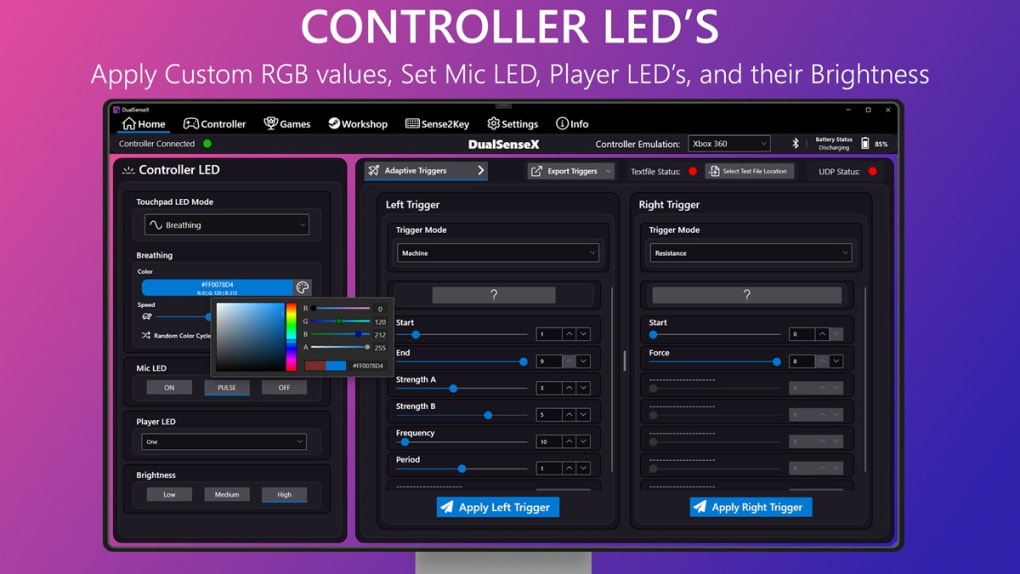
The software’s core strength lies in its ability to finely tune the DualSense’s advanced features. Adaptive Triggers, a key selling point of the DualSense, are fully adjustable within DSX. This allows users to set different levels of tension and resistance on the trigger buttons, significantly increasing immersion. For example, the subtle resistance offered during precise aiming in a shooter can be enhanced, while the forceful trigger pull needed for launching a rocket can be equally amplified. Similarly, Haptic Feedback, responsible for the controller’s various vibrations, can be fully managed, allowing for dynamic adjustments based on in-game events. This means experiencing the subtle rumble of a vehicle driving over gravel, or the impactful shock of an explosion, with enhanced fidelity. Importantly, for older games that don’t utilize these advanced features, DSX allows for their simple deactivation, ensuring compatibility across a wide range of titles.
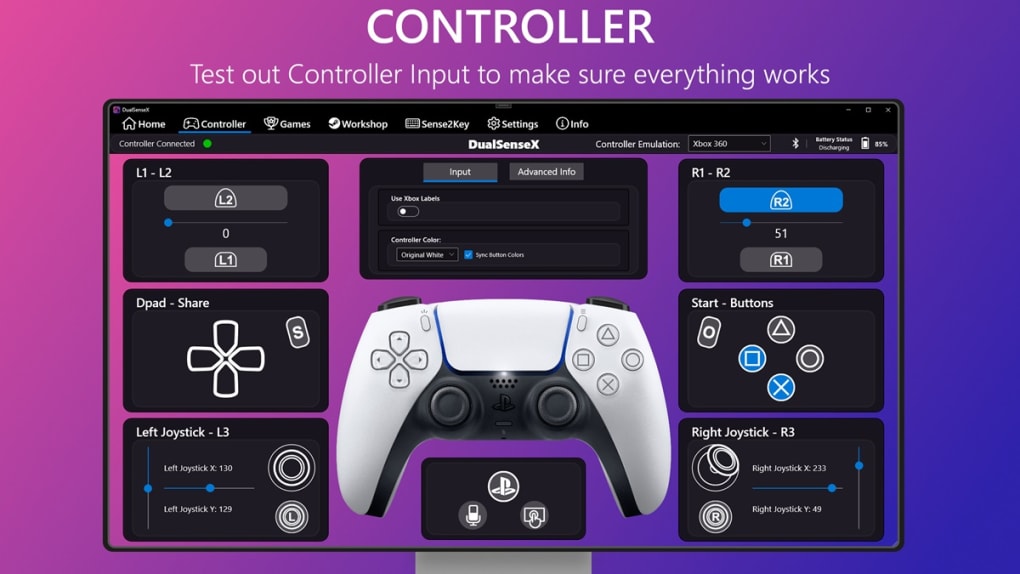
Beyond its core functionalities, DSX offers further convenience. Support for over 20 languages ensures accessibility for a global audience, while the option to configure automatic startup upon system boot simplifies the workflow for frequent users. The only significant limitation is the requirement of a persistent internet connection. This is due to built-in DRM anti-piracy measures, intended to prevent unauthorized distribution. While some might consider this an unnecessary restriction, it is understandable from a software developer’s perspective, balancing user experience with the need for software protection.
Enhanced Features in the v3 Beta Release
The v3 Beta release of DSX introduced several significant improvements and bug fixes, further enhancing its utility and user experience. One of the most notable additions is the inclusion of Window Background Effects. This feature provides four dynamic options for customizing the application’s visual integration with the desktop environment. Users can select from “None” for a clean, uncluttered look; “Mica” and “Tabbed” for a seamless integration with the Windows 11 design language; and “Acrylic” for a more subtle blur effect compatible with Windows 10 and later. This level of customization caters to different aesthetic preferences and desktop setups.
Beyond the visual enhancements, this beta update also addresses several operational issues. Previous problems with the accurate display of paddles in Full Dark Mode have been rectified, ensuring consistent visual representation of all controller inputs. A dynamic rumble sync issue within the Vibration Trigger Mode has also been resolved, ensuring smoother and more accurate haptic feedback. Furthermore, the developers addressed the potential for multiple DSX instances to run simultaneously by introducing a pop-up confirmation dialog. This simple addition significantly improves system management and prevents potential conflicts or instability.
In addition to these key improvements, the v3 Beta release includes numerous bug fixes and performance optimizations. This dedication to addressing user-reported issues and optimizing performance demonstrates a commitment to providing a stable and reliable user experience. The continuous updates and improvements signify the ongoing development and refinement of DSX.
DSX: A Powerful Tool for Discerning Gamers
DSX caters to gamers who appreciate fine-grained control over their gaming peripherals. The software’s intuitive layout and dark aesthetic create a user-friendly experience, making it ideal for use between gaming sessions. Its ability to fully leverage the modern features of the DualSense controller, while also offering the option to revert to more traditional controller behavior, makes it a versatile tool for playing both modern and classic games.
The ability to adjust Adaptive Triggers and Haptic Feedback allows for a deeper level of immersion and personalized control. The impact of this customization varies depending on the game, but the consistent improvement in control and feedback makes a significant difference for those who appreciate precise control. Whether enhancing the feel of a racing game’s acceleration or refining the subtle feedback in a first-person shooter, DSX gives players the ability to fine-tune their experience in ways previously unavailable.
This ability to precisely tailor controller response is a key differentiator. For gamers accustomed to subtle variations in controller feedback, this level of granular control is invaluable. The app’s ability to handle these nuances effectively makes it a highly sought-after tool for enhancing both precision and immersion.
Weighing the Pros and Cons
Pros:
- Sleek and intuitive dark-themed interface: Minimizes glare and eye strain, providing a visually appealing experience.
- Comprehensive DualSense controller support: Allows for advanced customization of Adaptive Triggers and Haptic Feedback.
- Multilingual support: Offers accessibility for a global audience.
- Configurable auto-start: Streamlines the workflow for regular users.
- Regular updates and improvements: Demonstrates the developer’s commitment to ongoing enhancement.
- Enhanced background effects: Offers customizable window background effects to improve desktop integration.
- Resolution of key issues: Addresses previous problems with paddle display, rumble sync, and multiple instances.
Cons:
- Requires a constant internet connection: Due to DRM anti-piracy measures, which might inconvenience some users.
In conclusion, DSX provides a compelling solution for gamers seeking to optimize their DualSense controller experience on PC. The sleek interface, granular control over advanced features, and continuous development efforts make it a strong contender in the market. While the persistent internet connection requirement might be a drawback for some, the benefits of precise controller calibration and the regular updates outweigh this for many users. DSX offers a significant enhancement to the PC gaming experience for those who appreciate the nuanced control it offers.
File Information
- License: “Full”
- Version: “v3-beta011”
- Latest update: “March 26, 2024”
- Platform: “Windows”
- OS: “Windows 10”
- Language: “English”
- Downloads: “6.8K”


