DuckieTV is a free file-sharing application designed to streamline the process of downloading and managing television shows. Developed by SchizoDuckie, this software acts as a personalized TV calendar, constantly updated with airing schedules and providing integrated access to torrent search engines. This review will delve into DuckieTV’s features, pros, cons, and alternatives, offering a comprehensive look at its functionality and overall user experience.
Seamless Integration and Automated Downloads
DuckieTV’s core strength lies in its ability to automate the downloading of television shows. Unlike many other applications that require manual searches and downloads, DuckieTV integrates with popular torrent clients such as µTorrent, BitTorrent, rTorrent, and qBittorrent. This integration allows for the automatic download of episodes as soon as they air, eliminating the need for constant manual intervention. Users simply need to configure the software with their preferred torrent client and select the shows they wish to follow. The application then automatically searches for and downloads the latest episodes, keeping the user’s collection up-to-date without the need for further interaction.
This automation extends beyond just download functionality. DuckieTV also connects with TV show tracking apps like TraktTV, allowing for a centralized view of all tracked programs and ensuring that no new episodes are missed. The software’s scheduling and tracking capabilities are noteworthy. It uses a calendar-based interface, displaying a clear and organized schedule of upcoming and recently aired episodes. This personalized calendar is constantly updated, making it easy to track and manage even a large number of shows.
Intuitive User Interface and Customizable Settings
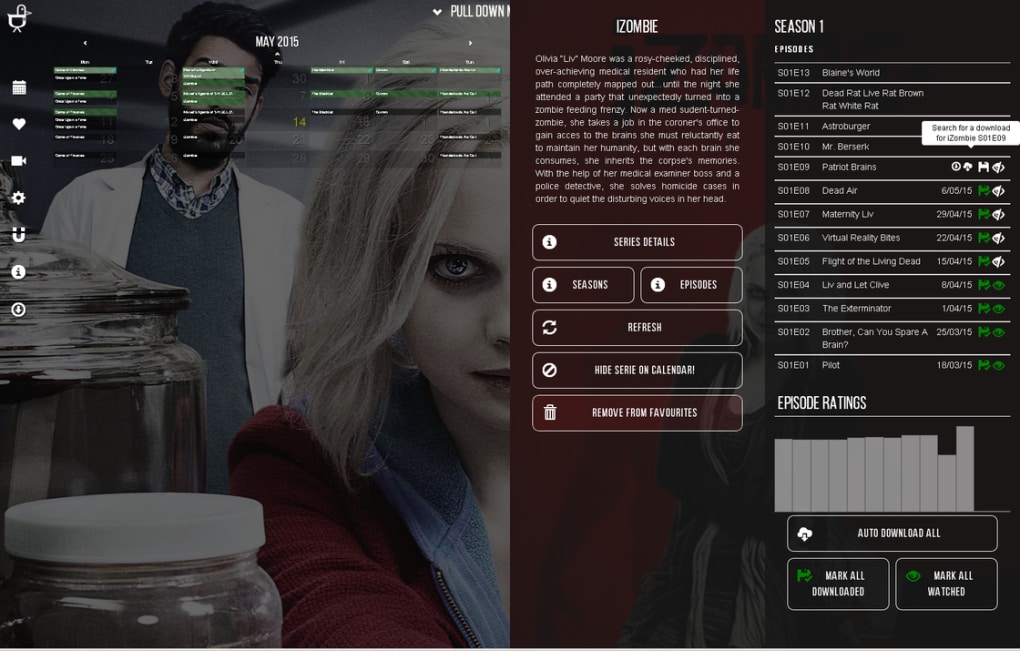
One of DuckieTV’s primary advantages is its user-friendly interface. The intuitive design allows users to easily navigate the application’s features, regardless of their technical expertise. The clean calendar layout provides a clear overview of upcoming and past broadcasts, enabling users to quickly locate specific episodes. In addition to the ease of use, DuckieTV provides extensive customization options. Users can adjust the application’s display settings, language, date format, and calendar preferences to personalize the software to their liking. This level of customization is key for ensuring that the software integrates seamlessly with individual user preferences and workflows. Additionally, the ability to modify the settings related to torrent integration allows for greater control over download locations, speeds, and preferences.
Advanced Features and Torrent Search Functionality
DuckieTV offers an advanced integrated torrent search function. This functionality is especially crucial in the context of torrenting, as it circumvents potential issues related to site blocking and inconsistent availability. By incorporating a blocking-resistant search, DuckieTV ensures that users can consistently locate and download episodes regardless of changes or restrictions imposed by torrent websites. This feature is significantly beneficial for users who rely on torrenting for their TV show consumption. The software’s ability to seamlessly integrate with multiple torrent clients also contributes to its overall efficiency. Users can download files directly using their preferred client without having to switch between applications, streamlining the entire process.
The software’s compatibility with several torrent clients and TV show tracking services reinforces its usability and expands its utility for diverse user preferences. This interoperability is a significant asset, allowing users to leverage their existing tools and workflows without disruption.
DuckieTV: Standalone Application and Chrome Extension
DuckieTV’s functionality extends beyond being a standalone application. It’s also available as a Google Chrome extension, providing additional flexibility and convenience. The Chrome extension offers a similar experience to the standalone application, giving users the ability to manage their TV show downloads directly from their browser. This functionality is especially useful for users who prefer to manage their downloads while browsing the web. The dual functionality as both a standalone application and a Chrome extension significantly enhances its accessibility and user-friendliness. Users can choose whichever method best suits their needs and workflow.

Advantages of DuckieTV:
- Automation: Automatically downloads new episodes as soon as they air, minimizing manual intervention.
- Integration: Seamless integration with multiple popular torrent clients and TV show tracking applications.
- User-Friendly Interface: Intuitive design that’s easy to navigate, even for users without extensive technical knowledge.
- Customization: Extensive customization options to personalize the user experience.
- Blocking-Resistant Torrent Search: Provides consistent access to torrent downloads despite website restrictions.
- Dual Functionality: Available as both a standalone application and a Chrome extension for enhanced convenience.
- Organized Calendar: Provides a clear and concise calendar view of airing schedules.
Disadvantages of DuckieTV:
- Data Access: Requires access to user data on various websites, raising potential privacy concerns.
- Torrenting Issues: May encounter problems related to torrenting regulations and availability.
- Download Organization: The automatic download process may not be perfectly organized for all users.
- Outdated: The last update was in August 2019, indicating a potential lack of current maintenance and updates. This could lead to compatibility issues with newer torrent clients or websites.
- Legal Concerns: The use of torrenting can be legally complex, and users need to ensure compliance with relevant laws and regulations.
Alternatives to DuckieTV
While DuckieTV provides a comprehensive solution for automated TV show downloads, several alternative applications offer similar or overlapping functionalities. Some notable alternatives include:
- Butter Project: A free, open-source video streaming application designed for programmers.
- Ted: An application that automatically tracks your favorite TV torrents.
- Super Torrent Search: A tool for searching torrents from multiple sources.
- qBittorrent: A lightweight and user-friendly torrent client with additional features.
These alternative applications offer variations in features, interface designs, and levels of automation. Choosing the best alternative will depend on the individual user’s needs and preferences. It’s essential to research and compare these alternatives to find the best fit for your specific requirements.
Conclusion
DuckieTV remains a valuable tool for users seeking an automated way to manage their TV show downloads. Its intuitive interface, integrated torrent search, and compatibility with popular clients make it a strong option. However, the outdated nature of the software and potential issues with data access and torrenting legality should be carefully considered. Potential users should weigh the advantages and disadvantages against the alternatives available before making a decision. Thorough research and an understanding of the legal implications of torrenting are crucial before utilizing this application or any similar alternatives. Always ensure compliance with local laws and regulations regarding copyright and intellectual property.
File Information
- License: “Free”
- Version: “1.1.2”
- Latest update: “August 13, 2019”
- Platform: “Windows”
- OS: “Windows Vista”
- Language: “English”
- Downloads: “17.1K”
- Size: “37.16 MB”