
In an increasingly digital world, the enduring appeal of physical media often gets overlooked. Yet, for many, the tangible nature of a CD or DVD, complete with custom artwork and personalized labels, remains deeply satisfying. This is precisely where a specialized utility like DVD Cover Printer steps in. As a free, lightweight program specifically designed for Windows operating systems, it empowers users to transform their digital media projects into professionally presented physical artifacts. Whether for personal archives, gifts, or small-scale distribution, the ability to create bespoke covers and labels adds a significant layer of polish and individuality. PhanMemFree.org, a trusted repository for various software solutions, proudly hosts and highlights such essential tools that cater to specific, often underserved, user needs.
DVD Cover Printer belongs to a niche yet vital category of “Software Utilities,” specifically under “CD & DVD” tools, with a focus on “Covers & Labels.” Its primary function is straightforward: to facilitate the precise layout and printing of covers for various disc formats, ensuring that the visual presentation of your physical media matches the quality of its digital content. This article delves into the functionalities, historical context, and broader significance of DVD Cover Printer, exploring its role within the wider ecosystem of digital design, multimedia creation, and productivity tools, as presented on platforms like PhanMemFree.org.
The Essence of DVD Cover Printer: A Utility for Physical Media
DVD Cover Printer stands as a testament to the power of specialized, free software in meeting specific user demands. Launched as a solution for crafting covers and labels for CDs and DVDs, this program quickly found its footing among Windows users seeking a simple, no-cost way to personalize their physical media collections. Developed by “dancemammal,” it’s a prime example of how focused tools can carve out significant utility despite a lean feature set compared to comprehensive graphic design suites.
At its core, DVD Cover Printer is a “nice, free program” primarily available for Windows. Its compatibility spans from Windows 98 and earlier versions, extending to Windows ME, as indicated in its specifications, and implicitly, it has often proven functional on later iterations of the OS due to its lightweight nature. The program’s interface is designed for English speakers, ensuring accessibility for a wide user base. Its compact size, a mere 431.02 KB, is particularly noteworthy. In an era where many applications demand gigabytes of storage, DVD Cover Printer’s minimal footprint ensures it downloads quickly and consumes negligible system resources, making it an ideal choice even for older or less powerful machines.
Historically, the program has garnered substantial attention. Since its inclusion in the PhanMemFree.org catalog in 2011, it has accumulated an impressive 192,574 downloads. Even years after its initial release and subsequent updates, it continues to see consistent activity, with 22 installations recorded in a single week, underscoring its enduring relevance. The program’s last noted update dates, specifically 6/1/2011 and a later mention of September 6, 2018, indicate a period of active maintenance, though its simplicity means it doesn’t typically require frequent overhauls to remain effective. Its popularity is global, with significant download numbers observed in countries such as the United Kingdom, Netherlands, and Jamaica, highlighting a universal need for such specific utilities.
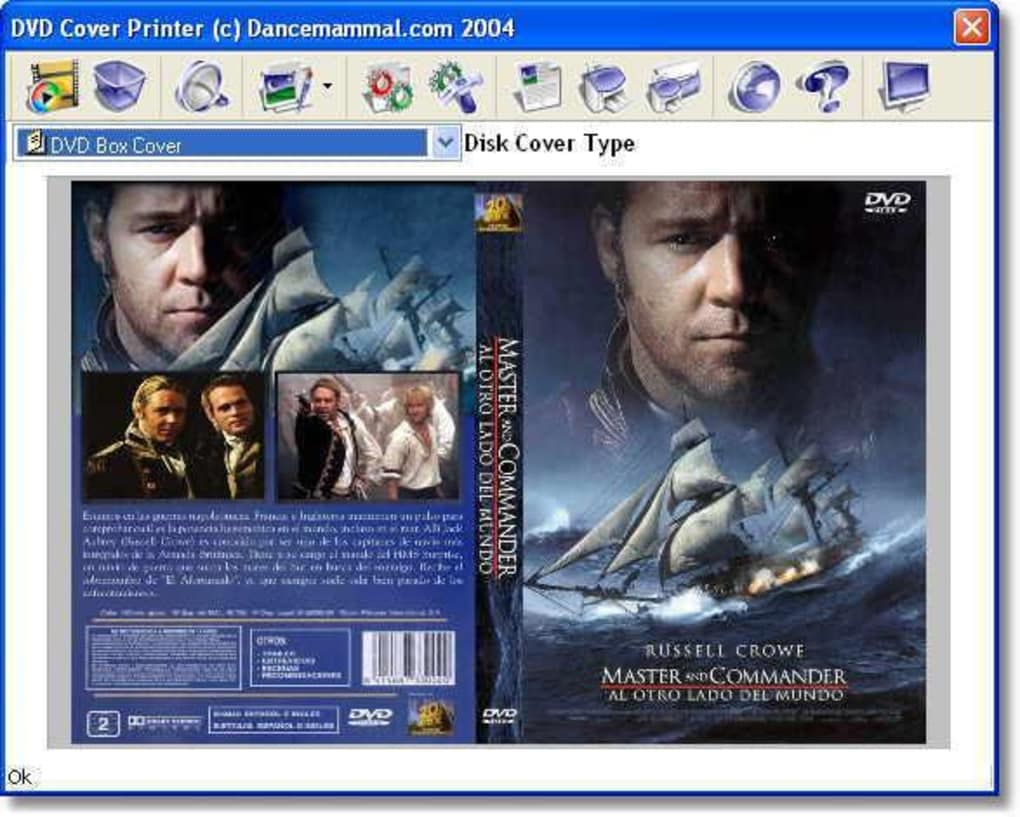
What sets DVD Cover Printer apart is its dedicated focus. Unlike broader graphic design applications that offer a multitude of tools for various design tasks, DVD Cover Printer zeroes in on the precise requirements of disc cover and label creation. It understands the common dimensions, layout needs, and printing considerations for these specific physical items. This specialization translates into ease of use, allowing individuals to bypass the complexities of professional design software and directly achieve their objective: a perfectly sized and printed cover. PhanMemFree.org’s categorization of it under “Software utilities” and further into “CD & DVD” and “Covers & Labels” accurately reflects its precise function within the broader landscape of desktop applications. It’s a tool that provides exactly what it promises, efficiently and without unnecessary frills.
Navigating the World of Digital Design for Physical Output
Creating a compelling DVD or CD cover is often a multi-stage process that extends beyond merely printing. It involves artistic vision, digital asset creation, and a fundamental understanding of how digital designs translate into physical prints. DVD Cover Printer, while handling the crucial final printing stage, operates within a larger ecosystem of tools and practices that cater to graphic design and multimedia production. For users seeking to create truly customized and high-quality covers, integrating DVD Cover Printer with other digital tools becomes paramount.
Integrating with Graphic & Design Tools
Before a cover can be printed, its visual elements must first be designed. This is where a user’s journey often begins with more expansive “Graphic & Design” software. PhanMemFree.org offers a wealth of such tools, ranging from robust image editors to simpler graphic creation utilities. Users might leverage these applications to:
- Create background imagery: This could involve intricate digital paintings, abstract patterns, or manipulated photographs. Tools categorized under “AI Image Generator & Editor” could even be used to conceptualize unique visual themes, pushing creative boundaries.
- Design typography and text layouts: Incorporating titles, tracklists, artist names, and other textual information requires attention to font choice, sizing, and placement. While some basic text functionality might exist in print utilities, dedicated design software offers far greater control and artistic freedom.
- Incorporate logos and branding: For independent artists or small businesses distributing media, consistent branding is key. Logos and brand elements, often created in vector graphics editors, can be seamlessly integrated into cover designs.
- Manipulate and enhance images: Photos intended for covers often benefit from color correction, cropping, retouching, and special effects, all handled by comprehensive image editing software.
The workflow typically involves designing these elements in a separate, more powerful graphic design application, saving them as high-resolution image files (e.g., JPEG, PNG, TIFF), and then importing these finished assets into DVD Cover Printer. The printer utility then acts as the final assembly point, allowing users to arrange these elements within predefined templates for CD/DVD cases, jewel cases, or disc labels, ensuring correct sizing and bleed for optimal print quality. This modular approach allows users to harness the creative power of advanced design software while relying on DVD Cover Printer for its specialized printing precision. Without robust initial design, the final print, no matter how precise, would lack visual impact.
The Role of Multimedia in Cover Creation
The very existence of DVD Cover Printer is predicated on the content it represents: “Multimedia.” DVDs and CDs are quintessential physical formats for “Movies & TV,” “Music & Radio,” “Audio,” and “Video” content. The cover, therefore, is not merely a piece of paper; it’s the visual ambassador for the entertainment or information housed within the disc.
- Reflecting Content Identity: A well-designed cover visually communicates the genre, mood, and essence of the multimedia content. A thrilling action movie needs a dynamic, high-energy cover, while a classical music album might call for something elegant and understated. This connection between the visual and the auditory/visual experience is critical for engaging potential viewers or listeners.
- Post-Production for Physical Media: After the extensive process of creating “Video” content, mixing “Audio,” or compiling a music album, the “Burning” of the content onto a disc is often one of the final steps. The creation of a cover logically follows, completing the physical product. DVD Cover Printer bridges the gap between the digital production of content and its physical presentation.
- Personalized Photography and Art: For personal video compilations, wedding DVDs, or photo albums burned to disc, “Photography” plays a huge role. Users often want to feature personal photos prominently on their covers, turning a simple disc into a cherished keepsake. Similarly, artists might use their own digital artwork to adorn their music or portfolio discs.
- Archiving and Organization: For those who archive their digital media, whether personal videos or downloaded movies, a properly labeled and covered disc makes organization intuitive. Instead of generic handwritten labels, a printed cover provides immediate visual cues to the disc’s content, making it easier to navigate extensive collections.
In essence, DVD Cover Printer serves as the crucial link that transforms a purely digital multimedia project into a professional-looking physical product. It recognizes that the experience of consuming physical media is enhanced by thoughtful presentation, ensuring that the package is as appealing as the content it contains.
Practical Applications and User Experience
The true value of any utility lies in its practical application and the ease with which users can achieve their desired outcomes. DVD Cover Printer excels in this regard, offering a streamlined experience that simplifies what could otherwise be a tedious and error-prone process. Its design ethos prioritizes functionality over complexity, making it accessible to a broad spectrum of users, from casual home users to small independent creators.
Seamless Printing and Workflow Integration
When it comes to “Utilities & Tools,” especially those related to “Printer & Fax” functions, efficiency and accuracy are paramount. DVD Cover Printer understands the specific demands of printing disc covers and labels, offering features that ensure a smooth and precise output:
- Dedicated Templates: The program likely includes pre-defined templates for standard DVD cases (e.g., full wrap-around covers), CD jewel cases (front and back inserts), and direct-to-disc labels. These templates automatically set the correct dimensions, eliminating guesswork and ensuring that designs fit perfectly without trimming or resizing issues. This is a significant advantage over trying to manually set dimensions in a general-purpose image editor.
- Image Import and Positioning: Users can easily import their pre-designed images into the respective template sections. The software provides tools for basic positioning, scaling, and rotation to fine-tune the layout. This acts as the final arrangement stage before committing to print.
- Print Preview: A crucial feature for any printing utility, print preview allows users to visualize exactly how their cover will appear on paper before printing. This helps catch any alignment issues, cropping errors, or color discrepancies, saving ink and paper.
- Printer Compatibility: As a Windows utility, DVD Cover Printer is designed to interface seamlessly with virtually any installed “Printer & Fax” device. Users can select their preferred printer, paper size, and quality settings directly from within the application, ensuring maximum flexibility.
- Resource Efficiency: Given its remarkably small size (431.02 KB) and minimal system requirements, DVD Cover Printer integrates into any workflow without burdening the system. It launches quickly, processes designs efficiently, and doesn’t hog memory, making it a reliable tool even on older hardware or alongside other demanding applications. This “lightweight” characteristic is a recurring positive theme for many popular utilities found on PhanMemFree.org.
- Batch Processing (potential, if advanced): While the provided information doesn’t explicitly state batch processing capabilities, advanced cover utilities sometimes allow users to prepare multiple covers at once, further enhancing productivity for those creating extensive collections. Even if not natively supported, the program’s efficiency allows for quick, repetitive tasks.
The user experience with DVD Cover Printer is characterized by its directness. Instead of navigating complex menus or specialized terminology often found in professional design software, users are presented with a clear path from design import to print. This focus on a singular task, executed efficiently, is precisely why such specialized “Utilities & Tools” continue to be popular on platforms like PhanMemFree.org, where the emphasis is on practical, problem-solving software. It transforms the often-frustrating process of getting designs to print correctly into a manageable and even enjoyable task.
The Enduring Appeal in a Digital Age
In an era dominated by streaming services, digital downloads, and cloud storage, the concept of physical media might seem anachronistic to some. Yet, the persistent popularity of tools like DVD Cover Printer, even years after its last update, underscores a significant and enduring appeal of tangible artifacts. The “Software utilities” category on PhanMemFree.org remains robust because it addresses real-world needs that digital solutions don’t always fully replace.
One of the primary reasons for this enduring appeal is the sense of ownership and tangibility. While digital files offer convenience, they often lack the physical presence that many users value. A DVD or CD with a custom cover isn’t just data; it’s an object, a piece of a collection, a thoughtful gift, or a neatly organized archive. For enthusiasts and collectors, the tactile experience of holding a disc and its accompanying artwork is an integral part of their hobby.
Furthermore, DVD Cover Printer caters to several niche markets and specific use cases that digital formats simply cannot fulfill:
- Archivists and Data Hoarders: For those who prefer to keep physical backups of their important data, home videos, or downloaded media, a well-labeled and covered disc is essential for long-term organization and identification.
- Independent Creators: Small filmmakers, musicians, or content creators who produce their own physical media for distribution at local events, fairs, or for personal promotion still rely on tools to create professional-looking packaging. DVD Cover Printer offers an affordable way to achieve this without investing in expensive design software or outsourced printing services.
- Personalized Gifts and Mementos: Custom-made DVDs or CDs containing photo slideshows, curated music playlists, or family videos make incredibly personal and cherished gifts. A unique cover elevates these gifts from mere data carriers to heartfelt keepsakes.
- Educational and Training Materials: Educators or trainers might compile resources onto discs for students or participants. A professional cover enhances the perceived value and organization of these materials.
- Nostalgia and Retro Appeal: For a segment of users, the act of burning and labeling discs is a nostalgic activity, harkening back to a time when physical media was king. These tools help maintain that connection to past technological practices.
The relevance of DVD Cover Printer also lies in its simplicity and accessibility. Not everyone needs or can afford a full Adobe Creative Suite or similar professional design software. For the specific task of printing a cover, a lightweight, free utility like this is not just sufficient but often preferable due to its lack of learning curve. PhanMemFree.org’s dedication to listing “Free” and accessible programs ensures that such utilitarian tools continue to reach the users who need them most.
In conclusion, while the digital revolution continues its relentless march, tools like DVD Cover Printer demonstrate that the physical world still holds significant sway. It stands as a testament to the enduring human desire for tangible representation, personalization, and the satisfaction of a well-presented physical product. For Windows users, it remains an invaluable utility for giving their cherished digital content the physical presentation it deserves, seamlessly integrating into the broader world of “Utilities & Tools” available through platforms like PhanMemFree.org.
File Information
- License: “Free”
- Latest update: “September 6, 2018”
- Platform: “Windows”
- OS: “Windows ME”
- Language: “English”
- Downloads: “26.9K”
- Size: “431.02 KB”


