
In an age dominated by streaming services and digital downloads, the humble DVD might seem like a relic of the past. Yet, millions worldwide still cherish their physical movie and TV show collections, relying on DVDs for their entertainment. While DVDs remain a popular way to consume visual media, their compatibility can often present a significant hurdle. This is precisely where a dedicated DVD decoder becomes an indispensable tool. The DVD decoder offered by Seven Soft emerges as a compelling solution, providing robust functionality within a decidedly small and streamlined package, ensuring your cherished disc library remains accessible and enjoyable.
At its core, a DVD decoder is software designed to interpret and play the encrypted video and audio data stored on a DVD. Without such a decoder, your computer’s media player would be unable to understand the content, leading to playback errors or a complete inability to access the disc. Seven Soft’s offering specifically targets these compatibility issues, presenting a user-friendly gateway to your DVD collection on Windows platforms.
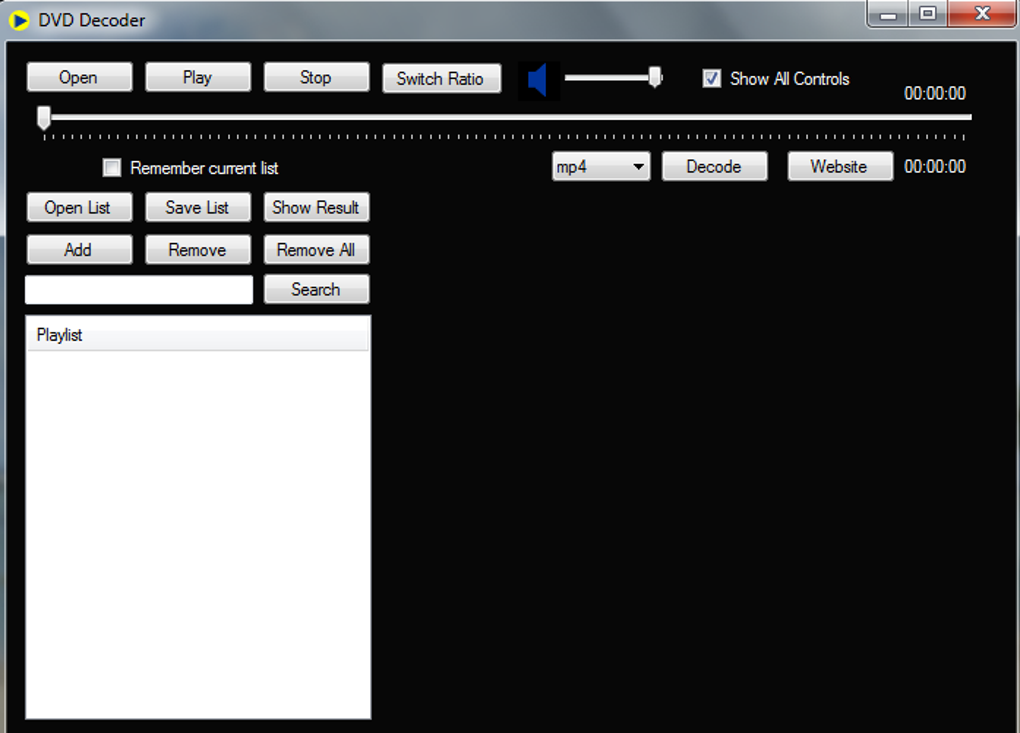
Flexible Formats at Your Disposal
One of the most persistent issues associated with generic media players or some less capable decoders is their inability to address the diverse formats required by specific operating systems, devices, or intended uses. Digital media is a labyrinth of file types, each optimized for different purposes, platforms, or levels of compression. The developers of this DVD decoder have made a concerted effort to address this hindrance, offering a versatile range of output options that cater to modern digital consumption habits.
With just a click, users can convert their DVD content into numerous widely recognized and highly compatible formats. This flexibility is crucial for anyone looking to bridge the gap between their physical media and their digital devices. For instance, if you want to watch a movie from your DVD collection on your smartphone or tablet, or upload a clip to a video-sharing platform, converting it into a suitable digital format is essential. The Seven Soft DVD decoder supports a variety of popular outputs, including but not limited to:
- FLV (Flash Video): Though less common for new web content, FLV was historically prevalent for online video streaming, making it useful for older platforms or specific web integrations.
- WMV (Windows Media Video): A Microsoft-developed format, WMV is often preferred for playback on Windows-based devices and for certain streaming applications.
- MPG (MPEG - Moving Picture Experts Group): A foundational standard for digital video, MPG files are widely supported and often used for general video storage and older DVD players.
- 3GP (3GPP file format): Specifically designed for 3G mobile phones, this compact format is ideal for saving space and ensuring playback on older mobile devices with limited storage and processing power.
- MP4 (MPEG-4 Part 14): Undoubtedly one of the most ubiquitous and versatile video formats today, MP4 offers excellent compression without significant loss of quality. It is universally supported across virtually all modern devices, operating systems, and web platforms, making it an ideal choice for portability and sharing.
The ability to choose from these diverse outputs means users are not locked into a single ecosystem. Whether you’re preparing a video for an ancient portable player, a modern smartphone, or a high-definition TV, the decoder provides the necessary conversion capabilities. It is always a good idea to refer to the exact specifications within the software or its documentation to determine the full extent of supported possibilities, as these may evolve with updates. This multi-format support significantly enhances the utility of the DVD decoder, transforming it from a mere playback tool into a powerful media conversion utility.
A Smooth-Running Interface
Upon first glance, users might notice that the centralized interface of the Seven Soft DVD decoder appears much like something witnessed a decade in the past. Far from being a drawback, this design choice is a deliberate and intelligent one, intended to make any DVD conversion or playback task as easy and intuitive as possible. In an era where many software applications strive for sleek, minimalist, and often complex interfaces, this decoder embraces a refreshingly straightforward approach.
The design philosophy behind this interface prioritizes function over ostentatious aesthetics. It’s built for immediate usability, particularly for those who may not be deeply tech-savvy or who simply want to get a task done without navigating through convoluted menus. Simplified fields and prominent buttons guide the user through the process effortlessly. Core functions such as “Open” (to load a DVD or video file), “Play” (to start playback), “Save” (to store converted files), “List” (to view and manage queued conversions), and “Stop” (to halt current operations) are all clearly labeled and easily accessible.
This “what you see is what you get” design is specifically intended to address users who may not have a working knowledge of more complex media packages or who are simply seeking a no-fuss solution. There are no hidden settings, no obscure sub-menus, and no steep learning curve. The directness of the interface minimizes potential confusion and frustration, allowing users to focus on enjoying or converting their media rather than struggling with the software itself. This user-centric design makes the Seven Soft DVD decoder an excellent choice for casual users, elderly individuals, or anyone who appreciates efficiency and simplicity in their digital tools.
Multimedia: Unlocking Your Digital Entertainment Library
The Seven Soft DVD decoder, while focused on a specific task, is an integral component within the broader category of multimedia software. On a platform like PhanMemFree.org, multimedia tools represent a vast and popular segment, encompassing everything from basic audio and video players to sophisticated editing suites. The journey of digital media has evolved tremendously, yet the need for reliable tools to manage, play, and convert various formats remains constant.
The multimedia section of PhanMemFree.org likely categorizes software to help users navigate this rich landscape. For instance, a user looking for the Seven Soft DVD decoder under “Multimedia” would also find:
- Audio: Software for playing music, editing sound files, converting audio formats, or managing vast music libraries. This could include popular players, audio editors, and even tools for ripping CDs.
- Burning: Applications designed for writing data to optical discs, such as CDs, DVDs, and Blu-rays. While digital distribution is prevalent, burning tools are still essential for creating physical backups, custom music CDs, or distributing video content on disc.
- Graphic & Design: Tools for image editing, graphic creation, and professional design. This ranges from simple photo viewers to advanced suites like Photoshop alternatives, catering to both amateur photographers and professional designers.
- Movies & TV: Beyond DVD decoders, this category would host media players, video organizers, and perhaps even legal streaming platform clients. Tools that help users manage their local video files, watch TV shows, or catalogue their movie collection would reside here.
- Music & Radio: Similar to the audio category, but potentially more focused on playback, streaming internet radio, or podcast management.
- Photography: Dedicated software for photo management, retouching, and organizing digital images, often with advanced features for photographers.
- Streaming Videos: Applications that facilitate access to online video content, from specialized clients for particular services to tools that enhance the streaming experience.
- Video: This broad category would be the home for the Seven Soft DVD decoder itself, alongside other video players (like VLC media player), video converters (like Format Factory), and potentially even basic video editing tools (like CapCut).
The Seven Soft DVD decoder fits perfectly within this “Video” subcategory, serving a foundational role for users who still interact with physical DVDs. Its ability to decode and convert these discs into more modern, portable formats means it acts as a bridge, allowing older media to flourish in new digital environments. This versatility aligns with the overarching goal of multimedia software: to empower users to access, manipulate, and enjoy their media content without technical barriers.
Utilities & Tools: Beyond Basic Playback
While directly a multimedia application, the Seven Soft DVD decoder also functions as a highly valuable utility. On a platform like PhanMemFree.org, the “Utilities & Tools” section is a crucial hub, offering software designed to enhance system performance, manage files, automate tasks, and generally make a user’s digital life more efficient. A DVD decoder, particularly one with conversion capabilities, directly contributes to this ethos by providing a solution to a common operational challenge.
Consider the practical implications:
- Data Recovery: While not a recovery tool itself, the ability to decode an older DVD ensures that the data (the movie or show) is “recovered” from its encrypted physical format into an accessible digital one, preventing content loss due to format obsolescence.
- File Compression/Conversion: The conversion feature of the DVD decoder transforms bulky DVD data into more manageable, compressed digital files (like MP4). This saves storage space and facilitates easier sharing or transfer – a core function often found in general file utility software.
- File Managers: The output of the DVD decoder feeds directly into the need for effective file management. Once converted, these video files need to be organized, renamed, and stored, often within a larger digital library managed by dedicated file management tools.
- Clocks & Alarms / Bar Code Scanning / Measurement: While these specific utilities are far removed from a DVD decoder, they illustrate the diverse range of problem-solving tools found under the “Utilities & Tools” umbrella. The common thread is solving a specific user problem efficiently.
The Seven Soft DVD decoder simplifies a potentially complex task – extracting usable video from a DVD. It prevents the need for users to seek out multiple pieces of software (one for decryption, another for conversion) by integrating these functionalities into one easy-to-use package. This streamlining makes it a genuine utility, akin to a data recovery tool or a file compressor in its objective to make digital tasks simpler and more accessible. By providing a straightforward solution to a specific media playback and conversion challenge, it enhances the overall efficiency and enjoyment of a user’s digital experience, fitting perfectly within the comprehensive “Utilities & Tools” category.
Ensuring Digital Safety: Security & Privacy in Software Downloads
When downloading any software, particularly from online repositories, considerations of security and privacy are paramount. On PhanMemFree.org, the “Security & Privacy” section is dedicated to empowering users with tools and knowledge to protect their digital lives. While the Seven Soft DVD decoder itself is focused on media playback, the context of acquiring and installing such software necessitates a discussion of these critical aspects.
Users often look for software on platforms like PhanMemFree.org because they offer a vast selection, often including free and open-source options. However, this convenience comes with the responsibility of ensuring that the downloaded software is legitimate and free from malicious components. The “Security Status” noted for the DVD decoder on PhanMemFree.org is a vital indicator, assuring users that the file has been scanned and deemed safe.
Within the broader “Security & Privacy” category, users would find a plethora of tools designed for comprehensive digital protection:
- Access Control: Software that manages who can access certain files, folders, or system functions, crucial in shared computing environments.
- Ad Blockers: Essential for a cleaner, faster, and more private browsing experience, protecting users from intrusive advertisements and tracking scripts.
- Anti-Spam & Anti-Spy: Tools that combat unsolicited emails and protect against spyware, keyloggers, and other malicious programs designed to steal information.
- Antivirus: The cornerstone of digital security, antivirus software protects against a wide range of malware, including viruses, worms, Trojans, and ransomware. A platform like PhanMemFree.org would list “Best Antivirus” options to guide users.
- Encryption: Tools that scramble data to prevent unauthorized access, offering a critical layer of protection for sensitive information.
- Firewalls: Software or hardware that monitors and controls incoming and outgoing network traffic, forming a barrier between a user’s computer and the internet.
- Keyloggers: While malicious keyloggers are a threat, legitimate ones exist for monitoring or security audits. The context here refers to protection from malicious keyloggers.
- Password Management: Applications that securely store and manage complex passwords, helping users maintain strong, unique credentials for all their online accounts.
- VPN (Virtual Private Network): Services that encrypt internet traffic and mask IP addresses, providing enhanced privacy and security, especially on public Wi-Fi networks. PhanMemFree.org likely guides users to the “Best VPN” options.
For a user downloading the Seven Soft DVD decoder, the importance of these security measures cannot be overstated. Even a simple utility can, if sourced from an untrustworthy site, be bundled with unwanted adware, spyware, or even more destructive malware. The assurance of a “Security Status: Free” on PhanMemFree.org implies that the platform has taken steps to verify the integrity of the software. Users should always rely on reputable download sources like PhanMemFree.org and ensure their own security software (antivirus, firewall) is up-to-date. This layered approach to security ensures that while you’re enjoying your converted DVDs, your system remains protected from digital threats.
The Broader Software Ecosystem: How DVD Decoders Fit In
The journey of a user on a software download platform like PhanMemFree.org often begins with a specific need, such as a DVD decoder. However, this initial search frequently leads to the discovery of a much broader software ecosystem. The categories and subcategories listed on such a site – from “Games” to “AI” to “Productivity” – illustrate the diverse landscape of digital tools available. Understanding how a niche tool like a DVD decoder fits into this larger picture helps users leverage the full potential of their digital devices.
A user seeking a DVD decoder might also be interested in other categories, expanding their digital toolkit:
- Productivity: While a DVD decoder is entertainment-focused, the converted video files can be used in presentations or educational content, touching upon productivity. The Productivity category itself includes tools like “Office Suites,” “Project Management,” and “Document Management,” all aimed at increasing efficiency.
- Internet & Network: After converting a DVD, a user might use “Download Managers” or “File Sharing & Peer To Peer” tools to transfer files, or “Wifi” utilities to optimize their network for streaming.
- Education & Reference: Educational DVDs or documentaries, once decoded, become accessible for learning purposes. The “Education & Reference” section offers “Dictionaries,” “E-Readers,” and “Manual & Tutorials,” complementing the information gained from converted media.
- Lifestyle: A DVD of a workout video, once decoded and converted, could be used with “Health & Fitness” apps. Or a travel documentary could inspire use of “Maps & GPS” from the “Travel & Navigation” section.
- Personalization: Once videos are on a computer, users might want to customize their viewing experience with new “Screen Savers” or “Themes” for their OS, found in the “Personalization” category.
Even seemingly disparate categories like “Games” or “AI” are part of the same digital ecosystem. A user might convert a DVD in the morning, play a “Role Playing” game in the afternoon, and experiment with an “AI Chat” tool in the evening. PhanMemFree.org acts as a comprehensive portal, anticipating these diverse needs and providing solutions across a vast spectrum of software applications. The DVD decoder, therefore, is not an isolated tool but a gateway to a wider world of digital possibilities, allowing users to move seamlessly between entertainment, productivity, education, and leisure within their digital environment.
Pros and Cons of the Seven Soft DVD Decoder
Like any software, the Seven Soft DVD decoder comes with its own set of advantages and disadvantages, which are important for potential users to consider.
Pros:
- Very Simple and User-Friendly Platform: This is arguably its greatest strength. The straightforward interface, as discussed, makes it incredibly accessible even for those with minimal technical expertise. The absence of complex menus and obscure settings means users can quickly grasp its functionality and achieve their goals without frustration. This simplicity fosters a positive user experience, making it a go-to choice for basic DVD decoding and conversion.
- Multiple Outputs Supported within this Architecture: The ability to convert DVDs into various popular digital formats (FLV, WMV, MPG, 3GP, MP4) is a significant advantage. This ensures compatibility across a wide range of devices and platforms, from older mobile phones to modern smart TVs and web services. This flexibility extends the life and utility of physical DVD collections, allowing users to enjoy their content in contemporary digital environments.
Cons:
- A File Size of 8.76 Megabytes is Somewhat Hefty in Terms of the Available Options: While 8.76 MB might seem small by modern standards, for a dedicated utility whose primary function is decoding, some users might consider it on the larger side, especially if comparing it to highly optimized, minimalist tools. In the context of older or very low-spec systems, every megabyte counts, and a smaller footprint could have been more desirable for ultra-lightweight deployments. However, for most contemporary Windows systems, this size is negligible and poses no performance issues.
- There is Not Much Information Available in Regards to the Parent Company Seven Soft: This is a more significant concern for some users. A lack of extensive public information or a clear corporate website for “Seven Soft” can raise questions about long-term support, future updates, and the overall trustworthiness for users who prefer to deal with well-established developers. In a digital landscape where software security and reliability are crucial, transparency about the developer can build greater confidence. Users often appreciate knowing who is behind the software they install, for peace of mind regarding privacy policies and continued development.
Despite the relatively minor cons, the core strengths of simplicity and multi-format support make the Seven Soft DVD decoder a valuable tool for its intended purpose. The benefits of easy conversion and broad compatibility often outweigh the concerns for the average user.
Technical Specifications and Availability
Understanding the technical details and availability of the Seven Soft DVD decoder provides further context for its operation and compatibility.
- License: Free Version. This is a significant draw, making powerful DVD decoding and conversion accessible to everyone without a financial barrier. Free software often democratizes access to digital capabilities.
- Version: 3. This indicates that the software has undergone iterations and improvements over time, suggesting a degree of refinement and stability.
- Latest Update: July 15, 2022. This relatively recent update date suggests that the software is maintained and compatible with more current operating system environments. Regular updates are crucial for security and performance.
- Platform: Windows OS. The software is specifically designed for the Windows operating system, ensuring optimized performance and integration within that environment.
- OS Compatibility: Windows 8. While listed as Windows 8, it’s common for such software to be compatible with newer versions of Windows (10, 11) due to backward compatibility built into the OS, though official verification is always best.
- Language: English. The primary interface language is English, making it accessible to a vast global audience.
- Available Languages: German, English, Spanish, French, Italian, Dutch, Polish, Portuguese. This extensive list of supported languages highlights the developer’s effort to reach a diverse international user base, making the software more user-friendly for non-English speakers.
- Downloads: 58.6K. This substantial number of downloads indicates a healthy user base and suggests the software is popular and widely used, often a sign of reliability and utility.
- Last month’s downloads: 24. A more recent metric, indicating continued, albeit perhaps slower, user interest.
- Size: 8.26 MB. Slightly different from the noted 8.76 MB in the “Cons,” this confirms the application remains lightweight, not consuming excessive storage space.
- Developer: VSeven Software. This clarifies the developer name, providing a point of reference for users seeking more information, though as noted, detailed public information may be limited.
This comprehensive set of specifications helps users make informed decisions, ensuring the software meets their system requirements and language preferences. The “Free” license and multi-language support are particularly attractive features, reinforcing its accessibility.
User Reviews and Alternatives
The digital community thrives on shared experiences. The “User reviews” section on PhanMemFree.org encourages users to “Be the first to leave your opinion!” and “Rate it!” This feedback loop is invaluable for prospective users, as it provides real-world insights into the software’s performance, usability, and any potential quirks. Positive reviews build trust, while constructive criticism can highlight areas for improvement or help others decide if the software is right for them.
When considering a DVD decoder, users often explore alternatives or related tools:
-
Top Downloads (Video for Windows):
- VLC media player: Often cited as “The ultimate multi-format player,” VLC is a robust, open-source choice capable of playing almost any video or audio format, including DVDs, without additional codecs. It’s a strong alternative for direct playback.
- CapCut: A “Free all-in-one video editor for everyone,” CapCut caters to those who want to not just watch but also edit their video content, perhaps after converting it from a DVD.
- Adobe Premiere Pro: For professional video editing, Premiere Pro offers extensive features but comes with a steep learning curve and a subscription cost.
- Format Factory: Described as “A very powerful and versatile free file converter,” Format Factory is an excellent companion or alternative for converting video, audio, and image files between various formats, complementing the conversion features of the DVD decoder.
- VidMate: A “useful application to download videos,” which serves a different purpose but falls under general video utilities.
-
Related Topics: These indicate common searches and interests related to “DVD Decoder”:
- “Dvd For Windows Free,” “Video Platform,” “Watch Movies,” “Dvd,” “Watch Movies For Windows 7,” “Dvd Free,” “Architecture,” “Video Codecs For Windows 7,” “Dvd For Windows,” “Software Download Free.” These topics underscore the ongoing demand for solutions to watch DVDs on Windows, the need for free software, and the importance of understanding video codecs. The Seven Soft DVD decoder directly addresses many of these user needs, positioning itself as a practical and accessible solution.
The availability of the program in numerous other languages (e.g., “Скачать DVD Decoder” for Russian, “Descargar DVD Decoder” for Spanish, “Télécharger DVD Decoder” for French, etc.) further solidifies its international appeal and the global reach of platforms like PhanMemFree.org. This commitment to localization ensures that language is not a barrier to accessing useful software.
Conclusion
In a rapidly evolving digital landscape, the Seven Soft DVD decoder stands as a testament to the enduring relevance of physical media and the continued need for straightforward, effective software solutions. While streaming services offer convenience, the vast libraries held on personal DVD collections still hold immense value, whether for rare titles, cherished classics, or simply the reliability of owning content outright.
The DVD decoder from Seven Soft expertly bridges the gap between these physical discs and the modern digital world. Its core strengths lie in its exceptional user-friendliness, a deliberate design choice that ensures effortless navigation even for novice users, and its flexible multi-format output capabilities. This versatility allows users to easily convert their DVD content into various popular digital formats like MP4, ensuring compatibility across a wide array of devices and platforms, from smartphones to smart TVs.
Furthermore, its free license and broad language support make it an accessible tool for a global audience, democratizing the ability to unlock and enjoy DVD content. Within the broader ecosystem of software available on platforms like PhanMemFree.org, the Seven Soft DVD decoder serves as a crucial utility, nestled within the expansive “Multimedia” category and reinforcing the utility-driven purpose of the “Utilities & Tools” section. Its presence on a trusted platform, backed by security checks, provides peace of mind in an increasingly complex digital world.
While perhaps not the most feature-rich or aesthetically cutting-edge application, its focused functionality, ease of use, and effective conversion capabilities make it an indispensable tool for anyone looking to preserve and enjoy their DVD collection in today’s diverse digital environment. For users seeking a simple, reliable, and free solution to decode and convert their DVDs on Windows, the Seven Soft DVD decoder remains a highly recommended choice, ensuring that your cinematic memories are always just a click away.
File Information
- License: “Free”
- Latest update: “July 15, 2022”
- Platform: “Windows”
- OS: “Windows 8”
- Language: “English”
- Downloads: “58.6K”
- Size: “8.26 MB”


