
In an age where digital content reigns supreme, managing an ever-growing library of movies, music, and personal videos can often feel like a daunting task. From physical discs like DVDs and Blu-rays to diverse digital formats and a myriad of playback devices, compatibility issues and copy protection can frequently impede seamless enjoyment. Enter DVDFab, a name that has become synonymous with comprehensive digital media management. More than just a simple tool, DVDFab stands as an expansive, all-in-one software suite designed to empower users to copy, rip, convert, and create media with unparalleled flexibility and control. For over a decade, it has served as a critical utility for personal media enthusiasts, ensuring that cherished collections are preserved, accessible, and adaptable to virtually any modern platform.
DVDFab’s reputation is built on its robust feature set, which addresses nearly every conceivable need related to DVD, Blu-ray, and general video handling. It’s an essential application for those looking to digitize their physical media library, back up valuable discs, convert videos for specific devices, or even create their own professional-looking discs. Operating primarily on Windows, this powerful software integrates seamlessly into a user’s digital workflow, transforming complex media tasks into intuitive processes. This in-depth exploration will delve into the multifaceted capabilities of DVDFab, highlighting how it provides a definitive solution for multimedia enthusiasts, making it a standout offering in the competitive landscape of digital tools available on platforms like PhanMemFree.org.
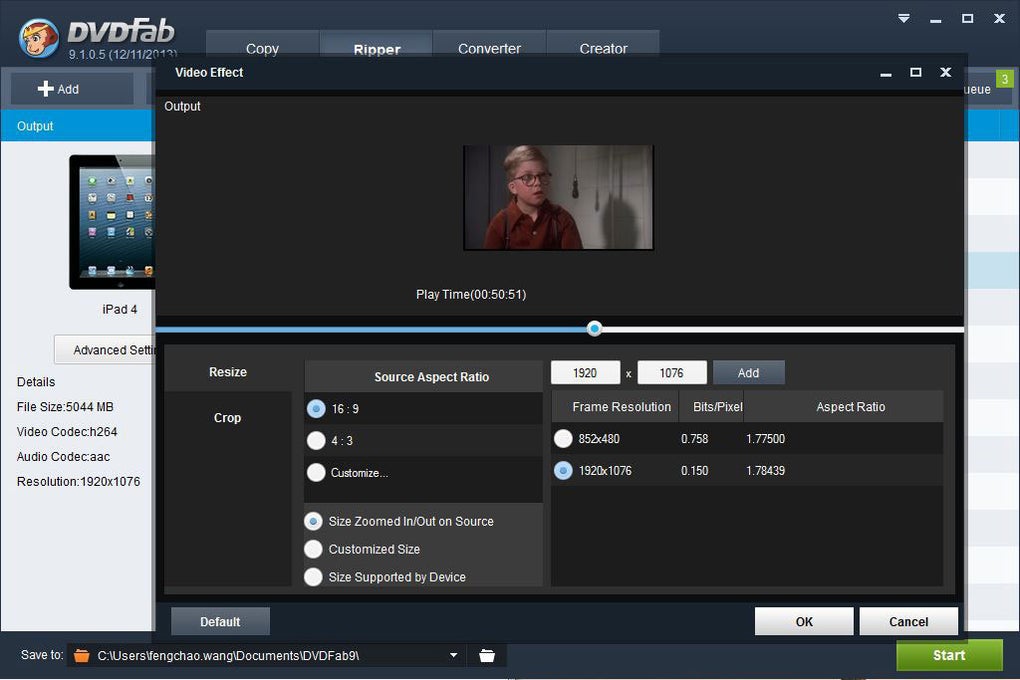
DVDFab: A Multimedia Powerhouse
At its core, DVDFab is renowned as the most powerful and flexible DVD/Blu-ray copier and ripper available on the market. This fundamental capability is what initially drew many users to the software, addressing a critical need for safeguarding physical media. Optical discs, despite their quality, are susceptible to scratches, degradation, and loss. DVDFab provides a robust solution by allowing users to create perfect digital backups of their DVDs and Blu-rays, ensuring that their cinematic investments are protected for the long term.
The software’s ability to remove copy protections is a cornerstone of its functionality. This feature, while often subject to debate regarding digital rights, is primarily utilized by individual users for legitimate personal backup purposes within their legal rights in many jurisdictions. It enables users to transfer content they legally own from a physical disc to a hard drive or other digital storage, thereby bypassing the restrictions that would otherwise prevent personal archiving or format shifting. This is particularly valuable for users who wish to preserve their disc collections, convert them for playback on devices that lack an optical drive, or consolidate their media into a centralized digital library.
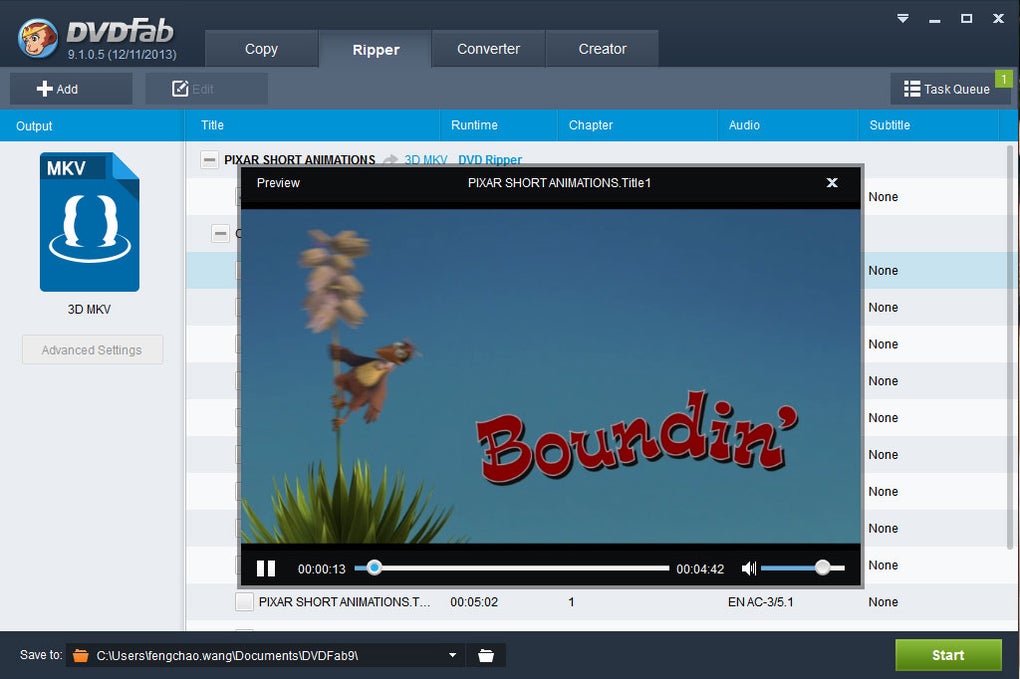
The DVDFab suite is modular, encompassing a wide array of specialized applications that work harmoniously under one umbrella. Key among these are DVD Copy and Blu-ray Copy. These modules allow for a 1:1 sector-by-sector copy of a disc, creating exact duplicates or compressing content to fit onto smaller media (e.g., a dual-layer disc onto a single-layer disc) without significant loss of quality. Users can choose to copy the entire disc, main movie only, or customize their selection, giving them granular control over their backups. This flexibility is crucial for anyone with a diverse collection, from Hollywood blockbusters to independent films and personal home videos.
Complementing the copy features are DVD Ripper and Blu-ray Ripper (including 3D Plus). Ripping involves extracting the video and audio content from a disc and converting it into a digital file format compatible with various devices and software. The DVDFab ripper tools excel here, offering an extensive range of output profiles. Users can rip their DVDs and Blu-rays to popular formats like MP4, MKV, AVI, WMV, and more, making their content playable on smartphones (iPod, iPhone, cell phones), gaming consoles (PSP, PS3, ZUNE, NDS), tablets, smart TVs, and media players. The inclusion of 3D Plus ripping for Blu-ray means that users with 3D displays can also preserve and enjoy their stereoscopic content in a digital format.

Beyond simple ripping, DVDFab extends its versatility with specialized converters. The Blu-ray to DVD Converter is a prime example, allowing users to down-convert high-definition Blu-ray content to standard-definition DVD format. This is incredibly useful for maintaining compatibility with older DVD players or for creating smaller file sizes when storage space is a concern. Conversely, the 2D to 3D Converter offers an innovative solution for transforming standard 2D video into an immersive 3D experience, breathing new life into existing media libraries for those with 3D-capable displays. These tools underscore DVDFab’s commitment to providing comprehensive solutions, truly making it a multimedia powerhouse that serves a wide spectrum of user needs, firmly placing it within the “Multimedia” category on PhanMemFree.org.
Comprehensive Features for Every Digital Media Need
DVDFab’s capabilities extend far beyond mere copying and ripping, offering a comprehensive suite of features designed to cater to virtually every digital media requirement. For those looking to create new discs or convert videos between different formats, the software provides powerful and intuitive tools that transform raw media into polished products.
The DVD Creator and Blu-ray Creator modules are indispensable for anyone wanting to author their own video discs. Whether it’s digitizing old home movies, compiling vacation footage, or distributing independent film projects, these creators enable users to burn video files directly to DVD or Blu-ray discs. A significant advantage highlighted by users is the ability to “burn more than one video at a time,” streamlining the creation process for compilations or multi-part series. Furthermore, the software provides “customizable templates” for disc menus, allowing users to add a professional and personal touch to their creations. As one PhanMemFree.org user eloquently put it, DVDFab DVD Creator is “an ideal software for beginners like me!” who appreciate the flexibility to give “an added touch to each DVD.” This level of customization ensures that even novice users can produce high-quality discs that look and feel professionally made.
At the heart of DVDFab’s versatility is its Video Converter. This module is a “piece of extremely powerful and full-featured converter software that supports almost all video and audio formats.” Its primary function is to convert video files from one format to another, which is essential for ensuring compatibility across the myriad of devices available today. Whether you need to convert a large MKV file to a smaller MP4 for your smartphone or prepare a video for web streaming, DVDFab handles it with ease. The software is specifically “designed to convert video for your mobile video player as 3gp, mp4, PSP, PS3, iPod, iPhone, etc.,” demonstrating its foresight in addressing the evolving landscape of personal electronic devices.
What truly sets DVDFab’s Video Converter apart is the granular control it offers over output parameters. Users can “alter the video elements” with abandon, including critical settings like “video quality, frame rate, resolution, audio quality, sample rate, etc.” This allows for precise optimization, whether prioritizing file size, visual fidelity, or specific device requirements. This level of control, combined with impressive performance, makes it a top-tier “Utility & Tool” for media management. Users frequently praise the “fast ripping speed with the best video quality!” and the remarkable fact that conversion occurs “even without video or audio quality loss.” This commitment to preserving the original quality while offering extensive modification options makes DVDFab a truly comprehensive solution for managing and manipulating digital media. The fact that “everything is said and done in just a few minutes!” speaks to its efficiency and user-centric design, solidifying its place among “first-class dvd ripping tools!” and an “extremely powerful and useful converter!” in the user community.
Seamless Integration Across Your Digital Workflow
In today’s interconnected digital ecosystem, the ability of software to integrate smoothly into a user’s broader workflow is paramount. DVDFab excels in this regard, acting as a crucial bridge between disparate media formats and platforms. Its “All-In-One” approach eliminates the need for multiple, single-purpose applications, thereby streamlining the process of managing a digital media library and enhancing overall productivity. Instead of juggling separate tools for copying, ripping, converting, and creating, users can rely on DVDFab for a cohesive and efficient experience.
Consider the journey of a typical media enthusiast. They might have an extensive collection of DVDs and Blu-rays accumulated over years, alongside digital downloads, streaming content, and personal videos captured on various devices. The challenge lies in bringing all this content together, making it accessible on every screen – from a home theater PC to a smartphone on the go. DVDFab addresses this by allowing users to digitize their physical media, thus freeing content from the constraints of optical discs. Once digitized, the Video Converter ensures that these files are compatible with virtually any playback device. This seamless conversion capability means that content ripped from a Blu-ray can be instantly formatted for an iPhone, or a personal video can be prepared for burning onto a DVD, all within the same intuitive interface.
The File Transfer utility further enhances this integration, simplifying the process of moving converted media to target devices. This feature minimizes friction, ensuring that once a video is processed, it can be quickly and easily deployed where it needs to be, whether to a portable player or a network-attached storage (NAS) device. This focus on an end-to-end solution positions DVDFab not just as a converter, but as a central hub for media preparation and deployment, significantly contributing to the user’s “Productivity” in managing their digital assets.
DVDFab is engineered for the Windows operating system, leveraging its capabilities to deliver stable and high-performance media processing. Its compatibility with Windows 10 and regular updates (like version 12.0.9.2, updated May 24, 2023) ensure that it remains current with the latest OS advancements and security protocols. This focus on a dedicated platform allows for optimized performance, utilizing system resources effectively for tasks like fast ripping and high-quality conversion.
Moreover, in a world where users are constantly seeking the “Best Products” across various software categories, DVDFab consistently stands out in its niche. Its comprehensive nature means that it often negates the need to search for separate tools for DVD copy, Blu-ray ripping, or video conversion, making it a compelling choice for those who value efficiency and consolidated functionality. It empowers users to achieve creative freedom with their media, transforming how they interact with their digital libraries and enabling them to consume content on their own terms, across all their devices, effortlessly integrated into their daily digital life.
Ensuring Quality and Compatibility in a Diverse Digital World
The digital landscape is characterized by its constant evolution and incredible diversity. New codecs emerge, display technologies advance, and the sheer number of playback devices multiplies annually. In this dynamic environment, two factors remain paramount for any media management solution: ensuring the highest possible quality and guaranteeing broad compatibility. DVDFab has consistently demonstrated its commitment to both, establishing itself as a reliable tool for future-proofing media collections and enhancing the viewing experience.
One of the most frequently lauded aspects of DVDFab, especially in user reviews, is its dedication to maintaining or even improving media quality. Users consistently highlight “the best video quality!” and the assurance of “without video or audio quality loss” during conversion and ripping processes. This is a critical distinction, as many less sophisticated converters can degrade quality during re-encoding. DVDFab employs advanced algorithms and optimized processing techniques to ensure that even when compressing or converting files, the integrity of the original video and audio streams is preserved to the greatest extent possible. For discerning viewers and audiophiles, this commitment to fidelity is non-negotiable, ensuring that the visual richness of a Blu-ray or the intricate soundscape of a high-fidelity audio track is not compromised during digital transformation.
Compatibility, on the other hand, addresses the “how” and “where” media can be consumed. The proliferation of devices—from high-definition televisions and projectors to laptops, tablets, and smartphones—each with its own preferred formats and specifications, creates a complex matrix of compatibility challenges. DVDFab’s extensive support for “almost all video and audio formats” directly tackles this problem. Whether the target is a legacy device requiring 3GP or AVI, a modern smartphone optimized for MP4, or a home theater system that prefers MKV or ISO files, DVDFab provides the necessary conversion profiles. This wide-ranging format support means users are never locked into a single ecosystem; their media can be enjoyed across any device they own, at any time.
Furthermore, DVDFab’s multilingual support (available in German, English, Spanish, French, Italian, Japanese, Portuguese, and more, as indicated on PhanMemFree.org) underscores its global reach and user-centric design. This internationalization ensures that a diverse user base can navigate and utilize the software comfortably, further enhancing its accessibility and utility worldwide. The ongoing development and regular updates, such as the May 24, 2023, update to version 12.0.9.2, also speak to the developer Fengtao Software Inc.’s commitment to staying abreast of technological changes, ensuring ongoing compatibility with new hardware, software, and evolving media standards. By consistently delivering on quality preservation and universal compatibility, DVDFab empowers users to confidently manage their digital media, knowing that their valuable content will remain accessible and enjoyable for years to come, regardless of future technological shifts.
Conclusion
DVDFab stands as a titan in the realm of digital media management, offering a comprehensive and incredibly powerful suite of tools that cater to virtually every need of the modern media enthusiast. From the critical task of backing up physical DVD and Blu-ray collections, liberated from copy protection for personal use, to the intricate art of video conversion and disc creation, DVDFab provides a seamless and intuitive experience. Its modules, including DVD Copy, DVD Ripper, Blu-ray Copy, Blu-ray Ripper, and the versatile Video Converter, empower users with unprecedented control over their digital content.
Praised by users for its speed, quality retention, and extensive feature set, DVDFab consistently delivers on its promise of an “all-in-one” solution. It bridges the gap between diverse formats and devices, ensuring that your cherished movies, music, and personal videos are not only preserved but also accessible on any platform you choose, from the latest smartphones to traditional home theater systems.
As a dedicated Windows application available for trial download on PhanMemFree.org, DVDFab has cemented its position as an indispensable utility for archiving, converting, and creating media. Its ongoing development and commitment to quality and compatibility ensure that it remains a top-tier choice for anyone looking to master their digital media library. For those seeking efficiency, versatility, and peace of mind in managing their digital assets, DVDFab offers a robust and rewarding solution, truly embodying its status as the ultimate all-in-one software for digital media mastery.
File Information
- License: “Trial version”
- Latest update: “May 24, 2023”
- Platform: “Windows”
- OS: “Windows 10”
- Language: “English”
- Downloads: “47.2K”
- Size: “8.04 MB”


