
DVDFab is a powerful and versatile software suite designed for comprehensive DVD and Blu-ray disc management. This guide explores its capabilities, features, and user experience, providing a detailed overview of its functionalities for both novice and experienced users. From simple copying to advanced customization and decryption, DVDFab offers a wide range of tools for handling your optical media.
DVDFab’s Core Functions: Copying, Ripping, and Burning
At its heart, DVDFab acts as an all-in-one solution for DVD and Blu-ray disc manipulation. Its primary functions include copying, ripping, and burning, allowing users to create backups, convert formats, and even create custom discs. The software boasts a user-friendly interface, simplifying even complex tasks.
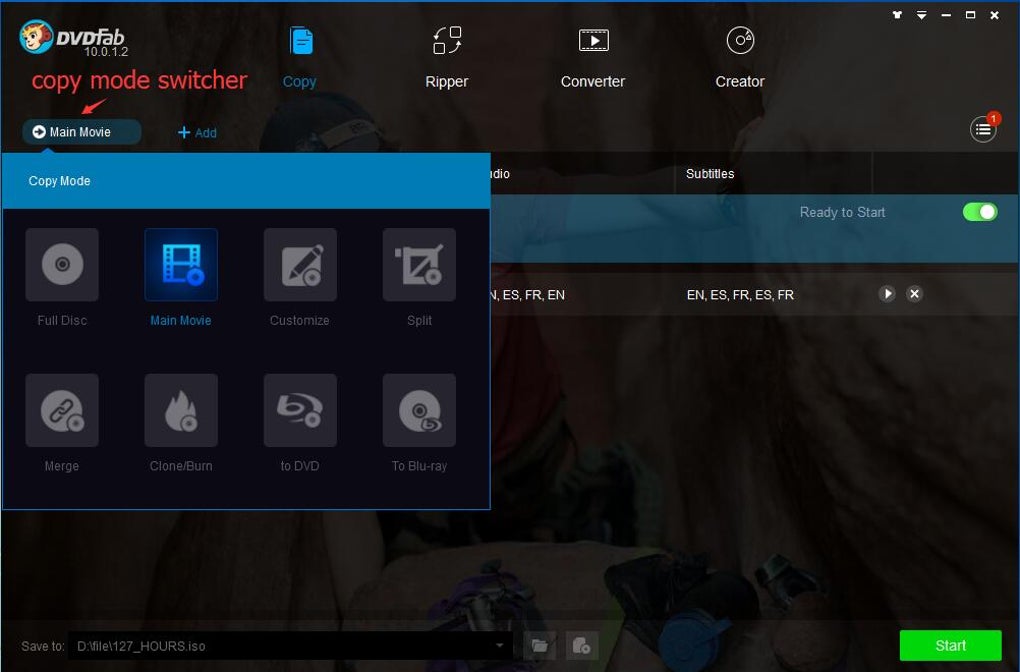
Copying: DVDFab provides multiple copy modes to cater to diverse needs. The “Full Disc” mode creates an exact, bit-by-bit copy of the entire disc, preserving all content, including menus, trailers, and special features. This is ideal for archiving precious discs or creating backups. The “Main Movie” mode focuses solely on the main feature film, allowing users to select their preferred audio track and subtitles, resulting in a smaller file size and faster processing time.
The “Split” mode is particularly useful for copying dual-layer DVDs (DVD-9) onto two single-layer discs (DVD-5). This feature cleverly preserves the original menus across both discs, maintaining a seamless user experience. This is especially beneficial for TV series spread across multiple discs. The “Customize” mode allows users to create highly personalized copies, selecting specific chapters, removing unwanted content such as commercials, and choosing audio tracks and subtitles. Finally, the “Clone” mode facilitates the creation of exact 1:1 copies, useful for backing up game discs or other specialized media.
Ripping: DVDFab’s ripping capabilities extend beyond simple copying, enabling users to extract content from DVDs and Blu-rays and convert them into various digital formats. This allows users to watch their movies on different devices, such as smartphones, tablets, or media players, without needing the physical disc. The software supports a range of output formats, including MPEG-4, DivX, XviD, and MP4, catering to diverse playback requirements. Furthermore, the software’s ability to handle copy-protected discs makes it a valuable tool for accessing content that might be inaccessible through other means.
Burning: Once you’ve created a digital copy or made edits, DVDFab’s burning functionality allows you to create new DVDs or Blu-rays from the resulting files. This enables users to archive their digital collections onto physical media for offline access or to share with others. The burning process is streamlined and efficient, minimizing the time required to create new discs.
Advanced Features and Capabilities
Beyond its core functions, DVDFab offers a suite of advanced features that enhance its versatility and functionality:
Handling Copy Protection: One of DVDFab’s most significant strengths is its ability to bypass various copy protection mechanisms employed on DVDs and Blu-rays. This enables users to create backups of discs that would otherwise be inaccessible due to regional restrictions or manufacturer-imposed limitations. The software regularly updates to counteract new forms of copy protection, ensuring its ongoing effectiveness.
Customization Options: The level of customization offered by DVDFab is extensive. Users can meticulously select the specific content they wish to include in their copies, fine-tuning audio and subtitle options, and removing unwanted elements such as previews or advertisements. This granular control allows for tailored experiences and optimized file sizes.
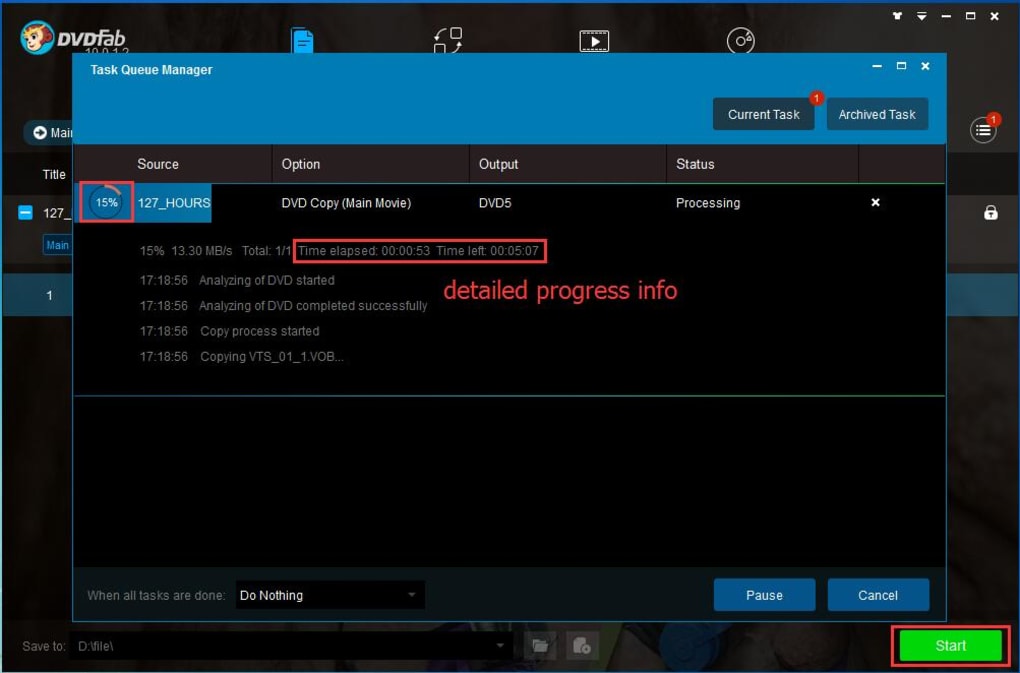
High-Speed Processing: DVDFab is designed for efficient processing, striving to minimize the time required for copying, ripping, and burning. While the exact time varies depending on the disc size, processing power, and chosen settings, the software aims for significantly faster performance compared to many alternative solutions. While powerful hardware will always accelerate the process, DVDFab’s optimization efforts contribute to a smoother workflow even on less powerful systems.
Recovery Capabilities: DVDFab offers some degree of data recovery from damaged or scratched discs. By carefully working around corrupted sectors, it can help retrieve usable content from media that might otherwise be unplayable. This functionality provides a valuable lifeline for rescuing precious memories or important data stored on compromised discs.
User Interface and Ease of Use
DVDFab is designed with a focus on user-friendliness. The interface is intuitive and straightforward, making it accessible to both technical experts and casual users. The software guides users through the process, clearly presenting options and minimizing the complexity associated with disc management. The well-organized menus and clear instructions make navigating the software’s capabilities a relatively simple and straightforward process.
System Requirements and Compatibility
DVDFab is compatible with a range of operating systems, including Windows and macOS. System requirements typically involve a reasonably modern computer with sufficient processing power, memory, and storage space. The software’s developers provide detailed system requirements on their official website, ensuring users can ascertain compatibility prior to installation. Staying updated on the latest software versions is essential to ensure compatibility and benefit from the latest performance improvements and security patches.
User Reviews and Feedback
DVDFab enjoys a largely positive reputation within the user community. Many reviews highlight its ease of use, powerful features, and its ability to handle challenging copy-protected discs. However, some users have reported occasional crashes or compatibility issues, particularly on older systems. Feedback regarding these issues has largely been addressed through software updates. The software’s continuous updates and iterative improvements reflect the developer’s commitment to addressing user concerns and enhancing the overall user experience.
.jpg)
Comparison with Alternative Software
DVDFab stands out from competitor software through its comprehensive feature set and its robust handling of copy protection. While many alternative DVD and Blu-ray management tools exist, few provide the same all-in-one functionality, versatility, and speed. Features like the highly customizable copy modes and the advanced data recovery capabilities position DVDFab as a strong contender in the market. The software’s continuous updates ensure its ability to counter evolving copy protection methods, thus maintaining its competitive edge.
Conclusion
DVDFab provides a highly effective and comprehensive solution for managing DVDs and Blu-ray discs. Its versatile features, intuitive interface, and effective handling of copy protection establish it as a valuable asset for anyone seeking to back up, convert, and create custom versions of their optical media. While minor issues have been reported by users, these are largely mitigated by the software’s ongoing updates and the overall positive user experience. For individuals seeking a powerful and user-friendly tool for managing their disc collections, DVDFab remains a strong choice.
File Information
- License: “Trial version”
- Latest update: “June 24, 2025”
- Platform: “Windows”
- OS: “Windows 8.1”
- Language: “English”
- Downloads: “647.2K”
- Size: “8.17 MB”


