
In the intricate world of computer-aided design (CAD), the ability to efficiently view, analyze, and share design files is paramount. Professionals and enthusiasts alike constantly seek tools that can simplify these critical tasks without compromising on capability or breaking the bank. Enter DWG FastView, a remarkable free CAD viewer developed by Gstarcad, which has emerged as an indispensable solution for anyone working with DWG and DXF formats. Designed with a clear focus on speed, ease of use, and comprehensive functionality, DWG FastView transcends the basic viewing experience, offering a robust platform for both 2D vector images and complex 3D models. This powerful application eliminates the need for expensive, full-fledged CAD suites purely for viewing purposes, democratizing access to high-quality design review for a broader audience.
DWG FastView distinguishes itself through its intuitive interface and its capacity to handle a wide spectrum of CAD files. From the moment you launch the application, its user-centric design becomes apparent. Users can effortlessly open multiple drawings simultaneously using a straightforward drag-and-drop mechanism, drastically speeding up workflow efficiency. The program’s commitment to compatibility is evident in its support for AutoCAD DWG/DXF formats ranging from R2.5 all the way up to the latest R2017 versions, ensuring that virtually no design file is left behind. Beyond mere file opening, DWG FastView provides a suite of sophisticated tools for detailed examination, allowing users to delve into every aspect of their designs with precision and clarity. Whether you’re an architect reviewing blueprints, an engineer examining a mechanical part, or a student learning CAD, DWG FastView offers the flexibility and power needed to enhance your viewing experience and streamline your design collaboration processes.
Unpacking the Power of DWG FastView
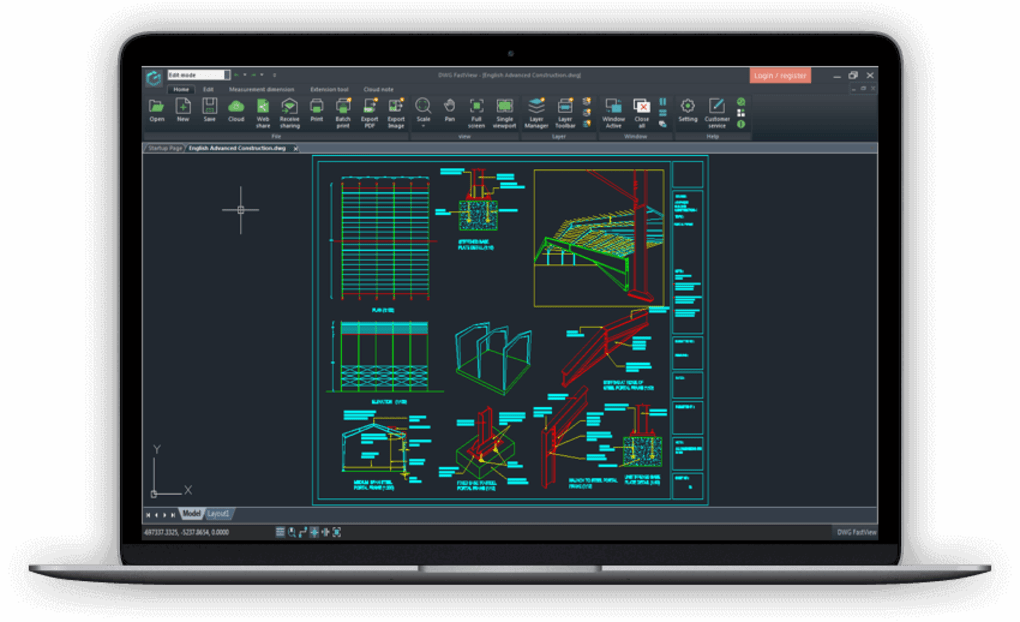
DWG FastView is engineered to offer more than just a glimpse into your CAD files; it provides a comprehensive environment for interaction and analysis. Its design philosophy centers around delivering powerful features within an accessible framework, making advanced CAD viewing capabilities available to a broad user base, regardless of their technical proficiency.
Core Compatibility and Versatility
At the heart of DWG FastView’s utility is its exceptional compatibility. The application is a true workhorse when it comes to handling the industry-standard DWG and DXF formats. This extensive support, spanning from older AutoCAD R2.5 files to contemporary R2017 iterations, means users are rarely faced with incompatible file issues. This broad compatibility is crucial in collaborative environments where different versions of CAD software might be in use, ensuring that all team members can seamlessly open and review shared drawings without requiring a full AutoCAD license.
Moreover, DWG FastView is not limited to a single dimension of design. It serves as an equally adept viewer for both 2D vector images and intricate 3D models. This dual capability is a significant advantage, allowing users to switch between different representations of a design within the same application. For 2D drawings, it provides the clarity and precision needed for detailed blueprint analysis. For 3D models, it supports the viewing of meshes, surfaces, and object information, enabling a deeper understanding of the three-dimensional geometry and spatial relationships. The ability to view attached drawing references further enriches the review process, providing context and ensuring a holistic understanding of complex projects. This versatility positions DWG FastView as an all-encompassing viewing solution, capable of meeting diverse design review requirements across various engineering and architectural disciplines.
Intuitive Interface and User Experience
One of DWG FastView’s most praised attributes is its intuitive and uncluttered interface. In a field often associated with steep learning curves, DWG FastView strives to offer a refreshing user experience that prioritizes ease of use without sacrificing depth of functionality. The layout is clean, logical, and designed to minimize cognitive load, allowing users to quickly locate and utilize the tools they need. This makes it an ideal tool for both seasoned CAD professionals looking for a quick viewing solution and novices who might be intimidated by more complex CAD software.
The program’s drag-and-drop functionality is a prime example of its commitment to user convenience. To open a file or even multiple files simultaneously, users simply drag them onto the main interface. This simple action saves valuable time and eliminates the need to navigate through traditional file menus, especially when dealing with several drawings at once. Beyond opening files, interaction within the viewing environment is equally streamlined. Common actions such as zooming and panning are responsive and fluid, allowing for seamless exploration of intricate details or broad overviews of designs. This smooth interaction contributes significantly to a positive user experience, fostering productivity and reducing frustration, even for those who may not possess extensive technical skills in CAD software. The emphasis on an intuitive interface ensures that users can focus on the design content itself, rather than struggling with the software.
Advanced Viewing and Navigation Tools
DWG FastView goes beyond simple static viewing, equipping users with a robust set of tools for dynamic exploration and detailed inspection of their CAD files. These tools are crucial for effective design review, allowing users to scrutinize every aspect of a drawing or model.
Traditional zooming and panning tools are naturally included, providing the foundational means to navigate large and detailed drawings. Users can fluidly zoom in to examine minute elements or zoom out for a broader contextual view. Panning allows for effortless movement across the drawing canvas, ensuring that no part of the design remains out of reach. What truly sets DWG FastView apart, however, is its innovative magnifier tool. This feature acts like a digital magnifying glass, allowing users to quickly zoom into specific parts of a drawing and view details without altering the overall zoom level of the main viewport. This is particularly useful for focusing on small, intricate areas or text without losing sight of the surrounding context, enhancing both efficiency and precision during review.
Furthermore, DWG FastView supports the viewing of complex graphical elements inherent in professional CAD files. This includes the ability to display meshes, which are crucial for visualizing the surface geometry of 3D models, and explicit surfaces, providing accurate representations of design forms. The program can also display comprehensive object information, allowing users to query specific elements within a drawing to retrieve metadata, dimensions, or other critical properties. For designs that rely on external references, DWG FastView ensures that all attached drawing references are also viewable, providing a complete and integrated picture of the entire project. This suite of advanced viewing and navigation tools empowers users to conduct thorough and insightful analyses of their CAD files, fostering better understanding and more informed decision-making.
Beyond Simple Viewing: Enhanced Functionality for Professionals
While DWG FastView excels as a free and efficient viewer, its capabilities extend far beyond passive observation. It incorporates features typically found in more premium CAD software, making it a valuable asset for active participation in the design review and documentation process.
Comprehensive Layer Management
For anyone accustomed to working with CAD software, the concept of layers is fundamental to organizing and managing complex drawings. DWG FastView understands this necessity and provides comprehensive layer control, mirroring the functionality found in professional CAD applications. Users can easily manipulate individual layers within a drawing, offering a powerful way to streamline the viewing experience and isolate specific design elements for analysis.
The layer control features include the ability to turn layers on or off, allowing users to selectively display or hide parts of a drawing to reduce visual clutter and focus on relevant components. For instance, an architect might want to view only the structural elements of a building plan without the electrical or plumbing layers. Beyond simple visibility, DWG FastView also enables users to freeze, lock, or unlock layers. Freezing a layer completely removes it from the regeneration process, which can significantly speed up performance when working with very large or complex files, as the program doesn’t need to recalculate the frozen layer’s geometry. Locking a layer prevents accidental modifications, ensuring that critical design elements remain untouched during review, while unlocking them restores full interactive capability. This granular control over layers empowers users to customize their viewing environment, enhancing clarity, improving performance, and enabling a more structured approach to design analysis.
Export and Print Capabilities
In many design workflows, the ability to share or document designs in various formats is just as important as viewing them. DWG FastView recognizes this need and offers robust export and printing functionalities that are both flexible and user-friendly. These features transform the viewer into a practical tool for communication and record-keeping, allowing designs to transcend the digital screen.
For digital sharing and integration into other documents, DWG FastView allows users to export their viewed drawings to a wide range of popular image formats. This includes common filetypes such as BMP, JPG, and PNG. This capability is invaluable for creating high-quality images of designs for presentations, reports, websites, or social media. Whether you need a crisp screenshot of a specific detail or a full-size image of an entire drawing, the export options cater to various requirements, ensuring compatibility with virtually any image-editing software or publishing platform.
Furthermore, DWG FastView boasts full print capabilities, enabling users to generate physical copies of their designs with precision. This includes an enhanced print preview screen, a critical feature that allows users to meticulously check the layout, scale, paper size, and line weights before committing to printing. The print preview helps to minimize errors and waste, ensuring that the final printed output accurately reflects the design intent. This comprehensive printing support, coupled with its digital export options, maximizes DWG FastView’s utility within both the digital and physical elements of a broader design suite. It makes it easy to transition from on-screen review to tangible documentation, fulfilling a complete cycle of design interaction.
Performance and Stability
In the realm of CAD, dealing with large and complex files is a common occurrence. The performance and stability of a viewing application are therefore critical determinants of user satisfaction and productivity. DWG FastView is engineered with these considerations at the forefront, consistently delivering a fast and stable experience, even when faced with demanding datasets.
One of its most significant advantages is its speed in opening and viewing DWG files, particularly large ones. While other viewers might struggle, leading to frustrating delays, DWG FastView is optimized for rapid loading times, allowing users to get straight to their work without unnecessary waiting. This efficiency is a major boon for professionals who frequently open and close multiple design files throughout their day. The underlying architecture of the software is designed to prioritize faster user interaction, meaning that navigation, zooming, panning, and layer operations are all executed with minimal lag. This responsiveness creates a seamless and enjoyable user experience, making design review a fluid process rather than a choppy one. Moreover, the program is built with stability in mind, minimizing crashes and errors that can disrupt workflow and lead to lost time. Regular updates and bug fixes, as evidenced by notes on version enhancements, underscore the developer’s commitment to maintaining a robust and reliable application. This focus on performance and stability ensures that DWG FastView remains a dependable tool, even in demanding professional environments where efficiency is paramount.
Integrating DWG FastView into Your Workflow
DWG FastView is more than a standalone application; it’s a tool designed to integrate smoothly into existing design ecosystems, enhancing collaboration and accessibility. Its architecture and feature set make it a flexible component in various professional settings.
A Component of Your Design Suite
While DWG FastView is a powerful viewer, it is not intended to replace full-featured CAD authoring software like AutoCAD. Instead, it positions itself as an excellent complementary tool, perfectly suited to form a part of a comprehensive design suite. In many organizations, not every team member needs the full capabilities and associated cost of a high-end CAD program. For those primarily involved in reviewing, commenting, and presenting designs, DWG FastView offers all the necessary functionalities.
Its compatibility with multiple file types and robust print capabilities means it can seamlessly fit into workflows where designs need to be shared, reviewed, and approved across different departments or with external stakeholders. For example, project managers can use DWG FastView to review progress, sales teams can use it to showcase designs to clients, and maintenance crews can use it to access historical drawings, all without needing specialized CAD training or licenses. This strategic positioning allows organizations to optimize their software investments, providing advanced viewing capabilities to a wider audience at no additional cost. It fosters better communication and collaboration by ensuring that everyone involved in a project has access to the visual information they need, regardless of their primary role in the design process.
Developer-Friendly with API Support
For organizations with unique requirements or developers looking to extend the functionality of DWG FastView, the application offers a significant advantage: a C++ API (Application Programming Interface). This feature sets it apart from many other free viewers, indicating a commitment to extensibility and customization.
The provision of a C++ API means that developers can build plug-ins and customized solutions based on DWG FastView’s core engine. This opens up a world of possibilities for tailoring the software to specific industry needs or integrating it more deeply into proprietary systems. For instance, a company might develop a plug-in to automate certain viewing tasks, integrate with their document management system, or add specialized analysis tools relevant to their field. This level of extensibility allows businesses to leverage DWG FastView as a foundation for more specialized applications, enhancing its value proposition far beyond a simple off-the-shelf viewer. It ensures that the software can adapt and grow with the evolving demands of professional CAD environments, making it a future-proof choice for those who require more than standard functionality. The C++ API underscores Gstarcad’s vision for DWG FastView as a flexible platform, not just an isolated utility.
What’s New and Looking Ahead
Continuous development and refinement are hallmarks of quality software, and DWG FastView is no exception. While specific version numbers can vary, the developers at Gstarcad consistently release updates that introduce new features, enhance existing ones, and address user feedback. A look at the improvements in versions like 2.5 highlights this commitment to progress.
Version 2.5, for example, brought several key enhancements that significantly improved the user experience and functionality. A crucial addition was the “Settings” option, accessible under the Tools menu. This allowed users to customize default settings for messages and file associations, giving them greater control over how the application behaves and interacts with their operating system. Such customization options are invaluable for tailoring the software to individual preferences and ensuring a smoother workflow.
Further performance enhancements were implemented, particularly in the print preview functionality. This optimized performance meant that users could generate and review print layouts more quickly and efficiently, reducing wait times and improving the overall printing process. The startup page display also received optimization, contributing to a faster and more refined initial launch experience for the application. Beyond new features, the developers diligently fixed known bugs, which is critical for maintaining software stability and reliability. These bug fixes directly contribute to a more robust and dependable application, ensuring that users encounter fewer interruptions and can rely on DWG FastView for their critical design review tasks. These iterative improvements demonstrate a proactive approach to software development, ensuring that DWG FastView remains a cutting-edge and user-friendly solution in the evolving landscape of CAD viewing.
Pros and Considerations
Like any software, DWG FastView offers distinct advantages while also having specific considerations for potential users. Understanding these can help individuals and organizations determine if it’s the right fit for their needs.
Pros:
- Sophisticated CAD Viewing Tools: DWG FastView is packed with features that go beyond basic file opening. Its comprehensive layer control, advanced zooming and panning, innovative magnifier tool, and ability to display 3D meshes, surfaces, and object information provide a rich and detailed viewing experience. These sophisticated tools empower users to perform thorough analyses of designs, ensuring accuracy and understanding.
- Free to Download and Use: Perhaps its most compelling advantage is that DWG FastView is completely free. This eliminates significant cost barriers associated with proprietary CAD viewing software, making professional-grade design review accessible to students, freelancers, small businesses, and anyone else who needs to view DWG/DXF files without investing in an expensive full CAD license. This democratic access to powerful tools is a major benefit for the broader design community.
- Wide Compatibility: Its support for a vast range of AutoCAD DWG/DXF formats (R2.5-R2017) ensures that users can open almost any CAD file they encounter, minimizing compatibility issues that can disrupt workflows.
- Intuitive and Fast: The user-friendly interface and optimized performance for opening large files contribute to a highly efficient and enjoyable user experience, even for those without extensive CAD expertise.
Cons:
- Only of Use to People Involved with Computer-Aided Design: While its specialized nature is a strength for its target audience, it also means DWG FastView has a limited appeal outside of CAD-related fields. Individuals not working with engineering, architecture, or manufacturing drawings will find little utility in this software. It’s a niche tool, albeit a very effective one for that niche.
- Learning the Full Range of Features Will Take Time: Despite its intuitive interface for basic operations, mastering the full suite of advanced viewing and layer management tools may require some dedication. While the core functionality is straightforward, unlocking its full potential for complex analyses and customizations might involve a learning curve, particularly for new users unfamiliar with CAD conventions.
Technical Specifications and Accessibility
DWG FastView is designed for broad accessibility within its target environment, ensuring a wide range of users can benefit from its capabilities.
- License: Free. This is a primary differentiator, making it an economically viable choice for individuals and businesses alike.
- Platform: Windows. The software is specifically developed for the Windows operating system, ensuring optimized performance and compatibility with Windows environments (e.g., Windows 8 and later versions are supported).
- Language: English. The primary interface and documentation are in English, making it accessible to a vast global user base.
- Developer: Gstarcad. A reputable name in the CAD software industry, providing confidence in the application’s quality and ongoing support.
- File Size: Approximately 101 MB. This relatively small footprint ensures a quick download and minimal impact on system storage, making it easy to install even on systems with limited space.
- Downloads: With tens of thousands of downloads each month (e.g., 99.6K total, 751 last month on PhanMemFree), DWG FastView demonstrates its popularity and widespread adoption among CAD users.
Conclusion
DWG FastView stands out as an exceptionally capable and, crucially, free CAD viewer that caters to a diverse range of users, from seasoned professionals to students just beginning their journey in computer-aided design. Its commitment to compatibility with a broad spectrum of DWG and DXF formats, spanning many AutoCAD versions, ensures that virtually any design file can be opened and reviewed without hassle. Beyond simple viewing, the application provides an array of sophisticated tools including comprehensive layer management, advanced navigation with innovative magnifier technology, and robust export and printing capabilities. These features transform it from a mere viewer into a powerful component of any design review and collaboration workflow.
The intuitive, drag-and-drop interface significantly lowers the barrier to entry, making it accessible even for those without extensive technical skills. Meanwhile, its performance optimizations ensure fast loading times and stable operation, even with large and complex 2D and 3D models. The inclusion of a C++ API further extends its value, allowing for customization and integration into specialized systems. While it targets a specific user base involved in CAD, for that audience, DWG FastView offers an indispensable solution that provides professional-grade viewing and analysis tools without the associated cost of a full CAD suite. As a reliable, efficient, and versatile application from Gstarcad, DWG FastView undoubtedly solidifies its position as a go-to choice for anyone seeking a seamless and powerful way to interact with their CAD drawings and models. It is more than just a free download; it’s an essential enhancement to any digital design toolkit, readily available on platforms like PhanMemFree.
File Information
- License: “Free”
- Latest update: “July 28, 2025”
- Platform: “Windows”
- OS: “Windows 8”
- Language: “English”
- Downloads: “100.3K”
- Size: “101.77 MB”


