
Dynamic Photo-HDR is a Windows-based software application designed to enhance and improve the quality of photographs, particularly those suffering from blur, distortion, or focus issues. Leveraging advanced image processing techniques, it offers a streamlined solution for achieving high dynamic range (HDR) effects and correcting various photographic imperfections. While not a full-fledged image editor with the expansive features of Photoshop, its specialized focus on HDR enhancement and correction makes it a valuable tool for photographers seeking to elevate their images without needing extensive photo editing expertise. This review delves into its capabilities, strengths, weaknesses, and overall user experience.
Capabilities and Features
Dynamic Photo-HDR’s core functionality revolves around improving the visual quality of digital photographs. Its primary strength lies in its ability to address common issues such as blur, distortion, and ghosting. This is achieved through a combination of algorithms and techniques, each playing a crucial role in the final image output.
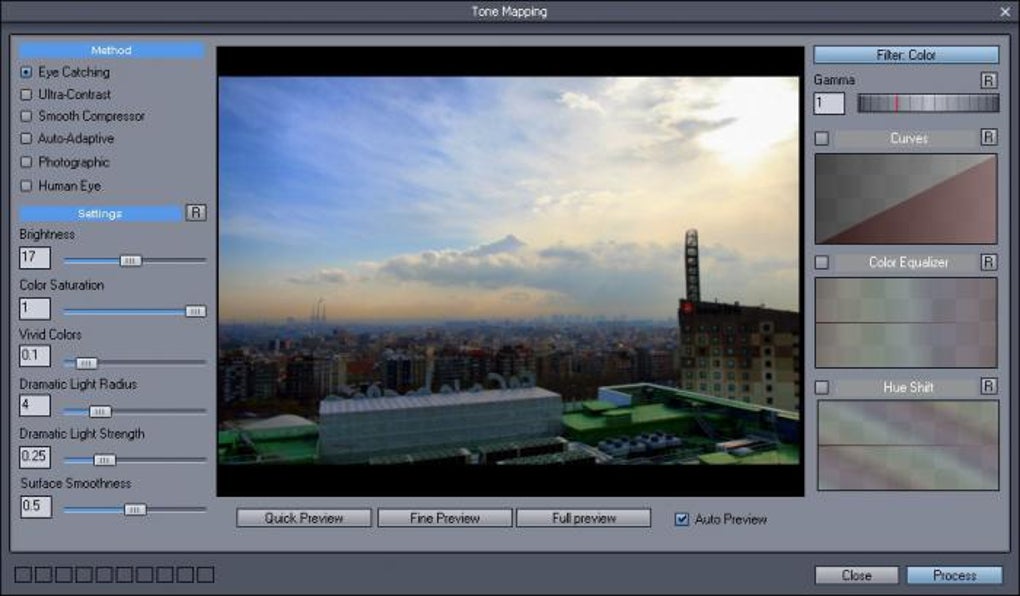
HDR Enhancement and Tone Mapping: The software’s name highlights its focus on High Dynamic Range (HDR) imaging. HDR aims to capture a broader range of tones and details than standard photography, resulting in richer, more vibrant, and more realistic images, especially in scenes with significant contrast between light and shadow. Dynamic Photo-HDR achieves this through sophisticated tone mapping procedures. These processes compress the wide range of luminance values captured in an HDR image into a displayable range, while preserving as much detail and visual impact as possible. Users can control the intensity of these effects, ranging from subtle enhancements to dramatically stylized images. The software allows for the creation of everything from naturally enhanced photographic looks to vividly contrasted and dramatic results.
Alignment and Ghost Removal: A significant feature of Dynamic Photo-HDR is its robust alignment capabilities. The software employs a powerful auto-aligning function, supplemented by manual and auto-assist alignment options. This is particularly important when creating HDR images from multiple exposures, as slight camera movements between shots can lead to visible artifacts or “ghosting” effects. Dynamic Photo-HDR’s sophisticated alignment, incorporating a technique called “Pin Warping,” effectively corrects for various types of misalignment, including camera roll and pitch, ensuring seamless blending of images and minimizing or completely eliminating ghosting. This function is crucial for producing clean, professional-looking HDR images, especially when photographing moving objects or in challenging lighting conditions.
Blur Reduction and Distortion Correction: Dynamic Photo-HDR isn’t solely focused on HDR creation. It directly addresses image quality issues like blur and distortion. While it can’t magically refocus severely distorted or out-of-focus images, it effectively enhances clarity and sharpness, especially in cases of slight blurring or minor distortions. The software’s algorithms aim to smooth out imperfections and focus problems, improving the overall visual appeal of the photograph. The level of improvement varies based on the severity of the initial problem; severely blurry or distorted images might not see as much of a transformation as slightly out-of-focus images.
User Experience and Interface
The software’s user interface is designed to be relatively intuitive, even for users unfamiliar with advanced photo editing software. While lacking the extensive array of tools found in professional-grade applications like Adobe Photoshop, its simplicity makes it accessible to a wider audience. The streamlined workflow facilitates quick processing and enables users to focus on the results rather than navigating a complex interface. The steps involved in processing an image are generally straightforward, allowing for efficient editing without sacrificing control over the final output.
Strengths and Weaknesses
Strengths:
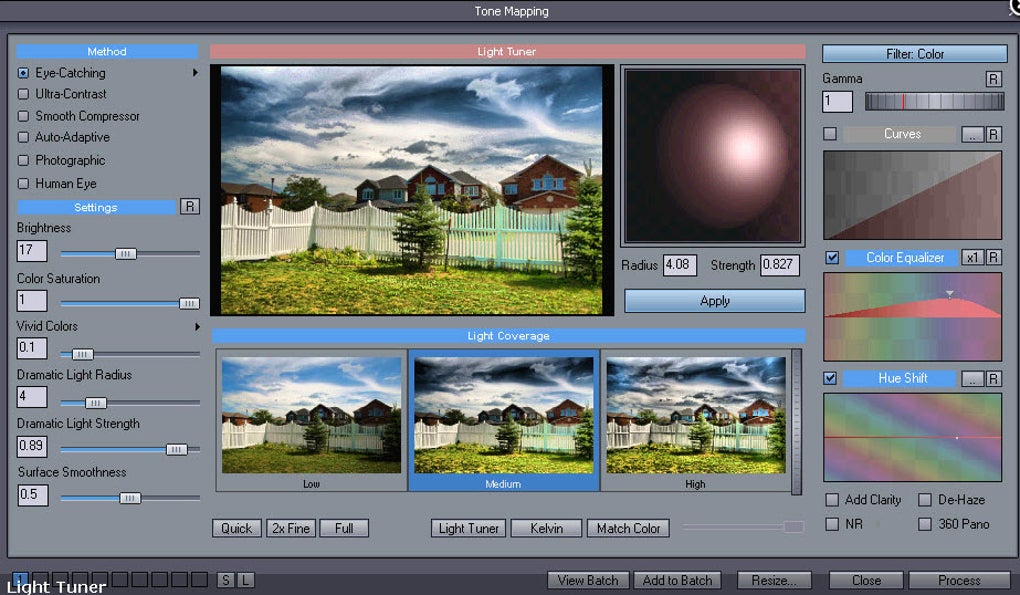
- HDR Enhancement: Dynamic Photo-HDR excels at producing high-quality HDR images, enhancing detail and contrast in a visually appealing manner. The ability to control the intensity of tone mapping allows for a broad range of stylistic choices.
- Alignment and Ghost Removal: The advanced alignment features effectively minimize or eliminate ghosting, crucial for creating clean HDR images from multiple exposures.
- User-Friendly Interface: The intuitive interface is easy to navigate, even for beginners in image processing.
- Specific Focus: Its specialization in HDR and image correction makes it efficient and effective for its intended purpose, avoiding the complexity of a full-fledged image editor.
- Relatively Fast Processing (for its time): While processing times are noted as a potential drawback (discussed below), for its release year, the processing speed was likely considered reasonable by users.
Weaknesses:
- Processing Time: User reviews frequently mention the time required to process images, especially larger files. This is a common limitation in HDR processing software, as it demands significant computational resources to effectively manipulate the image data. Improvements in computer hardware since its release may mitigate this issue for newer systems, but it remains a relevant point.
- Limitations in Blur Correction: The software’s blur correction capabilities are not miraculous. It is effective for minor blur or distortions but might not produce satisfactory results with severely out-of-focus or highly distorted images. It is important to have realistic expectations regarding the degree of correction achievable.
- Limited Feature Set: As a specialized application, it lacks the comprehensive editing features found in more general-purpose image editing software. It is not intended to replace such tools but to work as a focused enhancement application.
- Outdated Software: The last update for Dynamic Photo-HDR was in July 2011. This means it lacks modern features and optimizations found in more contemporary image processing tools. It also raises questions about compatibility with newer operating systems and hardware.
- Lack of Technical Support (as reported by users): User reviews highlight difficulties in contacting technical support, which is a significant concern for any software application.
User Reviews and Feedback
User reviews reveal a generally positive sentiment towards Dynamic Photo-HDR, with many praising its ability to create naturally beautiful HDR images and its ease of use. However, recurring concerns regarding processing times and the absence of technical support are evident. Some users compare it favorably to other HDR software, highlighting its strength in delivering more natural-looking results compared to some competitors. While acknowledging its limitations, users appreciate its focused functionality and the improvement in image quality it offers. The mix of positive and negative feedback underscores the importance of managing expectations and understanding its strengths and weaknesses before use.
Conclusion
Dynamic Photo-HDR offers a valuable solution for users seeking to enhance their photographs through HDR processing and image correction. While its limited feature set and potential processing time issues need consideration, its ease of use and ability to produce appealing results make it a worthwhile option, especially for users focused on improving image clarity, contrast, and dynamic range. However, the lack of recent updates and reported issues with technical support present concerns that prospective users should evaluate. Considering the age of the software and the advances in image processing technology since its release, exploring newer alternatives might be beneficial for users needing more advanced features or reliable technical support.
File Information
- License: “Trial version”
- Version: “5.2.0”
- Latest update: “July 5, 2011”
- Platform: “Windows”
- OS: “Windows XP”
- Language: “English”
- Downloads: “229.2K”
- Size: “14.74 MB”


