
E Auto Clicker is a free, open-source utility program designed to automate mouse clicks on your Windows or Android device. Its primary function is to simulate repetitive mouse clicks at user-defined intervals, making it a popular tool amongst gamers and others needing to perform repetitive tasks. While other similar programs exist, E Auto Clicker distinguishes itself through its free availability, open-source nature, and user-friendly interface. This guide explores the features, uses, and considerations surrounding E Auto Clicker.
Understanding E Auto Clicker’s Functionality
At its core, E Auto Clicker acts as a virtual mouse, capable of executing clicks at specified locations on your screen. This automation eliminates the need for manual clicking, saving time and effort in various contexts. The program’s versatility stems from its customizable parameters, allowing users to precisely control several key aspects of its operation:
-
Click Location: Users can define the exact coordinates on the screen where the clicks should occur. This ensures accurate targeting of specific on-screen elements, crucial for automating actions within games or applications.
-
Click Type: E Auto Clicker supports both left and right mouse clicks, providing flexibility for various tasks requiring different types of input.
-
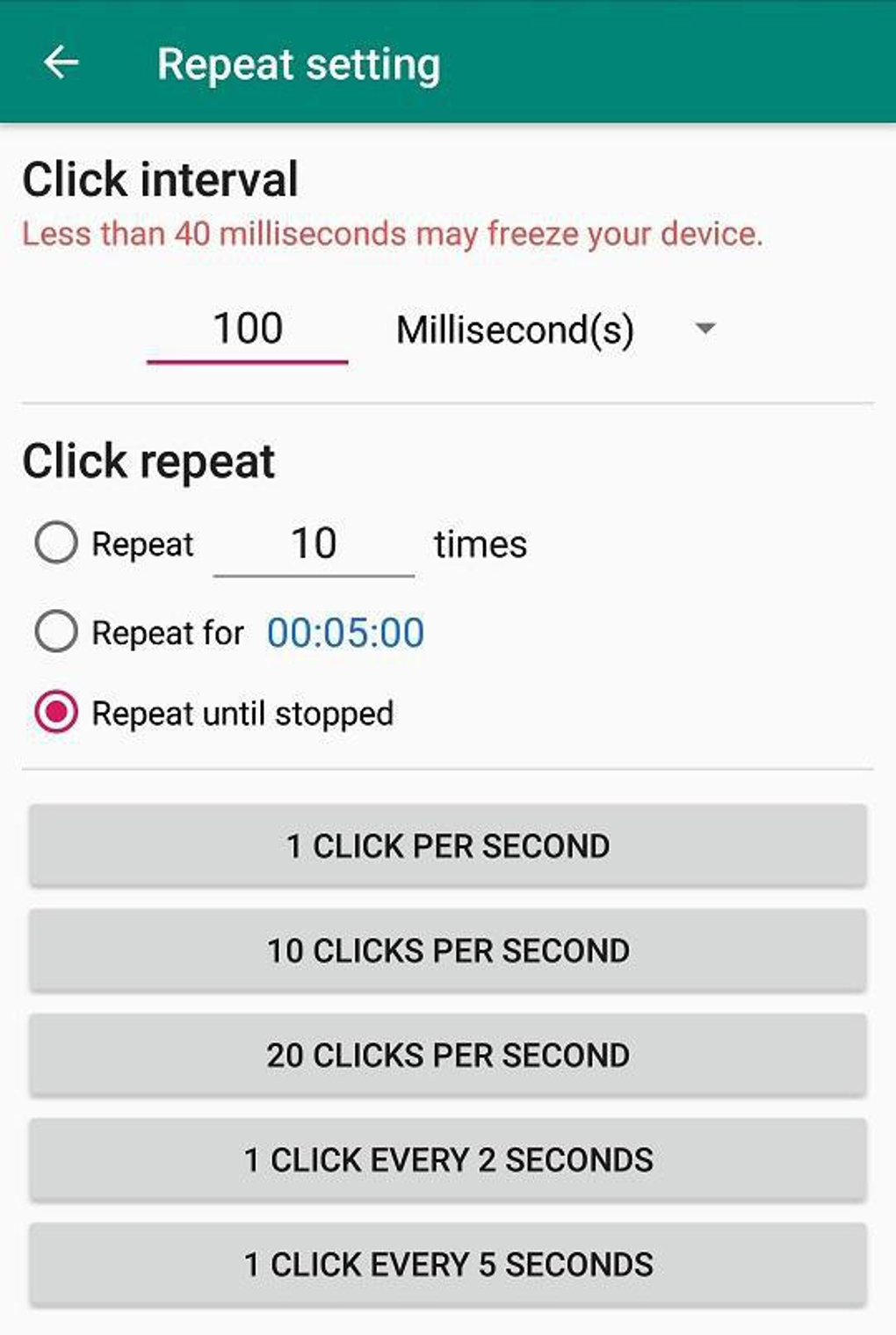
Click Interval: A crucial feature is the ability to set a time delay between consecutive clicks. This adjustable interval allows for precise control over the speed of automation, adapting to the specific demands of different applications. This could range from rapid-fire clicks for gaming scenarios to slower, more deliberate clicks for other tasks.
-
Click Count: Users can specify the total number of clicks to be executed, preventing the program from running indefinitely. This feature ensures controlled automation and prevents unintended consequences.
-
Hotkeys: For enhanced efficiency, E Auto Clicker employs hotkeys, allowing users to quickly start, stop, or pause the automated clicking process without interrupting their workflow. These hotkeys provide a convenient and intuitive control mechanism, minimizing any disruption to the user’s primary activity.
-
Open-Source Nature: A significant advantage of E Auto Clicker is its open-source nature. This means that the source code is publicly available, allowing users to examine its functionality, modify it according to their needs, and contribute to its improvement by identifying and fixing bugs or adding new features. This transparency fosters community involvement and continuous development, resulting in a robust and adaptable program.
Using E Auto Clicker: A Step-by-Step Guide
While the specific interface may vary depending on the version, the general process of using E Auto Clicker remains consistent. The program is designed for user-friendliness, prioritizing ease of use and intuitive navigation.
-
Installation and Launch: Download the E Auto Clicker executable file from a reputable source and install it on your system. Once installed, launch the application. The interface is typically straightforward, with clearly labeled controls.
-
Defining Click Parameters: This is the core of configuring E Auto Clicker. The user interface should provide input fields for specifying:
- X and Y Coordinates: These represent the horizontal and vertical position on the screen where the clicks will be executed. Often, the program allows users to click a button to easily select the desired coordinates directly on the screen.
- Click Type: Select whether you need left or right clicks.
- Click Interval: Enter the desired delay (in milliseconds) between each click.
- Number of Clicks: Specify the total number of clicks to be performed. Leaving this blank often results in continuous clicking until manually stopped.
-
Hotkey Assignment (Optional): Most versions allow users to assign custom hotkeys to start, stop, and pause the clicking process. This feature enhances efficiency, allowing users to control the automation without needing to interact directly with the program’s interface.
-
Testing and Calibration: Before initiating extensive automation, it’s crucial to test the settings with a small number of clicks. This helps ensure that the coordinates, interval, and click type are correctly configured.
-
Initiating the Automated Clicks: Once parameters are verified, initiate the automated clicks using either the designated start button within the interface or the assigned hotkeys.
-
Monitoring and Termination: Keep an eye on the automated process, ensuring that it operates as intended. Use the stop button or hotkey to terminate the automated clicking when necessary.
Applications and Use Cases of E Auto Clicker
While primarily known for gaming applications, E Auto Clicker’s capabilities extend to a wider range of scenarios where repetitive mouse clicks are required. Some notable applications include:
- Gaming: This is arguably the most common use case. E Auto Clicker allows gamers to automate repetitive actions, providing advantages in games that involve continuous clicking. This can include actions such as farming resources, clicking on specific elements, or performing other repetitive actions that would otherwise require tedious manual labor. It’s important to note that the ethical implications of using such tools in online games should be carefully considered.
-
Data Entry: In situations requiring extensive data entry or repetitive clicking tasks, E Auto Clicker can significantly enhance efficiency. It can be used to automate tasks such as filling out online forms or clicking through web pages.
-
Software Testing: E Auto Clicker can be used in the context of software testing, simulating user interactions and automating repetitive test cases.
-
Research and Development: In scenarios involving the automation of experiments or data collection, E Auto Clicker can provide valuable assistance. It’s particularly useful where repetitive interactions with software or hardware interfaces are necessary.
Ethical Considerations and Potential Risks
While E Auto Clicker is a powerful tool, it’s essential to use it responsibly and ethically. Misuse can have negative consequences. Important considerations include:
-
Terms of Service Violations: Many online games strictly prohibit the use of automation tools, including auto-clickers. Violating these terms of service can result in account suspension or termination. Always check a game’s rules and regulations before employing this tool.
-
Fair Play: Using E Auto Clicker to gain an unfair advantage in competitive games raises ethical questions about fairness and sportsmanship.
-
Software Compatibility: Ensure that E Auto Clicker is compatible with the target software or game before using it, as conflicts might cause system instability or unexpected behavior.
-
Security Risks: While E Auto Clicker itself is generally safe, downloading it from untrusted sources can expose your system to malware or viruses. Always download from reputable sources and scan the downloaded file before running it.
-
Overuse and System Strain: Extensive use of E Auto Clicker might place unnecessary strain on your system, potentially leading to performance issues or even hardware damage.
Alternatives to E Auto Clicker
Several alternative auto-clicker programs exist, each offering unique features and functionalities. Some popular alternatives include:
-
GS Auto Clicker: Known for its advanced features and customizability.
-
AutoHotkey: A more powerful scripting language that allows for complex automation tasks beyond simple clicking.
-
FYT Auto Clicker: Offers a user-friendly interface and a range of customization options.
Choosing the right auto-clicker depends on individual needs and preferences. Factors to consider include ease of use, feature set, and compatibility with the target application.
Conclusion
E Auto Clicker provides a simple yet effective solution for automating repetitive mouse clicks. Its free availability, open-source nature, and user-friendly interface make it an accessible tool for a variety of users. However, responsible and ethical usage is crucial. Users should carefully consider the potential implications before utilizing this powerful automation tool and always adhere to the terms of service of any online platforms or games where it is employed. Remember to prioritize fair play and respect the rules and regulations governing the specific context in which E Auto Clicker is used.
File Information
- License: “Free”
- Version: “1.0”
- Latest update: “March 31, 2022”
- Platform: “Windows”
- OS: “Windows 8”
- Language: “English”
- Downloads: “48.2K”
- Size: “792.40 KB”


