
EaseUS Data Recovery Wizard Free Edition is a powerful data recovery tool designed to retrieve lost or deleted files from various storage devices. This free utility offers a robust set of features, making it a valuable asset for both novice and experienced users facing data loss scenarios. While limitations exist in the free version, its capabilities extend far beyond basic recovery, providing a comprehensive solution for a wide range of data loss situations. This review delves into the software’s strengths, weaknesses, and overall effectiveness.
Recovering Lost Data: Capabilities and Performance
The EaseUS Data Recovery Wizard Free Edition excels at recovering data lost due to accidental deletion, formatting errors, operating system crashes, virus attacks, and other unforeseen circumstances. Its ability to recover files from various storage media, including hard disk drives (HDDs), solid-state drives (SSDs), USB drives, SD cards, and digital cameras, broadens its appeal and practicality. The software supports an impressive array of over 1,000 file types, ensuring compatibility with a wide range of documents, images, videos, audio files, and emails. This extensive file type support makes it a versatile tool capable of handling diverse data recovery needs.
A key strength of EaseUS Data Recovery Wizard Free Edition lies in its dual-scan approach. It offers both quick and deep scan modes. The quick scan is ideal for quickly locating recently deleted files, while the deep scan is more thorough, meticulously searching for data even in severely damaged or formatted drives. This adaptability caters to different data loss situations and allows users to optimize the scan based on their specific needs and urgency. The software utilizes advanced algorithms to locate and recover even fragmented or corrupted files, demonstrating a high level of data recovery proficiency.
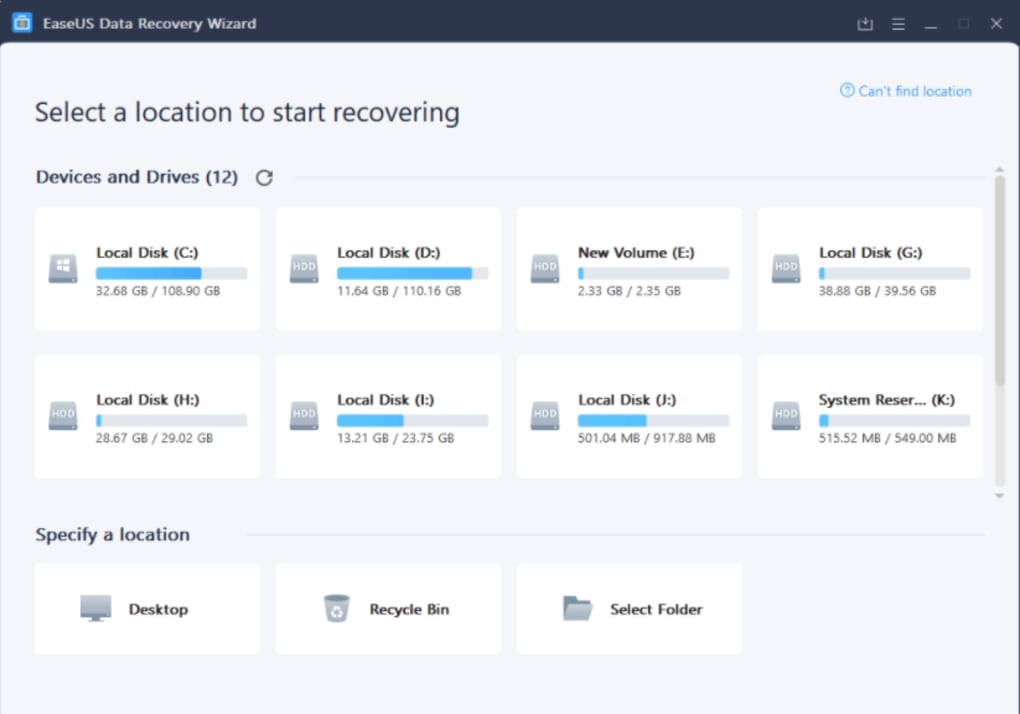
The software’s user interface is notably intuitive, making it easy to navigate for even those without prior experience with data recovery tools. Clear instructions and visual cues guide users through the recovery process. The ability to preview recoverable files before initiating the recovery process is a significant advantage, allowing users to confirm the accuracy and completeness of the recovered data. This feature reduces the risk of accidentally recovering incorrect files or wasting valuable time on fruitless recovery attempts.
Beyond its fundamental data recovery capabilities, EaseUS Data Recovery Wizard Free Edition showcases impressive proficiency in more complex recovery scenarios. It adeptly handles formatted partitions, retrieving data from formatted HDDs, USB flash drives, and SD cards with commendable speed and accuracy. Its ability to recover data from damaged, encrypted, inaccessible, or even RAW hard drives significantly expands its utility in dealing with challenging data loss situations. The inclusion of bootable media creation further enhances its effectiveness in cases where the operating system itself is compromised, enabling data recovery even when the primary system fails to boot.
File Management and Organization
After a scan is completed, EaseUS Data Recovery Wizard Free Edition neatly organizes the recovered files into categorized groups, such as pictures, videos, documents, and audio files. This efficient categorization simplifies the selection process and allows users to easily locate specific file types. Users can further filter the scan results, enabling precise selection of the files intended for recovery. This fine-grained control allows users to prioritize and retrieve only the most essential files, eliminating the time-consuming process of sifting through irrelevant data.
Limitations of the Free Edition
Despite its comprehensive features, the free edition of EaseUS Data Recovery Wizard imposes a significant limitation: a 2GB data recovery limit. This means that users can only recover up to 2GB of data without purchasing the premium version. While sufficient for recovering smaller sets of crucial files, this restriction can be a significant drawback for users facing extensive data loss, such as a complete hard drive failure.
Another notable limitation is the absence of remote consultation and assistance features in the free edition. Users encountering difficulties or requiring technical support may find themselves without readily available guidance. This lack of direct support can pose challenges, particularly for less tech-savvy users.
Furthermore, the free version may struggle with severely corrupted media files, such as heavily damaged photos, videos, or documents. While the software excels in recovering a wide range of file types, the degree of corruption it can effectively handle may be limited in the free edition, potentially leading to incomplete or unusable recoveries in extreme cases.
Comparison with Other Data Recovery Software
EaseUS Data Recovery Wizard Free Edition stands up well against other free data recovery software options. Compared to competitors like Recuva, it offers a more comprehensive feature set, including its dual-scan functionality and broader file type support. While Recuva boasts a user-friendly interface and simplicity, EaseUS provides more advanced capabilities for tackling more complex data loss situations.
When compared to other commercial solutions, the free version of EaseUS falls short in terms of data recovery limits and support, but it provides a powerful and functional alternative for users with less extensive data loss needs or those unwilling to invest in premium software. The balance between cost and functionality makes it an attractive option for many users.
System Requirements and Compatibility
EaseUS Data Recovery Wizard Free Edition exhibits excellent compatibility across a wide range of operating systems and hardware. Its compatibility with various storage devices from leading brands like Microsoft, Lenovo, HP, Dell, Western Digital, Seagate, Toshiba, and Samsung demonstrates its broad applicability. The minimum system requirements are generally modest, making it accessible to a wide range of computer users.
Overall Assessment
EaseUS Data Recovery Wizard Free Edition is a reliable and user-friendly data recovery tool that offers a compelling mix of features and ease of use. Its ability to handle a variety of data loss scenarios, combined with its intuitive interface, makes it an excellent choice for users needing to recover lost data. The 2GB recovery limit is a noticeable restriction, but for users with smaller-scale data loss needs, the free edition offers considerable value. The software proves particularly valuable as a first response to data loss, offering a readily available and effective solution before considering more expensive professional services. While some limitations exist, the strengths of EaseUS Data Recovery Wizard Free Edition significantly outweigh its shortcomings for many users. Its ease of use, robust features, and wide compatibility solidify its position as a strong contender in the free data recovery software market.
File Information
- License: “Free”
- Latest update: “February 4, 2025”
- Platform: “Windows”
- OS: “Windows 8.1”
- Language: “English”
- Downloads: “101.9K”


