
EaseUS Partition Master is a powerful disk partition management tool designed to simplify and streamline the process of creating, modifying, and maintaining partitions on your hard drive. Whether you’re a seasoned computer user or a novice, this software provides a user-friendly interface (though some may find it dated) to handle various disk management tasks with ease and confidence. This comprehensive guide explores the features, functionalities, and advantages of EaseUS Partition Master, examining both its strengths and potential shortcomings.
Core Features and Functionalities
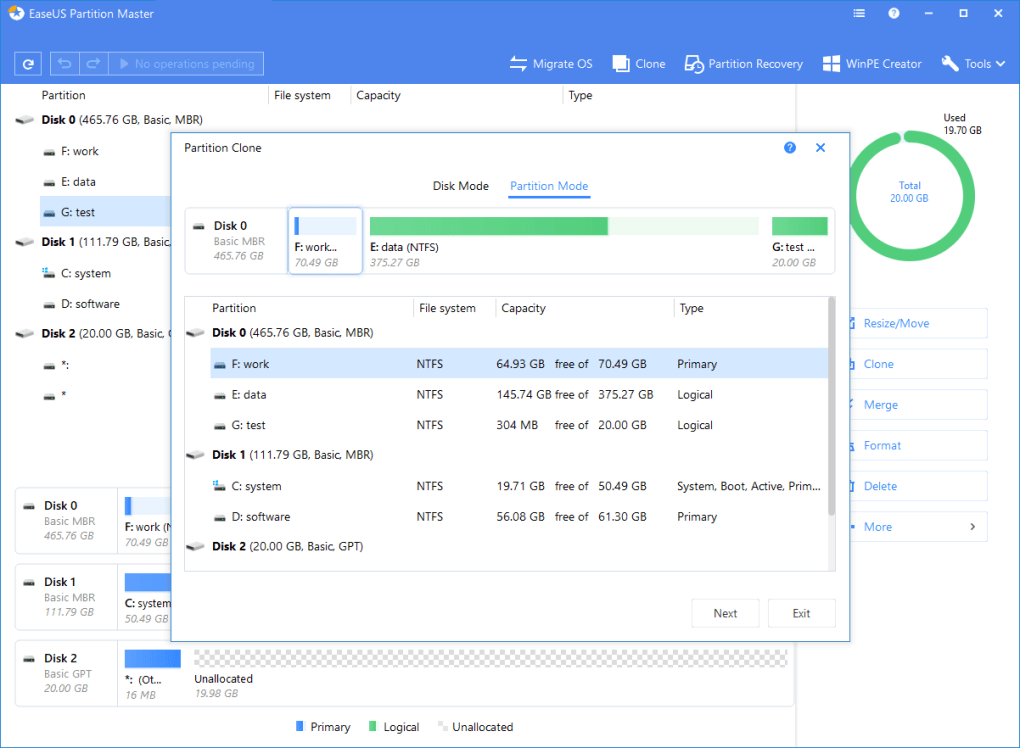
EaseUS Partition Master’s core strength lies in its ability to handle a wide range of partition management tasks. The software offers a straightforward interface, presenting a clear list of existing partitions on the hard drive along with their properties, such as size, file system type, and drive letter. This allows users to quickly assess the current disk configuration. Beyond simple visualization, the software offers robust functionality, including:
-
Partition Creation: Easily create new partitions on your hard drive, allocating specific sizes and file systems (FAT, FAT32, NTFS, and others) as needed. This is crucial for organizing data, installing multiple operating systems, or dedicating space to specific applications.
-
Partition Deletion: Safely remove unwanted or unnecessary partitions. This feature is vital for reclaiming disk space, reorganizing storage, or preparing a drive for repartitioning. EaseUS Partition Master ensures data is securely erased before partition removal, preventing data recovery.
-
Partition Formatting: Format existing partitions to a desired file system. This is necessary when preparing a partition for a new operating system, a specific application, or simply to refresh a drive. Different file systems offer varying performance characteristics and compatibility with different operating systems.
-
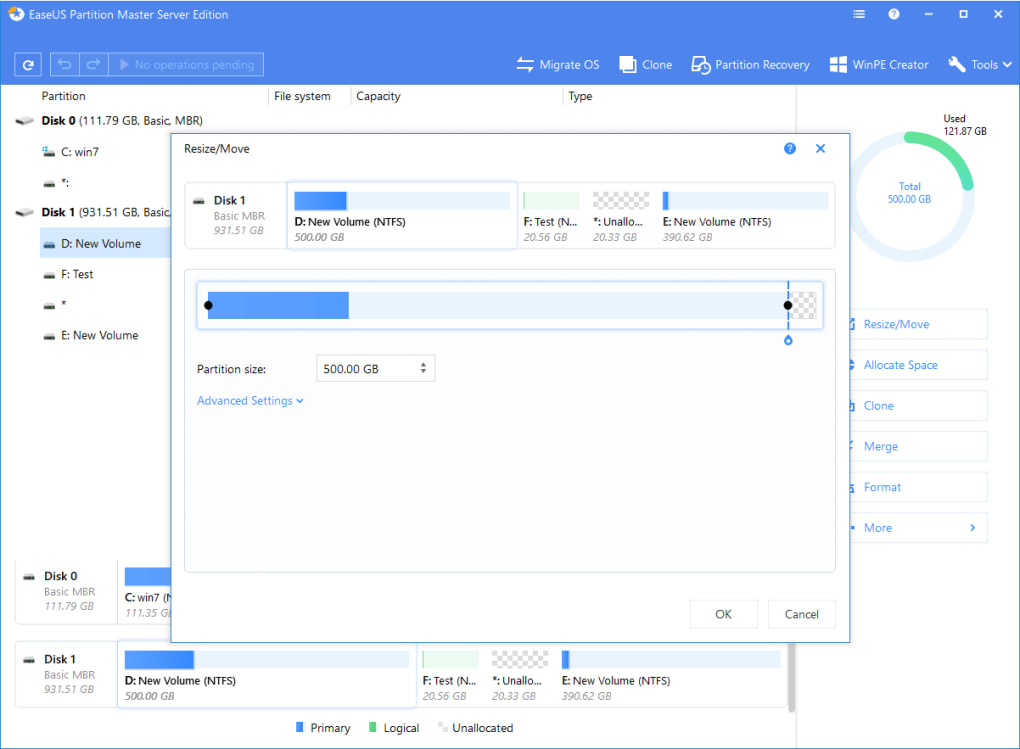
Partition Resizing/Moving: One of the most valuable features is the ability to dynamically resize and move partitions without data loss. This allows users to expand shrinking system partitions to prevent performance issues or allocate more space to data-heavy applications. The live resizing capability minimizes downtime and avoids the need for data backups (though a backup is always recommended).
-
Partition Merging: Combine multiple partitions into a single, larger partition, streamlining disk organization and improving storage efficiency. This simplifies disk management and reduces fragmentation.
-
Partition Copying: Create exact copies of existing partitions. This is invaluable for creating backups, cloning drives, or migrating data to a new hard drive without reinstalling the operating system.
-
Disk/Partition Cloning: EaseUS Partition Master facilitates migrating an entire hard drive or a specific partition to another drive, a crucial step in upgrading to a larger drive or migrating to a new computer. This process mirrors the entire disk structure, maintaining the operating system and applications without reinstalling them.
-
Bootable Disk Creation: Create a bootable rescue disk or USB drive. This functionality is vital for recovering from boot failures or addressing partition issues when the operating system is inaccessible. The bootable disk provides a means to access and repair partitions when the main operating system isn’t functional.
-
Data Wiping: Securely erase data from unallocated space or partitions. This important feature enhances data security, preventing sensitive information from falling into the wrong hands.
-
Advanced Features: The software offers several advanced features, such as support for dynamic volumes, GPT disks, and large hard drives (exceeding 4TB). These options allow for broader compatibility and adaptability across various hardware configurations.
EaseUS Partition Master Interfaces and Usability
The EaseUS Partition Master interface, while functional, adopts a slightly dated design. While all the necessary functions are easily accessible, the visual aesthetic might feel less polished than some modern alternatives. However, its simplicity can be considered an advantage for users who prioritize straightforward functionality over elaborate visual design. The clear layout and intuitive organization of features minimize the learning curve, making it accessible to users with varying levels of technical expertise. Wizards guide users through complex operations like disk cloning or partition migration, reducing the potential for errors.
EaseUS Partition Master Editions and Pricing
EaseUS Partition Master is available in multiple editions, catering to different user needs and budgets. The core functionalities are available in a free version, sufficient for many basic partition management tasks. However, advanced features and additional support are typically found in paid versions like the Professional and Server Editions. The Professional Edition often includes the bootable disk creator, advanced partition recovery tools, and enhanced technical support. The Server Edition is tailored towards enterprise and server environments, often with additional features for managing larger storage systems and supporting multiple users. This tiered approach makes the software accessible to individuals and businesses with different technical requirements and budgets.
EaseUS Partition Master Advantages and Disadvantages
Advantages:
-
Comprehensive Functionality: EaseUS Partition Master offers a wide range of partition management tools, encompassing both basic and advanced functions. This comprehensive approach eliminates the need for multiple utilities.
-
Ease of Use: Despite its dated interface, the software’s intuitive design and helpful wizards make it surprisingly easy to use for users of all skill levels. Complex operations are simplified through guided procedures.
-
Data Safety: The software prioritizes data safety, implementing measures to prevent data loss during operations such as resizing or moving partitions. Data wiping functionality enhances security.
-
Multiple Editions: The availability of different editions caters to the varying needs and budgets of individual users and businesses. A free edition is available for basic use, while more advanced features are offered in paid editions.
-
Support for Large Disks: EaseUS Partition Master handles large hard drives and supports diverse file systems, ensuring compatibility across various hardware configurations.
-
Bootable Disk Creation: The ability to create a bootable rescue disk is crucial for resolving boot issues and accessing partitions when the operating system is unavailable. This feature enhances the software’s problem-solving capabilities.
Disadvantages:
-
Outdated Interface: The interface design is arguably outdated, lacking the modern visual appeal found in some competing software. While functionality is not compromised, the aesthetic might not appeal to all users.
-
Limited Free Features: The free edition offers core functionality, but users will require a paid upgrade to unlock advanced features and increased technical support.
Comparing EaseUS Partition Master with Alternatives
EaseUS Partition Master stands as a strong contender within the crowded market of disk partition management tools. It competes with several alternatives, each offering its own unique strengths and weaknesses. Aomei Partition Assistant is often cited as a direct competitor, known for its user-friendly interface and extensive features. MiniTool Partition Wizard also holds a strong reputation for reliability and comprehensive functionality. The best choice ultimately depends on individual needs and preferences, with factors such as budget, required features, and interface preference playing pivotal roles.
Conclusion
EaseUS Partition Master offers a robust and versatile solution for all your disk partition management needs. While the interface could benefit from a visual update, its intuitive functionality and comprehensive set of features make it a compelling choice for both novice and experienced users. The tiered pricing model ensures accessibility across various budget constraints, making it a valuable tool for managing and optimizing your hard drive space. With its data-safe operations and powerful advanced features, EaseUS Partition Master effectively simplifies a potentially complex and daunting task.
File Information
- License: “Trial version”
- Latest update: “February 4, 2025”
- Platform: “Windows”
- OS: “Windows 8.1”
- Language: “English”
- Downloads: “35.4K”


