
EaseUS VoiceWave is a free, real-time AI voice changer designed for use across a variety of platforms, including Discord, online games, live streaming services, and online chat applications. This software provides users with the ability to dramatically alter their voice, adding an element of fun, enhancing interactivity, protecting privacy, and allowing for greater immersion in online interactions. This detailed review explores its features, usability, pros and cons, and compares it to similar software options.
Transforming Your Voice: EaseUS VoiceWave’s Core Functionality
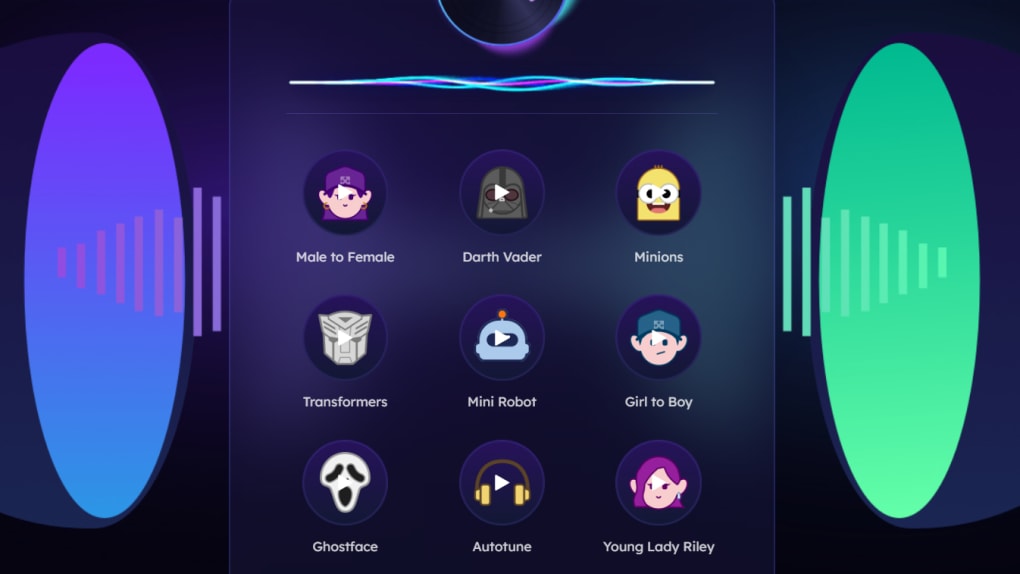
At its heart, EaseUS VoiceWave is a voice modulator. It allows users to modify their voice in real-time, altering tone, pitch, and adding a wide range of special effects and filters. This real-time modification is crucial for its intended applications, ensuring a seamless and lag-free experience during online gaming, voice chats, and live streams. The software boasts a library exceeding 100 voice effects, drawing inspiration from popular media and culture. These range from subtle pitch adjustments to dramatic transformations, including robotic voices, alien-like vocalizations, and character voices inspired by popular movies and games. Users can select pre-set effects or manually adjust parameters such as volume, pitch, and timbre to create unique, personalized vocalizations. This level of customization offers unparalleled flexibility, allowing users to create a voice perfectly suited to their needs and preferences.
The software also supports over 200 online games and over 50 messaging services, ensuring broad compatibility with popular platforms. This extensive compatibility makes EaseUS VoiceWave a versatile tool for gamers and online communicators alike. Users can effortlessly integrate the voice changer into their existing workflows, avoiding the need to switch between different applications. The compatibility extends to popular platforms such as Fortnite, Roblox, Minecraft, Skype, Zoom, and Discord, among many others. This wide-ranging support significantly enhances the software’s practical value.
Beyond Voice Modification: Additional Features and Tools
EaseUS VoiceWave’s capabilities extend beyond simple voice modification. The software includes a built-in audio recorder, allowing users to capture and edit their vocal recordings directly within the application. This integrated recording feature simplifies the workflow, eliminating the need for separate recording software. Recorded audio can then be further refined using the software’s editing tools before export in MP3 format. The ease of recording and exporting audio files significantly contributes to the software’s overall usability.
Furthermore, the software incorporates a sophisticated audio mixer, enabling users to combine multiple audio tracks and fine-tune the balance between them. This feature allows for the creation of more complex audio projects, such as adding background music or sound effects to a recording. The mixer provides a range of controls allowing precise adjustments to ensure a professional-sounding final product. The inclusion of a mixer opens up creative possibilities beyond simple voice modification.
A key feature contributing to high-quality audio output is the advanced noise reduction tool. This functionality effectively removes background noise and enhances vocal clarity, resulting in cleaner, more professional-sounding recordings. This is particularly useful for users recording in less-than-ideal acoustic environments, enhancing the quality of their audio regardless of background noise. The noise reduction capabilities are a significant advantage, especially for users lacking professional recording equipment.
Finally, EaseUS VoiceWave includes a dynamic soundboard, featuring a vast library of over 300 sound effects. These sound clips can be easily integrated into recordings, adding a fun, creative element to vocal projects. The soundboard allows for seamless addition of sound effects, enhancing engagement and personalization within voice-based content.
User Interface and Ease of Use
EaseUS VoiceWave boasts a user-friendly interface that is both intuitive and visually appealing. Designed with a Discord-like layout, the software’s interface is familiar to many users, minimizing the learning curve. This design choice enhances accessibility, particularly beneficial for users already familiar with Discord’s interface.

The software’s settings are easily accessible and straightforward to adjust. Users can quickly select and apply desired voice effects, customize parameters such as pitch and volume, and integrate sound effects from the soundboard with minimal effort. This streamlined design encourages experimentation and allows users to rapidly achieve the desired vocal modifications. The intuitive nature of the interface contributes significantly to the software’s overall usability.
EaseUS VoiceWave: Pros and Cons
Pros:
- Free to use: EaseUS VoiceWave offers a comprehensive set of features without any upfront costs, making it accessible to a wider range of users.
- Wide compatibility: The software supports a large number of online games and messaging services, ensuring broad application across diverse platforms.
- Extensive effects library: Over 100 voice effects and over 300 sound effects provide a vast range of creative options for users.
- Intuitive interface: The Discord-like UI is easy to navigate and understand, enhancing user experience.
- Integrated tools: The inclusion of an audio recorder, mixer, and noise reduction tool within a single application streamlines the workflow.
- Real-time voice modification: The ability to change voice on the fly is crucial for many applications, such as live streaming and online gaming.
- Customizable presets: Users can create and save their own voice presets for easy switching between different vocalizations.
Cons:
- Internet connection requirement: A stable internet connection is needed for software registration and access to online services. This can be a limitation for users with unreliable internet access.
Comparison with Alternative Software
While EaseUS VoiceWave offers a compelling package of features, it’s worthwhile comparing it to other available voice changer software. Competitors often offer similar core functionalities but may differ in their pricing models, feature sets, and user interfaces. Some alternatives may focus on specific niches, such as professional voice-over work, while others may cater primarily to casual users. The optimal choice depends on individual needs and preferences.
For instance, some paid software might offer a wider range of advanced features or superior audio quality, while free alternatives may have limitations on the number of available effects or the quality of noise reduction. Careful consideration of individual requirements, budget, and technical expertise is recommended before making a decision.
Conclusion
EaseUS VoiceWave provides a comprehensive and user-friendly solution for real-time voice changing. Its extensive features, including a vast library of effects, integrated recording and mixing tools, and advanced noise reduction, combined with its intuitive interface, make it a compelling choice for both casual users and those seeking more advanced capabilities. While an internet connection is required for full functionality, its free availability and wide compatibility make it a strong contender in the voice changer software market. Whether you’re a gamer, streamer, content creator, or simply enjoy experimenting with vocal effects, EaseUS VoiceWave offers a powerful and versatile tool to enhance your online experiences.
File Information
- License: “Free”
- Latest update: “September 8, 2024”
- Platform: “Windows”
- OS: “Windows 8.1”
- Language: “English”
- Downloads: “35.1K”


