
In an era increasingly dominated by streaming services and digital downloads, the humble audio CD might seem like a relic of a bygone age. Yet, for countless music enthusiasts, collectors, and those seeking uncompromised audio quality, the compact disc remains a cherished format. This is precisely where software like Easy CD Ripper steps in, bridging the gap between physical media and the boundless convenience of digital audio. As its name suggests, Easy CD Ripper offers a straightforward, efficient solution for converting your beloved audio CD collections into a variety of digital formats, ready for playback on modern devices, archival, or personalized management.
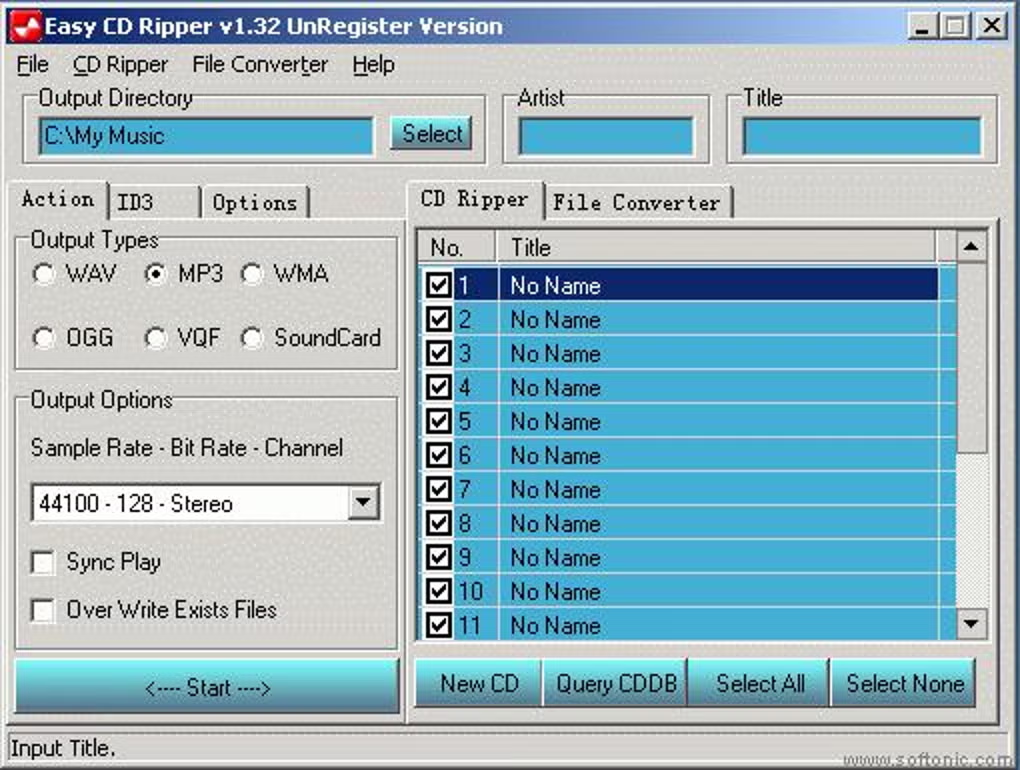
Easy CD Ripper, available as a trial version exclusively for Windows operating systems, is a dedicated piece of audio software specializing in CD/DA extraction. Its primary function is to transform the tracks on an audio CD into common digital formats such as MP3, WAV, WMA, OGG, or VQF. For anyone looking to digitize their physical music library, create backups, or simply enjoy their CD tracks without needing the disc itself, Easy CD Ripper presents itself as a practical and accessible utility.
While the digital landscape has shifted dramatically since its initial release, Easy CD Ripper holds a particular niche. It’s designed with simplicity in mind, ensuring that even users with minimal technical expertise can navigate the process of digitizing their audio. This focus on ease of use, combined with its compact footprint – requiring less disk space than many comparable audio programs – has contributed to its sustained, albeit specialized, popularity. The software has historically seen frequent downloads in regions like the Netherlands, Italy, and China, suggesting a continued appreciation for physical media and the tools to manage it digitally within those communities.
Since its inclusion in the selection of programs and apps on platforms like PhanMemFree.org in 2011, Easy CD Ripper has garnered a total of 75,859 downloads. While the volume of downloads has naturally tapered off with the advent of pervasive streaming, its continued activity, with a reported 5 downloads in a recent week, underscores its enduring relevance for a specific segment of users. This consistent, if smaller, engagement highlights the persistent need for reliable CD ripping solutions, whether for nostalgic purposes, academic archival, or simply to take cherished physical albums into the digital realm.
The software’s compatibility footprint is notably wide, supporting operating systems from Windows 95 and older versions, indicating its longevity in the software ecosystem. While its primary software version is 2.14, with its last known update on June 14, 2011, the listing on PhanMemFree.org shows a more recent update to its metadata, reflecting Version 3.14 and a last update date of December 19, 2023. This discrepancy likely indicates a refresh of the listing information on PhanMemFree.org rather than a substantial update to the application itself, which largely remains a product of its earlier development cycle. This means users should consider its origins as a tool designed for earlier Windows environments, though it generally functions well on more contemporary versions through backward compatibility. The program is available solely in English, which streamlines its user interface but limits its accessibility for non-English speakers.
Multimedia: Embracing Digital Audio
The journey of audio consumption has been one of constant evolution, from vinyl records and cassette tapes to the compact disc, and ultimately, to the ubiquitous digital file. The concept of “multimedia” itself encapsulates this convergence of various forms of media – audio, video, text, images – into a unified digital experience. Within this vast domain, audio stands as a fundamental component, and tools like Easy CD Ripper play a crucial role in enabling users to transition their audio assets across different formats and platforms.
The advent of the audio CD in the early 1980s revolutionized music consumption, offering superior sound quality and durability compared to its analog predecessors. However, the rise of the internet and portable MP3 players in the late 1990s and early 2000s ushered in a new era: the digital audio revolution. Suddenly, users wanted to take their music with them without carrying stacks of CDs. This created a massive demand for “ripping” software – applications capable of extracting the digital audio data from a CD and converting it into more versatile, often compressed, digital file formats.
Easy CD Ripper belongs to this crucial period of transition. It provided a simple pathway for users to convert their CD libraries into formats suitable for their nascent digital music players or for storage on their personal computers. The ability to convert to MP3, for instance, meant that hundreds of songs could be stored on a device that fit in one’s pocket, a stark contrast to the physical limitations of CDs. Similarly, WAV files offered uncompressed, studio-quality digital audio, perfect for archiving original recordings or for use in audio editing projects. WMA (Windows Media Audio) provided Microsoft’s proprietary alternative, often featuring digital rights management (DRM), while OGG Vorbis emerged as an open-source, patent-free alternative offering competitive audio quality at efficient bitrates. The inclusion of VQF, a less common but historically significant format, further illustrates the range of options available during that period of rapid format development.
The Enduring Appeal of Audio Ripping
Despite the dominance of streaming services like Spotify, Apple Music, and YouTube Music, the act of “ripping” audio CDs continues to hold appeal for several key reasons, contributing to the persistent download figures of software like Easy CD Ripper.
Firstly, ownership and control. When you subscribe to a streaming service, you don’t truly own the music; you license access to it. If a track is removed, or your subscription lapses, your access disappears. With a physical CD, and its digital ripped counterpart, you retain full ownership. This is particularly important for collectors, audiophiles, and those who value digital self-sufficiency. Ripping a CD creates a personal, permanent digital copy that is immune to changes in streaming catalogs or internet connectivity issues.
Secondly, audio quality. While streaming services offer various quality tiers, many still default to compressed formats, and even their “lossless” offerings may not match the pristine quality of a direct rip from a CD, especially when converted to a WAV or a high-bitrate FLAC (though FLAC is not a native output option for Easy CD Ripper, a WAV file can easily be converted to FLAC later). For audiophiles with high-fidelity sound systems, a well-ripped CD can offer a superior listening experience.
Thirdly, preserving legacy collections. Many individuals possess vast CD collections accumulated over decades. These albums might not all be available on streaming platforms, or they might be rare, out-of-print, or feature unique liner notes and artwork that aren’t replicated online. Ripping these CDs is a critical step in preserving this cultural heritage and personal history, ensuring that these recordings can be enjoyed for years to come on contemporary digital devices.
Lastly, customization and creativity. Once music is in a digital file format, it opens up possibilities for personalized playlists, custom mixes, or even sampling for creative projects. Easy CD Ripper, by providing these foundational digital files, empowers users to manage their audio in ways that streaming services cannot fully replicate. The simplicity of its interface ensures that this power is accessible to a broad audience, making the digitization process less daunting and more inviting.
Utilities & Tools: Essential Software for Digital Media Management
In the vast ecosystem of software, “Utilities & Tools” represent applications designed to perform specific, often crucial, tasks that enhance the functionality of a computer system or streamline user workflows. Easy CD Ripper perfectly embodies this category. It’s not a comprehensive media player or an operating system; rather, it’s a focused tool with a singular purpose: to extract audio from CDs and convert it into various digital formats. Such specialized utilities are indispensable for effective digital media management, allowing users to tailor their digital environment to their specific needs.
The utility aspect of Easy CD Ripper extends beyond mere conversion. It contributes to various facets of digital life:
- Data Recovery and Backup: Ripping a CD can be seen as a form of personal data backup. Should a physical CD become scratched, damaged, or unplayable, the digital copy serves as a valuable safeguard, preserving the music. While not a “data recovery” tool in the traditional sense of recovering deleted files from a hard drive, it recovers audio data from a specific physical medium.
- File Managers and Organization: Once ripped, these audio files become part of a user’s digital library. Tools like Easy CD Ripper facilitate the creation of this library, which then requires effective file management – sorting, tagging, and organizing the newly created MP3s, WAVs, or WMAs. While Easy CD Ripper doesn’t perform file management itself, it creates the assets that necessitate good file management practices.
- Streamlining Digital Workflows: For anyone moving between physical and digital media, utilities like this are key. They eliminate the friction of physical media, allowing for instant access to music without searching for discs. This contributes to a more efficient and productive digital environment, enabling users to spend less time managing media and more time enjoying it.
The interface of Easy CD Ripper is designed for efficiency. Upon inserting an audio CD, the software typically reads the disc, lists the available tracks, and often attempts to retrieve track information (metadata) from online databases if an internet connection is available. Users then select the tracks they wish to rip, choose their desired output format (MP3, WAV, WMA, OGG, or VQF), adjust quality settings (e.g., bitrate for MP3), and designate an output folder. The “easy” in its name truly reflects this streamlined workflow, reducing complex technical processes into a few intuitive steps.
The lightweight nature of Easy CD Ripper, as noted by its minimal system resource requirements, is another characteristic of a well-designed utility. It performs its task without bogging down the system, making it suitable even for older computers or those with limited processing power. This efficiency ensures that the focus remains on the conversion process itself, rather than on system performance issues.
Maximizing Productivity with Your Audio Library
While not typically categorized under “Productivity” in the traditional business sense, managing one’s personal digital audio library can significantly enhance personal productivity and quality of life. An organized and accessible music collection can serve as a powerful tool for focus, relaxation, and inspiration.
Imagine an academic researcher who needs specific classical music to aid concentration, or a graphic designer who uses certain genres to fuel creativity. Having a readily accessible, personalized digital library, rather than fumbling with CDs, saves time and reduces friction. Easy CD Ripper enables the creation of such a library. By digitizing CDs, users can:
- Create custom playlists: Tailor music for specific activities, moods, or durations, without being constrained by album order.
- Integrate music across devices: Enjoy their ripped music on smartphones, tablets, car stereos, or smart home devices, seamlessly moving between different listening environments.
- Reduce physical clutter: Digitizing a large CD collection frees up physical space, leading to a more organized living or working environment.
- Backup and secure valuable assets: Protect against the loss of rare or cherished recordings by having digital copies.
These benefits directly contribute to a sense of personal productivity by eliminating common frustrations and providing immediate access to desired audio content. The simplicity of Easy CD Ripper makes this process efficient, allowing users to quickly integrate their physical media into their digital lives and then focus on other tasks or enjoy their music without interruption.
FOR BUSINESS: Archiving, Licensing, and Corporate Media Solutions
While Easy CD Ripper is primarily a consumer-oriented tool, the principles and applications of CD ripping extend into the business domain, particularly concerning archival, content management, and specialized media solutions. Businesses, educational institutions, and organizations often possess extensive collections of audio CDs – ranging from training materials and historical recordings to licensed music for public spaces or internal use. Digitizing these assets, facilitated by tools like Easy CD Ripper or more robust enterprise solutions, becomes a critical business function.
One primary application within a business context is digital archiving and preservation. Libraries, museums, and historical societies frequently have vast archives of audio content on CDs. To ensure the longevity of these recordings and make them accessible to a wider audience, digitization is essential. While Easy CD Ripper’s capabilities are basic, the concept of converting physical CDs to digital files is fundamental to such large-scale archival projects. Professional solutions would offer more advanced features like error correction, metadata management, and conversion to archival-grade formats (like FLAC or uncompressed WAV). However, for smaller businesses or departments, Easy CD Ripper could serve as a rudimentary tool for a small-scale internal archive project.
Another area is content management and internal media libraries. Companies that create their own audio content – perhaps for marketing, internal communications, or product demonstrations – might distribute it on CDs. Digitizing these materials allows for easier integration into internal content management systems, corporate intranets, or e-learning platforms. This enhances accessibility for employees, facilitates reuse of content, and streamlines distribution. Moreover, businesses using music in public spaces (e.g., retail stores, restaurants) or for internal presentations need to ensure proper licensing. While Easy CD Ripper doesn’t handle licensing, it provides the digital files that can then be managed and played in compliance with relevant copyright laws and licensing agreements.
For educational institutions, digitizing spoken-word CDs (e.g., lectures, language learning materials) can make resources available to students through online learning platforms. This enhances flexibility, allowing students to access materials at their own pace and convenience, supporting distance learning initiatives. Similarly, for media production houses or broadcasting companies, access to a vast, digitized sound library (including effects, music beds, or historical audio clips) is crucial for efficient production workflows. While they would likely use more sophisticated ripping and metadata management tools, the foundational process of converting physical CDs to usable digital assets remains the same.
Lastly, the concept of digital asset management (DAM) systems is highly relevant. Businesses need to manage all their digital assets – including audio files – efficiently. Ripped audio from CDs, once properly tagged with metadata (artist, title, album, genre), can be ingested into a DAM system, making it searchable, retrievable, and governable across the organization. This ensures that valuable audio assets are properly cataloged, secured, and made available to authorized personnel, preventing loss and maximizing their utility.
In summary, while Easy CD Ripper itself is not an enterprise-grade solution, it demonstrates the fundamental utility of CD ripping technology, which scales up to critical business functions. For companies, non-profits, and educational bodies, the ability to transition audio content from physical CDs into a versatile digital format is indispensable for modern operations, supporting everything from historical preservation and internal communications to licensed media playback and digital asset management. It underscores the broader significance of seemingly simple tools in enabling complex organizational objectives within the digital age.
The enduring presence of Easy CD Ripper on platforms like PhanMemFree.org is a testament to the persistent demand for straightforward, functional tools that address specific user needs. Despite its older development timeline and the shift in mainstream media consumption, it continues to serve a valuable purpose for those who wish to maintain control over their cherished CD collections, preserve audio quality, or simply integrate their physical media into a convenient digital lifestyle. As long as audio CDs remain a part of our cultural fabric, simple and effective rippers like Easy CD Ripper will retain their niche, bridging the past and present of digital audio.
File Information
- License: “Trial version”
- Latest update: “December 19, 2023”
- Platform: “Windows”
- OS: “Windows ME”
- Language: “English”
- Downloads: “4.6K”


