
In the evolving landscape of modern education, the demands on educators are multifaceted and ever-increasing. Beyond the core task of imparting knowledge, teachers are responsible for an array of administrative duties, paramount among which is student assessment and grade management. Traditionally, this arduous process relied heavily on physical paper gradebooks, a system prone to inefficiencies, errors, and significant time investment. Enter Easy Grade Pro (EGP), a sophisticated teaching and training program developed by Orbis Software, designed to usher grade management into the digital age. This robust application transforms the conventional grading experience, offering educators a comprehensive, intuitive, and highly customizable platform to manage all their classes and student data within a single, unified environment.
Easy Grade Pro stands as a powerful alternative to the traditional paper notebook, providing instructors with a meticulous tool to track the success of each student in their respective courses with unprecedented depth. Its modular design intelligently organizes coursework, allowing teachers to dedicate their valuable time and energy to creating relevant and engaging assignments, rather than wrestling with complex administrative logistics. From calculating weighted averages—a critical feature for accurately reflecting the true value of different assignments—to generating insightful reports, EGP aims to empower educators, enhance accuracy, and foster a more efficient and effective learning environment. This article will delve into the myriad features, benefits, and practical applications of Easy Grade Pro, highlighting how it addresses the critical needs of today’s educators and contributes significantly to pedagogical excellence.
Productivity in Education: The Digital Gradebook Revolution
The concept of productivity in education has transcored mere efficiency; it now encompasses the strategic deployment of tools and methodologies that amplify learning outcomes and optimize administrative overhead. Easy Grade Pro epitomizes this shift, fundamentally redefining how educators manage grades and student information. For decades, the ubiquitous paper gradebook was the cornerstone of academic record-keeping. While familiar, this method was inherently limited. It was susceptible to loss or damage, offered no inherent calculation capabilities, and made the generation of reports or detailed analysis a laborious, manual undertaking. The advent of Easy Grade Pro addresses these limitations head-on, presenting an electronic gradebook that not only mirrors the structure of its paper predecessor but significantly transcends its capabilities.
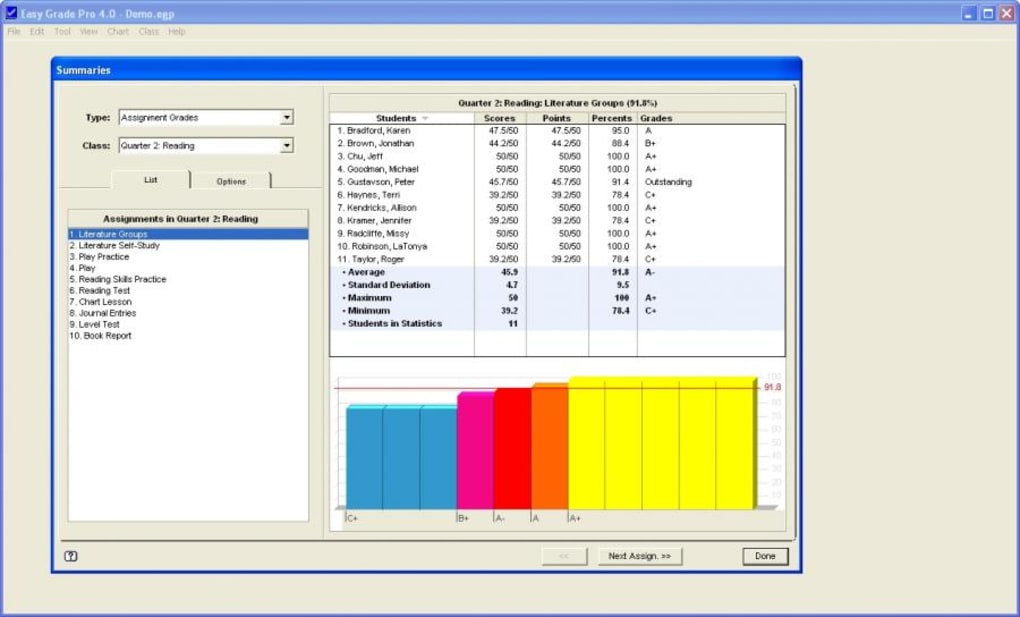
At its core, Easy Grade Pro functions as a digital repository for all student information across all courses and topics an educator teaches. This consolidation into a single file represents a monumental leap in organizational efficiency. Instead of juggling multiple physical binders or disparate spreadsheets, teachers can access a holistic view of their students’ academic journeys from one centralized location. This digital framework not only preserves the integrity of data but also provides a wealth of time-saving resources, transforming hours of manual calculations and record-keeping into mere moments of digital input and automated processing. The ability to generate both hard and soft copies of reports further amplifies its utility, ensuring that critical data is always accessible, shareable, and archived securely.
Setting Up Your Virtual Classroom: Getting Started with Easy Grade Pro
Embarking on the Easy Grade Pro experience begins with a straightforward, albeit critical, registration process designed to personalize and secure the user’s account. Upon the initial launch of the application, users are greeted by a registration window, a portal through which their unique credentials are established. Here, the program requires the input of an Installation Card Identification number. It is imperative that all dashes are meticulously included in this ID, as precision at this stage ensures seamless activation. Following this, users are prompted to enter a registration name. This could be the name of their educational institution, such as “Springfield High School,” or their personal registered instructor’s name, like “Mr. John Smith.” This step not only formalizes the software’s ownership but also customizes the user interface, grounding the digital gradebook in the educator’s specific professional identity. After applying the changes and clicking “OK,” the system is configured, ready for the user to explore its extensive functionalities.
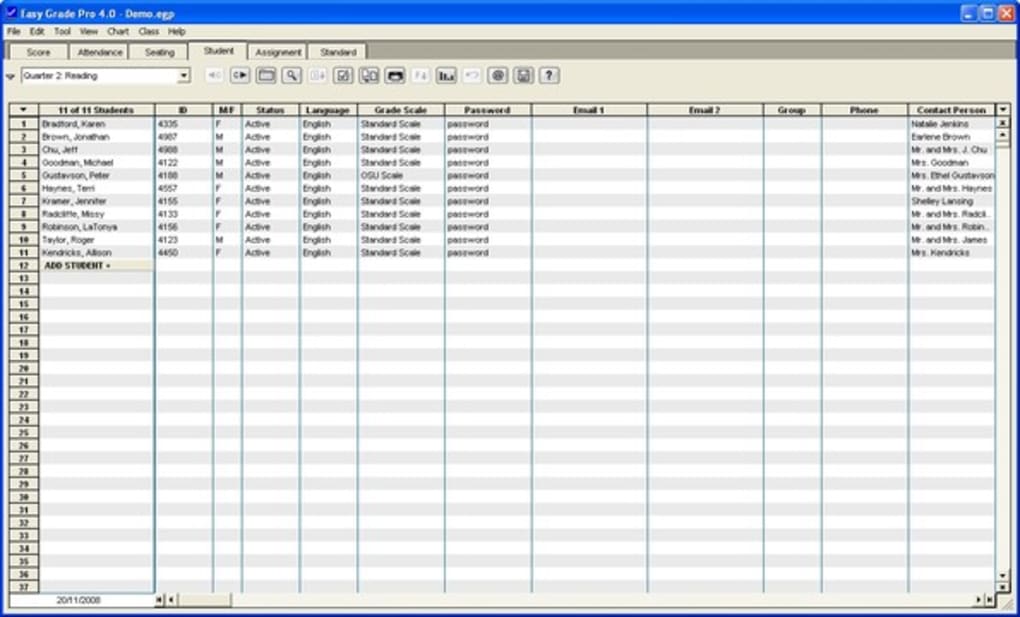
For new users or those wishing to familiarize themselves with the software’s architecture without immediately inputting live data, Easy Grade Pro provides an invaluable resource: the Demo Gradebook. Opening this demo reveals a hypothetical sixth-grade teacher’s gradebook, cleverly named “Ms. Demo.” This simulated environment is an excellent starting point, offering a safe space to navigate the software and understand its structure. As users explore Ms. Demo’s gradebook, they will observe that she is currently in the second quarter of the school year, a detail vividly displayed in her class’s score chart. This demo provides a realistic context for understanding how grades accrue over time.
A crucial insight gleaned from the demo is the revelation that in a real classroom setting managed by Easy Grade Pro, a single class is represented by five distinct, yet interconnected, charts: the Score Chart, Enrollment Chart, Seat Chart, Student Chart, and Work Chart. While Ms. Demo primarily utilizes the Score Chart for day-to-day grading, the existence and occasional use of the other charts underscore the depth of data management EGP offers. The Score Chart is, naturally, where grades for assignments and tests are entered. The Enrollment Chart manages student attendance and class rosters. The Seat Chart allows for visual organization of the classroom layout. The Student Chart serves as a comprehensive profile for each student, while the Work Chart helps organize assignments and their details. Understanding the purpose and interplay of these five charts is fundamental to harnessing the full power of Easy Grade Pro for holistic classroom management.
Streamlining Classroom Management with Digital Tools
The very essence of effective classroom management lies in the seamless integration of various pedagogical and administrative tasks. Easy Grade Pro excels in this domain by offering a sophisticated yet user-friendly interface that streamlines the most time-consuming aspects of an educator’s role. Beyond merely recording grades, the software empowers teachers to orchestrate their entire grading workflow with unprecedented efficiency and precision.
Mastering the Grading Process: Efficiency and Accuracy
For many educators, the act of adding tasks and ratings to a gradebook is historically the most laborious and time-intensive part of the grading process. Easy Grade Pro directly confronts this challenge by furnishing a rich array of tools designed for intuitive use, thereby significantly boosting teacher efficiency. To fully appreciate these tools, one typically begins by opening the demo grade book, which makes the score chart readily available for practical exploration. Here, users can quickly discern how the program simplifies the entry of assignments, quizzes, tests, and participation scores. With just a few clicks, new tasks can be created, weighted values assigned, and student scores inputted, all within a clear and navigable interface. This digital approach eliminates the need for manual calculations, cross-referencing, and tedious corrections, freeing up valuable time that can be redirected towards instruction and student engagement.
One of the standout features of Easy Grade Pro is its intelligent handling of varied task weights. The awareness that certain tasks, such as class involvement versus homework assignments, or a mid-term examination versus a final project, hold differing pedagogical significance is built into the program’s core functionality. This means that educators can easily assign different weights to different assignments, ensuring that the final calculated grade accurately reflects the importance of each component of the course. For instance, a final exam might be weighted at 30% of the overall grade, while individual homework assignments contribute 10%. Easy Grade Pro automatically performs these weighted average calculations, removing the potential for human error and ensuring that the grading system remains fair, consistent, and transparent. This automatic calculation of weighted averages is not merely a convenience; it is a pedagogical necessity that underpins equitable student assessment.
Modular Design for Organized Workflows
The philosophical underpinnings of Easy Grade Pro are deeply rooted in a modular design principle. This approach is paramount to organizing the intricate work within a course effectively. Rather than presenting a monolithic, overwhelming interface, EGP breaks down complex tasks into manageable, interconnected modules. This means that the instructor can focus distinctly on various aspects without cognitive overload. For example, setting up grading criteria is distinct from entering daily scores, which is separate from generating end-of-term reports. This compartmentalization ensures that teachers can concentrate on specific functions—such as making homework relevant to the course content—without getting bogged down by the mechanics of the gradebook itself. The modularity extends to how data is stored and accessed, allowing for quick navigation between student profiles, assignment lists, and overall class performance charts. This structured approach not only enhances user experience but fundamentally streamlines the entire workflow, making the digital gradebook a truly intuitive and efficient companion for educators.
Customization and Pedagogical Flexibility: Tailoring the Teaching Experience
Every classroom is unique, every teacher possesses a distinct pedagogical style, and every course has its specific requirements. Recognizing this inherent diversity, Easy Grade Pro provides an exceptional host of possibilities to suit individual teaching styles, offering a level of customization that goes far beyond what a physical gradebook could ever provide. This flexibility is crucial for ensuring that the software adapts to the educator, rather than forcing the educator to adapt to the software.
Tailoring to Your Teaching Style: Gradebook and Class Options
Easy Grade Pro’s customization features are thoughtfully categorized to offer both broad, universal adjustments and granular, class-specific modifications. At the highest level, there are “Gradebook Options” which impact the entire grade book. These include choices like font size, which can be adjusted to enhance readability for the user, whether for personal comfort or for projection during parent-teacher conferences. Such overarching settings ensure a consistent aesthetic and functional experience across all courses managed within the software. The ability to control these global parameters allows teachers to set up their digital environment in a way that is most conducive to their work habits and preferences.
However, Easy Grade Pro truly shines in its “Class Options,” which apply to only one specific class, allowing for unparalleled pedagogical flexibility. Within these options, educators can fine-tune a multitude of parameters to reflect the unique structure and assessment methodologies of each course. These include:
- Ratings: Defining custom rating scales or symbols (e.g., A-F, Pass/Fail, 1-5, or even custom rubrics).
- Levels: Setting up different performance levels or categories for assignments.
- Weights: As previously discussed, assigning specific percentage weights to different assignment types or categories (e.g., homework, quizzes, projects, exams).
- Schedules: Integrating class schedules and academic calendars directly into the gradebook for better organization.
- Colors: Customizing the color scheme of charts and entries to visually differentiate classes, assignment types, or student performance levels, aiding in quick identification and data interpretation.
This granular control means that a teacher managing a humanities course with extensive essay writing can implement a rubric-based rating system with specific weighting for analytical depth, while simultaneously managing a mathematics course that relies on quantitative scores and a different weighting for problem-solving proficiency. The freedom to set charts to meet specific needs in several respects ensures that the digital gradebook is a truly bespoke tool for each educator.
Dynamic Data Presentation: Custom Columns
Further enhancing this customization is the ability to add specific columns to the score table. While default columns typically display classes and scores, Easy Grade Pro allows educators to integrate virtually any other details about their pupils. This could include columns for tracking participation, specific skill mastery, socio-emotional learning indicators, project phases, or even behavioral notes. Such dynamic data presentation transforms the score table from a mere list of grades into a rich, comprehensive student profile within the context of a specific course. For instance, a teacher might add a column for “Effort” or “Collaboration Score” for group projects, providing a more holistic view of student engagement beyond just academic performance. This capacity for tailored data display ensures that all relevant information pertinent to student progress and assessment is readily accessible and logically organized.
Automatic Saving: Peace of Mind for Educators
One of the unsung heroes of digital productivity tools is the automatic saving feature, and Easy Grade Pro seamlessly integrates this crucial functionality. Throughout the grading process, and critically, when the program is closed, all changes made to the score chart are applied automatically. This means that educators never have to worry about losing their painstakingly entered data due to an unexpected power outage, a system crash, or simply forgetting to hit a save button. This provides immense peace of mind, allowing teachers to focus entirely on their work with the confidence that their valuable records are continually preserved. This seemingly small detail represents a significant quality-of-life improvement for any user of administrative software, reducing stress and ensuring data integrity. To exit the program, users simply select “Leave/Exit” from the File menu, secure in the knowledge that all their efforts have been safely recorded.
Beyond the Basics: Reporting and Data Insights
While the core functionality of Easy Grade Pro lies in its ability to manage and calculate grades, its true power is unlocked through its comprehensive reporting features and the invaluable data insights it provides. An effective grading tool doesn’t just store numbers; it transforms those numbers into meaningful information that can inform teaching practices, facilitate communication with stakeholders, and ultimately enhance student learning.
Comprehensive Reporting Capabilities
Easy Grade Pro empowers educators to create a wide array of reports, available in both hard and soft copies. This dual output capability is incredibly versatile. Hard copies are essential for official records, parent-teacher conferences, and distributing student progress reports. Imagine being able to print a professionally formatted report card for each student, detailing their performance across various assignments, their overall weighted average, and any specific notes—all generated with a few clicks. Soft copies, on the other hand, are ideal for digital archiving, emailing to parents or administrators, or for seamless integration with other digital platforms.
These reports can range from individual student performance summaries to overall class grade distributions. A teacher can generate a report detailing every assignment a student has completed, their score on each, and how that contributes to their final grade. This level of detail is invaluable for student self-reflection and for justifying grades during discussions with students or parents. For the teacher, the ability to quickly generate such reports saves countless hours that would otherwise be spent manually compiling data, ensuring consistency and accuracy across all documentation.
In-Depth Student Tracking and Assessment
Easy Grade Pro is not merely a data entry system; it is a sophisticated tool for in-depth student tracking. By organizing all classes into one file and providing five separate charts for each class (score, enrollment, seat, student, and work), EGP offers a holistic view of each student’s journey. The “Student Chart,” for instance, can serve as a detailed profile, accumulating data beyond just academic scores. When integrated with specific columns added to the score table (as discussed in the customization section), teachers can track progress on individual learning objectives, observe trends in student performance over time, and identify areas where a student might be struggling or excelling.
This granular tracking allows educators to provide highly personalized feedback. Instead of general comments, a teacher can point to specific assignments, patterns of performance, or areas where a student’s effort has significantly impacted their grade. This level of insight enables more targeted interventions and more effective support strategies for individual learners, fostering a truly differentiated learning environment. It’s a way for teachers to assess overall class results, but critically, also to pinpoint the unique needs and achievements of each student within that broader context.
Assessing Overall Class Performance and Informing Pedagogy
Beyond individual student tracking, Easy Grade Pro offers powerful capabilities for assessing overall class results. By aggregating and analyzing data across all students, teachers can gain a clear understanding of class-wide strengths and weaknesses. For example, if a significant portion of the class struggles with a particular type of assignment or a specific concept, the teacher can quickly identify this trend from the grade distribution reports. This insight is invaluable for informing pedagogical adjustments, such as revisiting certain topics, modifying teaching strategies, or developing additional support materials.
The program’s ability to calculate weighted average marks across the entire class also provides a robust measure of overall academic progress. This can be critical for departmental reviews, curriculum evaluations, and demonstrating accountability. By simplifying the analysis of complex data, Easy Grade Pro empowers educators to make data-driven decisions that can significantly enhance the quality of instruction and the effectiveness of their curriculum. In essence, it transforms raw scores into actionable intelligence, guiding teachers towards more impactful educational practices.
Pros and Cons of Easy Grade Pro
Like any specialized software, Easy Grade Pro comes with a distinct set of advantages and a few considerations. Understanding these helps potential users determine if it’s the right fit for their specific needs.
Pros:
- Organizes all your classes into one file: This is perhaps the most significant benefit, eliminating fragmentation and offering a centralized repository for all student data, assignments, and grades across multiple courses.
- Calculates weighted average marks: This critical feature ensures accurate and fair assessment, automatically factoring in the varying importance of different assignments without manual calculation.
- Includes 5 separate charts for 1 class: The comprehensive suite of Score, Enrollment, Seat, Student, and Work charts provides a holistic view of classroom management, from grades to attendance to student profiles.
- Includes a demo for new users: The pre-populated demo gradebook (Ms. Demo’s example) offers a risk-free environment for new users to explore features and understand the program’s structure before committing to live data.
- Time-saving resources: Automation of calculations, streamlined data entry, and report generation significantly reduce the administrative burden on educators.
- Customization: Extensive options for gradebook-wide settings and class-specific parameters (ratings, weights, colors) allow teachers to tailor the software to their unique teaching styles and course requirements.
- Automatic saving: Provides peace of mind, ensuring that all data is continuously saved and protected against loss.
Cons:
- Best suited for objective-based scoring: While customizable, the software’s structure and strong emphasis on numerical grades and weighted averages may make it less ideal for purely qualitative assessment methods or highly subjective grading criteria without significant adaptation. Educators who primarily use narrative feedback or portfolio-based assessment might find some features less applicable, though the ability to add custom columns can mitigate this to some extent.
Technical Specifications and Accessibility
Easy Grade Pro is a reliable and well-established application, designed with specific technical parameters to ensure broad compatibility and ease of use.
- License: It is offered as a Trial version, allowing prospective users to experience its full functionality before committing to a purchase. This “try before you buy” model is highly beneficial for educators needing to assess its suitability within their unique classroom environment.
- Version: The most recent version available is 4.0.3.
- Latest update: The software was last updated on January 31, 2023, indicating ongoing maintenance and improvement by Orbis Software Inc.
- Platform: Easy Grade Pro is primarily available for Windows, with a version specifically designed for Windows 7 and later operating systems. This wide OS compatibility ensures that a vast majority of educators can utilize the software without significant system upgrades.
- Language: The primary language of the application is English, but PhanMemFree.org (formerly Softonic.com) lists its availability in numerous other languages including Spanish, Thai, Korean, Japanese, Chinese, Russian, German, French, Indonesian, Italian, Dutch, Polish, Portuguese, Swedish, Turkish, and Vietnamese. This multilingual support makes Easy Grade Pro accessible to a global audience of educators.
- Downloads: The program has seen significant uptake, with 4.9K downloads overall and 14 downloads in the last month (as per the provided data), demonstrating its consistent appeal among educators.
- Size: The application is relatively lightweight, with a download size of 18.74 MB, ensuring quick downloads and minimal impact on system resources.
- Developer: Orbis Software Inc. is the developer behind Easy Grade Pro, a company dedicated to creating tools for educators.
Beyond Windows, an alternative version of Easy Grade Pro is also available for Mac, further expanding its reach to users across different operating systems. This cross-platform availability underscores the developer’s commitment to serving a broader educational community.
Conclusion
Easy Grade Pro emerges as an indispensable tool for the modern educator, offering a sophisticated yet intuitive solution to the multifaceted challenge of classroom management and student assessment. By transitioning the traditional paper gradebook into a dynamic, digital environment, it not only addresses the inherent inefficiencies of manual record-keeping but also introduces a wealth of features designed to enhance accuracy, save time, and provide deeper insights into student performance.
From its robust ability to calculate weighted average marks and organize all classes into a single, accessible file, to its comprehensive suite of five distinct charts per class, Easy Grade Pro empowers teachers to manage every aspect of their academic records with precision and ease. The extensive customization options, allowing educators to tailor everything from grading scales to visual layouts, ensure that the software seamlessly integrates with diverse teaching styles and pedagogical approaches. Furthermore, the inclusion of a demo gradebook and the critical automatic saving feature underscore its user-centric design, promoting a stress-free and productive experience.
While its primary strength lies in objective-based scoring, the flexibility offered by custom columns and varied rating scales allows for adaptation to a broader spectrum of assessment methodologies. In an era where data-driven decisions and efficient administrative practices are paramount, Easy Grade Pro stands as a powerful ally for educators. It liberates teachers from the tedious aspects of grade management, allowing them to redirect their focus towards their core mission: inspiring, educating, and nurturing the next generation of learners. For any educator seeking to streamline their workflow, enhance their assessment practices, and gain a more profound understanding of student progress, Easy Grade Pro offers a truly compelling and effective digital solution.
File Information
- License: “Trial version”
- Version: “4.0.3”
- Latest update: “January 31, 2023”
- Platform: “Windows”
- OS: “Windows 7”
- Language: “English”
- Downloads: “4.9K”
- Size: “18.74 MB”


