
Easy MP3 Cutter is a user-friendly application designed for basic audio editing tasks. While it lacks the advanced features of professional Digital Audio Workstations (DAWs) like Audacity, FL Studio, or Cubase, its simplicity and ease of use make it an ideal choice for casual users and those new to audio editing. This review will delve into the features, functionality, pros and cons, and alternatives to Easy MP3 Cutter, helping you determine if it’s the right tool for your audio editing needs.
Straightforward Functionality for Everyday Users
Easy MP3 Cutter excels in its simplicity. It’s a streamlined application focused on the core task of cutting MP3 and WAV audio files. This makes it a perfect choice for users who need to quickly trim silence from the beginning or end of recordings, split longer audio files into smaller segments for easier organization, or extract specific portions of audio for use as ringtones or other short clips. The software is intuitive and requires no prior audio editing experience, making it accessible to a broad range of users. The focus on ease-of-use comes at the cost of advanced features; power users seeking extensive editing capabilities will find Easy MP3 Cutter too limited.
The software’s intuitive interface prioritizes ease of use. Most functions are completed with a single mouse click, minimizing the learning curve. This streamlined approach makes quick work of simple editing tasks, such as trimming unwanted sections or splitting a track into multiple segments.
Key Features and User Interface
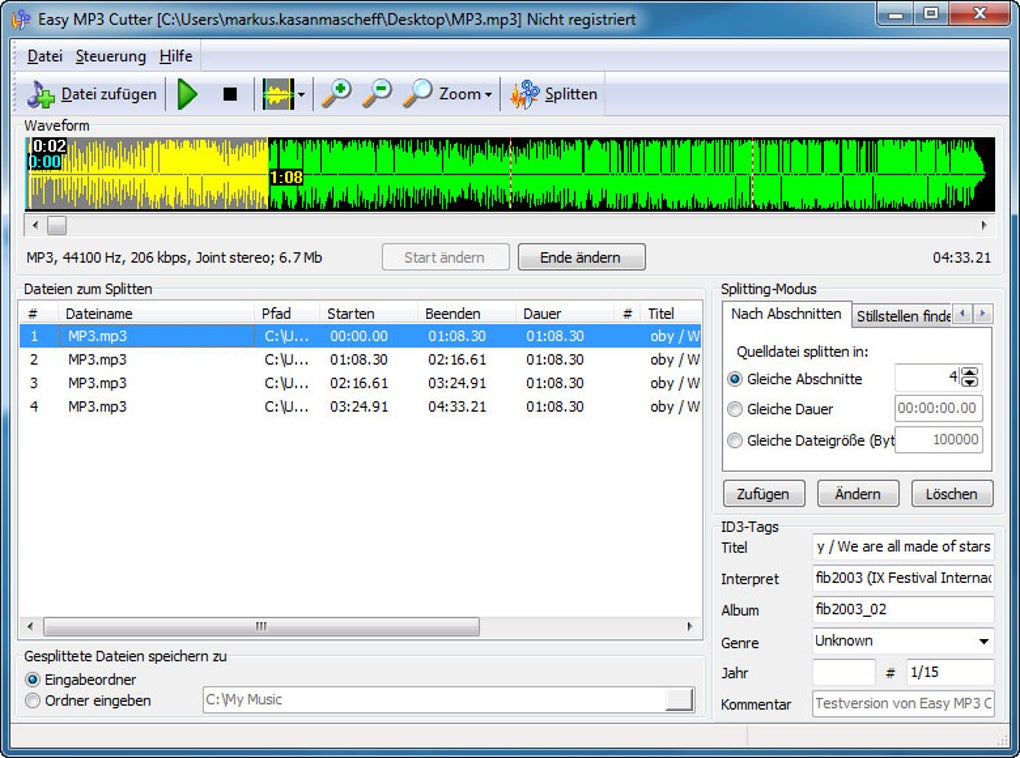
Easy MP3 Cutter boasts a clean and uncluttered interface, reflecting its straightforward functionality. The core features revolve around cutting and trimming audio files. Users can visually edit audio using a waveform display, allowing for precise selection of cutting points. The software supports both manual cutting, where users define specific start and end points, and automatic cutting based on specified durations. This automatic feature is particularly useful for batch processing, where many files need to be split into equal-length segments.
Beyond basic cutting, Easy MP3 Cutter offers several additional helpful features:
-
Automatic Silence Detection: This feature automatically identifies silent portions of audio, assisting users in precisely trimming unwanted gaps. This enhances efficiency, especially when dealing with recordings containing significant periods of silence.
-
Volume Control: The software allows for adjusting the volume of the audio, providing granular control using a slider. Users can increase or decrease the overall volume level. The intuitive slider makes volume adjustment precise and user-friendly.
-
Fade In/Fade Out Effects: This feature allows users to smoothly transition the audio in and out, preventing abrupt starts and stops. This adds a degree of polish to edited audio clips.
-
ID3 Tag Editing: Easy MP3 Cutter allows for adding and modifying ID3v1 and ID3v2 tags to output files. These tags contain metadata about the audio file, such as title, artist, album, and other information, improving file organization and management. This ensures better metadata management for enhanced library organization.
-
Batch Processing: The software supports batch processing, enabling users to apply the same editing operations to multiple files simultaneously. This significantly reduces the time spent on repetitive tasks.
-
Built-in Audio Player: A built-in audio player allows users to preview their edits before saving the final product. This ensures that the desired edits have been accurately implemented before finalizing the changes.
-
Lossless Editing: Easy MP3 Cutter doesn’t recompress your audio files during the editing process. This ensures that no quality is lost during the cutting or trimming process, preserving the original audio fidelity. This is a key advantage over many other simple audio editors.
How to Use Easy MP3 Cutter
Using Easy MP3 Cutter is remarkably intuitive. The process generally involves these steps:
-
Loading the Audio File: Begin by launching the application and loading the desired MP3 or WAV audio file.
-
Visual Editing (Waveform): The audio file will be displayed as a waveform, providing a visual representation of the audio data. Users can then select the portion they want to keep.
-
Cutting: Once the desired section is selected, users can click the “Cut” button to remove the unwanted parts of the audio.
-
Adjustments (Optional): Users can then apply any desired adjustments, such as volume changes or fade effects.
-
Saving the Edited File: Finally, the edited audio can be saved in either MP3 or WAV format. The software provides options to save edited versions of the original file.
The process is designed to be quick and easy, with intuitive controls that even novice users will find comfortable. Undo and redo functionality is incorporated, minimizing errors.
Limitations and Alternatives
Despite its strengths, Easy MP3 Cutter does have some limitations. The most significant is the limited format support. It only supports MP3 and WAV files, excluding common formats like OGG or M4A. Additionally, the free trial is limited to a 30-day period and restricts the number of cuts to five.
If these limitations are deal-breakers, several alternative applications offer similar functionality with added features:
-
Audacity: A powerful, free, and open-source audio editor with extensive features. While more complex than Easy MP3 Cutter, Audacity provides much greater flexibility and control over audio editing.
-
Timbre: A more advanced alternative to Easy MP3 Cutter, offering a broader range of features and format support. Timbre strikes a balance between simplicity and capability.
-
Shorts: This application provides comparable features to Easy MP3 Cutter, offering a straightforward option for simple audio editing.
-
AIV MP3 Cutter: This tool offers simple functions and supports editable MP3 tags, providing comparable basic functionality to Easy MP3 Cutter.
-
Simple MP3 Cutter Joiner Editor: Focuses on simple actions and boasts compatibility with a variety of audio formats. This is a strong contender for those needing broader format support.
-
mp3DirectCut: A free, non-destructive editor and recorder for MP3 files. This option is appealing to those prioritizing non-destructive editing.
These alternatives offer a range of options, from free, open-source software to paid applications with enhanced features. The best choice depends on individual needs and technical expertise.
Conclusion: A Solid Choice for Basic Audio Editing
Easy MP3 Cutter is a highly effective tool for basic audio editing tasks. Its user-friendly interface, intuitive operation, and lossless editing make it an excellent option for users who need to quickly and easily trim, split, or adjust their audio files. While its lack of advanced features and limited format support restricts its appeal to power users, it remains a strong contender for casual users and those new to audio editing. Its lightweight nature and simple workflow make it a convenient addition to any user’s toolkit. However, users seeking more advanced features or broader format compatibility should consider the alternative applications mentioned above.
File Information
- License: “Trial version”
- Version: “3.0”
- Latest update: “January 31, 2023”
- Platform: “Windows”
- OS: “Windows 7”
- Language: “English”
- Downloads: “657K”
- Size: “2.92 MB”


