
In the vast and ever-evolving landscape of digital tools, certain applications stand the test of time, proving their enduring value through simplicity, efficiency, and a clear focus on solving a specific problem. Easy Thumbnails is undeniably one such gem. Developed by Fookes, this free-to-use software for Windows has carved out a significant niche for itself as an indispensable utility for anyone dealing with image collections, especially those who need to generate accurate thumbnail images and scaled copies with ease. In an era dominated by complex, feature-heavy photo editors, Easy Thumbnails offers a refreshing return to core functionality, delivering precisely what it promises without unnecessary frills.
Since its inception, Easy Thumbnails has been lauded for its straightforward approach to a common digital challenge: managing image sizes for various platforms, whether for web galleries, digital archives, or personal viewing. The program, available in English and compatible with a wide range of Windows operating systems from Windows 95 onwards, has maintained its relevance, even receiving updates to improve support for newer environments like Windows Vista. Its modest size of just 1.07 MB ensures it’s a light footprint on your system, requiring less free space than many of its more bloated counterparts in the design and photography category. This combination of powerful functionality, user-friendliness, and system efficiency explains its enduring popularity across the globe, particularly in regions like India, the United States, and the Netherlands.
Unveiling Easy Thumbnails: A Legacy of Simplicity and Efficiency
At its heart, Easy Thumbnails is built on a philosophy of making complex tasks accessible. For both casual users and professionals who handle large volumes of images, the need for quick, accurate, and consistent thumbnail generation is paramount. This software addresses that need directly, proving that effective tools don’t always need to come with a hefty price tag or a steep learning curve. Its design is a testament to the power of focused development, where every feature serves a clear purpose, contributing to an overall experience that prioritizes the user.
The Core Promise: Accurate Thumbnails and Flexible Scaling
The primary function of Easy Thumbnails is, as its name suggests, to create thumbnails. However, it goes beyond mere miniaturization. The software is designed to produce “accurate thumbnail images,” meaning the scaled-down versions faithfully represent the original while adhering to specified dimensions and quality settings. This accuracy is crucial for applications where visual consistency and clear representation are key, such as online product catalogs, photo archives, or content management systems.
Beyond just thumbnails, Easy Thumbnails also excels at creating “scaled-down/up copies” from a broad spectrum of popular picture formats. This flexibility allows users to not only reduce image sizes for faster loading times or more efficient storage but also to enlarge images if needed, though the quality of enlargement will naturally depend on the original resolution. The support for a “wide range of popular picture formats” is another significant advantage, ensuring that users aren’t limited by file type when processing their images. Whether you’re working with JPEGs, BMPs, GIFs, or other common formats, Easy Thumbnails is equipped to handle them, streamlining your workflow by eliminating the need for multiple conversion tools. This comprehensive format support underscores its utility as a versatile image processing tool, not just a niche thumbnail creator. The ability to batch process these different formats seamlessly further enhances its appeal, allowing users to apply uniform scaling and quality adjustments across diverse collections without individual manual intervention.
A User-Centric Design: Navigating with Ease
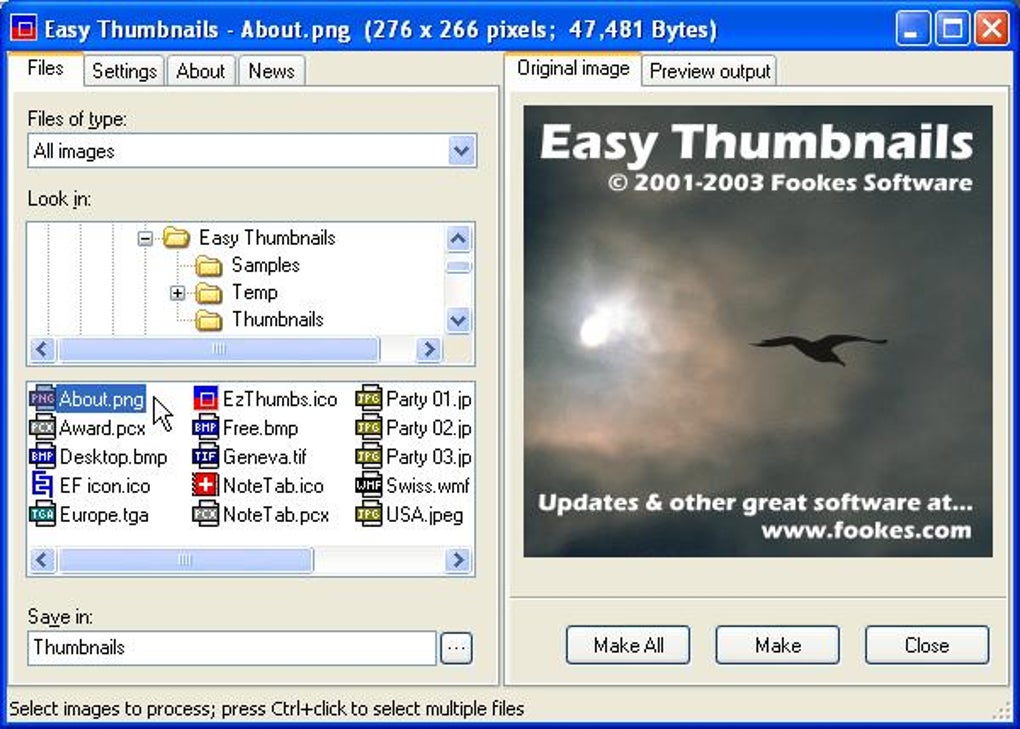
One of the most frequently praised aspects of Easy Thumbnails is its “elegant interface.” In an era where software often attempts to impress with flashy, sometimes overwhelming, designs, Easy Thumbnails opts for clarity and intuitiveness. The layout is clean, logical, and easy to navigate, minimizing the time it takes for new users to become proficient. The central focus is always on the images themselves and the actions you want to perform on them.
The process begins with a “simple file selector and built-in image viewer.” This integrated approach means users don’t need to switch between different applications to find, select, and preview their images. You can browse your computer’s file system directly within Easy Thumbnails, view thumbnails of your images, and pick out the ones you want to process. This capability extends to selecting images “individually, in groups, or in whole folders,” offering maximum flexibility for various workflows. Whether you need to generate a single thumbnail for a specific image, process a handful of pictures from a recent event, or convert an entire directory of vacation photos, Easy Thumbnails handles it all with equal ease. The visual feedback provided by the built-in viewer during selection is invaluable, ensuring that you’re always working with the correct images and that the results meet your expectations. This streamlined selection and viewing process is a core component of the software’s efficiency, allowing users to quickly move from intention to execution without unnecessary steps or confusion.
Under the Hood: Technical Specifications and System Compatibility
Easy Thumbnails, developed by Fookes, is a lean yet powerful application. Its version 3.0 was last updated on November 27, 2008, showcasing its longevity in the market. Despite this older update date, its core functionality remains highly relevant, especially for users who prefer lightweight, dedicated tools or operate on older Windows systems. The program’s modest file size of 1.07 MB is a significant advantage, particularly for users with limited disk space or slower internet connections. It means quick downloads and minimal system resource consumption, ensuring that the application runs smoothly without bogging down your computer.
Initially compatible with Windows 95 and prior versions, Easy Thumbnails demonstrated its adaptability by including improvements for “Windows Vista” in its updates, indicating its continued support across different generations of the operating system. While the specific mention of “Windows 98” under its app specs on PhanMemFree.org points to its solid foundation in earlier Windows environments, its update for Vista suggests an effort to remain functional for a broader user base as operating systems evolved. The software is provided entirely in English, which contributes to its widespread accessibility, particularly in countries where English is a primary language or commonly understood.
The statistics from PhanMemFree.org highlight its sustained impact: “100,162 installations” since its addition to the catalog in 2005, with a consistent stream of “95 downloads” in a recent week. This indicates that even years after its last major update, Easy Thumbnails continues to be discovered and utilized by new users, alongside its loyal existing base. Its popularity in India, the United States, and the Netherlands further underscores its global reach and diverse applications, from personal photo management to business-related tasks requiring image optimization. These figures paint a picture of a tool that, despite its age, remains a go-to solution for its specific purpose.
Beyond Basic Creation: Advanced Features for Image Optimization
While the name “Easy Thumbnails” might suggest a rudimentary tool, the software surprises with a suite of intuitive controls that allow for more than just simple resizing. These features empower users to fine-tune the appearance and quality of their generated images directly within the application, eliminating the need to export and edit them in a separate image manipulation program. This integrated approach saves time and streamlines the entire workflow, making Easy Thumbnails a truly comprehensive solution for many basic image optimization needs.
Granular Control Over Image Attributes
Easy Thumbnails provides “slider controls” that offer a level of precision typically found in more advanced photo editors. These sliders allow users to adjust several critical image attributes:
- Rotation: Easily correct image orientation. Whether a photo was taken sideways or needs a specific rotation for a layout, a simple slide adjusts the angle. This is particularly useful for batch processing, where an entire folder of images might need a uniform rotation.
- Contrast: Enhance or soften the distinction between light and dark areas in an image. Increasing contrast can make images pop, while decreasing it can give a softer, more artistic look.
- Brightness: Lighten or darken an image. This is invaluable for correcting underexposed or overexposed photographs, ensuring that details are visible and the overall mood is correct.
- Sharpness: Adjust the clarity of image edges and details. Sharpening can make images appear crisper and more defined, which is often desirable for thumbnails where small details might otherwise be lost.
- Quality: This control is crucial for managing file size and visual fidelity. For compressed formats like JPEG, quality settings directly impact the level of compression applied. Users can strike a balance between a smaller file size (lower quality) and a visually pristine image (higher quality), depending on their specific needs, such as web optimization versus print preparation.
The genius of these controls lies in their integration with a “convenient built-in viewer.” As you manipulate the sliders, the changes are reflected in real-time on the image displayed in the viewer. This immediate feedback loop is incredibly powerful, allowing users to experiment with different settings and “check out the results” instantly. There’s no guesswork involved; you can visually assess the impact of each adjustment before committing to the final output, ensuring that every thumbnail and scaled copy meets your exact specifications. This level of interactive control significantly enhances the user experience and the quality of the final product.
Batch Processing: A Time-Saver for Large Collections
One of the most powerful and time-saving features of Easy Thumbnails is its robust batch processing capability. For anyone managing a large number of images – be it a photographer archiving client work, a web developer preparing assets for a new site, or a museum archivist digitizing historical documents – the ability to process multiple files simultaneously is a game-changer. Easy Thumbnails excels here, allowing users to “process images individually, in groups, or in whole folders.”
Imagine having thousands of photos that all need to be resized to specific dimensions for a website, or perhaps rotated and sharpened for an online gallery. Manually opening, editing, and saving each image would be an incredibly tedious and time-consuming task. Easy Thumbnails bypasses this by enabling users to apply a consistent set of transformations—including scaling, rotation, and quality adjustments—to an entire batch of images in a single operation. You simply select the folder or group of files, define your desired output parameters using the intuitive controls, and let the software do the heavy lifting.
This feature is frequently highlighted in user testimonials as a primary reason for the program’s enduring appeal. For example, a user named Jan Molendijk specifically praised this capability on PhanMemFree.org, stating, “I were wondering if i could thumbnail 27000 pictures in once & it worked almost perfectly.” While he noted a minor issue with “special signs” in some filenames requiring manual “OK-button” clicks, the overall success with such a massive batch underscores the program’s efficiency and reliability for large-scale operations. Another anonymous user commented, “Quick, easy and effective.. I use this program frequently, making thumbnails to insert in an Access database for the archives in a museum. Absolutely simple to use and copes well with single and multiple conversion of photographs.” These anecdotes vividly illustrate how Easy Thumbnails streamlines workflows, making what would otherwise be a monumental task into a quick and manageable one. The ability to define output folders also ensures that your original images remain untouched, with the processed versions saved separately, maintaining data integrity and offering peace of mind.
Why Easy Thumbnails Continues to Be a Preferred Choice
In an age where new software emerges daily, the continued relevance and popularity of Easy Thumbnails speaks volumes about its inherent quality and utility. Its enduring appeal is not just a testament to its technical merits but also to its alignment with fundamental user needs that haven’t changed much over the years. This loyalty stems from a combination of its accessibility, proven effectiveness, and the strong positive feedback from its user base.
The Free Factor: Accessibility for All
Perhaps the most compelling reason for Easy Thumbnails’ widespread adoption is its status as “freeware.” In a digital economy increasingly dominated by subscription models, paid licenses, and in-app purchases, a powerful and reliable tool that is completely free offers significant value. This accessibility ensures that anyone, regardless of their budget or professional affiliation, can leverage its capabilities. Students, hobbyists, small business owners, and non-profits alike can benefit from its features without incurring any costs.
This “free factor” isn’t merely about saving money; it’s about breaking down barriers to entry. It democratizes the ability to perform professional-grade image optimization tasks. Many individuals or organizations might not justify the expense of a full-fledged image editing suite if their primary need is just thumbnail creation and batch resizing. Easy Thumbnails fills this gap perfectly, providing a focused solution without any financial overhead. The fact that it’s a fully functional, unrestricted program, rather than a limited trial or a freemium model, further cements its appeal. Users know they are getting the complete package without hidden costs or feature limitations, making it a trustworthy and straightforward choice for image processing.
Community Acclaim and Real-World Applications
The true measure of a software’s worth often comes from its users, and Easy Thumbnails enjoys a strong, positive reputation within its community. User reviews on platforms like PhanMemFree.org consistently highlight its strengths:
- Ease of Use: “Open a file, make thumbnails. Can’t get much easier than that!” one anonymous reviewer enthusiastically stated. This sentiment echoes throughout the feedback, emphasizing the intuitive nature of the interface and the straightforward workflow.
- Effectiveness and Reliability: Many users commend its ability to perform its core function flawlessly. The aforementioned Jan Molendijk’s success with 27,000 pictures is a prime example of its robust performance in high-volume scenarios. Another user from a museum context praised its ability to cope “well with single and multiple conversion of photographs,” confirming its reliability for critical archival tasks.
- Quick Performance: The program is frequently described as “quick,” meaning users don’t have to wait long for images to be processed, even in batches. This efficiency is a critical factor for productivity, especially in professional environments where time is money.
- Stability: Despite its age, users rarely report crashes or significant bugs, indicating a well-coded and stable application. This reliability is paramount for any tool, especially one used for processing valuable digital assets.
These positive endorsements underline why Easy Thumbnails has maintained its popularity over the years. It’s a tool that consistently delivers on its promises, solving practical problems for a diverse user base. From personal photo organization to professional archiving and web development, its applications are broad and varied. The simple fact that it just “works” and does so efficiently and without cost, makes it a highly valued asset in the digital toolkit of many Windows users.
Navigating the Digital Landscape: Easy Thumbnails in Context
In today’s fast-paced digital environment, software options are abundant. For every task, there are often dozens, if not hundreds, of tools vying for attention. Placing Easy Thumbnails within this context helps appreciate its unique position and continued relevance. While newer, more sophisticated image manipulation programs exist, Easy Thumbnails holds its own by specializing in its niche and executing it exceptionally well.
A Comparison with Contemporary Tools
When considering alternatives, Easy Thumbnails stands out for its focused simplicity. Many other programs, such as Adobe Photoshop CC or PhotoScape, are comprehensive image editors that include thumbnail creation as one of many features. While these tools offer unparalleled depth for editing, their complexity and often their cost (in the case of Photoshop) can be overkill for someone who primarily needs to generate thumbnails or batch-resize images.
Other dedicated thumbnail creators exist, some of which are listed as alternatives on PhanMemFree.org:
- Video Thumbnails Maker: As its name suggests, this tool specializes in video thumbnails, a different domain.
- Thumbnail Generator: A direct competitor, also free and focused on image thumbnails, but Easy Thumbnails often gets praised for its elegance and batch processing power.
- Thumb Studio: An album generator that includes thumbnails and slideshows, offering a broader scope but perhaps less direct control over individual thumbnail specifics.
- ThumbNailer: A trial version tool, which implies a cost for full functionality.
- Icaros and Extreme Thumbnail Generator: These offer similar functionality, often with different interfaces or additional features, but Easy Thumbnails frequently wins on its blend of simplicity and comprehensive controls.
The key differentiator for Easy Thumbnails often comes down to its elegant balance. It’s not too simple that it lacks essential features like quality control or rotation, nor is it too complex that it becomes overwhelming. It finds the sweet spot, providing just enough functionality to be highly effective for its intended purpose without introducing unnecessary bloat. For users who prioritize a lightweight, efficient, and free solution for batch image processing and thumbnail creation, Easy Thumbnails remains a compelling choice, often preferred over more feature-rich but resource-intensive alternatives. Its long-standing presence and consistent performance signify that its design choices were robust and continue to meet a genuine user need.
Installation, Usage, and Maintenance Tips
Getting started with Easy Thumbnails is straightforward, reflecting its overall user-friendly design. As a small-sized utility (1.07 MB), the download from PhanMemFree.org is quick, and the installation process is typically uncomplicated, following standard Windows procedures. Once installed, the program’s intuitive interface guides users through its functionalities:
- Selection: Upon launching, users are presented with a file browser. Navigate to the folder containing your images. The built-in image viewer allows for quick previews, helping you select individual images, groups, or entire folders for processing.
- Configuration: This is where you define your output settings. Use the slider controls for desired thumbnail dimensions, rotation, brightness, contrast, sharpness, and output quality. The real-time preview in the viewer is crucial here, allowing you to fine-tune settings interactively. You can also specify the output format and location for the processed images, ensuring your originals remain untouched.
- Processing: With settings configured, a single click initiates the batch processing. Easy Thumbnails efficiently generates all the specified thumbnails or scaled copies, saving them to your chosen destination. For large batches, a progress indicator keeps you informed.
Regarding maintenance, given that the last official update was in 2008, the program is largely static. This means fewer unexpected changes or compatibility issues arising from frequent updates. However, users running very modern versions of Windows might occasionally encounter minor cosmetic glitches, though core functionality typically remains unaffected. It’s always advisable to download the software from reputable sources like PhanMemFree.org to ensure you get the legitimate, clean version. Periodically checking the output quality and file sizes can help ensure the program continues to meet your specific requirements, especially if your operating system or other software configurations have significantly changed over time. For the most part, Easy Thumbnails operates as a “set it and forget it” utility, quietly performing its task with consistent reliability.
Conclusion: The Enduring Value of Easy Thumbnails
In conclusion, Easy Thumbnails by Fookes stands as a testament to the power of well-executed, purpose-built software. It embodies the principles of simplicity, efficiency, and accessibility, delivering a robust solution for thumbnail creation and image scaling without any cost. Its elegant interface, intuitive slider controls for fine-tuning image attributes, and powerful batch processing capabilities make it an invaluable tool for a wide array of users, from digital archivists to web content creators.
Despite its last official update dating back to 2008, Easy Thumbnails has maintained its relevance and popularity, a fact evidenced by its consistent download numbers and positive user reviews on platforms like PhanMemFree.org. It continues to be celebrated for its ease of use, speed, reliability, and the sheer convenience it offers in managing large collections of images. In a digital world often cluttered with overly complex or expensive solutions, Easy Thumbnails offers a refreshing, straightforward alternative that simply gets the job done. For Windows users seeking a dependable, lightweight, and free application to manage their image dimensions and quality, Easy Thumbnails remains an excellent and highly recommended choice, proving that true utility often lies in elegant simplicity.
File Information
- License: “Free”
- Version: “3.0”
- Latest update: “November 27, 2008”
- Platform: “Windows”
- OS: “Windows 98”
- Language: “English”
- Downloads: “45.8K”
- Size: “1.07 MB”


