
Easy Video Cutter is a straightforward video editing and conversion tool designed for ease of use, particularly for beginners. While it lacks some advanced features found in professional-grade software, its simplicity and effectiveness make it a valuable option for basic video manipulation tasks. This review delves into the software’s functionalities, pros and cons, and compares it to alternative options.
Core Features and Functionality
Easy Video Cutter’s primary function is to cut and convert video files. It’s not a multifaceted video editor with extensive capabilities like advanced effects or intricate timeline editing. Instead, it focuses on providing a quick and easy way to trim videos or change their formats. This streamlined approach makes it particularly appealing to users who need a simple, efficient solution without the complexities of professional software.
The software boasts support for a wide array of video formats, including but not limited to AVI, MPG, DAT, ASF, WMV, FLV, MPEG-1/2, DVD/SVCD/VCD, VOB, Divx, xVid, MOV, MP4, 3GP, MKV, RM, RMVB, SWF, and formats compatible with various portable devices such as iPods, PSPs, iPhones, Zunes, BlackBerrys, Apple TVs, PS3s, Xbox 360s, Creative ZENs, Archos devices, iRivers, and more. This broad compatibility ensures that most common video files can be handled without issues.
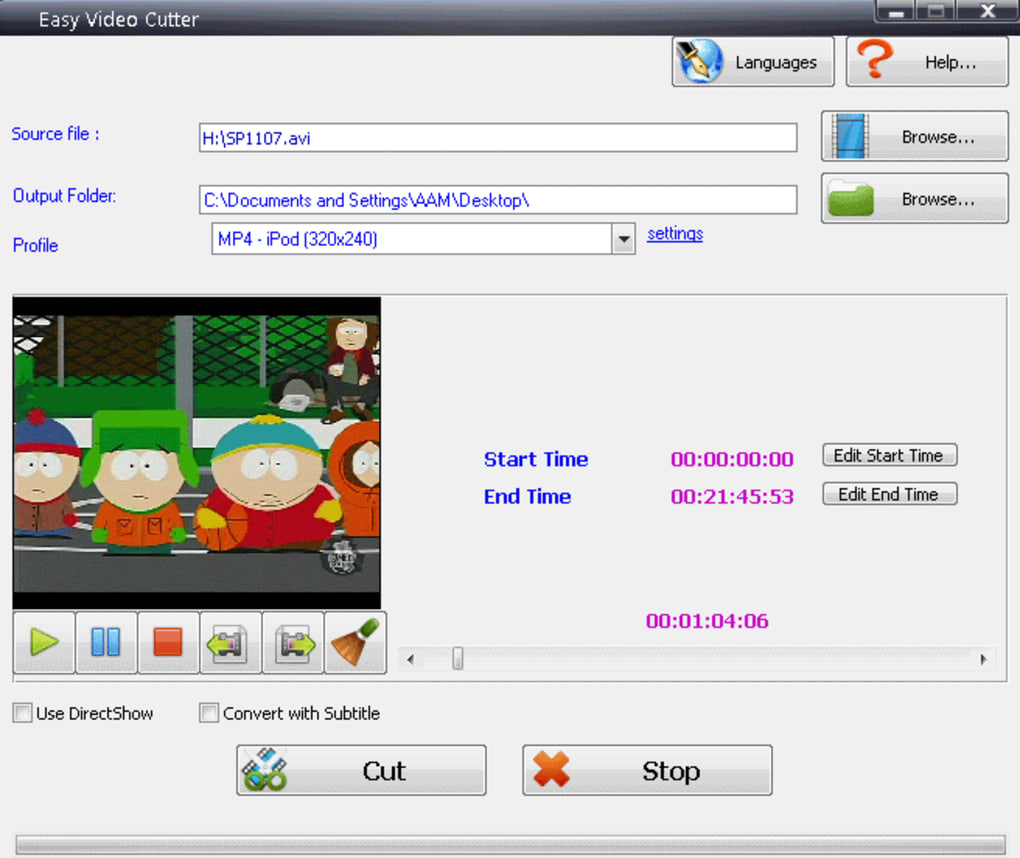
One of the key strengths of Easy Video Cutter is its user-friendly interface. The intuitive design minimizes the learning curve, allowing users to quickly grasp the fundamental functions. This ease of use is a significant advantage, especially for those unfamiliar with video editing software. The straightforward layout makes the process of cutting and converting videos remarkably efficient, saving time compared to more complex applications.
Beyond basic cutting and conversion, Easy Video Cutter also offers the ability to add subtitles directly to the video files. This is a valuable feature for those who need to create multilingual versions of their videos or add captions for accessibility purposes. The inclusion of multilingual support within the software itself further enhances its accessibility, making it usable for a wider range of users.
Technical Specifications and System Requirements
Easy Video Cutter is a relatively lightweight application, minimizing the system resources it consumes. This makes it suitable for use on older machines that might struggle with more demanding video editing software. However, it’s important to note that compatibility with newer Windows operating systems is not explicitly stated, which may pose limitations for some users. It is recommended to check the system requirements before installing the software to ensure compatibility with your specific configuration. The application is available in English, Spanish, French, and Portuguese, offering a good level of international accessibility.
The software’s installation is generally straightforward and trouble-free. Reports of malware or viruses associated with the software are absent from credible sources, which is a significant plus for user security and peace of mind. The absence of a free version is a noticeable drawback, however, restricting access for users who prefer to try before committing to a purchase.
Advantages and Disadvantages
Pros:
- Ease of use: The intuitive interface makes the software accessible to beginners. The straightforward design streamlines the video cutting and conversion processes.
- Wide format compatibility: It supports a large number of video formats, ensuring broad compatibility with various video files and devices.
- Subtitles support: The ability to add subtitles directly to videos is a useful feature for multilingual content or accessibility.
- Multilingual interface: The software’s availability in multiple languages enhances its accessibility to a global user base.
- Lightweight and efficient: The software’s low system requirements allow it to run efficiently on less powerful computers.
- Security: Reputable sources have not reported any malware or virus issues associated with Easy Video Cutter, suggesting a secure user experience.
Cons:
- Lack of advanced features: Easy Video Cutter lacks the sophisticated editing tools and features found in professional video editing software.
- No free version: The absence of a free trial or free version limits the ability to test the software before purchasing it.
- Limited operating system support: The lack of explicit compatibility details for newer Windows systems may present a barrier to entry for some users.
- Trial version only: The software is only offered as a trial version, requiring a purchase for continued use. This limits the ability to thoroughly explore its features without making a financial commitment.
Comparison with Alternative Video Cutting Software
Several alternative video cutting applications exist, each offering different features and capabilities. Some notable alternatives include Free Video Cutter, Free Video Cutter Joiner, and Moo0 Video Cutter. These alternatives often offer similar core functionalities, such as basic cutting and joining of videos, but may differ in their interface, supported formats, and additional features. A comparison of these alternatives would necessitate a detailed examination of their individual features, performance, and user reviews.
For example, Free Video Cutter often receives praise for its simplicity and ease of use, aligning with Easy Video Cutter’s strengths. However, Free Video Cutter Joiner extends its functionality by allowing users to join multiple video clips together, a feature absent from Easy Video Cutter. Moo0 Video Cutter, similarly, might present a distinct interface and set of supported formats.
Choosing between Easy Video Cutter and its alternatives depends on individual needs and preferences. Users primarily requiring basic video cutting and conversion functionality might find Easy Video Cutter sufficient. However, those seeking more advanced features or specific format support should consider alternatives and carefully weigh their respective pros and cons before making a selection.
User Reviews and Feedback
User reviews on platforms such as Phanmemfree often highlight the ease of use and effectiveness of Easy Video Cutter for straightforward video editing tasks. Many users appreciate the software’s simplicity and straightforward approach, particularly those who are new to video editing. Positive feedback generally centers on the software’s intuitive interface, efficient performance, and broad format support.
However, some criticisms revolve around the lack of advanced features, the absence of a free version, and potential compatibility issues with newer operating systems. These concerns reflect the software’s limitations and target audience. Easy Video Cutter is not designed for professional video editing; its strengths lie in its simplicity and ability to quickly accomplish basic video trimming and conversion tasks.
Conclusion
Easy Video Cutter provides a user-friendly solution for basic video cutting and conversion needs. Its straightforward interface, wide format compatibility, and subtitle support make it a viable option for beginners and users seeking a simple, efficient tool. However, the absence of a free version and limited advanced features restrict its appeal to users seeking more comprehensive video editing capabilities. Potential users should carefully consider their specific requirements and compare it to alternative options before deciding if Easy Video Cutter meets their needs. While not a professional-grade editor, it effectively fills a niche for those requiring a straightforward and easily accessible video editing tool.
File Information
- License: “Trial version”
- Version: “2.3”
- Latest update: “May 24, 2023”
- Platform: “Windows”
- OS: “Windows Vista”
- Language: “English”
- Downloads: “173.8K”
- Size: “17.57 MB”


