
In the competitive world of kitchen design and manufacturing, efficiency, accuracy, and client satisfaction are paramount. Designers, cabinet makers, and remodelers constantly seek tools that can not only bring their creative visions to life but also streamline the entire workflow from concept to construction. This is where Easycab Pro Kitchen 3D steps in, offering a robust and intuitive 3D modeling software specifically tailored for crafting intricate kitchen furniture designs and arranging them within virtual kitchen environments. Developed by Clay Reid, this trial version software, available for Windows, aims to be a comprehensive solution for professionals looking to design kitchens with unprecedented precision and flexibility.
Easycab Pro Kitchen 3D distinguishes itself as a sizable kitchen modeling software, meaning it empowers users to create furniture designs that are inherently adaptable. Unlike many conventional design programs that might impose rigid structures or require workarounds for custom dimensions, Easycab Pro Kitchen 3D embraces adaptability from its core. It eliminates the need for fillers, frames, or restrictive “euro” specifications, allowing designers to size cabinets and virtually any piece of furniture in mere seconds to perfectly fit any given room dimension. Whether the challenge involves designing a unique 45-degree angle cabinet, innovative pull-out shelves, sophisticated multi-panel raised doors, or custom raised drawer faces, this software provides the freedom to do so, ensuring these elements seamlessly integrate into the overall kitchen layout with remarkable speed.
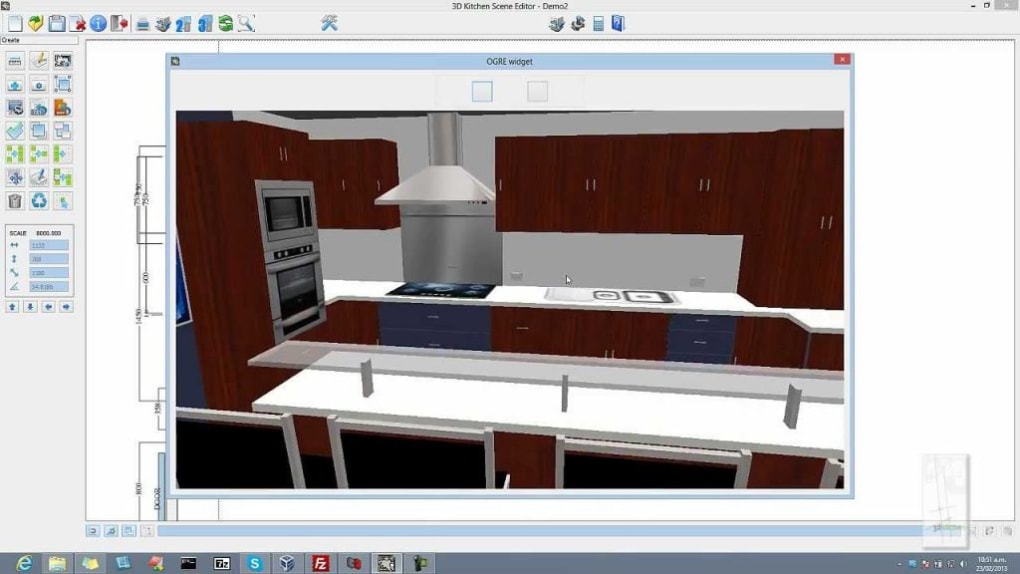
Beyond just sizing, the application boasts an extensive material library, a critical feature for any detailed design work. This library enables designers to render furniture with a vast array of materials, from various wood types to glass and even combinations of different finishes. This visual fidelity is crucial for presenting designs to clients and making informed decisions about aesthetics and functionality. Furthermore, Easycab Pro Kitchen 3D allows for swift adjustments to furniture placement within a chosen virtual room. This real-time positioning capability ensures designers can experiment with different layouts and immediately visualize how the room will appear with the new additions. Both size and position adjustments are supported across both 3D and 2D interfaces, offering maximum flexibility in the design process.
For Business: Streamlining Professional Kitchen Design
For businesses operating in the kitchen and cabinetry sector, Easycab Pro Kitchen 3D represents a significant leap forward in operational efficiency and client engagement. The professional landscape demands not just creativity but also precision, cost-effectiveness, and the ability to communicate complex designs clearly to clients and manufacturers. This software is engineered to address these demands directly, positioning itself as an indispensable tool for commercial applications.
At its heart, Easycab Pro Kitchen 3D accelerates the design phase, which is often a bottleneck in project timelines. The ability to quickly iterate on designs, make instant sizing adjustments, and visualize changes in real-time drastically reduces the time spent on drafting and revisions. Instead of sketching or relying on generic templates, designers can construct a precise 3D model that reflects the exact specifications and aesthetic preferences of their clients. This speed is not at the expense of detail; rather, the software’s flexible modeling capabilities mean that intricate details, such as specific door styles (like multi-panel raised doors) or specialized storage solutions (like pull-out shelves), can be integrated and rendered accurately.
Client communication is another area where Easycab Pro Kitchen 3D shines. Presenting a fully rendered 3D model of a proposed kitchen allows clients to visualize their future space in a way that 2D drawings simply cannot achieve. They can “walk through” their virtual kitchen, assess the flow, and understand how each element interacts. The software’s capacity to display designs in various wood grains is particularly valuable here, allowing customers to make definitive choices on finishes. This immersive experience minimizes misunderstandings, reduces the likelihood of costly changes post-production, and ultimately leads to higher client satisfaction and trust. For a business, this translates into fewer reworks, quicker project approvals, and a stronger reputation.
Moreover, the integration with manufacturing processes is a powerful business advantage. The ability to export models for CNC machines means that designs created in Easycab Pro Kitchen 3D can be directly translated into production. This level of integration bridges the gap between design and fabrication, minimizing manual errors and significantly speeding up the manufacturing process. It supports various construction methods, including fifty percent dado, blind dado, and rabbet construction, catering to different manufacturing preferences and ensuring that the digital design translates flawlessly to the physical product. This efficiency is critical for businesses looking to scale their operations, reduce lead times, and deliver high-quality custom kitchens consistently.
Multimedia: Immersive 3D Visualization and Realistic Previews
In the realm of modern design, multimedia capabilities are not just a luxury but a necessity, especially when dealing with client-facing projects like kitchen renovations. Easycab Pro Kitchen 3D excels in this aspect, transforming abstract ideas into tangible, immersive 3D visualizations that captivate clients and facilitate informed decision-making.
The core strength lies in its sophisticated 3D modeling engine. Unlike generic CAD software, Easycab Pro Kitchen 3D is purpose-built for kitchens, ensuring that every cabinet, countertop, and appliance can be rendered with exceptional realism. The large material library plays a pivotal role here, allowing designers to experiment with a vast array of textures and finishes – from the grain of different wood species to the sheen of various metals and the translucency of glass. This enables the creation of highly detailed visual representations that accurately reflect the final product, helping clients truly envision their dream kitchen. The subtle nuances of light interaction with different materials can be simulated, adding another layer of realism to the previews.
Beyond individual furniture pieces, the software provides a comprehensive virtual kitchen environment. It includes features for designing 2D floor plans, adding floor tiles, integrating realistic appliances, furnishings, textures, and wallpapers. Crucially, these elements are presented within a layout of 10 distinct 3D kitchen rooms. This means designers aren’t just placing furniture in a void; they are populating fully furnished, contextualized spaces. This feature is invaluable for understanding how a design will look and feel within a complete room setting, considering factors like room dimensions, window placement, and natural light. Clients can see how a specific cabinet color harmonizes with the chosen flooring or how an appliance fits into the overall aesthetic.
The ability to rapidly change furniture position and size in both 3D and 2D interfaces further enhances the interactive visualization experience. A designer can instantly shift a wall cabinet, resize an island, or adjust the orientation of a dishwasher, and the changes are immediately reflected in the 3D preview. This fluidity allows for dynamic presentations, where clients can provide feedback and see their suggestions implemented in real-time. This iterative process fosters collaboration and ensures the final design meets the client’s expectations precisely. The detailed representation of various wood grains, allowing clients to virtually “try on” different finishes, is a powerful sales tool, eliminating guesswork and boosting confidence in their choices. In essence, Easycab Pro Kitchen 3D transforms the design presentation into an immersive storytelling experience, ensuring that every aspect of the kitchen is visualized with unparalleled clarity and realism.
Productivity: The Power of Integrated Estimation and Project Management
While visual design is crucial, the practicality of any project lies in its execution, which heavily relies on accurate planning and resource management. Easycab Pro Kitchen 3D significantly boosts productivity by integrating powerful estimation and project management tools directly into the design workflow, moving beyond mere aesthetics to provide actionable data.
One of the most noteworthy features is its integrated material calculating tool. For any designed furniture piece, the software automatically generates an estimated list of required materials. This is a game-changer for budgeting, procurement, and minimizing waste. The list is not just a general overview; it provides a precise cutlist, detailing part sizes, and even specifying rabbet and dado locations. This level of detail is invaluable for manufacturers, as it directly informs the cutting and assembly process, drastically reducing the potential for errors and speeding up production. Imagine the time saved by not having to manually calculate quantities for hundreds of individual components across multiple cabinets!
Furthermore, the app can create a list of parts options for different materials. This means that if a client is considering multiple material choices (e.g., different wood types or finishes), the software can generate comparative material lists, aiding in cost analysis and client decision-making. This feature not only streamlines the estimation process but also enhances transparency and flexibility in project proposals.
Beyond material specifics, Easycab Pro Kitchen 3D also offers a list of suggested positions for different items. While designers ultimately have creative control, these suggestions can serve as a starting point or a double-check for optimal layouts, especially useful for newer designers or when exploring unconventional arrangements. This subtle guiding hand contributes to more efficient design exploration and ensures functional layouts.
The integration of these features means designers no longer need to switch between multiple software applications for design, estimation, and basic project planning. Everything is contained within a single, cohesive environment. This reduces administrative overhead, minimizes data entry errors, and allows designers to focus more on their creative work rather than tedious calculations. The comprehensive nature of the software, encompassing not just visual design but also the practicalities of material estimation and precise component detailing, makes it a true productivity engine for any kitchen design and manufacturing business. This seamless flow from design to detailed planning is a hallmark of truly effective professional software.
Utilities & Tools: Enhancing Your Design Ecosystem with Connectivity
In today’s interconnected digital landscape, the power of a software application is often amplified by its ability to integrate with other tools and systems. Easycab Pro Kitchen 3D understands this principle, offering a suite of utilities and tools that extend its functionality beyond standalone design, fostering a more collaborative and efficient design ecosystem.
A significant advantage for professionals is the software’s capability to import projects from other similar design tools. Specifically, it supports importing from applications like Cut2D and VCarve. This interoperability is crucial for designers who might be working with existing files from these programs or collaborating with partners who utilize them. It means that previous investments in design work are not lost, and projects can seamlessly transition into Easycab Pro Kitchen 3D for further refinement, visualization, or material estimation. This import functionality avoids the tedious and error-prone process of recreating designs from scratch, saving considerable time and effort.
Furthermore, Easycab Pro Kitchen 3D is not just about design; it’s also about facilitating manufacturing. It supports various types of construction methods, including fifty percent dado, blind dado, and rabbet construction. This technical precision is vital for ensuring that the virtual design accurately translates into a physically buildable product. By integrating these construction details directly into the design process, the software helps prevent manufacturing errors and ensures structural integrity, aligning the design intent with fabrication realities.
Perhaps one of the most powerful utilities for modern cabinet making is the tool’s ability to create models for any CNC (Computer Numerical Control) machines. This feature is a cornerstone of advanced manufacturing. Once a kitchen design is finalized in Easycab Pro Kitchen 3D, the software can generate the necessary files and instructions for CNC routers and other automated machinery. This direct link between design and fabrication revolutionizes the production process, allowing for highly accurate, repeatable, and efficient manufacturing of custom cabinets and components. It minimizes manual labor, reduces production time, and ensures a consistently high level of quality, making it an indispensable asset for businesses leveraging automated manufacturing techniques.
Finally, the software includes helpful utilities for client interaction, such as displaying kitchen designs in multiple wood grains. While seemingly a visual feature, it’s a powerful tool for customer engagement, enabling clients to easily compare and decide on their preferred aesthetic without needing physical samples. This speeds up the decision-making process and adds a layer of professionalism to client presentations.
These integrated utilities and tools underscore Easycab Pro Kitchen 3D’s commitment to providing a holistic solution for kitchen designers and manufacturers. By facilitating data exchange, supporting industry-standard construction methods, and enabling direct manufacturing integration, it ensures that the design process is not an isolated activity but a well-connected part of a larger, efficient workflow.
A Powerful and Evolving Solution
Easycab Pro Kitchen 3D, with its trial version 9.0.69 last updated on July 25, 2022, represents a potent combination of design flexibility and practical utility for Windows users. While its user interface might be considered basic by some and there might be a learning curve, especially for beginners, its extensive feature set far outweighs these initial hurdles. With over one hundred programmable parameters and dimensions, it offers unparalleled control over every aspect of a design, from the minute details of dados and rabbets to the broader considerations of rails and side widths.
For designers, cabinet makers, and remodelers seeking a powerful software solution that can handle the complexities of kitchen design, streamline material estimation, and integrate with modern manufacturing processes, Easycab Pro Kitchen 3D is a compelling choice. Its robust capabilities for sizable modeling, a vast material library, integrated material calculator, and seamless import/export functionalities make it an invaluable asset in a competitive market. As a tool designed to empower professionals, it enables the creation of stunning, accurate, and manufacturable kitchen designs, ultimately enhancing productivity and client satisfaction.
You can learn more about Easycab Pro Kitchen 3D, download the trial, and find alternative apps or related topics like “3d Modeling For Windows,” “Graphics Program,” and “Material Design” at PhanMemFree.org. The software also offers a wealth of resources in multiple languages, including Arabic, German, Spanish, French, Indonesian, Italian, Japanese, Korean, Dutch, Polish, Portuguese, Russian, Swedish, Thai, Turkish, Vietnamese, and Chinese, highlighting its global reach and accessibility.
App specs License: Trial version Version: 9.0.69 Latest update: July 25, 2022 Platform: Windows OS Windows 2000 Language: English Downloads: 42.8K Last month’s downloads: 25 Developer: Clay Reid
File Information
- License: “Trial version”
- Version: “9.0.69”
- Latest update: “July 25, 2022”
- Platform: “Windows”
- OS: “Windows 2000”
- Language: “English”
- Downloads: “42.8K”


