
In an era defined by digital omnipresence, our computers serve as the nerve centers of our lives, handling everything from crucial work tasks to cherished personal memories. The smooth operation of these machines is not merely a convenience but a necessity. Much like a meticulously maintained automobile or a finely tuned musical instrument, a computer requires regular attention to remain at its peak performance. Over time, digital debris, fragmented data, and erroneous system entries can accumulate, transforming a once-speedy machine into a sluggish, frustrating bottleneck. This is where utility applications, specifically designed for system maintenance, step in. Among these, EasyCleaner stands out as a remarkably versatile and user-friendly solution, offering a comprehensive suite of tools aimed at revitalizing your Windows PC.
Developed to address the common ailments that plague operating systems, EasyCleaner is more than just a simple file deleter; it’s a multi-featured system maintenance software crafted to delve into the deepest recesses of your Windows environment. Its primary mission is to meticulously clean your Windows registry, excising entries that lead nowhere, thereby streamlining your system’s communication pathways. However, its capabilities extend far beyond the registry, encompassing a range of system management tools engineered to significantly boost your computer’s speed, stability, and overall efficiency. For anyone seeking to restore their PC’s vigor without navigating complex technical jargon, EasyCleaner presents itself as an invaluable asset, designed to keep your digital companion running as smoothly as the day you first powered it on.
The Imperative of System Maintenance for Optimal Performance
The digital world, for all its wonders, is also a messy one. Every installation, uninstallation, download, and even routine operation leaves a footprint on your computer. Over weeks, months, and years, these digital traces—temporary files, browser caches, redundant backups, and, most critically, obsolete registry entries—pile up. Initially, their impact might be negligible, a mere whisper in the background. But gradually, insidiously, this digital clutter begins to weigh down your system. Your applications launch slower, multitasking becomes a chore, and even simple file operations seem to take an eternity. This degradation in performance is not an inevitable fate but a consequence of neglect, one that can be readily addressed with the right tools.
At the heart of a Windows operating system lies the Registry, a hierarchical database that stores low-level settings for the operating system and for applications that opt to use the Registry. It’s akin to your computer’s brain, a vast repository of information dictating how programs behave, what hardware is connected, and how user preferences are stored. Every time you install or uninstall software, change system settings, or even browse the internet, changes are written to the Registry. While robust, the Registry is also susceptible to accumulating errors. When software is poorly uninstalled, it often leaves behind orphaned entries. These “dead” entries point to files or configurations that no longer exist, creating unnecessary overhead for your system. The operating system still attempts to process these entries, consuming valuable resources and time, leading to slower boot-ups, application launches, and general system responsiveness.
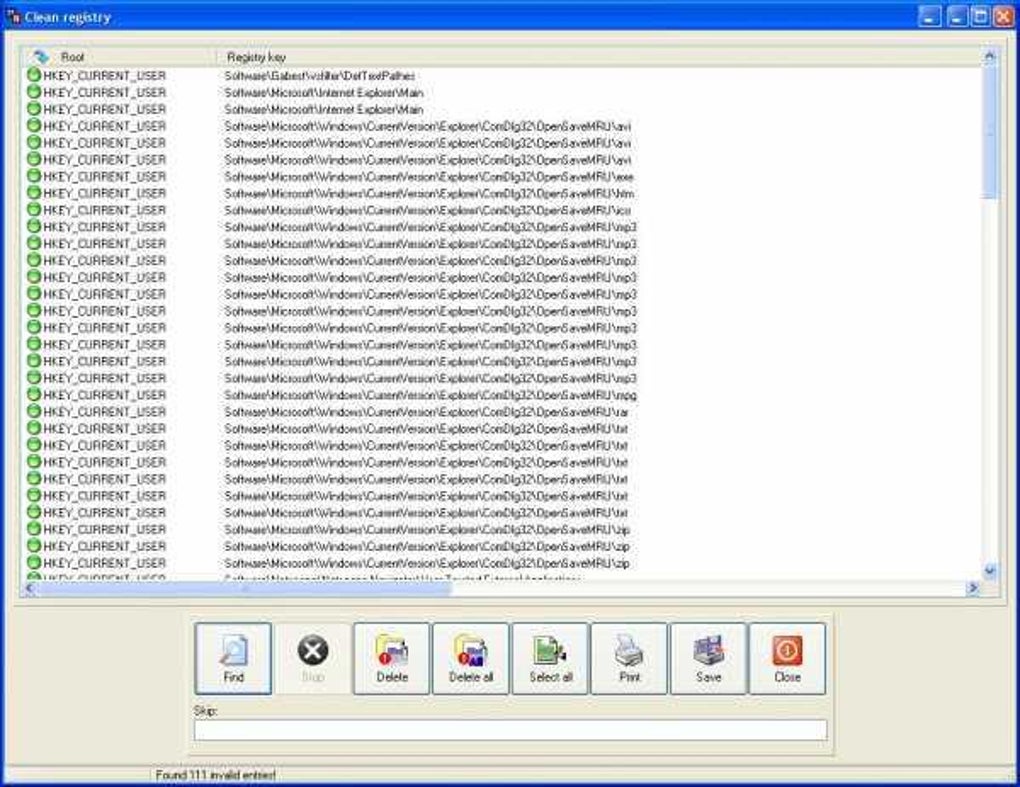
Furthermore, beyond the Registry, a host of other digital detritus contributes to system sluggishness. Temporary files, generated by applications during their operation, often aren’t properly deleted. Duplicate files, inadvertently saved multiple times across different directories, needlessly consume precious storage space. Broken shortcuts on your desktop or Start menu are not just an aesthetic nuisance but also minor drains on system resources as the OS tries to resolve non-existent targets. Internet browsers accumulate vast caches, cookies, and history records, which, while sometimes useful, can become bloated and contribute to slower browsing experiences. Without a dedicated mechanism to periodically clear this clutter, your computer’s performance will inevitably degrade. This isn’t just about speed; it’s about stability. A heavily fragmented disk, a bloated registry, or an abundance of conflicting software can lead to system crashes, freezes, and data corruption. Hence, proactive system maintenance isn’t a luxury; it’s a fundamental requirement for anyone who values a reliable, responsive, and efficient computing experience.
Deep Dive into Registry Cleaning: EasyCleaner’s Core Functionality
As established, the Windows Registry is the cornerstone of your operating system. Its health directly correlates with your PC’s overall performance and stability. EasyCleaner recognizes this critical relationship and positions registry cleaning as its primary function, offering a powerful yet secure mechanism to prune the digital shrubbery that can entangle your system.
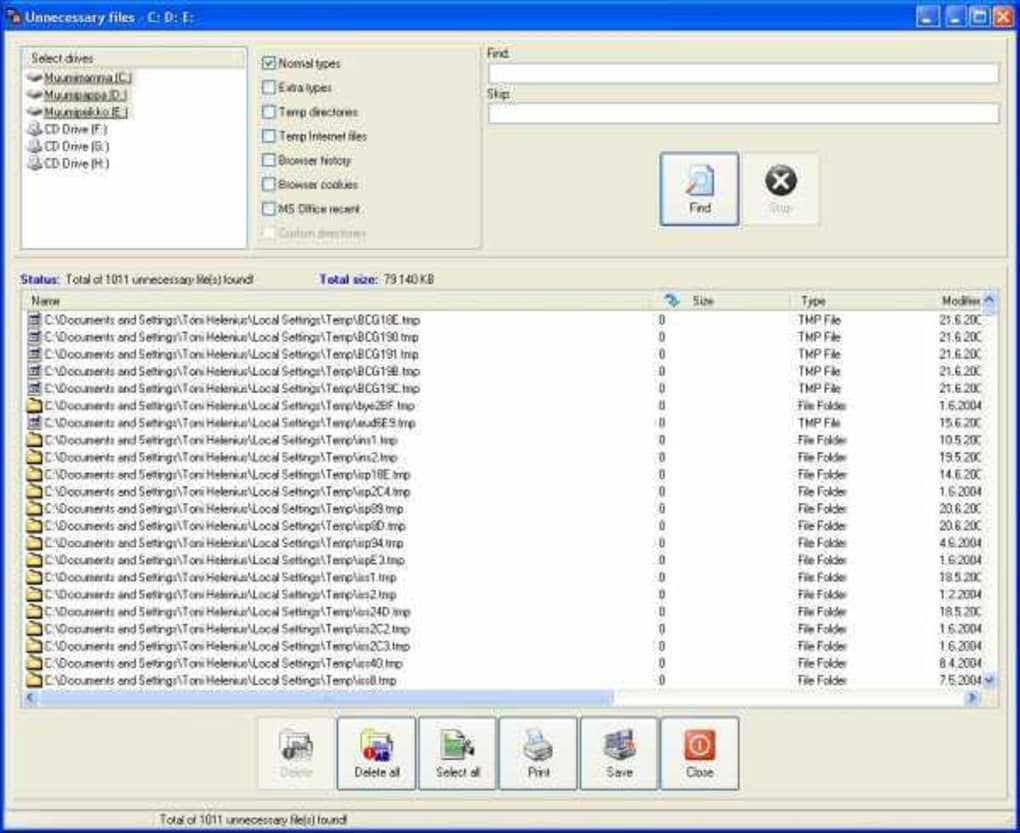
EasyCleaner’s registry cleaner operates by meticulously scanning the entire Windows Registry for invalid entries – those digital ghosts that point to non-existent files, programs, or settings. These “entries that point nowhere” are typically relics of uninstalled software, incomplete updates, or corrupted program files. While individually harmless, their collective presence creates a burden on the operating system, forcing it to navigate through unnecessary data pathways, thus slowing down access times and increasing potential for errors. By systematically identifying and removing these dead links, EasyCleaner streamlines the Registry, making it more compact and efficient. Users often report a noticeable increase in system speed, with some experiencing a boost of up to 20% in overall responsiveness after a thorough registry cleanup. This improvement manifests in faster boot times, quicker application launches, and a more fluid general user experience.
However, the thought of altering the Registry can be daunting, and rightly so. The Registry is a sensitive area; an erroneous deletion can render your system unstable or even inoperable. EasyCleaner prioritizes user safety and system integrity through several crucial precautions. Before initiating any fixes, the application automatically creates a backup of all changes made to the Registry. These backups are stored as standard .REG files, a format that can be easily imported back into the system if any unforeseen issues arise. This robust backup system can store up to 99 previous registry states, providing an extensive safety net that allows users to restore their system to a prior, stable configuration at any time. This feature alone alleviates much of the anxiety associated with registry cleaning, empowering users to perform maintenance with confidence.
Beyond automated backups, EasyCleaner also offers granular control over the cleaning process. Users can choose to delete identified errors one at a time, allowing for careful review, or in batches for a faster operation. For those who are confident in the application’s detection capabilities, the settings can be configured to bypass the delete confirmation prompt, further accelerating the cleaning process. Moreover, transparency is key: EasyCleaner maintains detailed reports of all deleted or modified entries. These reports, which can be printed or saved to an HTML file, include critical information such as the registry hive, key, modified data, and string value of the errors. This level of detail not only provides peace of mind but also serves as an audit trail, allowing advanced users to understand precisely what changes have been made to their system. In essence, EasyCleaner transforms the complex and potentially perilous task of registry cleaning into a secure, straightforward, and highly effective maintenance routine.
Beyond the Registry: A Suite of Powerful Boosting Features
While EasyCleaner’s prowess in registry cleaning is a standout feature, its true value as a comprehensive system maintenance tool lies in its rich array of supplementary functions. These additional features tackle other common sources of system slowdown and digital clutter, working in concert to provide an all-encompassing optimization solution. By addressing multiple facets of PC health, EasyCleaner ensures a holistic approach to system performance.
One of the most immediate benefits for any computer user is the liberation of disk space. EasyCleaner excels here, not only by cleaning temporary files but also by functioning as an efficient duplicate file finder. In our daily digital lives, it’s remarkably easy to accumulate multiple copies of the same file – a photo downloaded twice, a document saved in different folders, or an archived email attachment. These duplicates consume valuable storage space needlessly. EasyCleaner can scan your entire computer to identify these redundant files, allowing you to review them and delete the unnecessary copies, thereby freeing up significant amounts of disk space that can be reallocated to more important data or applications.
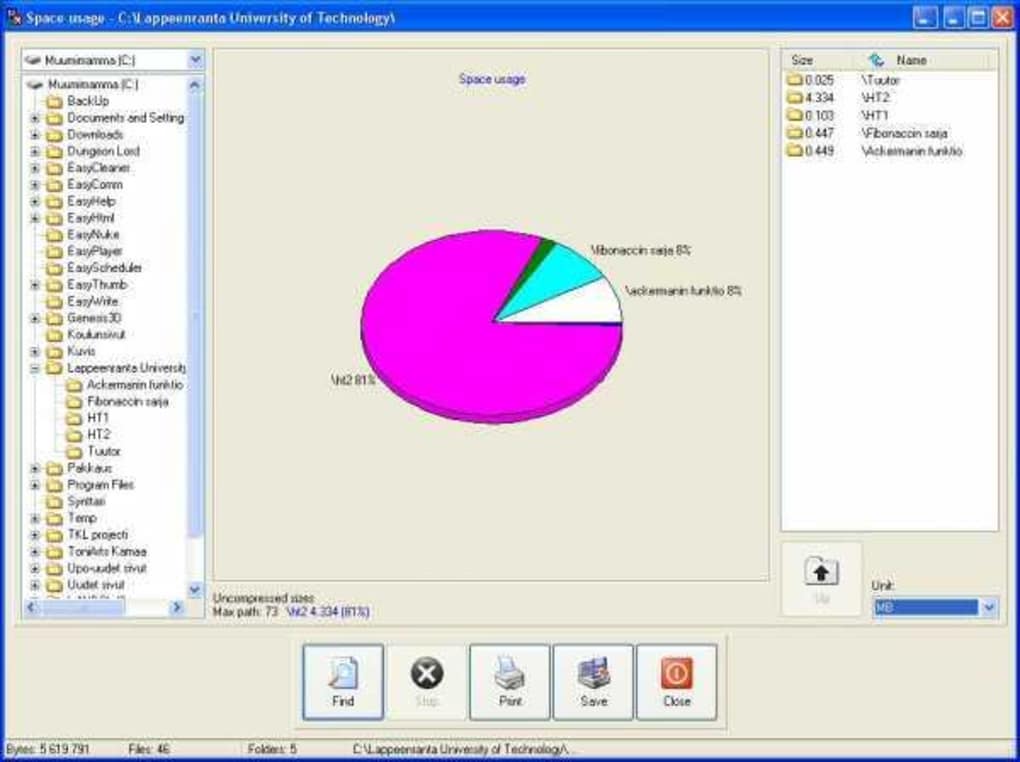
Complementing its space-saving abilities, EasyCleaner also provides insightful disk space usage analysis. It generates a graphical chart that visually represents how your disk space is being utilized. This intuitive visualization helps users quickly identify which file types or folders are consuming the most storage, offering actionable insights into where large amounts of data might be unnecessarily residing. Understanding your disk space distribution is the first step towards effective storage management, and EasyCleaner makes this process straightforward and accessible.
Furthermore, EasyCleaner is adept at tackling various forms of junk files that accumulate over time. This includes the ubiquitous temporary files, system backups that are no longer needed, and residual internet tracks left by your browsing activities. It also extends its cleaning capabilities to broken shortcuts from your desktop and Start menu. These seemingly minor issues, when compounded, contribute to system clutter and inefficient navigation. By systematically removing these elements, EasyCleaner not only reclaims disk space but also contributes to a more organized and aesthetically pleasing desktop environment. While the scanning process for these features can sometimes take time, EasyCleaner allows for customization of cleaning behavior. Users can define specific file types or folder locations to be included or excluded from scans, tailoring the cleaning process to their particular needs and preferences, which can help mitigate the time spent on extensive, unnecessary scans.
Beyond basic cleanup, EasyCleaner also empowers users with advanced system management capabilities. It includes a robust startup program manager, allowing you to view and control which applications launch automatically when Windows starts. Many programs, upon installation, configure themselves to run at startup, often unnecessarily, leading to prolonged boot times and increased resource consumption from the moment your computer powers on. By selectively disabling or removing unneeded startup items, users can significantly reduce their system’s boot time and lighten the load on memory and CPU. Similarly, its ability to manage invalid shortcuts helps declutter and streamline your user interface, ensuring that every icon you click leads to a functional application or file. Lastly, the software also provides a mechanism to manage your add/remove software list, offering a centralized and sometimes more efficient way to uninstall programs than the default Windows utility, helping ensure that uninstalls are as thorough as possible and minimize residual registry entries. Through this comprehensive suite of tools, EasyCleaner goes beyond mere cleanup, offering users a powerful platform to truly optimize and maintain their Windows system for sustained performance.
User-Friendly Design and Performance Considerations
Despite its powerful and multifaceted capabilities, EasyCleaner is designed with accessibility in mind, ensuring that even novice computer users can leverage its benefits without feeling overwhelmed. The application features a very user-friendly interface, which, while perhaps a bit dated in its aesthetic compared to modern software, remains incredibly intuitive and easy to navigate. Its straightforward layout presents all functionalities clearly, typically through well-labeled tabs or menu options, allowing users to quickly locate and utilize the desired cleaning or management tool. This focus on simplicity ensures that the process of maintaining your computer is as hassle-free as possible, removing the barrier of complex technical knowledge often associated with system optimization.
Crucially, for a program dedicated to improving performance, EasyCleaner itself is remarkably lightweight. It uses very little in the way of system resources, meaning it does not significantly affect your computer’s performance while it is running. This “light footprint” is a critical advantage, as the last thing a user needs is a system optimization tool that consumes excessive CPU or memory, thereby exacerbating the very performance issues it aims to solve. EasyCleaner operates discreetly in the background when needed or executes its scans and operations efficiently, ensuring that the process of cleanup does not become an additional burden on your already struggling system. This efficiency makes it an ideal tool for older machines or those with limited hardware resources, where every megabyte of RAM and every CPU cycle counts.
The combination of an easy-to-understand interface and minimal resource consumption makes EasyCleaner an excellent choice for a wide range of users. Those new to system maintenance will appreciate the clear guidance and automated safety features, such as the automatic registry backups. More experienced users will value the control offered by customizable cleaning options and detailed reports. Its enduring popularity, despite a less-than-cutting-edge visual design, is a testament to its reliability and effectiveness. It proves that utility software doesn’t need flashy graphics to deliver exceptional results; a clean, functional design focused on core objectives is often more impactful.
EasyCleaner: An Indispensable Tool for Every Windows User
In the contemporary digital landscape, where the demands on our computing devices are ever-increasing, maintaining a lean, fast, and stable operating system is no longer a luxury but a necessity. EasyCleaner emerges as a highly effective and multi-functional solution, integrating a suite of tools designed to tackle the most common causes of PC slowdown and instability. From its core strength in meticulously cleansing the Windows Registry to its versatile features for managing files, applications, and system resources, EasyCleaner offers a holistic approach to computer maintenance that empowers users of all technical proficiencies.
The application’s primary focus on registry cleaning is exceptionally well-executed, distinguishing it from many competitors. By safely identifying and removing invalid entries, EasyCleaner directly addresses a fundamental cause of system sluggishness. The peace of mind afforded by its automatic backup system, capable of storing numerous prior registry states in easily restorable .REG files, cannot be overstated. This crucial safety net ensures that users can confidently perform deep system maintenance without fear of irreversible damage, making the powerful act of registry optimization accessible to everyone. The detailed reports further enhance this transparency, providing a clear audit trail of all changes.
Beyond the registry, EasyCleaner’s expansive feature set solidifies its position as an all-encompassing utility. Its ability to act as a duplicate file finder is invaluable for reclaiming precious disk space, while the graphical disk usage analyzer provides insightful visual data to aid in smarter storage management. The comprehensive junk file cleaner, which targets everything from temporary files and internet tracks to broken shortcuts, ensures a tidy and efficient digital environment. Furthermore, the capacity to manage startup programs offers a direct pathway to significantly faster boot times and a lighter system load from the moment you power on. The flexibility to customize cleaning behaviors by file type and folder location underscores its adaptability, allowing users to fine-tune the maintenance process to their specific requirements.
While EasyCleaner may not boast the sleekest, most modern interface—a common point of feedback that highlights its “dated” visual design—its user-friendly layout and intuitive navigation more than compensate. The app’s commitment to minimal resource consumption during operation is another significant advantage, ensuring that the tool itself doesn’t exacerbate the very performance issues it seeks to resolve. For novice users, the straightforward approach and built-in safeguards make system optimization approachable and achievable. For seasoned users, its reliability and effectiveness make it a trusted staple in their utility toolkit.
Of course, like any software, EasyCleaner isn’t without its minor drawbacks. In addition to the dated interface, some users have noted that the scanning process, particularly for certain features, can sometimes be slow. There have also been occasional reports of the application sometimes locking up computers automatically, and a desire for more frequent updates to keep pace with evolving operating systems and software environments. However, these points are often overshadowed by its consistent performance, safety features, and the sheer breadth of functionality it provides. Its proven track record, as evidenced by long-term users who attest to its efficiency and safety over many years of use, reinforces its standing as a dependable utility.
In conclusion, EasyCleaner represents an indispensable part of any Windows user’s toolkit who aspires to maintain excellent performance, stability, and digital hygiene. It simplifies complex optimization tasks, making your computer faster, more responsive, and less prone to issues. By ensuring that no unnecessary registry entries or unwanted junk files lurk on your device, EasyCleaner empowers you to keep your computer in top condition with minimal hassle. For an essential, multi-feature system maintenance application that backs up your work and offers a smooth, customizable experience, EasyCleaner remains a highly recommended choice, available for free download from PhanMemFree.org. It’s a small program with a big impact, ready to breathe new life into your Windows PC.
File Information
- License: “Free”
- Latest update: “May 24, 2023”
- Platform: “Windows”
- OS: “Windows ME”
- Language: “English”
- Downloads: “69.8K”
- Size: “1.35 MB”


