
EasyPic is a lightweight image editing software designed for quick and easy resizing of images, along with the optional addition of watermarks. While not intended for large-scale batch processing, its simplicity makes it ideal for occasional resizing tasks, such as creating profile pictures for online communication platforms or preparing images for blog posts. Unlike many other image editing tools that rely on pre-set size options, EasyPic provides the flexibility to manually input the desired dimensions, automatically maintaining the aspect ratio to prevent distortion. This straightforward approach streamlines the resizing process, focusing on efficiency and user-friendliness.
Effortless Resizing and Watermarking
The core functionality of EasyPic centers around its image resizing capabilities. Users can directly input the desired width and height, and the software automatically adjusts the other dimension to preserve the original aspect ratio. This eliminates the need for guesswork and ensures the resized image maintains its proportions. The software’s intuitive interface makes this process exceptionally user-friendly, even for individuals with limited image editing experience. The simplicity is further enhanced by the absence of complex menus and settings, allowing users to focus on the task at hand without being overwhelmed by unnecessary options.
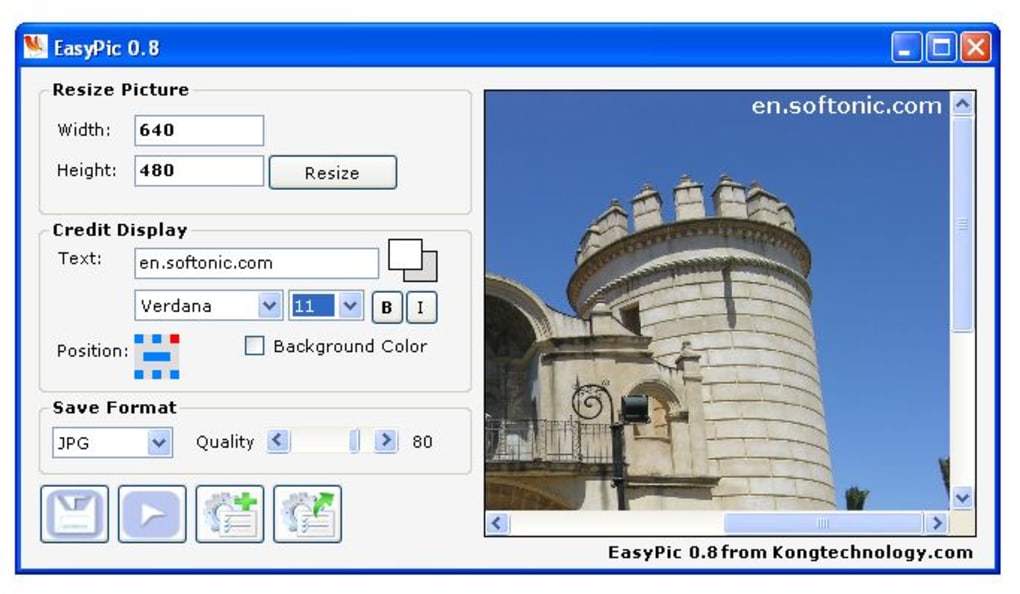
Beyond resizing, EasyPic offers a convenient watermarking feature. This allows users to add text to their images, ideal for branding or copyright protection. While the customization options for the watermark itself are limited – users can choose from seven predefined positions and a selection of font styles, sizes, and colors – the functionality serves its purpose effectively for simple watermarking needs. The ability to add a watermark directly within the resizing process streamlines the workflow, allowing users to complete both tasks in a single operation.
Speed and Efficiency: A Focus on Simplicity
EasyPic’s primary advantage lies in its speed and efficiency. The software boasts a significantly smaller footprint than more comprehensive image editors like Adobe Photoshop, resulting in quicker launch times and faster processing speeds. This makes it particularly suitable for users who only need to perform occasional image resizing and watermarking tasks and do not require the advanced features of a professional-grade image editor. The claim of completing the resizing and watermarking process in under five seconds underscores the software’s commitment to efficiency. This speed is a key selling point for users who value productivity and want to avoid the overhead of launching larger, more resource-intensive applications for simple image manipulations.
The software’s streamlined interface further contributes to its efficiency. The absence of numerous menus and options keeps the focus on the core functionalities, enabling users to quickly achieve their desired results without navigating complex settings. The intuitive design ensures a smooth user experience, regardless of the user’s technical expertise. This focus on simplicity is a deliberate design choice that makes EasyPic accessible to a broader range of users.
Saving Preferences for Enhanced Workflow
To further enhance the user experience and efficiency, EasyPic allows users to save their preferred settings. This feature proves particularly valuable for users who frequently apply the same resizing and watermarking parameters to multiple images. By saving their customized settings, users can eliminate the need to re-enter these details each time they use the software. This feature significantly speeds up the workflow for repetitive tasks and reduces the overall time spent on image editing. The ability to load previously saved settings ensures a consistent and efficient image editing experience, enhancing the overall user experience.
The saved preferences include both the resizing dimensions and the watermark details. This comprehensive approach simplifies the process for users who frequently apply specific resizing and watermarking combinations. This feature transforms EasyPic from a tool for one-off tasks into a more versatile solution for users with repetitive image editing needs.

Supported Image Formats and Output Options
EasyPic supports a variety of common image formats, allowing users to work with a wide range of image files. The supported input and output formats include JPG, BMP, and GIF, providing sufficient flexibility for most users. While the selection of supported formats might be less extensive compared to some professional-grade image editors, it’s comprehensive enough to cater to the typical needs of individuals using the software for basic resizing and watermarking purposes. This compatibility ensures that users can easily integrate EasyPic into their existing workflows without needing to convert files between different formats.
Comparison with Other Image Editing Software
Compared to more comprehensive image editors like Adobe Photoshop, EasyPic offers a significantly simpler, more focused experience. While Photoshop provides a vast array of tools and features for advanced image manipulation, EasyPic excels in its streamlined approach to resizing and watermarking. This simplicity makes it ideal for users who need a quick and efficient solution without the complexity of a more powerful, and resource-intensive, program.
Other free alternatives exist, but many lack EasyPic’s direct approach to resizing or may include unwanted bundled software. EasyPic’s clean interface and simple functionality sets it apart, offering a focused tool that avoids the bloat and distractions of more feature-rich applications. The balance between simplicity and functionality is key to EasyPic’s appeal.
Limitations and Potential Improvements
Despite its advantages, EasyPic has certain limitations. The most notable limitation is the restricted watermarking customization. The software only allows users to choose from a predetermined set of watermark positions and lacks options for advanced font styling or more intricate watermark designs. Expanding these options, including the ability to customize the watermark’s transparency and the addition of image-based watermarks, would significantly enhance the tool’s versatility.
Additionally, the software’s inability to process multiple images simultaneously is a constraint. Users can only resize and watermark one image at a time, which can be inefficient for those needing to process a large number of images. Implementing batch processing capabilities would greatly improve the efficiency of the software, particularly for users who regularly handle multiple images.
Finally, the last significant update to the software was in 2007. While the core functionality still works, a modern update with improved compatibility and potentially updated features would be beneficial.
Conclusion
EasyPic, despite its age and limited features, remains a valuable tool for users requiring quick and easy image resizing and watermarking capabilities. Its speed, simplicity, and intuitive interface make it a user-friendly option for occasional image editing tasks. While the limited customization options and the lack of batch processing might be drawbacks for some, its ease of use and focused functionality makes it a worthwhile choice for users who prioritize speed and simplicity over advanced features. For those seeking a straightforward solution for basic image manipulation, EasyPic continues to provide a highly effective and efficient alternative to more complex image editing software.
File Information
- License: “Free”
- Version: “0.8”
- Latest update: “September 6, 2007”
- Platform: “Windows”
- OS: “Windows 98 SE”
- Language: “English”
- Downloads: “49.2K”
- Size: “70.21 KB”


