
EasyScan is a free document and image scanning utility designed for Windows operating systems. Developed by Philippe Mignard, this software leverages the TWAIN standard, ensuring compatibility with a wide range of scanners and printer devices. Its straightforward interface and robust functionality make it a popular choice for users seeking a simple yet effective solution for digitizing documents and images. This guide delves into the features, functionality, and overall user experience of EasyScan, exploring its strengths and limitations.
EasyScan’s Core Functionality and TWAIN Integration
EasyScan’s primary function is to bridge the gap between your scanner hardware and your computer. It acts as an intermediary, translating the scanner’s output into easily manageable digital files. The software achieves this through its reliance on the TWAIN standard, a widely adopted interface specification for image acquisition devices. This means that EasyScan is designed to work with numerous scanners from various manufacturers, minimizing compatibility issues. The TWAIN standard provides a consistent set of commands and data formats, enabling EasyScan to seamlessly interact with different scanners without requiring specific drivers for each model.
Unlike some scanning applications that require individual drivers for each scanner, EasyScan’s utilization of the TWAIN standard significantly streamlines the installation and configuration process. This universality is a major advantage, allowing users to easily connect and utilize their scanner without needing to search for and install specific manufacturer-provided drivers. This feature makes EasyScan particularly appealing to users who might find driver installation complex or time-consuming.
However, the reliance on TWAIN also presents some limitations. While the TWAIN standard is widely supported, some specialized or older scanners may not fully integrate with it. In such cases, EasyScan might not be able to fully utilize all the features of the scanner, or it may not function at all. Users should check their scanner’s compatibility with TWAIN before relying on EasyScan.
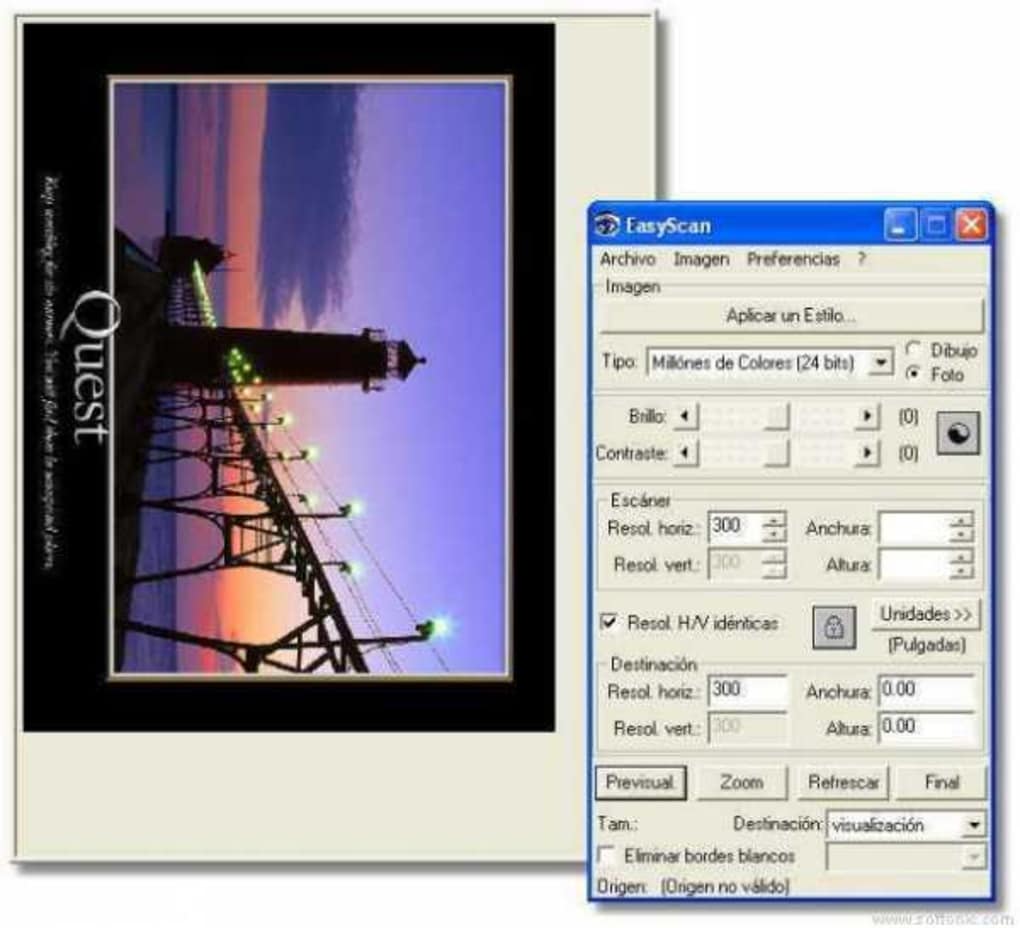
Image Formats and Color Depth Support
EasyScan supports a variety of common image formats, including BMP, JPEG, and GIF. This broad support enables users to save their scanned documents in formats suited to their specific needs. JPEG is generally preferred for photographs and images due to its compression capabilities, allowing for smaller file sizes. BMP, on the other hand, provides a lossless format, preserving image quality without compression but resulting in larger file sizes. GIF is commonly used for images with limited colors, often for graphics and logos.
The software offers adjustable color depth, allowing users to select between 256 colors and 16 colors. Choosing a lower color depth (16 colors) can result in smaller file sizes, but at the cost of some image detail. Higher color depth (256 colors) provides richer color representation but increases file size. The optimal color depth setting depends on the content being scanned and the desired balance between file size and image quality. The choice is crucial for balancing storage space with visual fidelity. This flexibility allows users to tailor the output to their storage constraints and the intended application of the scanned documents.
Advanced Features and Image Manipulation
While EasyScan primarily focuses on simple and efficient scanning, it also incorporates some basic image manipulation features. These features, while not as extensive as those found in dedicated image editing software, can prove useful for quick adjustments. While precise manipulation is limited, users can generally perform standard image corrections. The core functionalities revolve around basic adjustments like rotating and flipping the scanned image. These features streamline the process for immediate needs without relying on additional editing software, ideal for straightforward tasks and immediate use.
However, EasyScan’s image manipulation capabilities are relatively limited. Advanced editing tasks such as color correction, cropping, or more complex adjustments are not supported. For users requiring more extensive editing functionality, employing a dedicated image editing program after scanning with EasyScan would be necessary. This limitation acknowledges EasyScan’s streamlined nature, prioritizing ease of use and quick scanning over comprehensive image editing.
EasyScan’s System Requirements and Compatibility
EasyScan is primarily designed for Windows operating systems, supporting versions including Windows XP, Vista, 7, and later iterations. Its compatibility with older Windows versions makes it a valuable tool for users with legacy systems. The software’s minimal system requirements also allow it to run efficiently on less powerful machines, ensuring accessibility for a broader range of users. While it is primarily a Windows application, there is mention of an Android version, suggesting a broader platform reach.
Despite its wide compatibility, users should still check the software’s official website or documentation to confirm its compatibility with their specific operating system and scanner model before downloading and installing it. This verification helps prevent potential issues arising from outdated operating systems or incompatible scanner hardware. The software’s developers should be consulted for support in resolving compatibility issues.
EasyScan Alternatives and Comparison
Several alternative scanning applications exist, offering various features and functionalities. Some alternatives may provide more advanced image editing features, while others might focus on specific functionalities like Optical Character Recognition (OCR) for converting scanned text into editable documents. The choice of application depends on individual needs and priorities. A thorough comparison of alternatives alongside EasyScan will help potential users decide based on the desired functionality.
The key differences between EasyScan and alternatives often lie in the breadth of their features. While EasyScan provides a straightforward approach for basic scanning, more comprehensive solutions often include additional functionalities such as OCR, advanced image editing tools, and enhanced document management features. Users needing such additional capabilities might benefit from considering alternative options.
User Reviews and Feedback
User reviews highlight EasyScan’s ease of use and efficiency, with many praising its simplicity and ability to function with a wide range of scanners. However, some users have reported issues with specific scanner models or encountered limitations in its image manipulation capabilities. This feedback illustrates both the strengths and weaknesses of the application and highlights potential areas for improvement.
Gathering and analyzing user feedback, such as that found on software review platforms, can help developers identify potential bugs, improve existing features, and develop new ones based on user needs and preferences. A continuous process of gathering and acting upon feedback ensures the ongoing improvement and optimization of the software.
Conclusion: EasyScan’s Place in the Scanning Software Landscape
EasyScan remains a valuable tool for users seeking a simple, efficient, and reliable document and image scanning solution. Its reliance on the TWAIN standard ensures broad compatibility with various scanners, while its straightforward interface makes it accessible to users of all technical skill levels. However, users requiring advanced image editing functionalities or specialized features should consider alternative options.
EasyScan’s strengths lie in its simplicity and versatility. Its straightforward approach and compatibility with many scanners make it a convenient choice for everyday scanning tasks. The limitations in image manipulation are balanced by its efficiency and ease of use. EasyScan holds a strong position as a user-friendly entry point to digital document management for Windows users.
File Information
- License: “Free”
- Version: “1.13”
- Latest update: “November 25, 2021”
- Platform: “Windows”
- OS: “Windows 2000”
- Language: “English”
- Downloads: “356.2K”
- Size: “713.85 KB”


