
EasySetup is a free, lightweight Windows program categorized under Development software, specifically Installers. It simplifies the process of creating Windows installation packages, making it accessible even to users with limited technical expertise. This article delves into the features, benefits, and usage of EasySetup, exploring its strengths and limitations within the broader context of Windows installer creation tools.
Ease of Use and Functionality
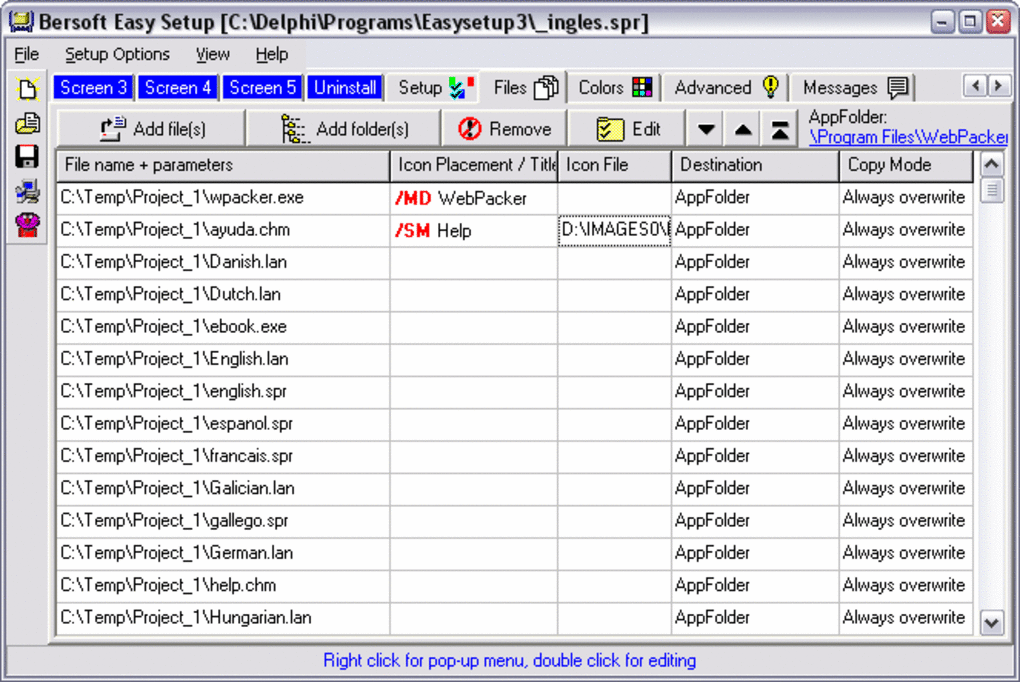
EasySetup’s primary strength lies in its intuitive interface and straightforward functionality. Unlike more complex installer creation tools that demand extensive knowledge of scripting languages or intricate configuration settings, EasySetup provides a user-friendly environment for building installers. This simplicity is a significant advantage, enabling users with varying levels of technical skill to create functional setup programs without navigating complex workflows or extensive documentation.
The core functionality revolves around the ability to bundle various files and folders into a single executable installer. This includes not only program files but also supporting documents such as user manuals, help files, or example data. The program supports a wide range of file types, extending beyond typical application files to encompass documents like Word (.doc, .docx), Excel (.xls, .xlsx), PowerPoint (.ppt, .pptx), PDF (.pdf), and HTML (.html) files. This flexibility makes it useful for distributing a variety of content, not just software applications.
Furthermore, EasySetup handles the creation of the installer package, including the generation of the necessary files and the compilation into an executable file ready for deployment. This alleviates the burden on users who may not be familiar with the intricacies of installer packaging, significantly reducing the time and effort required to prepare software or data for distribution.
Supported File Types and Applications
EasySetup’s broad compatibility with various file types expands its applicability beyond software installers. Its ability to package diverse file types, including documents, spreadsheets, presentations, and web pages, makes it a versatile tool for various applications. This versatility extends beyond software distribution to include the following:
- Software Distribution: The primary use case involves bundling application files, libraries, and other necessary components into a single installer for convenient and streamlined distribution. This simplifies the installation process for end-users, ensuring all necessary components are installed correctly.
-
Document Distribution: EasySetup can create installers for collections of documents, presentations, or training materials. This is particularly useful for distributing large sets of files or ensuring consistent versions of documentation are available to users. This simplifies the process of distributing large quantities of information and reduces the risk of version control issues.
-
Data Distribution: The tool facilitates the distribution of datasets, sample files, or configuration files needed for applications or projects. This ensures users have access to the required data without manual downloading and organization. This is particularly helpful in collaborative projects where multiple users need access to the same dataset.
-
Web Application Deployment: While not specifically designed for complex web applications, EasySetup could be used to distribute static web content or small web applications requiring minimal server-side interaction. This offers a simple deployment solution for small-scale web projects.
This versatility positions EasySetup as a practical solution for various distribution needs, beyond its core functionality as a software installer creator.
Comparison with Other Installer Creation Tools
While EasySetup excels in its simplicity, it’s crucial to compare it with more advanced installer creation tools available. Tools such as InstallShield, Advanced Installer, and Inno Setup offer a wider array of features, customization options, and support for complex installation scenarios. These tools often incorporate advanced features like:
-
Customizable installation dialogs: Advanced tools offer extensive control over the look and feel of the installation process, allowing for branding and customized user interactions.
-
Conditional logic and scripting: Complex installation scenarios, involving conditional installations based on system configuration or user input, are easily managed with scripting capabilities in advanced tools.
-
Rollback capabilities: Sophisticated rollback functionality enables the easy reversion to a previous state in case of installation failures.
-
Multiple language support: Internationalization features allow creation of installers in multiple languages, catering to a broader audience.
-
Network installations: Advanced tools often support network installations, simplifying deployment across multiple machines.
EasySetup’s simplicity means it lacks these sophisticated features. Its targeted audience is those who need a straightforward solution for creating basic installers without the complexity of advanced configuration options. Choosing between EasySetup and a more advanced tool depends on the specific needs of the project and the technical expertise of the user.
System Requirements and Limitations
EasySetup’s primary advantage—its simplicity—also contributes to its limitations. While its lightweight nature means minimal system resources are required, this translates to a restricted feature set. Its system requirements are relatively modest, generally compatible with older versions of Windows, but this also means that it may not integrate seamlessly with the latest Windows features or incorporate modern installer best practices.
Specific limitations include:
- Limited customization options: Users have minimal control over the installation process and the appearance of the installer.
-
Lack of advanced features: The program doesn’t support advanced features found in more sophisticated installer tools, such as custom actions, rollback capabilities, or silent installations.
-
Absence of scripting support: EasySetup does not offer scripting capabilities, limiting the ability to automate complex installation procedures.
-
Potential compatibility issues: Given its compatibility with older Windows versions, it might encounter compatibility issues with certain newer system configurations or file types.
Conclusion: When to Use EasySetup
EasySetup remains a valuable tool for users seeking a straightforward and user-friendly method for creating basic Windows installers. Its simplicity makes it ideal for individuals or small teams with limited technical expertise who need to create simple installers for their applications or documents. However, for complex projects requiring advanced customization, sophisticated features, or intricate installation logic, more advanced installer creation tools are better suited.
Ultimately, the choice between EasySetup and alternative tools depends on the project’s specific requirements and the user’s technical proficiency. For simple, straightforward installation needs, EasySetup’s ease of use and low resource consumption make it a compelling choice. For more complex projects, investing time in learning a more comprehensive installer creation tool will yield better results and more control over the installation process. The key is to select the tool that best aligns with the project’s complexity and the user’s technical capabilities.
File Information
- License: “Free”
- Version: “3.11”
- Latest update: “February 13, 2019”
- Platform: “Windows”
- OS: “Windows ME”
- Language: “English”
- Downloads: “6.1K”
- Size: “1.26 MB”


