
EasyWorship is a powerful presentation software specifically designed for churches and religious organizations. It streamlines the creation and delivery of engaging worship services by providing a centralized platform for managing various elements, including song lyrics, scripture readings, announcements, videos, and sermon notes. While offering a robust suite of features, the software does require a subscription for full functionality, although a free demo version is available for prospective users to explore its capabilities.
Key Features and Functionality
EasyWorship significantly simplifies the complexities of preparing and presenting church services. Its core functionalities revolve around the efficient organization and seamless presentation of multimedia content, making it an invaluable tool for church leaders and volunteers.
Integrated Song and Scripture Management: EasyWorship facilitates the creation of digital songbooks and readily accessible scripture references. Hymns and songs can be easily dragged and dropped into playlists, ensuring a smooth flow during the service. The software provides space to organize and store various versions of the Bible, allowing for quick selection of appropriate passages. This eliminates the need for manual searching and reduces the likelihood of errors during the service.
Multimedia Integration and Organization: Beyond text-based elements, EasyWorship seamlessly integrates various multimedia formats, including videos, audio files, and even live feeds. The software’s intuitive media library allows for efficient organization and quick access to these assets, significantly reducing the time spent searching for specific files. This streamlined process enhances the overall flow of the service, enabling a more focused and engaging experience for the congregation.
Enhanced Communication and Engagement: EasyWorship goes beyond simply presenting information; it also facilitates communication within the church community. The software allows for the creation and dissemination of alerts and messages, enabling church leaders to share important announcements or reminders directly to the congregation during the service or via other channels. This fosters a sense of community and ensures that vital information is readily accessible to everyone.
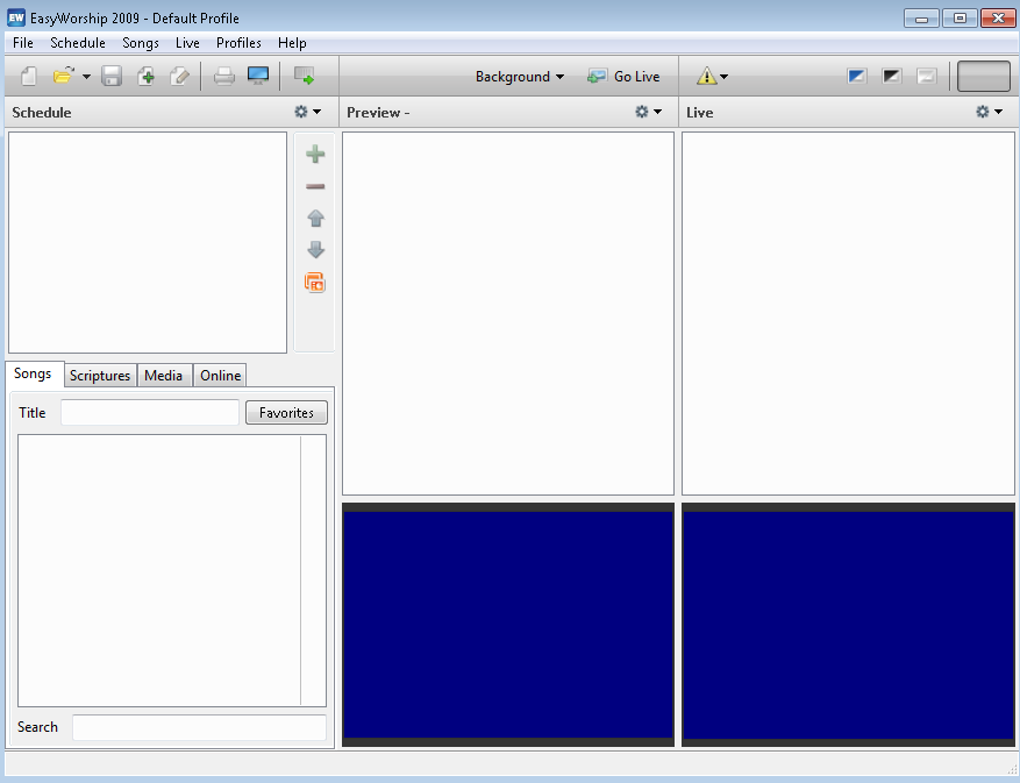
Customizable Features for Enhanced Presentation: The software offers a range of customization options, allowing users to tailor their presentations to reflect the unique style and preferences of their church. From the design of slides and backgrounds to the selection of transitions and effects, EasyWorship allows for a significant level of creative control, ensuring that presentations are visually appealing and engaging. The inclusion of tools for adding logos, creating custom clips from DVDs, and importing lyrics directly from services like CCLI’s SongSelect further enhances the software’s versatility and user-friendliness.
Scheduling and Playback Controls: EasyWorship’s advanced features extend to the scheduling and playback of music. Users can import and organize audio files for scheduled playback during a presentation, ensuring a smooth and seamless musical accompaniment to the service. The integrated media player provides comprehensive controls, including volume adjustment, mute functionality, play/pause, repeat options, and a seek bar, offering precise control over the audio playback during the service. This level of detail allows for a more professionally presented and polished worship experience.
Ease of Use and User Experience
While EasyWorship boasts a comprehensive range of features, its usability varies depending on the user’s technical proficiency. Tech-savvy individuals are likely to find the software intuitive and easy to navigate. However, users with limited computer experience may find the learning curve steeper, requiring more time and effort to master its functionalities. The software’s numerous features and options might initially feel overwhelming for beginners. The software’s developers acknowledge this potential challenge, and resources such as tutorials and support documentation are often available to assist new users.
Pricing and Subscription Plans
EasyWorship operates on a subscription-based model, offering various pricing tiers tailored to the size of the church congregation. The pricing structure typically caters to different church sizes, ranging from smaller congregations to larger ones with hundreds or even thousands of members. Each tier offers varying levels of access to features and resources. The core difference between the available subscription types, usually labeled as “Basic” and “Premium,” is the access to a broader media library. While both options receive regular updates and new feature releases, only the Premium plan provides access to a significantly larger collection of pre-designed backgrounds, motion graphics, and other media assets.
This tiered approach allows churches to choose a subscription plan that best aligns with their budget and needs, making EasyWorship accessible to a wider range of religious organizations, regardless of size or financial resources.
Alternatives to EasyWorship
For those seeking alternatives to EasyWorship, several other software options are available, each with its own strengths and weaknesses. These alternatives range from entirely free, open-source solutions to commercial offerings with comparable or less extensive functionalities. Considering budget, required features, and technical expertise is crucial when evaluating suitable alternatives. Some alternatives often cited include FreeWorship, which offers a free, simpler option, though with less advanced capabilities, and other similar presentation software tailored to religious applications.
User Reviews and Feedback
User reviews of EasyWorship reflect a spectrum of experiences. Many users praise the software’s powerful features, versatility, and ability to streamline various aspects of church service preparation. The seamless integration of multimedia content, the intuitive media management tools, and the efficient scheduling capabilities are frequently highlighted as key advantages. However, some users, particularly those with less technical experience, express frustration with the software’s learning curve and complexity. The steep learning curve for those unfamiliar with advanced presentation software is a common criticism. Overall, the feedback suggests that EasyWorship excels in its functionality and performance but could benefit from further improvements to enhance usability for a broader range of users.
Conclusion
EasyWorship stands as a prominent software solution for churches and religious organizations seeking to enhance the presentation and delivery of their services. Its robust features offer substantial advantages in managing multimedia content, streamlining workflows, and enhancing the overall worship experience. While the software’s complexity might pose a challenge for some users, its comprehensive capabilities and extensive customization options make it a valuable tool for those seeking a sophisticated and effective presentation solution. The availability of a free demo allows potential users to assess the software’s suitability before committing to a subscription, mitigating the risk of investment in a potentially unsuitable product. The decision to adopt EasyWorship or an alternative should ultimately depend on a church’s specific needs, technical expertise, and budgetary considerations.
File Information
- License: “Trial version”
- Latest update: “July 22, 2024”
- Platform: “Windows”
- OS: “Windows XP”
- Language: “English”
- Downloads: “566.2K”
- Size: “165.94 MB”


