
Edraw Mindmap is a free diagramming and mind mapping tool designed for Windows. It offers a user-friendly interface and a broad range of features, making it suitable for various diagramming needs, from simple mind maps to complex flowcharts and organizational charts. This review delves into its functionalities, ease of use, strengths, weaknesses, and overall value proposition.
User Interface and Ease of Use
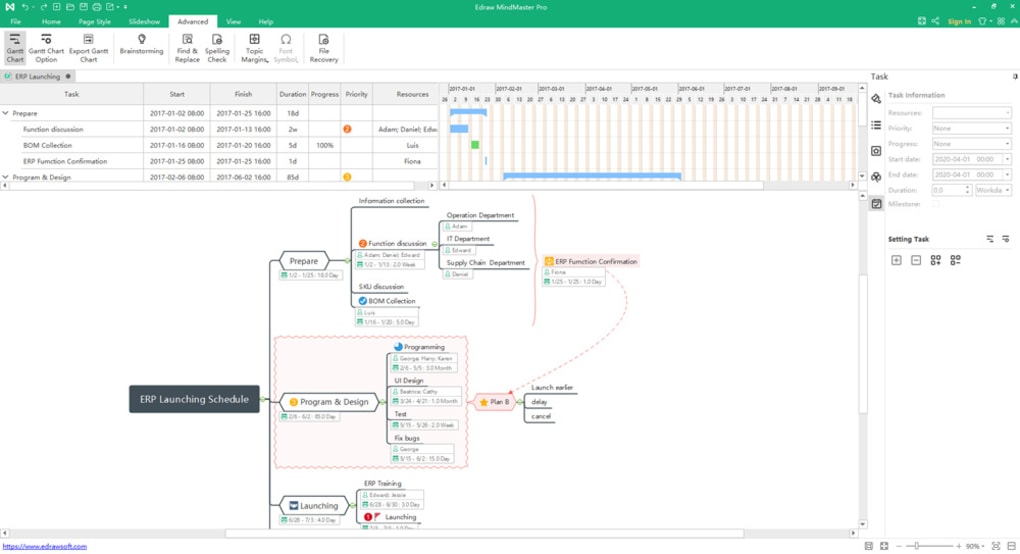
Edraw Mindmap boasts an intuitive and visually appealing interface, adopting the familiar ribbon layout commonly found in Microsoft Office applications. This design choice makes navigation straightforward, even for users unfamiliar with mind mapping software. The ribbon’s organization of tools into logical categories ensures easy access to the desired functionalities.
The program’s startup screen immediately presents users with a selection of pre-designed templates, offering a quick and easy start for various projects. This feature is particularly helpful for beginners, providing ready-made structures to jumpstart their work. The templates are diverse, covering a range of applications, eliminating the need to build a mind map from scratch.
The core functionality of Edraw Mindmap relies on a drag-and-drop interface. Users can easily drag elements from the extensive libraries on the left-hand side of the screen into the main workspace. These libraries contain a wide variety of shapes, symbols, and pre-designed components, allowing for the creation of visually rich and informative diagrams. Renaming, modifying, and repositioning elements is equally simple, contributing to a smooth and efficient workflow. The intuitive design fosters creativity and reduces the learning curve, allowing users to focus on their ideas rather than struggling with the software.
Features and Functionality
Edraw Mindmap provides a considerable array of features beyond basic mind mapping. Its capabilities extend to creating various diagrams, including flowcharts, organizational charts, and even floor plans. The extensive library of elements caters to diverse needs, from simple geometric shapes and standard symbols to more specialized icons related to fashion design or architectural planning. This versatility makes Edraw Mindmap a potentially valuable tool across various professions and contexts.
The software’s ability to handle multi-level projects is a significant advantage. It supports the creation of complex diagrams with numerous branches and sub-branches, enabling users to effectively represent hierarchical structures and intricate relationships between ideas. This feature makes it well-suited for complex projects demanding detailed visualization and organization.
Importantly, Edraw Mindmap provides support for a wide variety of file formats, allowing for seamless integration with other applications and workflows. The ability to export and import files in various formats ensures compatibility and data exchange across different platforms and programs. However, a notable limitation lies in the lack of robust sharing and collaboration features. The absence of options for importing documents, embedding hyperlinks, or integrating with cloud storage platforms restricts collaborative efforts. This constraint suggests that the software is better suited for individual use rather than large-scale team projects requiring real-time collaboration.
Strengths and Weaknesses
Edraw Mindmap’s strengths lie in its user-friendly interface, extensive libraries, and the versatility of its diagramming capabilities. The intuitive drag-and-drop interface streamlines the creation process, reducing the time and effort needed to build complex diagrams. The comprehensive library of shapes and symbols provides users with ample resources to create visually appealing and informative diagrams. The software’s ability to handle multi-level projects and support a wide range of file formats further enhances its appeal.
However, the software’s weaknesses primarily concern its limitations in collaborative features. The lack of options for sharing, importing external documents, or embedding hyperlinks significantly restricts its applicability to collaborative projects. While suitable for individual use, Edraw Mindmap falls short when compared to collaborative mind mapping tools that offer features such as real-time co-editing and cloud-based storage. This limitation is a crucial factor to consider when evaluating its suitability for team-based projects.
Comparison with Alternative Software
Several alternative mind mapping and diagramming tools are available, each with its own set of strengths and weaknesses. Some competitors, such as MindManager and XMind, offer more robust collaborative features, including real-time co-authoring and cloud-based synchronization. Others, like FreeMind, prioritize simplicity and ease of use, offering a lightweight and free alternative. The choice of software depends on individual needs and priorities. If collaborative functionality is paramount, then other options may be preferable. However, if individual use and a wide range of diagramming capabilities are the priority, Edraw Mindmap remains a strong contender.
Conclusion
Edraw Mindmap is a user-friendly and versatile diagramming tool that excels in individual use scenarios. Its intuitive interface, extensive libraries, and support for various file formats make it a suitable choice for creating a variety of diagrams, from simple mind maps to intricate flowcharts. The software’s ease of use and comprehensive features cater to diverse needs and skill levels. However, the lack of robust collaborative features restricts its applicability to team-based projects. Users prioritizing individual diagramming capabilities will find Edraw Mindmap a valuable tool, but those requiring collaborative features should consider exploring alternative software options. The balance between ease of use and features makes it a valuable addition for individual users and professionals looking for a versatile diagramming tool without the complexities of more advanced solutions.
File Information
- License: “Free”
- Latest update: “January 31, 2025”
- Platform: “Windows”
- OS: “Windows 7”
- Language: “English”
- Downloads: “127.9K”
- Size: “1.65 MB”


