
Elgato Camera Hub is a powerful software application designed to significantly enhance the video capture capabilities of Elgato webcams. This comprehensive guide will explore its features, functionalities, and benefits for both casual users and professional streamers. Whether you’re aiming to improve the quality of your video calls, create high-definition recordings, or elevate your live streaming experience, Elgato Camera Hub offers a robust suite of tools to achieve exceptional results.
Streamlining Your Workflow with an Intuitive Interface
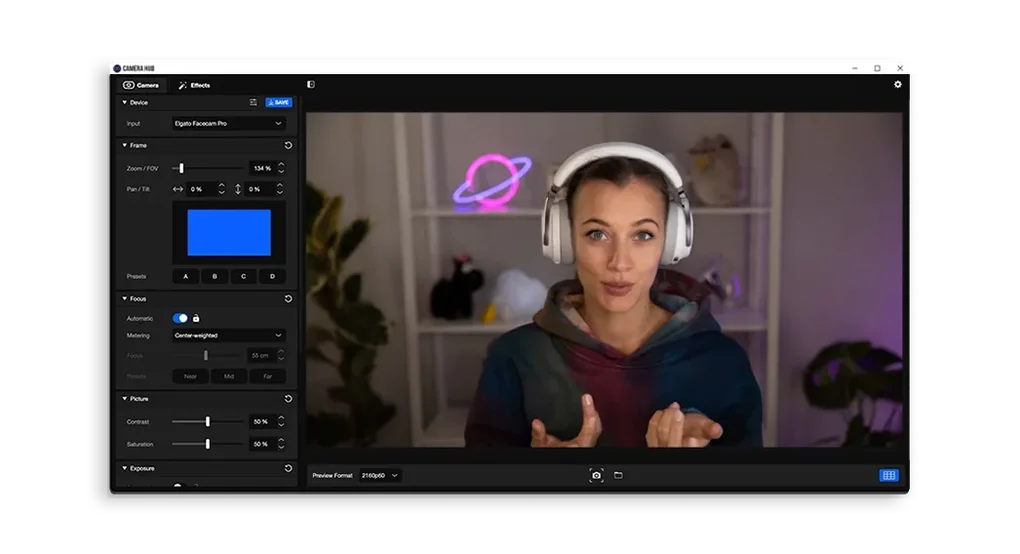
One of the standout features of Elgato Camera Hub is its intuitive and user-friendly interface. The software eschews unnecessary complexity, presenting users with a clean and straightforward layout. This ease of navigation makes it accessible to users of all technical skill levels, allowing even beginners to quickly master its powerful features. The key settings are prominently displayed, simplifying adjustments and reducing the time spent navigating menus. This user-centered design allows you to focus on your content creation rather than wrestling with complicated software.
Crucially, the intuitive interface doesn’t compromise functionality. Advanced users will find that the simplicity belies a deep level of control over their video capture. The ability to quickly access and adjust essential parameters, without being overwhelmed by options, ensures a smooth and efficient workflow. This balance between user-friendliness and robust functionality is a significant strength of Elgato Camera Hub.
Mastering Image Quality: Precision Control Over Camera Settings
Elgato Camera Hub provides granular control over a wide range of camera settings, enabling users to fine-tune their video output to perfection. This degree of control extends beyond simple adjustments, allowing for precise optimization in various lighting conditions and environments.
White Balance: Accurately setting the white balance is crucial for achieving natural and realistic colors in your videos. Elgato Camera Hub provides tools to easily adjust the white balance, compensating for different light sources and preventing color casts. The software allows for both automatic and manual adjustments, offering flexibility depending on the user’s needs and preferences.
Exposure: Correct exposure is paramount for avoiding overly bright or dark videos. Elgato Camera Hub offers sophisticated exposure controls, allowing users to precisely adjust the brightness levels to create well-balanced and visually appealing footage. This allows for optimal detail in both highlights and shadows, regardless of the ambient lighting.
Focus: Achieving sharp and clear focus is essential for high-quality video. Elgato Camera Hub facilitates precise focus adjustments, ensuring that your subjects are always in sharp focus, regardless of distance or lighting conditions. The software supports both automatic and manual focus modes, catering to different shooting styles and user preferences.
The ability to meticulously control these parameters, in addition to others, allows users to produce videos with a professional-level finish. This level of control empowers users to tailor their video settings precisely to their needs and environment.
Customizable Profiles for Effortless Setup
One of the most practical features of Elgato Camera Hub is its ability to create and save custom configurations, also known as profiles. This functionality dramatically streamlines the workflow for users with varying needs, allowing for quick transitions between different settings.
Imagine a streamer who uses their webcam for both gaming and casual conversation. They might create a profile optimized for high-frame-rate gaming, prioritizing speed and responsiveness, and a separate profile tuned for a more relaxed conversation setting, prioritizing color accuracy and natural lighting. With Elgato Camera Hub, switching between these configurations is instantaneous, eliminating the need for manual adjustments every time the context changes.
This feature isn’t just valuable for streamers. Anyone who regularly uses their webcam for different purposes – such as video conferencing, recording tutorials, or creating online content – will find this feature incredibly convenient and time-saving. The ability to quickly recall optimized settings ensures that the user is always ready to deliver high-quality video output, regardless of the application.
High-Resolution Streaming and Recording: 4K Capabilities and Beyond
Elgato Camera Hub supports high-resolution streaming and recording, including 4K capabilities, ensuring that your content looks its best. This functionality is critical for content creators and streamers who prioritize high-quality video output. The ability to capture and stream in 4K provides stunning detail and clarity, enhancing the overall viewing experience for audiences. This also future-proofs your setup, ensuring compatibility with the ever-increasing demand for high-resolution video.
The support for 4K isn’t just about resolution; it’s about the overall quality of the video. Higher resolutions allow for finer detail and smoother motion, resulting in a more immersive and engaging viewing experience. For professional streamers and content creators, this capability is essential for staying competitive and maintaining a high standard of quality.
Moreover, Elgato Camera Hub seamlessly integrates with other streaming tools and platforms, simplifying the broadcasting process. This integration helps to streamline the workflow, allowing users to focus on their content rather than struggling with technical compatibility issues. This smooth integration enhances the professional broadcasting experience significantly.
Conclusion: Elgato Camera Hub - A Powerful Tool for Enhanced Video Capture
Elgato Camera Hub is more than just webcam software; it’s a comprehensive solution for enhancing your video capture experience. Its intuitive interface, granular control over camera settings, customizable profiles, and high-resolution capabilities make it an invaluable tool for both casual users and professional content creators. Whether you’re aiming to improve your video calls, create high-definition recordings, or elevate your live streaming experience, Elgato Camera Hub provides the tools and flexibility to achieve exceptional results. The software’s ability to simplify complex processes, while still offering advanced features, makes it a compelling choice for anyone looking to improve their video capture workflow. Its focus on user-friendliness ensures that even those without extensive technical expertise can leverage its powerful capabilities, empowering them to produce high-quality video content with ease.
File Information
- License: “Free”
- Latest update: “December 11, 2024”
- Platform: “Windows”
- OS: “Windows 11”
- Language: “English”
- Downloads: “1.7K”


