
The Elgato Stream Deck has revolutionized the way streamers, content creators, and even everyday computer users interact with their digital workflows. This small, but powerful device is a physical control panel that allows for customizable button mapping, offering unparalleled control and efficiency. This review delves into the features, benefits, and potential drawbacks of the Elgato Stream Deck, providing a comprehensive understanding of this innovative tool.
Streamlining Your Workflow with Customizable Controls
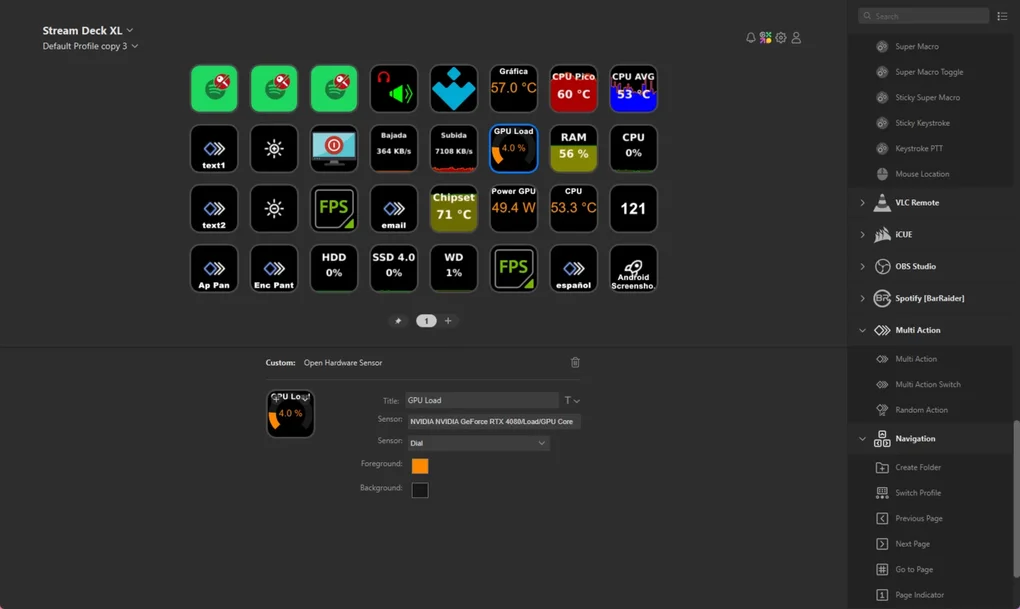
The core functionality of the Elgato Stream Deck revolves around its customizable LCD keys. These keys, typically arranged in a grid (the number of keys varies depending on the model), act as programmable shortcuts to a vast array of functions. Rather than constantly navigating through menus and software interfaces, users can assign actions to individual keys, instantly triggering them with a single touch. This level of hands-on control drastically reduces the time spent on repetitive tasks, leading to a significantly improved workflow.
The possibilities are virtually limitless. For streamers, this could mean launching specific scenes in OBS Studio, activating overlays, adjusting audio levels, starting and stopping recordings, or switching between cameras with a single button press. Content creators might use it to launch specific editing software applications, open pre-selected project files, insert pre-recorded audio clips, or control playback of video footage. Even everyday users can benefit, using the Stream Deck to control media playback, manage email, launch frequently used applications, or even control smart home devices.
The software accompanying the Stream Deck is intuitive and user-friendly, making the process of setting up and customizing the buttons remarkably straightforward. A drag-and-drop interface allows for easy assignment of actions, and users can create custom folders and organize their buttons logically for easy access. The software also supports a vast range of third-party integrations, extending its functionality even further.
Extensive Software Integration and Plugin Ecosystem
One of the most significant strengths of the Elgato Stream Deck is its broad compatibility and extensive plugin ecosystem. The software integrates seamlessly with a multitude of popular applications used by streamers and content creators, including OBS Studio, XSplit Broadcaster, Streamlabs Desktop, and many others. This interoperability eliminates the need to constantly switch between different programs, streamlining the entire production process.
Beyond the pre-integrated applications, the Elgato Stream Deck benefits from a robust community of developers who create and share custom plugins. These plugins add even more functionality, allowing users to integrate the Stream Deck with a wider range of software and services. This means that the possibilities for customization are virtually limitless, allowing users to tailor the Stream Deck to their specific needs and preferences. Whether you need to control lighting, manage social media, or interact with other specialized applications, the chances are good that a plugin exists to make it possible. This constant evolution through community contributions keeps the device relevant and versatile, adapting to the ever-changing landscape of streaming and content creation technology.
Hardware Specifications and Variations
Elgato offers several variations of the Stream Deck, each differing in size and the number of keys. The original Stream Deck, now often referred to as the “Mini,” boasts a smaller footprint with fewer keys, making it ideal for users who don’t need extensive control options or have limited desk space. The standard Stream Deck boasts a larger number of keys, allowing for more complex setups and simultaneous control of multiple functions. Elgato has also introduced the Stream Deck XL, featuring even more keys arranged in a larger grid. The larger models are best suited for users needing more controls at their fingertips.
.webp)
The physical build quality of all Stream Deck models is generally excellent. The keys offer tactile feedback and a satisfying click, while the overall construction feels durable and robust enough to withstand regular use. The displays themselves are bright and clear, even in dimly lit rooms, ensuring easy visibility of button assignments. The compact design makes it easy to transport and integrate into different setups without taking up too much space.
Beyond Streaming: Expanding the Use Cases
While the Elgato Stream Deck is frequently associated with streaming, its functionality extends far beyond the realm of live broadcasting. Its customizable controls and wide-ranging software integrations make it a valuable tool for a diverse array of users and applications.
For photographers and videographers, the Stream Deck can simplify post-production workflows. Users can assign keys to specific editing commands, quickly adjust settings, or apply filters and effects with a simple touch.
Musicians and audio engineers can leverage the Stream Deck for controlling DAWs (Digital Audio Workstations), launching virtual instruments, adjusting mixer levels, and manipulating effects in real-time.
For gamers, the Stream Deck can enhance their in-game experience. Macro assignments allow for the quick execution of complex sequences of commands, automating repetitive actions or launching specific abilities.
Professionals in various fields can also benefit from the Stream Deck’s ability to streamline their work. Quick access to frequently used applications, documents, or tools can drastically improve efficiency. It’s a versatile tool that adapts to the specific workflow of each user.
Conclusion: A Powerful Tool for Enhanced Productivity
The Elgato Stream Deck is more than just a gimmick; it’s a powerful tool that significantly improves workflow efficiency and control for a wide range of users. Its customizable controls, extensive software integrations, and ever-expanding plugin ecosystem make it a truly versatile device. While the initial investment might seem substantial, the time saved and increased productivity it provides often justify the cost. The user-friendly software, coupled with the intuitive hardware design, makes it accessible to both beginners and experienced users. Whether you’re a seasoned streamer, a content creator, a musician, or a professional in any field that involves extensive use of digital tools, the Elgato Stream Deck is a worthy investment that enhances productivity and streamlines daily tasks. The variety of models available caters to different needs and preferences, ensuring that there’s a Stream Deck to fit virtually any workspace and workflow.
File Information
- License: “Free”
- Latest update: “June 12, 2025”
- Platform: “Windows”
- OS: “Windows 11”
- Language: “English”
- Downloads: “2.4K”


