
Email Extractor is a software tool designed to efficiently collect email addresses in bulk. This makes it a valuable asset for various professionals, including internet entrepreneurs, marketers, and sales personnel, who require rapid and extensive email address gathering capabilities. This guide delves into the functionality, benefits, limitations, and alternatives of Email Extractor, offering a comprehensive understanding of this powerful tool.
Understanding Email Extractor’s Functionality
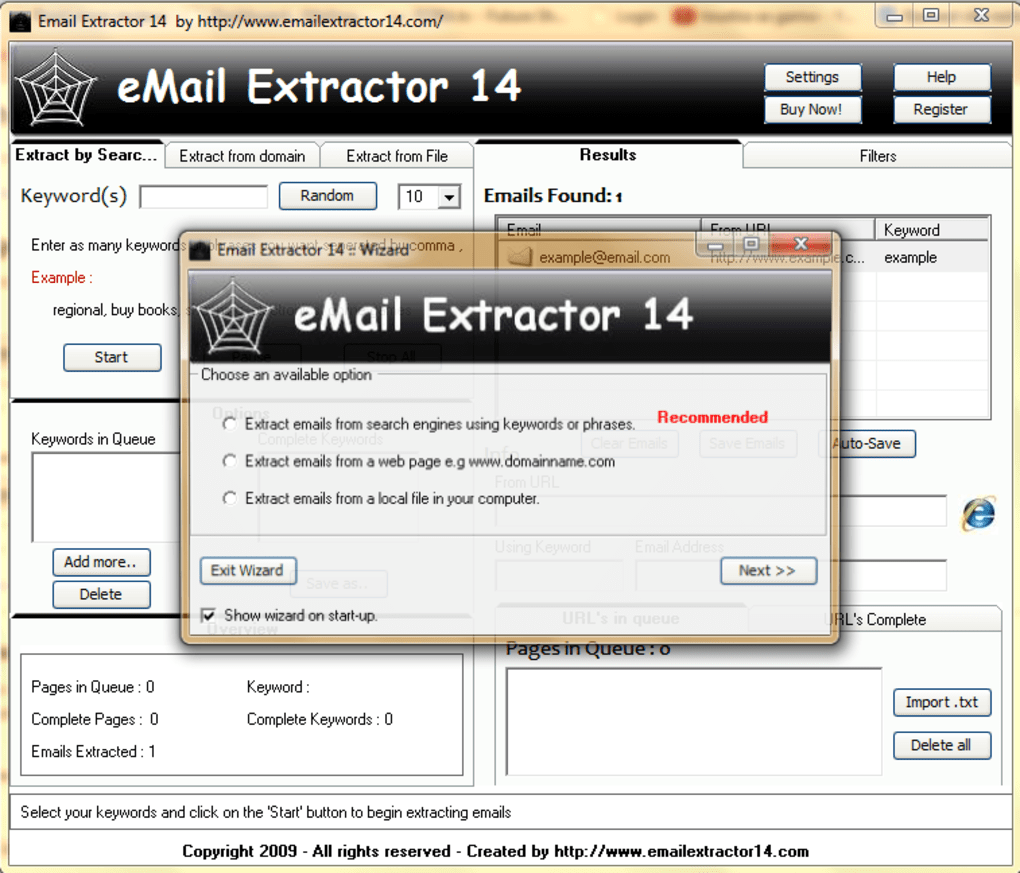
Email Extractor operates as a web crawler, systematically navigating the internet to identify and collect email addresses based on user-specified parameters. This targeted approach allows users to focus their search, significantly improving efficiency compared to manual searching. Instead of sifting through countless websites individually, Email Extractor automates this process, drastically reducing the time and effort required.
The software’s core strength lies in its ability to locate even the most elusive email addresses. These are often hidden within website code, buried deep within contact pages, or otherwise difficult to access through standard browsing methods. Email Extractor’s advanced searching capabilities bypass these obstacles, providing a comprehensive list of relevant contacts.
Users define their search criteria, enabling highly specific targeting. For instance, a marketer promoting birdwatching equipment could specify keywords related to ornithology, birdwatching clubs, or specific bird species. The software would then focus its search on websites containing this terminology, significantly increasing the likelihood of finding relevant email addresses.
Beyond web crawling, Email Extractor can also extract email addresses from local computer files. This functionality is particularly useful for individuals who already possess a collection of documents containing email addresses, but lack a streamlined method for organizing or extracting them. The software seamlessly integrates with various file formats, allowing users to process extensive datasets quickly.
Furthermore, Email Extractor supports domain-based searches. This feature is beneficial for targeting specific companies or organizations, enabling users to collect the email addresses of employees within a particular domain. This targeted approach is ideal for business development, lead generation, or other activities that require extensive contact lists within a specific organization.
Benefits of Using Email Extractor
The primary benefit of Email Extractor is its significant time-saving capabilities. Manual collection of email addresses is tedious, time-consuming, and prone to errors. Email Extractor automates this process, allowing users to focus on other critical tasks. The software’s speed and efficiency translate to increased productivity and improved workflow.
The software’s ease of use is another significant advantage. The intuitive interface and straightforward functionality make it accessible even to users with limited technical expertise. The simple input of search parameters initiates the automated search process, simplifying what would otherwise be a complex and laborious undertaking.
Email Extractor’s bulk email extraction capability is crucial for marketing campaigns and sales initiatives. Gathering a large number of email addresses manually is practically infeasible. Email Extractor makes this process manageable, allowing for the efficient execution of large-scale email marketing campaigns.
Limitations of Email Extractor
Despite its advantages, Email Extractor, like any software, has limitations. One potential drawback is the occasional fluctuation in success rates. While the software is generally highly effective, the success of its email address extraction can be affected by various factors, including website structure, website security measures, and the overall availability of email addresses on the targeted websites.
Compatibility issues may also arise depending on the operating system being used. While generally compatible with Windows systems, users may encounter issues with certain operating systems or versions. It is crucial to ensure compatibility before purchasing or using the software to avoid potential problems.
Alternatives to Email Extractor
The market offers several alternative email extraction tools, each with its own set of strengths and weaknesses. Choosing the right alternative depends on specific needs and preferences. Some alternatives may offer enhanced features, such as more advanced filtering options, integration with other marketing tools, or better support for various operating systems.
Others might prioritize specific functionalities, such as focusing on particular types of websites or data formats. A thorough comparison of available options helps users identify the most suitable tool for their unique requirements.
Consider factors such as the pricing model, ease of use, level of technical support, and the software’s overall reputation within the industry when choosing an alternative. Many free or trial versions are available, enabling users to evaluate their performance before committing to a full purchase.
Email Extractor: A Verdict
Email Extractor presents a powerful solution for the efficient and targeted collection of email addresses. Its ability to automate a previously laborious process provides significant time savings and increased productivity for professionals requiring extensive email lists. While limitations regarding success rates and compatibility exist, its overall efficiency and ease of use make it a valuable tool for various applications.
However, potential users should weigh the advantages and disadvantages carefully, considering the software’s limitations and exploring available alternatives before committing to its use. A thorough understanding of its functionality, along with a consideration of alternative solutions, ensures the selection of the most appropriate tool for achieving specific email extraction goals. Ultimately, Email Extractor’s effectiveness is highly dependent on the user’s ability to define targeted search parameters and understand the limitations inherent in automated web data extraction. Careful planning and strategic utilization of the software maximize its benefits and minimize the potential drawbacks.
File Information
- License: “Trial version”
- Latest update: “July 15, 2022”
- Platform: “Windows”
- OS: “Windows 7”
- Language: “English”
- Downloads: “41.7K”
- Size: “16.38 KB”


