
Embarcadero Delphi is a powerful Integrated Development Environment (IDE) that empowers developers to create high-performance native applications across multiple platforms. This comprehensive guide delves into the capabilities, features, and limitations of Delphi, focusing on its strengths as a tool for both individual developers and businesses. We will examine its suitability for various application types and explore its position within the broader landscape of software development tools.
Delphi for Business: A Powerful Tool for Enterprise Development
Delphi’s cross-platform capabilities make it an attractive option for businesses aiming to reach a wider audience without the overhead of maintaining separate codebases for different operating systems. The ability to write once and deploy to Windows, macOS, iOS, and Android significantly reduces development time and costs. This efficiency is particularly valuable for businesses needing to rapidly develop and deploy applications to respond to market demands or internal needs.
The community edition of Delphi provides a compelling entry point for startups and small businesses, offering a free license for organizations with annual revenue under $5,000 or fewer than five IT developers. This allows smaller teams to explore Delphi’s potential and build functional applications without significant upfront investment. However, it’s crucial to understand the limitations of the community edition, primarily the restrictions on the number of VCL and FMX components, which might become a constraint as the application’s complexity grows.
For larger enterprises or projects exceeding the community edition’s limitations, Embarcadero offers various commercial licenses – Professional, Enterprise, and Architect – each providing expanded functionality, support, and features tailored to the specific needs of larger development teams and complex projects. These versions offer a broader set of components, enhanced debugging capabilities, and access to advanced features not available in the community edition. The transition from the community edition to a commercial license is relatively straightforward, ensuring a smooth scaling of the development process as the business grows.
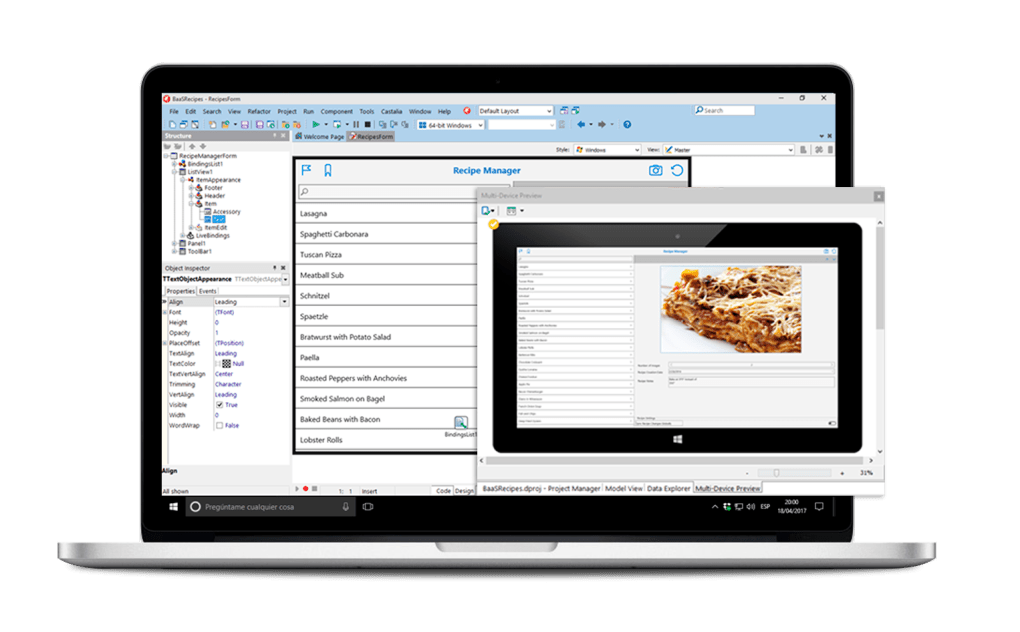
The integrated visual component library streamlines the development process, allowing developers to visually construct user interfaces and integrate various functionalities without extensive manual coding. This feature reduces development time and enhances productivity, especially beneficial in time-sensitive business environments. Delphi’s robust debugging tools ensure high-quality code, minimizing potential errors and streamlining the testing phase. The system-agnostic nature of these tools allows developers to seamlessly debug across different platforms, enhancing efficiency and reducing the time spent on troubleshooting.
Delphi’s focus on native code compilation results in applications with superior performance compared to cross-platform frameworks that rely on interpretation or virtual machine execution. This is crucial for applications requiring high responsiveness and efficient resource management. In business contexts where performance is paramount, Delphi’s native code compilation delivers a considerable advantage.
Delphi Application Types: From Games to Enterprise Software
Delphi’s versatility extends to a wide range of application types, catering to diverse development needs:
Articles and Business Applications:
Delphi’s strength lies in building robust, high-performance applications. Its efficiency in handling data and interacting with databases makes it suitable for developing various business applications, from inventory management systems to customer relationship management (CRM) software. The ability to create native applications with intuitive user interfaces ensures user-friendliness and enhances productivity for business users.
Applications:
Delphi’s capacity extends beyond business applications; it is a capable tool for creating a variety of applications, including desktop utilities, data processing tools, and even mobile applications. The cross-platform capabilities ensure wider deployment possibilities, reaching users across different device ecosystems. The availability of rich libraries and components simplifies the integration of various functionalities, making the development process smoother and faster.
Games:
While not the primary focus, Delphi can also be used to develop games, particularly those emphasizing logic and strategy rather than intense 3D graphics. Its strong performance in handling data structures and algorithms is an asset for game development, although developers might prefer engines specifically designed for graphics-intensive games.
Exploring Delphi’s Integrated Features and Ecosystem
Delphi’s power lies not just in its core language but also in the comprehensive suite of integrated tools and technologies:
The Integrated Development Environment (IDE):
The Delphi IDE provides a streamlined development experience, integrating code editing, debugging, compiling, and deployment into a single environment. Its intuitive interface allows developers to focus on coding rather than navigating multiple tools. Features like code completion, syntax highlighting, and integrated debugging tools significantly enhance productivity and reduce the time spent on repetitive tasks.
FireMonkey (FMX) and Visual Component Library (VCL):
Delphi utilizes two primary frameworks for creating user interfaces: FireMonkey (FMX) and Visual Component Library (VCL). FMX is a cross-platform framework, enabling the creation of applications that can run on Windows, macOS, iOS, and Android with minimal code changes. VCL is tailored for Windows applications, offering a high degree of integration with the Windows operating system. The choice between FMX and VCL depends on the target platforms and specific requirements of the application.
Object Pascal:
Delphi uses Object Pascal, a powerful object-oriented programming language known for its clarity, efficiency, and ease of use. Object Pascal’s structure simplifies code maintenance, making it easier for developers to manage and update applications over time. Its object-oriented nature facilitates code reusability, accelerating the development process and reducing the risk of errors.
Database Connectivity:
Delphi provides robust support for database connectivity, allowing developers to easily integrate applications with various databases. This capability is critical for business applications requiring data management and retrieval. The integrated database tools simplify database interaction, reducing development time and ensuring efficient data handling.
Deployment Tools:
Delphi’s built-in deployment tools make the process of releasing applications simple and efficient. The IDE facilitates the creation of installers and packages for different platforms, eliminating the need for external tools. This streamlines the deployment process and reduces the risk of errors.
Delphi’s Strengths and Weaknesses
Delphi, like any development tool, has its strengths and weaknesses:
Strengths:
- Cross-platform development: Build applications for Windows, macOS, iOS, and Android from a single codebase.
- Native code compilation: Achieve high performance and efficient resource utilization.
- Visual Component Library (VCL) and FireMonkey (FMX): Powerful frameworks for rapid UI development.
- Object Pascal: A clear, efficient, and well-structured programming language.
- Robust IDE: Comprehensive integrated development environment simplifies development tasks.
- Strong database connectivity: Easy integration with various database systems.
- Large and active community: Abundant online resources, tutorials, and support.
- Community edition availability: Free for qualifying organizations.
Weaknesses:
- Limited mobile market share: Compared to more dominant mobile development platforms like Java/Kotlin (Android) and Swift/Objective-C (iOS).
- Learning curve: While Object Pascal is relatively easy to learn, mastering Delphi’s features and capabilities requires time and effort.
- Community edition limitations: Restricted functionality compared to commercial versions.
- Cost of commercial licenses: Commercial versions can be expensive for larger teams or enterprises.
Conclusion: Delphi’s Place in the Modern Development Landscape
Embarcadero Delphi remains a relevant and powerful IDE, offering a compelling blend of performance, cross-platform capabilities, and developer-friendly features. While it may not be the ideal choice for every development project, its strengths in building high-performance native applications across multiple platforms make it a strong contender for a wide range of applications, from business software to games and utilities. The availability of a free community edition allows developers to explore its potential without upfront costs, making it accessible to both individual developers and smaller businesses. For larger enterprises and complex projects, the commercial versions provide the scalability and advanced features necessary for success. Ultimately, the decision of whether to use Delphi hinges on the specific project requirements, budget constraints, and the developer’s familiarity with Object Pascal and the Delphi IDE.
File Information
- License: “Free”
- Latest update: “July 11, 2023”
- Platform: “Windows”
- OS: “Windows 7”
- Language: “English”
- Downloads: “134K”
- Size: “135.40 MB”


