
The digital landscape is increasingly fraught with threats to online privacy. From relentless tracking by advertisers to sophisticated attempts at data harvesting by malicious actors, maintaining anonymity and security online requires a proactive approach. Epic Privacy Browser, a Chromium-based browser developed by Hidden Reflex, positions itself as a robust solution for users prioritizing online privacy. This comprehensive review will explore its features, strengths, weaknesses, and overall effectiveness in safeguarding user data.
Core Features and Functionality
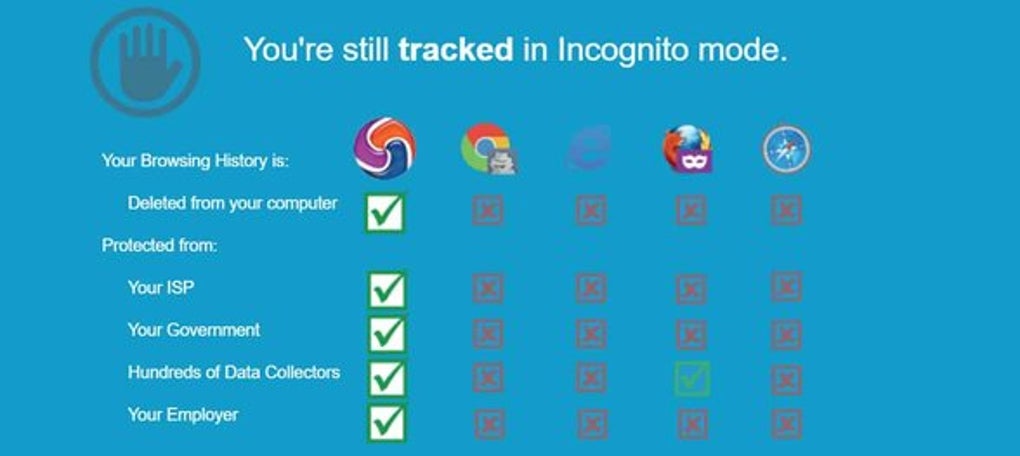
Epic Privacy Browser distinguishes itself by its unwavering commitment to privacy. Unlike many browsers that offer privacy modes as optional features, Epic Privacy Browser operates fundamentally in a private browsing mode. This means that by default, the browser doesn’t store browsing history, cookies, or other cached data, significantly reducing the digital footprint left behind during browsing sessions.
This inherent privacy focus is supplemented by a suite of integrated features designed to thwart various tracking mechanisms. The browser actively blocks over 600 tracking attempts per browsing session, targeting common methods such as:
-
Trackers: Epic Privacy Browser identifies and blocks a wide range of tracking scripts embedded in websites, preventing these scripts from collecting data about browsing habits, visited websites, and user preferences. This includes commonly used advertising trackers, analytics trackers, and social media trackers.
-
Advertisements: While many browsers offer ad-blocking extensions, Epic Privacy Browser incorporates ad-blocking directly into its core functionality. This removes intrusive advertisements and also eliminates many trackers often bundled within advertising code.
-
Ultrasound Signaling: This less-known tracking technique uses ultrasonic frequencies to transmit data about user activity. Epic Privacy Browser proactively blocks attempts at ultrasound signaling, another layer of protection against covert tracking.
-
Cryptomining: Malicious websites sometimes attempt to use user computing power to mine cryptocurrency without their consent. Epic Privacy Browser safeguards against this by actively blocking cryptojacking scripts.
-
Fingerprinting: Websites can use unique browser fingerprints to track users even when cookies are disabled. Epic Privacy Browser employs techniques to minimize its unique fingerprint, making it harder for websites to identify users across sessions.
-
WebRTC IP Address Tracking and Leaks: Web Real-Time Communication (WebRTC) can inadvertently leak a user’s IP address, exposing their location. Epic Privacy Browser incorporates measures to prevent such leaks, further enhancing user anonymity.
-
URL and Address Bar Tracking, Error Tracking, and Installation Tracking: The browser prevents tracking attempts originating from the URL bar, error messages, and software installation processes. This comprehensive approach aims to eliminate a wide range of data leaks.
The browser also utilizes a locally stored database for address bar suggestions, preventing external servers from accessing this potentially revealing information. The “Do Not Track” button is always enabled, and the referer header data – information revealing the previous website visited – remains private, reducing the ability of websites to build detailed user profiles.
Enhanced Security Measures: The Integrated VPN
A particularly noteworthy feature is the integration of VPN (Virtual Private Network) servers. While limited to 8 countries, this VPN functionality enhances privacy by masking the user’s IP address. This prevents their internet service provider (ISP), government agencies, employers, and other entities from monitoring their online activity. This also provides access to geo-restricted content and improves online security, as users’ connections are encrypted, making it significantly harder to intercept communications.
Data Handling and User Control
Transparency is a key aspect of Epic Privacy Browser. The browser provides users with detailed information about the specific online elements it has blocked, highlighting its effectiveness and giving users insight into the privacy risks it mitigates. Upon closing the browser, all browsing data, including history, cookies, and cached content, is automatically deleted, leaving minimal traces of online activity.
This level of data control contrasts with browsers that retain data even in private browsing modes. While some users might prefer to retain certain data, for those deeply concerned about digital privacy, the automatic data clearing is a valuable safeguard.
Comparison with Other Privacy-Focused Browsers
Compared to other privacy-focused browsers like Tor Browser, Epic Privacy Browser employs a broader range of measures to limit data sharing with third-party servers. While Tor focuses on strong anonymization through a network of relays, Epic Privacy Browser takes a comprehensive approach to block tracking attempts and prevent data leaks.
Limitations and Areas for Improvement
Despite its strengths, Epic Privacy Browser isn’t without limitations. The most significant drawback is the limited support for browser extensions and add-ons. While this restriction is justified from a privacy perspective (as extensions can introduce security risks and tracking capabilities), it might be inconvenient for users accustomed to using various extensions for enhanced functionality.
The limited number of VPN server locations also represents a constraint. While the integrated VPN is a significant security enhancement, expanding the server network to offer more diverse geographical options would further improve anonymity and access to geo-blocked content.
Another potential area for improvement is its connection speed. Some users have reported slower browsing speeds compared to other browsers. This could be due to the extensive blocking of trackers and advertisements, placing a greater load on the browser’s processing.
Finally, the lack of a dedicated business plan limits its appeal for corporate users. While the current version caters to individual users, a business version with tailored features and support could expand its market reach.
User Experience and Ease of Use
The browser’s user interface is largely similar to other Chromium-based browsers, making it easy to navigate for users familiar with Chrome, Brave, or Opera. The settings are intuitive and clearly organized, allowing users to customize certain aspects of the privacy settings to suit their individual needs.
Conclusion: Is Epic Privacy Browser the Right Choice for You?
Epic Privacy Browser is a powerful and effective tool for individuals prioritizing online privacy. Its proactive approach to blocking trackers, advertisements, and other privacy threats, combined with the integrated VPN, offers a robust level of protection against online surveillance. The automatic data clearing upon browser closure further strengthens its privacy focus.
However, the limited add-on support and relatively few VPN server locations might be deterrents for some users. The potential for slightly slower browsing speeds should also be considered. If privacy is your top priority and you can accommodate these limitations, Epic Privacy Browser is a compelling choice. For users requiring a wide range of extensions or prioritizing extremely high browsing speeds above all else, other browsers might be a more suitable option. Ultimately, the best browser depends on individual needs and priorities. If you value comprehensive privacy features and a proactive approach to online security, Epic Privacy Browser deserves serious consideration.
File Information
- License: “Free”
- Latest update: “May 23, 2023”
- Platform: “Windows”
- OS: “Windows XP”
- Language: “English”
- Downloads: “739K”
- Size: “1.83 MB”


