
Epic Pen is a digital marking tool designed to enhance productivity on Windows PCs. Developed by Tank Studios, it allows users to annotate and create notes directly on their screens, regardless of the active application. This review delves into its features, functionality, pros, and cons, providing a comprehensive assessment of its suitability for various users.
Functionality and Features: A Digital Pen for Any Application
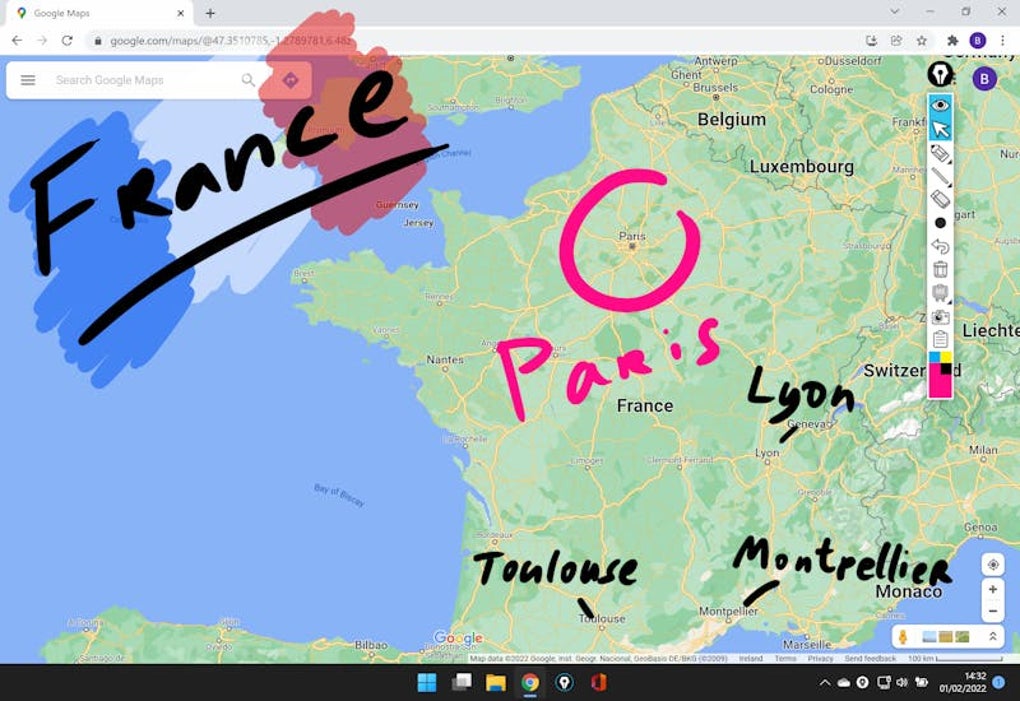
Epic Pen functions as an overlay, appearing on top of any application currently running on your system. This means you can seamlessly mark, draw, or highlight content within any program, from web browsers and document editors to video players and games. This versatility is a significant advantage over similar tools that may be confined to specific applications or platforms.
The software supports both finger input (up to 10-point multi-touch) and Wacom digital pens, allowing for a natural and intuitive drawing experience. Pressure sensitivity is also recognized, offering greater precision and control over line thickness and shading. Users can choose between pen and highlighter tips, along with a wide selection of over 10 color palettes. A built-in screenshot feature allows users to easily save their annotations for later reference or sharing.
The free version of Epic Pen provides a basic set of tools, giving potential users a taste of the software’s functionality. However, the paid, pro version unlocks a significantly expanded feature set. This includes an extended color palette, a text tool for adding typed notes, and shape tools perfect for creating charts, diagrams, or other visual aids. This expanded functionality caters to a wider range of users and tasks, making it a valuable asset in various professional and educational settings.

Perhaps one of the most valuable features for collaborative work is the integrated whiteboard or blackboard functionality. This enables real-time collaboration, allowing multiple users to simultaneously annotate and contribute to a shared workspace. This is particularly useful for online meetings, brainstorming sessions, and educational purposes. Further enhancing usability are convenient hotkeys, allowing for quick access and activation of key functions without interrupting the workflow.
While Epic Pen offers a substantial feature set, a noticeable drawback is the limited functionality of the free trial version. This limitation doesn’t fully showcase the comprehensive feature set of the pro version, potentially dissuading potential users who might find the paid version far more useful. This point warrants careful consideration before deciding to invest in the software.
User Interface and Experience: Intuitive and Efficient
Epic Pen boasts an intuitive user interface, making it easy to navigate and use, even for those unfamiliar with digital drawing tools. The straightforward design minimizes the learning curve, allowing users to quickly grasp the core functions and begin annotating or drawing almost immediately. The tools are logically arranged, and the color selection and other options are easily accessible, further enhancing the overall user experience.

The integration with various input methods, such as multi-touch and digital pens, contributes to a seamless and natural workflow. The pressure sensitivity, in particular, allows for a more expressive and nuanced drawing experience, crucial for those who require precise control and detailed annotations. The hotkey functionality also streamlines the user experience, allowing for rapid access to frequently used features, thus enhancing efficiency and minimizing interruptions in the workflow.
Comparison with Similar Software: Standing Out from the Crowd
Epic Pen distinguishes itself from competing software in several key aspects. Unlike Microsoft Whiteboard, which is often integrated within a specific Microsoft ecosystem, Epic Pen’s functionality transcends application boundaries. Its overlay nature allows it to work effectively across various applications, enhancing flexibility and providing a centralized annotation tool regardless of the software in use. This broad compatibility is a significant advantage, offering unparalleled convenience and versatility.
Other digital annotation tools might offer a similar range of functionalities, but Epic Pen’s ease of use and intuitive interface often place it above its counterparts. The simple yet effective design makes it accessible to a wider range of users, irrespective of their technical expertise. The focus on seamless integration and ease of use creates a user-friendly experience that elevates productivity.
Strengths and Weaknesses: A Balanced Perspective
Epic Pen presents a compelling set of advantages, including its cross-application compatibility, intuitive interface, and support for multiple input methods. The pressure sensitivity feature enhances precision, and the inclusion of both pen and highlighter tools, along with a diverse color palette, caters to various annotation and drawing styles. The collaborative whiteboard functionality is particularly valuable for team projects and educational purposes, allowing for seamless real-time collaboration. The inclusion of hotkeys further optimizes the workflow and enhances user efficiency.
However, the limited functionality of the free trial version presents a significant drawback. The free trial barely scratches the surface of the pro version’s capabilities, making it difficult for potential users to fully appreciate the software’s potential before committing to a purchase. This limited free version might dissuade potential users who may otherwise find the pro version invaluable. This aspect warrants consideration before investing in the software, as the free version provides only a glimpse into the comprehensive capabilities available in the paid version.
Conclusion: A Powerful Tool for Enhanced Productivity
Epic Pen offers a powerful and versatile solution for digital annotation and collaboration. Its cross-application compatibility, intuitive interface, and support for various input methods make it a valuable asset for students, educators, professionals, and anyone requiring a flexible and efficient annotation tool. While the limited free trial might deter some potential users, the extensive feature set of the pro version makes it a strong contender in the digital annotation software market. Its ease of use, coupled with its powerful features, makes it a compelling tool for enhancing productivity across diverse applications and workflows. The ability to seamlessly integrate into any workflow, regardless of the software being used, makes Epic Pen a truly unique and valuable tool for the modern digital workspace. The integrated collaborative features, such as the whiteboard and convenient hotkeys, further solidify its position as a robust and user-friendly digital marking solution. Despite the limitations of the free trial, the benefits offered by the pro version largely outweigh this shortcoming for many users.
File Information
- License: “Free”
- Latest update: “March 25, 2025”
- Platform: “Windows”
- OS: “Windows 11”
- Language: “English”
- Downloads: “12.2K”


