
In the vast and ever-expanding universe of digital literature, e-books have revolutionized how we consume written content. From sprawling novels and insightful non-fiction to academic textbooks and captivating magazines, the convenience of carrying an entire library in your pocket is undeniable. However, this digital landscape is not without its complexities, primarily stemming from format incompatibilities. One of the most common hurdles encountered by avid readers is the divergence between the widely adopted EPUB format and Amazon Kindle’s proprietary MOBI (or its newer AZW) format. This is precisely where a robust and efficient solution like the Epubor ePub to Mobi Converter becomes an indispensable tool for anyone looking to enjoy their digital books without restrictions.
This article delves into the critical role of e-book converters, with a particular focus on the Epubor ePub to Mobi Converter for Windows. We will explore its features, benefits, and how it addresses a fundamental need in the digital reading ecosystem, ensuring your literary journey remains uninterrupted and universally accessible across your preferred devices, especially the popular Kindle series.
Understanding Digital Book Formats: The Need for Conversion
The digital reading experience, while immensely convenient, often introduces a learning curve concerning file formats. Just as different media players require specific audio or video formats, e-readers and their accompanying software are often designed to work optimally with certain file types.
The Rise of E-Readers and Diverse Formats
The proliferation of e-readers and reading apps over the last two decades has been phenomenal. Devices like the Kindle Paperwhite, Kindle Voyage, and Kindle Fire, alongside Nook, Kobo, and various smartphone and tablet applications, have transformed reading habits globally. Each platform often comes with its preferred or exclusive file format.
EPUB (Electronic Publication) stands as a widely adopted, open e-book standard. It’s designed to reflow text according to the screen size of the device, offering a flexible and user-friendly reading experience across a multitude of platforms. Most e-readers (excluding Kindle), as well as a plethora of reading apps on iOS, Android, and desktop operating systems, natively support EPUB. Its open nature fosters broad compatibility and prevents vendor lock-in, making it a favorite for publishers and readers alike.
However, Amazon, a dominant force in the e-book market, chose a different path. Their Kindle devices primarily utilize proprietary formats like MOBI (Mobipocket e-book format), AZW, and KF8. These formats are optimized for the Kindle ecosystem, often incorporating DRM (Digital Rights Management) specific to Amazon. While Amazon offers tools to convert some basic text files, and supports PDF, the direct reading of EPUB files is not natively supported on Kindle devices. This creates a significant challenge for users who purchase or download EPUB books from various sources and wish to read them on their Kindle. The need for a reliable conversion tool, therefore, becomes paramount. Without it, a reader might be faced with the frustrating dilemma of having a book but no compatible device to read it on, or vice versa.
Why Convert EPUB to MOBI?
The primary motivation for converting EPUB to MOBI is straightforward: compatibility with Kindle devices. If you own a Kindle and acquire e-books in EPUB format, conversion is the only way to read them on your device. This isn’t merely about convenience; it’s about unlocking your digital library and ensuring your investment in e-books is not confined to a single ecosystem.
Beyond basic compatibility, there are several compelling reasons:
- Unified Reading Experience: Many readers prefer the e-ink display of Kindles for extended reading sessions due to reduced eye strain. Converting EPUBs to MOBI allows them to consolidate their entire e-book collection onto their preferred device, ensuring a consistent and comfortable reading experience.
- Access to a Wider Range of Content: Not all e-books are available in Kindle-specific formats. Many independent publishers, smaller online stores, and digital libraries distribute books exclusively in EPUB. A converter bridges this gap, giving Kindle users access to a much broader spectrum of digital content.
- Preservation of Formatting: A high-quality converter ensures that the original layout, formatting, images, tables of contents, and other elements of the EPUB file are faithfully replicated in the MOBI output. This means no loss of quality or readability, maintaining the author’s intended presentation.
- Device Flexibility: Even if you primarily use another e-reader, having a MOBI version of your books provides flexibility. Should you switch to a Kindle or want to share a book with a Kindle-owning friend (within legal boundaries), the converted file is ready.
In essence, an EPUB to MOBI converter empowers the reader, liberating their digital library from format constraints and fostering a more open and versatile reading environment within the often-closed Kindle ecosystem.
Enhancing Your Digital Productivity with Converters
Digital tools are fundamentally designed to enhance productivity, streamline workflows, and simplify complex tasks. In the realm of digital content management, converters play a crucial role, transforming data from one format to another to ensure compatibility and usability. An e-book converter, specifically, acts as a powerful productivity utility, allowing users to efficiently manage and access their literary assets.
Streamlining Your E-Book Library Management
Managing a growing collection of e-books can quickly become a daunting task. Different sources, different formats, and the desire to read across various devices necessitate robust management strategies. An EPUB to MOBI converter like Epubor’s offering significantly streamlines this process. Instead of having separate libraries for EPUB and MOBI files, or constantly searching for specific formats, you can convert your entire collection to a unified format suitable for your primary reading device.
This unification reduces clutter, simplifies backup procedures, and ensures that every book you own is readily accessible on your Kindle. Imagine having hundreds of books, some in EPUB, some in MOBI. Without a converter, you’d constantly be checking format compatibility before transferring to your Kindle. With an efficient converter, you process your EPUBs once, and they are then permanently ready for your Kindle, saving you considerable time and effort in the long run. This is a prime example of how a specialized utility can drastically improve one’s digital life, much like document management systems organize professional files or finance tools track personal spending.
Batch Conversion: A Productivity Game-Changer
Perhaps one of the most significant productivity features of the Epubor ePub to Mobi Converter is its support for batch conversion. In today’s fast-paced world, time is a precious commodity. Manually converting a single e-book at a time might be acceptable for a sporadic reader, but for someone with a substantial digital library or who frequently acquires new books, this would be an incredibly tedious and inefficient process.
Batch conversion allows users to queue up dozens, or even hundreds, of e-books for conversion simultaneously. You simply add all your EPUB files to the program, click “Convert,” and let the software handle the rest. This feature transforms what could be hours of repetitive clicking and waiting into a quick, set-it-and-forget-it task.
The Epubor converter claims “faster conversion speed than General,” converting “one eBooks within seconds, convert dozens of eBooks within minutes.” This speed, combined with batch processing, translates into massive productivity gains. For students, researchers, or voracious readers, the ability to rapidly prepare an entire semester’s worth of textbooks or a new haul of fiction for their Kindle device is invaluable. It shifts the user’s focus from worrying about technical compatibility to simply enjoying the act of reading, aligning perfectly with the core principles of effective digital productivity tools.
Key Features and Benefits of the Epubor ePub to Mobi Converter
The Epubor ePub to Mobi Converter stands out in a crowded market of conversion tools due to its specific focus on quality, speed, and user-friendliness. Developed by Epubor, a company known for its e-book solutions, this converter is tailored to meet the needs of Kindle users.
The software, available as a free download for Windows on PhanMemFree.org, has garnered a positive reputation, reflected in its user reviews and download statistics. It is designed to empower users by making their EPUB books compatible with Kindle devices such as Kindle Paperwhite, Kindle Voyage, Kindle Fire, and others that support MOBI, AZW, or PRC formats.
High-Quality Conversion and Layout Preservation
One of the most critical aspects of any e-book converter is its ability to maintain the integrity of the original content. Poor conversion can lead to jumbled text, missing images, incorrect formatting, and an overall frustrating reading experience. The Epubor ePub to Mobi Converter excels in this regard, promising “high quality conversion, no content loss.”
The developer emphasizes that the converter “will save the original ebook for you, and create an new book which remains all the original contents and layout.” This means readers can expect:
- Accurate Text Flow: The converted text will reflow correctly on Kindle screens, ensuring a natural and comfortable reading experience.
- Image Retention: All embedded images, charts, and illustrations from the original EPUB will be present and correctly displayed in the MOBI file.
- Table of Contents and Hyperlinks: The navigational structure, including the clickable table of contents and internal/external hyperlinks, is typically preserved, allowing for easy navigation within the e-book.
- CSS and Styling: The converter strives to retain the original styling (fonts, bolding, italics, headings) as much as possible, respecting the aesthetic design of the book.
- Screen Size Adaptation: “The converted ePub eBooks can automatically fit the screen size of your ePub readers.” This is crucial for optimal readability across different Kindle models, from smaller e-ink devices to larger tablets.
This commitment to quality ensures that the reading experience on a Kindle device is as good as, if not better than, reading the original EPUB on another platform.
User-Friendly Interface and Speed
Beyond quality, the utility of a software tool is often defined by its ease of use and efficiency. The Epubor ePub to Mobi Converter scores highly on both counts.
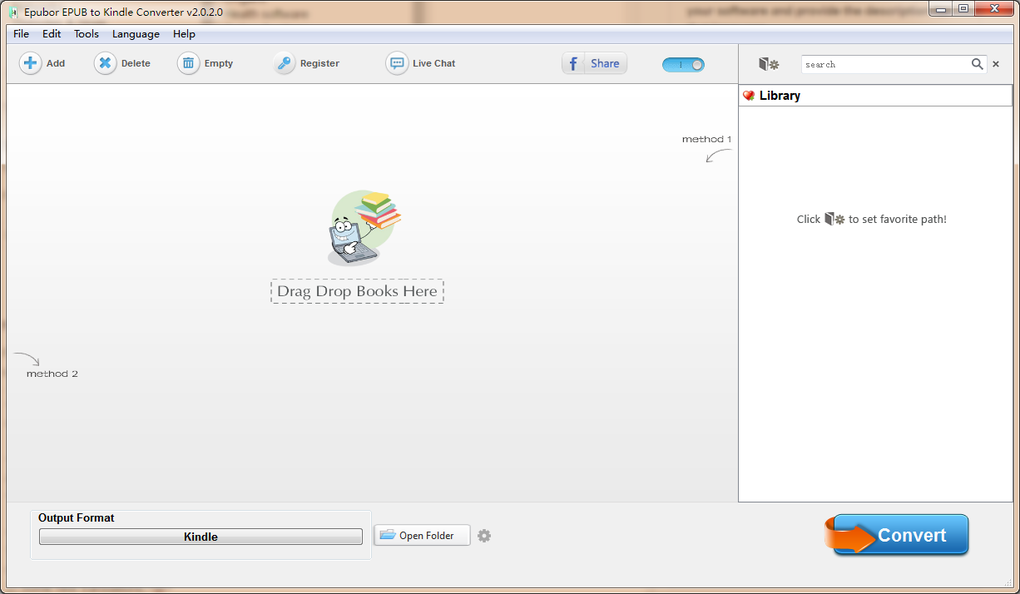
- User-Friendly Interface: The program is designed with simplicity in mind. It features a “user-friendly interface and Easy to use” approach. The process is boiled down to “Only two steps.” Users can either “straightly drag and drop or manually add eBooks from your PC into this awesome program, then click the ‘Convert’ button to get the converted eBooks.” This minimalist design ensures that even technologically less-savvy users can convert their books without hassle, eliminating the need to navigate complex menus or settings.
- Blazing Fast Conversion Speed: The converter boasts “faster conversion speed than General.” A significant upgrade highlighted in version 2.0.2.6 (released 2015/12/21) was the introduction of a “New conversion core – eCore, which is developed by Epubor, smaller in file size while 5X faster than other converters.” This proprietary eCore technology means that individual e-books are converted “within seconds,” and even “dozens of eBooks within minutes.” This speed, combined with batch conversion, dramatically reduces waiting times, allowing users to spend more time reading and less time converting.
Furthermore, the software’s continuous improvement is evident in its updates, which include “new translations,” “bunch of bugs fixed and performance optimization,” ensuring a stable and reliable experience. The version 2.0.2.8, updated on April 4, 2016, and available in multiple languages including English, German, Spanish, French, Italian, Japanese, and Dutch, demonstrates the developer’s commitment to accessibility and refinement. With a compact size of 23.38 MB, it’s a lightweight yet powerful addition to any Windows PC.
The Broader Landscape of Utilities & Tools for Digital Content
In the digital age, our lives are intertwined with a myriad of software applications that fall under the umbrella of “utilities & tools.” These programs serve to enhance, manage, protect, and optimize our digital interactions, ranging from system maintenance to specialized content manipulation. An e-book converter, while niche, fits perfectly into this broader category, providing a specific solution within the vast toolkit of digital content management.
Beyond E-Book Conversion: Other Essential Digital Tools
The world of utilities and tools is expansive. Consider some of the other categories listed in the reference:
- Bar Code Scanning: For quick information retrieval or inventory management.
- Clocks & Alarms: Basic but essential time management functions.
- Data Recovery: Crucial for retrieving lost or corrupted files, a digital safety net.
- File Compression: Tools like WinRAR or 7-Zip that reduce file sizes for easier storage and transfer.
- File Managers: Essential for organizing, moving, copying, and deleting files on your system.
- Keyboards: Software keyboards or tools to customize physical keyboards.
- Measurement: Utilities for precise calculations or spatial analysis.
- Printer & Fax: Drivers and management software for printing and faxing documents.
- Screen Capture: Tools for taking screenshots or recording screen activity.
Each of these utilities, much like an ePub to Mobi converter, addresses a specific need, solving a particular digital problem. They enhance our interaction with technology, making systems more efficient, user-friendly, and capable. The Epubor ePub to Mobi Converter is a specialized tool that ensures content compatibility, much like a video converter ensures a movie plays on your chosen device or an image editor optimizes pictures for web use. It’s about making digital assets work for the user, rather than the user being constrained by format limitations.
The Role of File Managers and Organizers
While an e-book converter handles the transformation of file formats, the subsequent organization of these converted files often falls to file managers. Tools like Windows File Explorer, or more advanced third-party file managers, are indispensable for maintaining an orderly digital library. After converting a batch of EPUBs to MOBI, a user would then typically use a file manager to:
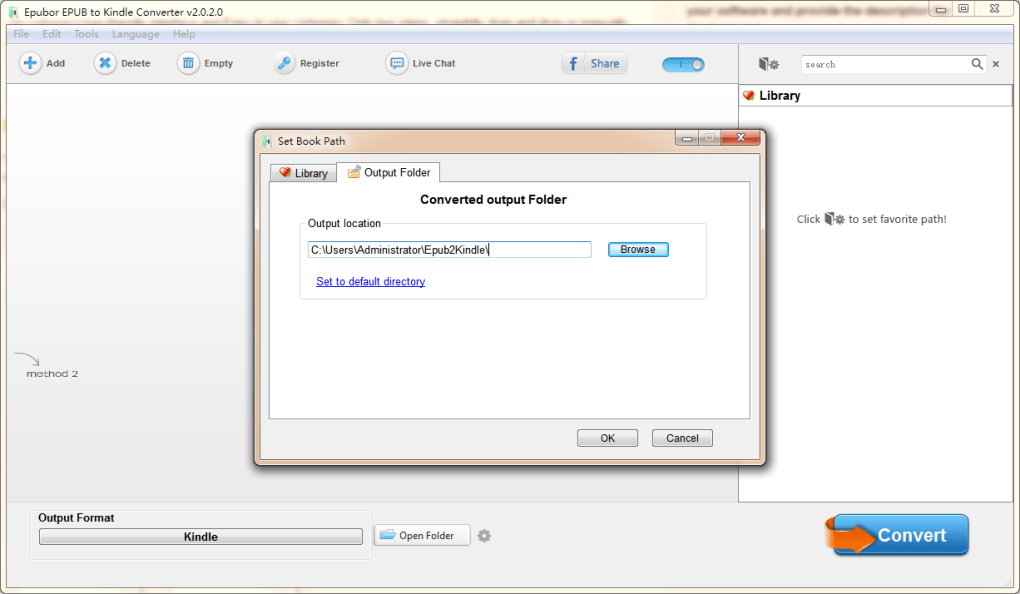
- Move the converted MOBI files: From the output folder of the converter to a dedicated “Kindle Books” folder.
- Rename files: Ensure consistent naming conventions for easy searching.
- Organize into subfolders: By author, genre, or series.
- Transfer to Device: Copy the MOBI files to the Kindle device via USB or email them to the Kindle’s specific email address.
The synergy between specialized converters and general-purpose file managers highlights how different utilities work in tandem to create a seamless digital experience. The converter makes the content readable, and the file manager makes it organized and accessible. This holistic approach to digital content management is key for any serious digital reader or professional.
Finding the Best Products for Your Digital Lifestyle
In an era saturated with digital solutions, choosing the “best” product for any given task can be overwhelming. From antivirus software and VPNs to image editors and e-book converters, the market offers countless options. For a tool like an EPUB to MOBI converter, determining what constitutes “best” involves considering several crucial factors that align with individual needs and expectations for a smooth digital lifestyle. PhanMemFree.org, as a platform, aims to guide users toward reliable and high-performing software, and the Epubor ePub to Mobi Converter certainly falls into this category based on its features and user feedback.
Criteria for Choosing a Reliable E-Book Converter
When evaluating an e-book converter, whether for EPUB to MOBI or any other format, several criteria stand out:
- Conversion Quality: As discussed, this is paramount. Does it preserve layout, images, and formatting faithfully? A converter that distorts content is worse than no converter at all. The Epubor converter, with its emphasis on “high quality, no content loss,” addresses this directly.
- Speed and Efficiency: How quickly does it perform conversions? Does it support batch processing? For users with large libraries, speed and the ability to process multiple files simultaneously are significant time-savers. The Epubor’s eCore technology is a strong point here.
- Ease of Use (User-Friendly Interface): Is the software intuitive? Can a novice user operate it without extensive instructions? A simple drag-and-drop mechanism, like that offered by Epubor, greatly enhances the user experience.
- Compatibility: Does it support the target devices and operating systems? The Epubor converter specifically targets Windows and Kindle devices.
- Features: Does it offer additional useful features, such as DRM removal (if legally permissible and relevant to the user’s rights) or metadata editing? While the primary function is conversion, extra features can add value.
- Security Status: Is the software safe to download and use? Does it contain malware or unwanted bundled programs? Reputable platforms like PhanMemFree.org typically verify the security status of listed software. The Epubor converter is listed as having a good security status.
- Cost: Is it free or paid? If paid, does the value justify the price? The Epubor ePub to Mobi Converter being “Free” makes it highly attractive.
- Developer Reputation and Support: Is the developer known for reliable software and good customer support? Epubor is a recognized name in the e-book utility space.
- Updates and Maintenance: Is the software regularly updated to fix bugs and improve performance? The update history of the Epubor converter suggests ongoing development.
By applying these criteria, users can make informed decisions, ensuring they pick a tool that genuinely enhances their digital lifestyle rather than complicating it.
The Value of User Reviews and Developer Reputation
In the digital marketplace, user reviews and the developer’s reputation serve as crucial indicators of a product’s real-world performance and reliability. A product might look good on paper, but user experiences reveal its practical efficacy.
- User Reviews: The Epubor ePub to Mobi Converter, despite having a moderate number of reviews (2.9 out of 5 from 14 reviews), includes positive feedback such as “WORKS LIKE A CHARM. By far, it is the best epub to mobi converter. Works like a charm Pros: works well, and easy to use. Cons: none.” Such direct testimonials from users provide valuable insights into a product’s strengths and weaknesses. They often highlight aspects that marketing materials might overlook, such as real-world performance, bug encounters, or ease of integration into daily routines. For potential users, these reviews offer social proof and help manage expectations.
- Developer Reputation: Epubor, as the developer, has a portfolio of “More programs (33),” indicating their expertise and commitment to e-book-related utilities. A developer with a track record of producing reliable software builds trust. This reputation suggests that the Epubor ePub to Mobi Converter benefits from experienced development, ongoing support, and a deeper understanding of the specific challenges faced by e-book readers.
Platforms like PhanMemFree.org play a vital role in curating these products, providing detailed specifications, security statuses, and a platform for user feedback, thereby assisting users in navigating the vast ocean of digital tools and finding the “best products” that truly cater to their digital lifestyle needs.
Conclusion
The Epubor ePub to Mobi Converter is more than just a piece of software; it’s a bridge between disparate digital ecosystems, offering freedom and flexibility to e-book enthusiasts. In a world where digital content is often siloed by proprietary formats, this converter stands out as an essential utility for anyone wishing to unify their digital library on their beloved Kindle devices.
Its blend of high-quality conversion, impressive speed, and a remarkably user-friendly interface makes it an exemplary “productivity” tool. It streamlines the often-tedious process of format conversion, transforming it into a seamless two-step operation. Furthermore, its place within the broader category of “utilities & tools” underscores its role in enhancing the overall digital experience, allowing users to manage their “education & reference” materials with ease.
By faithfully preserving content integrity and offering batch conversion capabilities, it empowers readers to access a wider range of “books” without compatibility worries. As a “free” offering available on PhanMemFree.org, backed by a developer with a solid reputation, the Epubor ePub to Mobi Converter is undoubtedly a contender for the “best products” in its niche, enabling a richer, more accessible, and truly enjoyable digital reading journey.
File Information
- License: “Free”
- Latest update: “April 4, 2016”
- Platform: “Windows”
- OS: “Windows 98”
- Language: “English”
- Downloads: “11.9K”
- Size: “23.38 MB”


