
eqMac2 is a free and open-source audio equalizer designed for macOS and OS X. This application offers system-wide audio equalization, aiming to enhance the sound quality of your Mac’s audio output across a variety of devices. While boasting broad compatibility and a commitment to free access, eqMac2 has also faced criticism regarding its user experience and stability. This review delves into the details, examining its strengths and weaknesses to provide a balanced perspective on its capabilities and limitations.
Feature Overview: System-Wide Equalization and Device Compatibility
eqMac2’s primary function is system-wide audio equalization. This means that it affects the audio output for all applications running on your Mac, providing a consistent and unified sound enhancement experience. Unlike some equalizers that only work with specific media players, eqMac2 acts as a global audio processor, improving the sound quality across the board. This makes it particularly useful for users who listen to music, watch videos, or participate in video conferencing from their Mac, as it ensures a uniform and enhanced audio experience across these various activities.
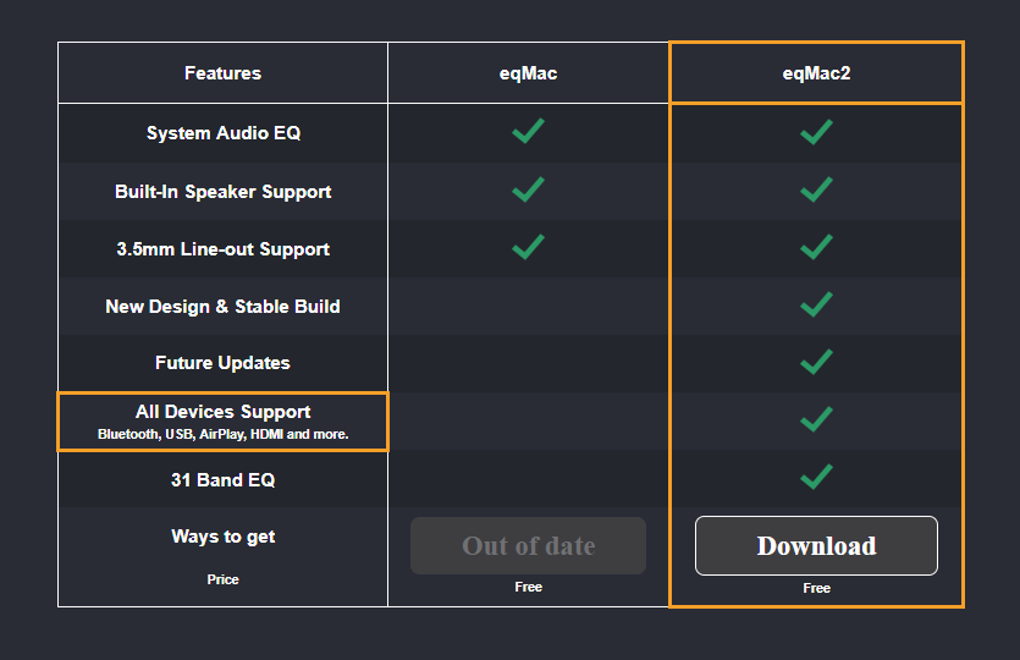
The software’s versatility extends to its compatibility with a wide array of audio output devices. This includes built-in speakers, the standard 3.5mm headphone jack, as well as Bluetooth devices, USB audio interfaces, HDMI audio, and AirPlay compatible devices. This broad range of support ensures that users with a diverse setup of audio peripherals can benefit from eqMac2’s equalizing capabilities, regardless of whether they are using wired or wireless connections. This wide compatibility is a major strength, simplifying the audio enhancement process for users with various output methods.
Furthermore, eqMac2 positions itself as a successor to its predecessor, eqMac, inheriting its core functionalities and incorporating the latest updates and improvements. This suggests a commitment to ongoing development and improvement, with the expectation of future updates adding further features and addressing any existing issues. The legacy of its predecessor and the promise of continued support contributes to its long-term viability and appeal.
Performance and Stability: A Mixed Bag of Experiences
While eqMac2 offers compelling features, its performance has been a subject of mixed reviews. Users have reported instances of crashing, which significantly detracts from the overall user experience. The frequency and severity of these crashes vary, with some users encountering them frequently, while others report a more stable experience. This inconsistency suggests that the stability of eqMac2 might depend on several factors, including the specific macOS version, the system’s hardware configuration, and potentially even conflicts with other installed software. Further investigation into the root causes of these crashes would be beneficial to improve the reliability of the software.
The reports of crashes highlight a critical area needing improvement. A stable audio equalizer is crucial; unexpected interruptions disrupt the workflow and negatively impact the user experience. Addressing stability concerns is paramount for enhancing user satisfaction and ensuring the software’s long-term success. Addressing these issues could significantly improve the software’s reputation and user base.
User Interface and User Experience: Room for Improvement
Another area where eqMac2 falls short is its user interface (UI) and overall user experience (UX). Reviews describe the UI as substandard, suggesting a lack of intuitive design and potentially hindering ease of use. A less-than-ideal user interface can significantly impact the usability of any software, even if its core functionalities are robust. A poorly designed UI can frustrate users, leading them to abandon the software even if it technically performs its intended task.
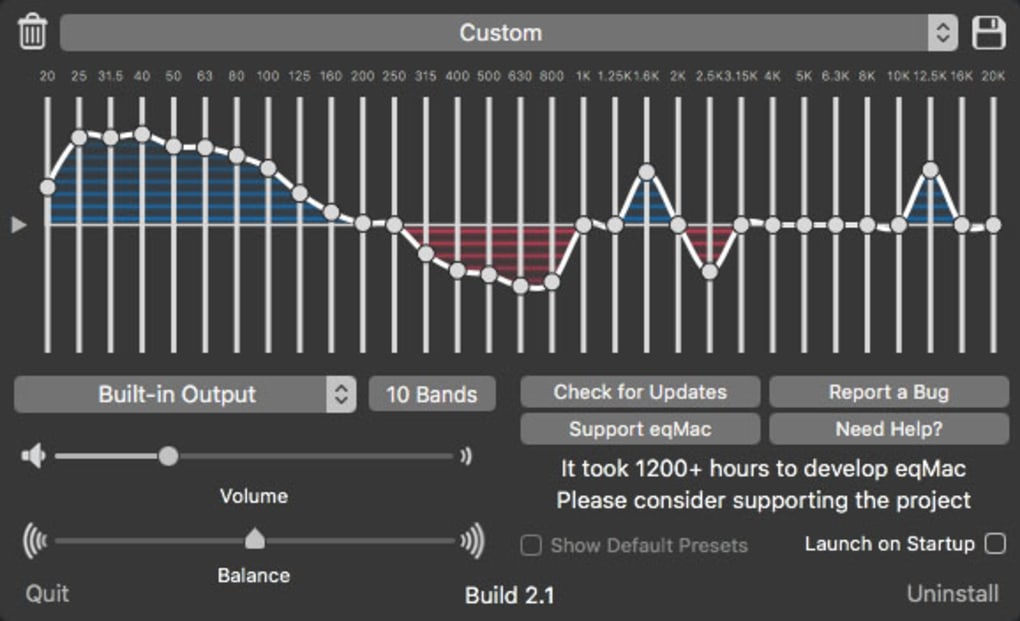
An intuitive UI should be a priority for future development. This means focusing on clear and logical layouts, easy-to-understand controls, and a visually appealing design. Improving the UX would not only improve user satisfaction but could also attract a wider range of users who might be intimidated by a less user-friendly alternative. Investing in UI/UX improvements could be a significant factor in boosting eqMac2’s adoption and popularity.
Pros and Cons: Weighing the Benefits Against Limitations
Summarizing the key points, eqMac2 offers several significant advantages:
Pros:
- System-wide equalization: Affects all audio output, providing a consistent enhancement experience.
- Broad device compatibility: Supports various audio output methods, including built-in speakers, 3.5mm jacks, Bluetooth, USB, HDMI, and AirPlay.
- Free and open-source: Accessible to all users without any cost, and the open-source nature allows community contribution and transparency.
- Regular updates (claimed): The development team’s commitment to releasing updates suggests ongoing maintenance and potential improvements.
Cons:
- Prone to crashing: Reports of instability and crashes raise significant concerns regarding reliability.
- Substandard UX: A poorly designed UI makes the software less user-friendly and potentially frustrating for users.
- Lack of detailed documentation: Limited documentation may make it difficult for users to understand and fully utilize the software’s capabilities.
Alternatives and Comparisons: Exploring Other Options
Given the limitations of eqMac2, exploring alternative audio equalizer options for macOS is worthwhile. Several commercial and free alternatives exist, each offering a different set of features and functionalities. Comparing these alternatives based on factors like stability, UI design, feature set, and pricing will assist users in making informed decisions based on their specific needs and priorities.
Considering the issues with eqMac2’s stability and user experience, exploring alternatives is a prudent approach. The availability of well-established and well-reviewed commercial and free options provides users with robust choices to ensure a smoother and more reliable audio enhancement experience.
Conclusion: A Promising Concept with Room for Significant Improvement
eqMac2 presents a promising concept: a free, open-source, system-wide audio equalizer for macOS. Its broad device compatibility and the potential for community contributions are attractive aspects. However, the reported issues regarding stability and user experience significantly hinder its usability and appeal. Addressing these concerns through improved development, bug fixes, and UI/UX enhancements is crucial for realizing eqMac2’s full potential. Until these improvements are implemented, users may want to consider alternative audio equalizer solutions to ensure a consistent and reliable audio experience on their Macs. The future success of eqMac2 hinges on addressing these limitations and enhancing the overall user experience.

File Information
- License: “Free”
- Latest update: “September 19, 2024”
- Platform: “Mac”
- OS: “Mac OS X”
- Language: “English”
- Downloads: “9.3K”
- Size: “26.06 MB”


