
Equalizer APO is a free, open-source graphic equalizer designed for Windows operating systems. Its lightweight design, intuitive interface, and minimal system resource consumption make it a popular choice for users seeking to enhance their audio experience without compromising system performance. This comprehensive guide explores the features, benefits, drawbacks, and overall usability of Equalizer APO.
Understanding Equalizer APO’s Functionality
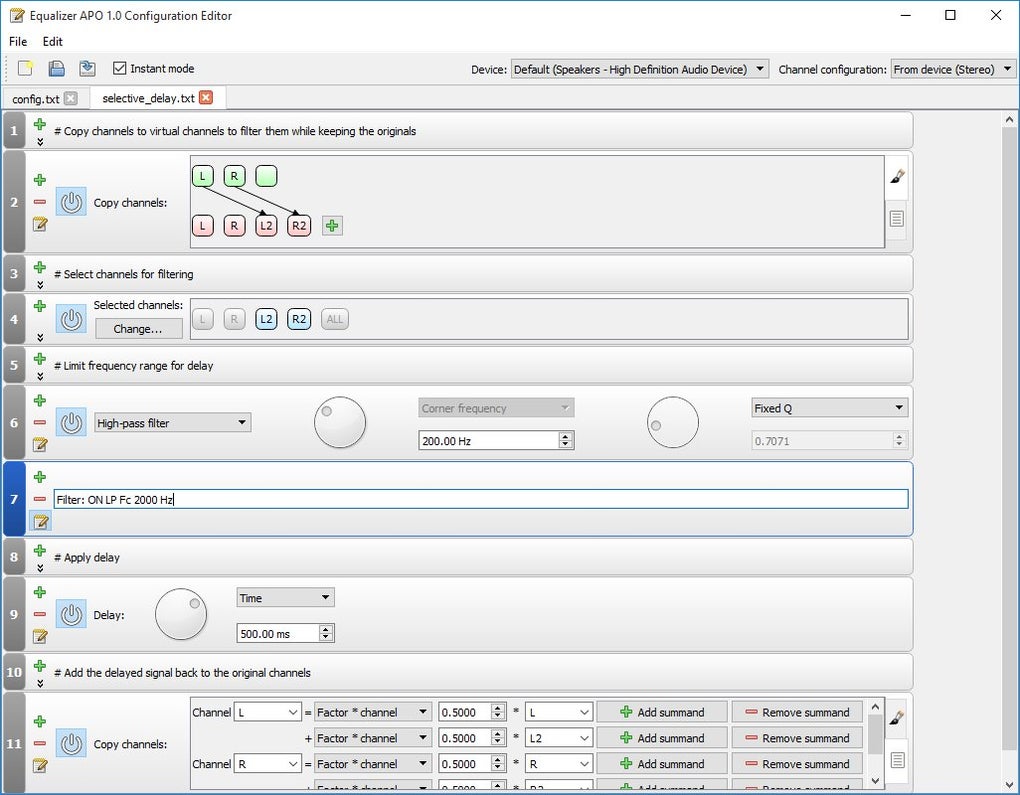
Equalizer APO operates as a system-wide audio equalizer, meaning it affects all audio output and input devices connected to your computer. This allows for a consistent and unified audio profile across various applications and scenarios. Unlike many other equalizers that are application-specific, Equalizer APO integrates seamlessly into the Windows audio architecture, providing granular control over your sound profile. Its core function is to adjust the frequency balance of audio signals, allowing users to boost or cut specific frequencies to achieve a customized sound. This is achieved through the application of various filters, which can be configured through a user-friendly graphical interface.
.jpg)
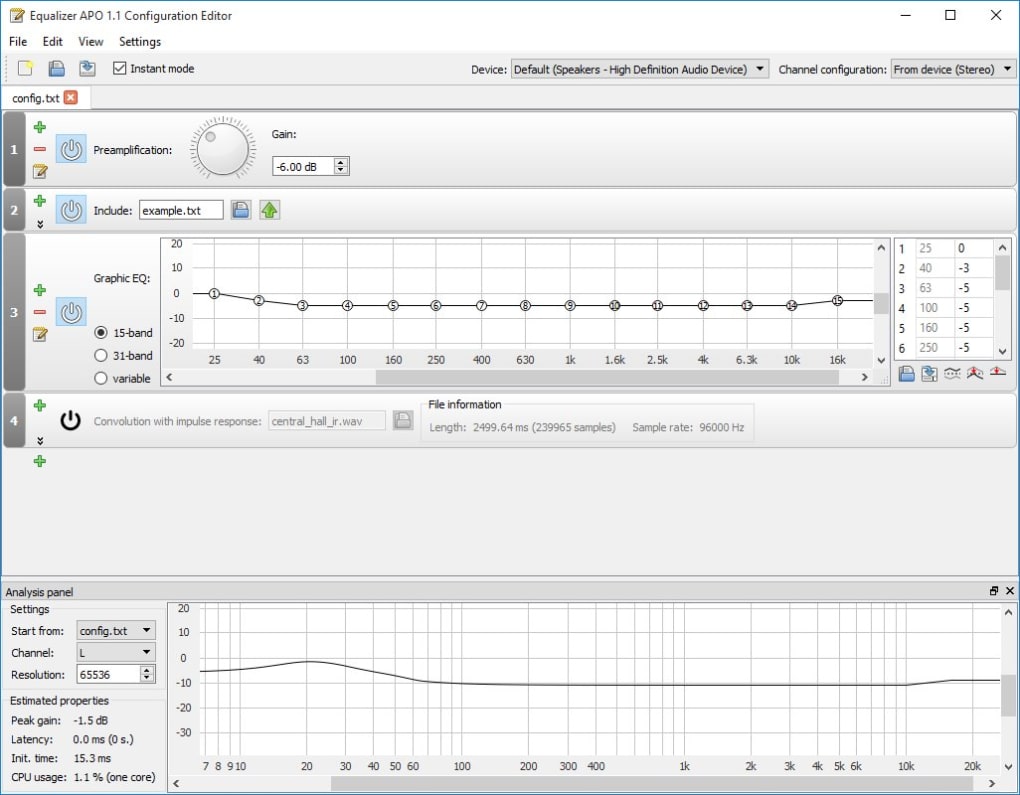
The equalizer itself is a visual representation of the frequency spectrum, enabling intuitive manipulation of the sound curve. Users can add, remove, and adjust the strength of filters, thus creating a personalized frequency response curve. The number of filters is virtually unlimited, enabling extremely fine-grained adjustments to match individual preferences or compensate for acoustic deficiencies in a listening environment. It offers the flexibility to create and manage multiple configurations for different devices or listening scenarios, ensuring optimal sound quality in every context. The software also supports multi-channel audio, catering to users with surround sound systems or those working with multi-track audio. Detailed visual representations of the applied configurations aid users in fine-tuning their settings.
Key Features and Advantages
Equalizer APO boasts several key advantages that contribute to its popularity amongst audio enthusiasts and casual users alike:
- Flexibility and Customization: The sheer range of customization options is one of Equalizer APO’s most compelling features. Users can create highly specific sound profiles tailored to their individual needs and preferences. The ability to add numerous filters allows for intricate manipulation of the audio frequency spectrum, enabling precise adjustments to suit different genres of music, games, or other audio sources. The absence of limitations on the number of filters allows for unparalleled precision and control.
-
System Resource Efficiency: Equalizer APO is remarkably lightweight, consuming minimal system resources. This means users can enjoy its powerful equalization capabilities without experiencing performance issues or noticeable lag, even on less powerful systems. Its low overhead makes it a suitable choice for users with less-resourceful computers.
-
Intuitive Interface (with a learning curve): While some prior knowledge of audio equalization concepts is helpful for optimal use, the graphical interface is largely intuitive and user-friendly. The visual representation of the frequency response curve makes it easy to understand the effects of adjustments, though mastering the full potential might require some exploration. This is complemented by readily available online resources and guides that assist users of all skill levels.
-
Open-Source Nature: Equalizer APO’s open-source nature provides transparency and community support. This means the source code is publicly available for scrutiny, ensuring accountability and trustworthiness. The community support available through online forums and other channels provides valuable assistance for users facing challenges or seeking further optimization strategies.
-
Multi-Device Support: Equalizer APO supports multiple audio devices simultaneously. This allows users to create unique equalization profiles for different speakers, headphones, or microphones, ensuring optimal audio quality across various audio output and input devices. This functionality is particularly useful for users with multiple audio setups or those who frequently switch between different audio devices.
-
Extensive Documentation and Community Support: While the software itself might present a slight learning curve initially, a wealth of online resources, tutorials, and community forums are readily available to aid users. These resources provide guidance for both beginners and advanced users, covering various aspects of configuration, troubleshooting, and advanced techniques. This extensive support network makes learning and problem-solving significantly easier.
Limitations and Potential Drawbacks
While Equalizer APO offers significant advantages, some potential drawbacks should also be considered:
-
Steeper Learning Curve: Although the interface aims for intuitiveness, achieving truly refined sound adjustments requires a basic understanding of audio frequency responses, equalization techniques, and filter types. Users unfamiliar with these concepts might find the initial configuration process challenging.
-
Configuration Management: Managing multiple configurations for different devices can become somewhat cumbersome. Each device requires a separate configuration file, which can lead to organizational challenges for users with a large number of audio devices or setups. A more streamlined method for managing these profiles would improve overall user experience.
-
Dispersed Settings: Certain settings are scattered across multiple windows and dialog boxes, which can sometimes impede efficient workflow. A more centralized and integrated settings panel would enhance usability.
-
Potential for Overwhelm: The extensive array of options and configurations can be overwhelming for novice users. The sheer number of available settings might lead to confusion or difficulty in deciding where to begin. A more user-friendly interface could help guide new users towards a smoother introduction to the program’s capabilities.
Comparing Equalizer APO to Alternative Solutions
Equalizer APO stands out from many alternative audio equalizers due to its open-source nature, flexibility, and system-level integration. While many commercial and free equalizers offer similar functionality, they often lack the level of granular control and customization that Equalizer APO provides. Furthermore, many other equalizers lack system-wide integration, meaning their effects are limited to specific applications or processes. This makes Equalizer APO unique in its comprehensive approach to audio equalization. However, users should weigh these advantages against the slightly steeper learning curve associated with its extensive configuration options.
Some alternatives may be easier to use for beginners, while others might focus on specific aspects of audio enhancement. The choice of equalizer depends heavily on the user’s technical skills, desired level of customization, and the specific audio enhancement needs.
Conclusion: A Powerful Tool for Audio Customization
Equalizer APO remains a compelling choice for users who require a highly customizable and powerful audio equalizer for their Windows system. Its open-source nature, flexibility, system-level integration, and lightweight design make it stand out from many alternatives. Although it presents a learning curve, the extensive online resources and community support available significantly mitigate this challenge. Ultimately, Equalizer APO empowers users to take control of their audio experience, tailoring the sound to their preferences and compensating for any limitations of their audio equipment or listening environment. The ability to create extremely precise and nuanced sound profiles makes it a valuable tool for both casual users and audio professionals alike.


