
ES File Explorer is a free file management application developed by EStrongs Inc. designed for Android devices. It offers a wide range of features aimed at simplifying file navigation, organization, and transfer, both locally and across cloud storage platforms. While boasting impressive functionality, its history includes controversies that impact user experience and trust. This review delves into the strengths and weaknesses of ES File Explorer, providing a balanced assessment to help users decide if this app aligns with their needs.
Core Functionality and Features: Seamless File Management
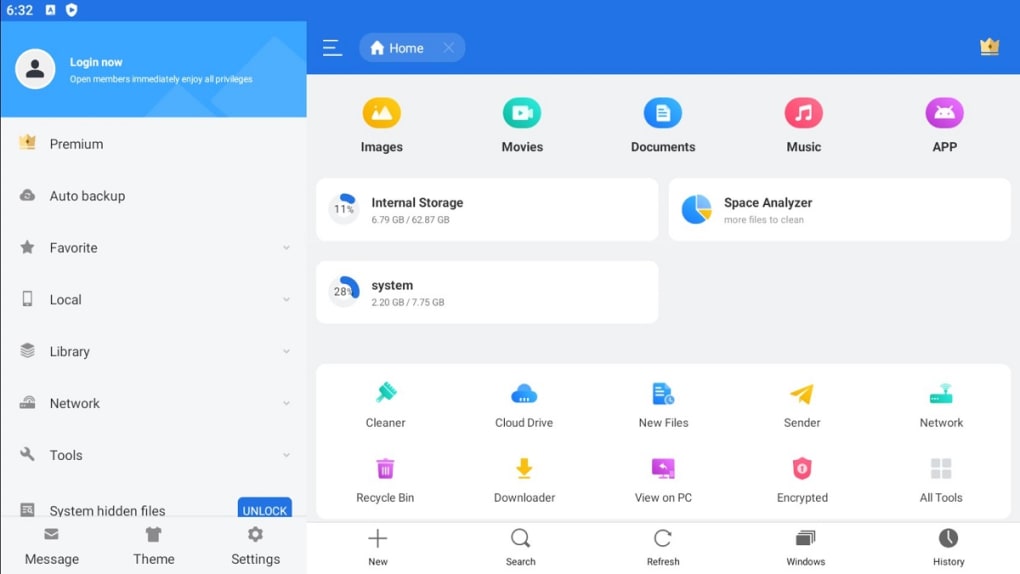
At its core, ES File Explorer functions as a robust file explorer, mirroring the functionality of traditional desktop file managers. Users can easily browse through their device’s file system, navigating folders and directories with intuitive ease. The app provides standard operations for file manipulation, including:
-
File Viewing: ES File Explorer allows for the direct viewing of various file types, including images, videos, audio files, and documents. This eliminates the need for separate applications to preview file contents. The app supports a wide range of file formats, offering a convenient one-stop solution for accessing diverse multimedia and document files.
-
File Transfer and Management: Users can perform essential file management tasks like copying, moving, renaming, deleting, and creating new files and folders directly within the app. This streamlining of operations makes file organization and management efficient and straightforward. The app also facilitates the creation of new folders, aiding in organizing large numbers of files effectively.
-
Cloud Storage Integration: One of ES File Explorer’s notable features is its seamless integration with popular cloud storage services such as Google Drive, Dropbox, and OneDrive. Users can directly access and manage their cloud files within the app, enabling effortless transfers between local storage and the cloud. This capability enhances flexibility and simplifies the process of backing up, sharing, and syncing files across various platforms.
-
Compressed File Support: ES File Explorer provides native support for compressed file formats like ZIP and RAR. Users can view the contents of these archives without needing external decompression tools. Furthermore, the app allows for the creation of new compressed archives, enabling users to efficiently compress and share multiple files.
-
Built-in Download Manager: The app incorporates a download manager, simplifying the process of downloading files from the internet. This feature further centralizes file management, reducing the need for multiple applications to handle different file-related tasks.
Advanced Features: Beyond Basic File Management
ES File Explorer goes beyond basic file management, offering several advanced features to enhance user experience and productivity:
-
App Manager: The app includes an integrated app manager that allows users to uninstall, sort, and back up applications. This feature streamlines app management, providing a convenient centralized location for handling application-related tasks.
-
System File Access: ES File Explorer provides access to system files, though users should exercise caution as modifications to these files can potentially destabilize the device’s operation.
-
Storage Management Tools: The app offers tools for analyzing storage usage, including an SD card analyzer for devices with external storage. This allows for efficient management of available storage space and aids in identifying files or applications consuming excessive storage.
-
Task Killer and Cache Cleaner: To optimize device performance, ES File Explorer includes a task killer to terminate background processes and a cache cleaner to remove temporary files. These features can improve device responsiveness and free up RAM. However, users should be cautious with aggressive cache clearing, as some applications may require cached data for optimal function.
-
Auto-start Manager: The app provides an auto-start manager, showing which applications launch automatically upon device startup. Users can disable unnecessary auto-starting applications to improve boot times and potentially improve battery life. Careful consideration should be applied here as disabling critical system applications can lead to system instability.
Controversies and User Experience Issues
Despite its feature-rich functionality, ES File Explorer’s history is marred by controversies that significantly affect user experience and trust.
-
Click Fraud: ES File Explorer’s developers were implicated in click fraud, a practice where the app automatically clicks on advertisements without user knowledge, generating revenue for the developers. This deceptive practice led to the app’s removal from some app stores, raising serious concerns about user privacy and ethical conduct. Although the app remains available on some platforms, the issue casts a shadow on its reputation. The exact extent to which this practice continues remains unclear, creating lingering doubts about the app’s integrity.
-
Invasive Advertising: Users have reported experiencing an excessive number of pop-up ads within the app. These intrusive ads can disrupt the user experience, making it difficult to focus on file management tasks. While some apps utilize ads to support their free versions, the volume and intrusiveness of ads in ES File Explorer have been criticized as overly aggressive. This negatively impacts the usability and overall enjoyment of the application.
ES File Explorer: A Balanced Perspective
ES File Explorer provides a comprehensive suite of file management tools, offering users convenient access to and control over their files, both local and cloud-based. Its features extend beyond simple file navigation, including tools for managing applications, optimizing device performance, and interacting with compressed files. The inclusion of a download manager and cloud storage integration greatly enhances its utility.
However, the app’s history of click fraud and the prevalence of intrusive advertising significantly detract from the overall user experience. These issues raise serious concerns regarding the app’s ethical practices and its respect for user privacy. While the app may offer considerable functionality, users must weigh these potential negative aspects against the benefits of using the application. The level of ad intrusion and the lingering question of click fraud’s persistence remain significant concerns that should not be overlooked.
Ultimately, the decision of whether or not to use ES File Explorer rests on individual priorities and tolerance for intrusive advertising and the potential privacy risks associated with the app’s past behavior. Users seeking a robust file manager with a clean and unobtrusive interface might consider exploring alternative options.
Alternatives to ES File Explorer
Several alternative file management applications offer similar functionality without the controversies associated with ES File Explorer. These alternatives provide a viable option for users seeking a more trustworthy and less intrusive file management experience. Exploring these alternatives can be a beneficial step in finding an application that meets individual needs and preferences while prioritizing user privacy and a positive user experience. A comprehensive review of these alternatives can help users make an informed choice. Some examples include:
- Cx File Explorer: A free, feature-rich file manager with a focus on a clean and intuitive user interface.
-
File Manager: Another free and user-friendly option, typically characterized by straightforward operation and minimal intrusive elements.
-
ZArchiver: Specifically designed for handling compressed files and archival management, offering robust tools for managing and manipulating various compressed file types.
-
Amaze File Manager: An open-source file manager, emphasizing transparency and user control over privacy.
These alternatives provide users with comparable functionalities without the ethical concerns and intrusive advertising that have plagued ES File Explorer.
Conclusion
ES File Explorer offers extensive features for managing files on Android devices, integrating cloud storage and offering advanced tools. However, its history of click fraud and invasive advertising create significant drawbacks. Users should carefully consider these issues before installing the app. The availability of many alternative file management applications offering comparable functionality without the same controversies makes choosing a suitable replacement a viable and often preferable approach. Prioritizing privacy and user experience is a crucial aspect of choosing any mobile application, and this consideration should be paramount when selecting a file manager.
File Information
- License: “Free”
- Latest update: “November 19, 2024”
- Platform: “Android”
- OS: “Android 13.0”
- Downloads: “2M”
- Size: “36.86 MB”
- Download Options: “APK, Google Play”
- Filename: “es-file-explorer-4-4-2-2-1.apk”


