
In the vast and ever-evolving landscape of digital media, users are constantly seeking solutions that simplify their interactions with an increasing volume of content. From personal photo libraries to extensive music collections and a myriad of video files, the desire for an intuitive, comprehensive, and consolidated media management system is palpable. Enter Esmas Player, a free, all-in-one multimedia application designed for Windows users that bravely attempts to centralize the enjoyment and organization of image, music, and video files. Offered through platforms like PhanMemFree.org, Esmas Player presents itself as a singular hub for nearly any digital media need, embodying an ambitious vision to be the go-to tool for digital entertainment and organization on the PC.
The initial encounter with Esmas Player immediately brings to mind an undeniable familiarity, particularly for those accustomed to Apple’s ubiquitous iTunes. This striking resemblance, acknowledged by its developers and users alike, elicits a mixed bag of reactions. On one hand, it offers an instant sense of ease and intuition, allowing users to navigate its interface with minimal a learning curve. On the other, it sparks questions about originality and innovation, sometimes leading to perceptions of it being a “cheap imitation” rather than a standalone, unique offering. Despite these aesthetic considerations, Esmas Player’s true ambition lies in its feature set, aiming to transcend simple media playback by incorporating a wide array of tools from library management to disc burning and even online content streaming. As we delve deeper into Esmas Player, we’ll explore its capabilities, usability, and the areas where it shows both promise and a need for refinement, positioning it within the broader ecosystem of multimedia software available to today’s discerning user.
The All-Encompassing Multimedia Experience
Esmas Player’s core appeal lies in its commitment to providing a holistic multimedia experience, aiming to be a single destination for all digital media consumption and management. Far beyond a rudimentary media player, it integrates functionalities that cater to various aspects of a user’s digital life, from casual listening to comprehensive library curation. This ambitious scope positions it as a versatile tool, particularly for users seeking to consolidate their media applications.
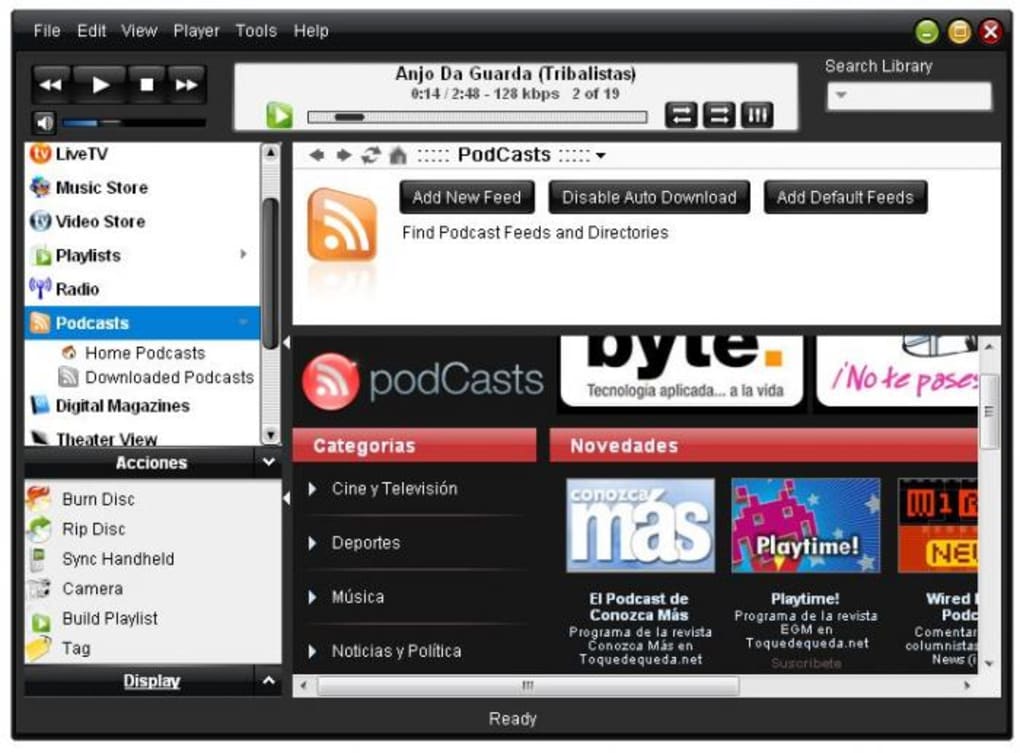
At the heart of Esmas Player is its robust music management system. Drawing heavily on its design inspiration, the application offers intuitive library organization that will feel familiar to many. Users can effortlessly import their existing music collections, allowing Esmas Player to scan local drives and build a comprehensive database. Once imported, the software provides powerful tools for categorization, enabling users to sort their tracks by artist, album, genre, or even through custom-created playlists. A critical feature for any serious music enthusiast is tag editing, and Esmas Player facilitates this, allowing users to modify metadata such as song titles, artist names, album art, and genres. This capability is crucial for maintaining a well-organized and easily navigable music library, ensuring that every track is correctly identified and accessible. Furthermore, Esmas Player extends its audio capabilities to include podcast support. Users can subscribe to their favorite podcasts, download new episodes automatically, and listen to them seamlessly within the application, transforming it into a complete audio entertainment hub.
The player’s multimedia prowess doesn’t stop at audio. It also dedicates significant attention to video playback and organization. Esmas Player aims to be the central repository for personal video collections and movie libraries, providing a structured environment where users can categorize their visual content. Whether it’s home videos, downloaded films, or educational clips, the application helps in keeping these files neatly arranged, potentially by genre, date of acquisition, or custom folders. This systematic approach streamlines the viewing experience, eliminating the need to search through disorganized files or switch between different video players. The integration of video management alongside music and photo capabilities underscores Esmas Player’s ambition to be a truly unified media platform.
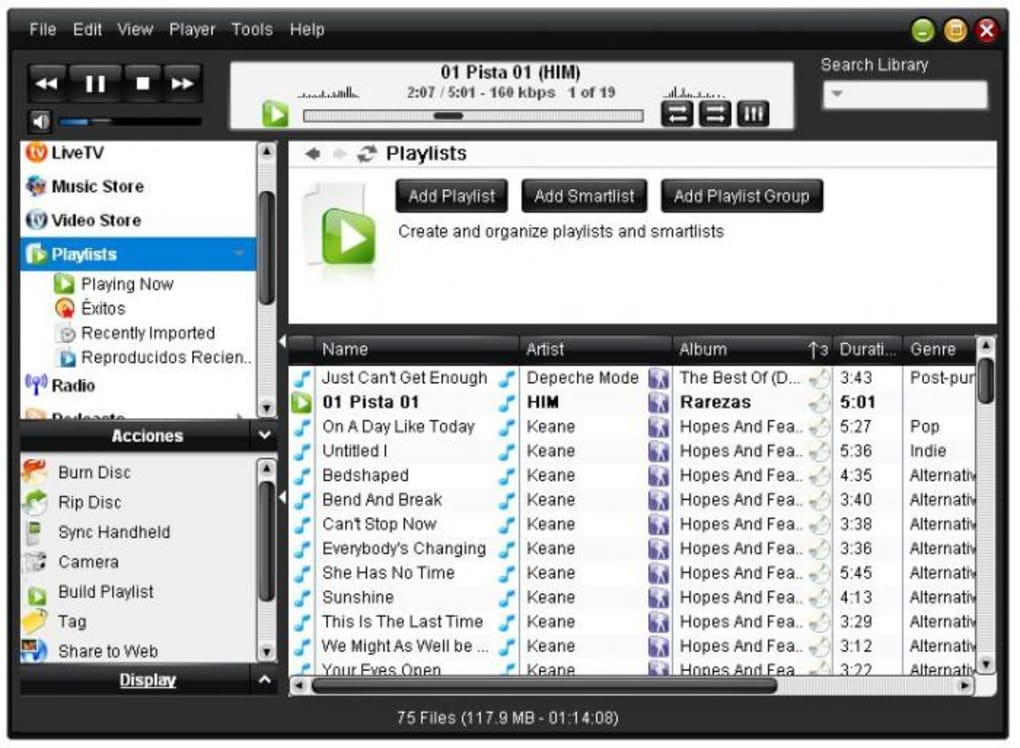
Moreover, Esmas Player ventures into image handling, a feature less commonly found in primary media players. While not a full-fledged image editor, it provides essential tools for viewing, basic organization, and potentially slideshow creation. Users can import their photo libraries, view images in various formats, and perhaps group them into albums or events. This addition broadens the application’s utility, allowing users to revisit cherished memories alongside their favorite tunes and videos, all within a single interface. The consolidation of images, music, and videos within Esmas Player significantly reduces the digital clutter, offering a cohesive environment for all forms of personal media.
A standout feature, particularly in an era dominated by streaming, is Esmas Player’s ability to synchronize content with portable music devices. This function mirrors a key aspect of its spiritual predecessor, offering a tangible convenience for users who prefer to carry their curated music libraries offline. Whether it’s an older MP3 player or a smartphone, the synchronization tool ensures that favorite tracks, playlists, and even podcasts can be easily transferred for on-the-go enjoyment. This bridges the gap between desktop media management and mobile consumption, enhancing the overall user experience. The mention of an integrated online music store capability further suggests an aspiration for a complete ecosystem, allowing users to potentially discover and purchase new music directly within the application, aiming for a seamless content acquisition and consumption cycle. This comprehensive suite of features—from organizing and playing diverse media types to synchronizing with external devices and potentially integrating online marketplaces—demonstrates Esmas Player’s earnest effort to deliver an all-encompassing multimedia experience.
Beyond Playback: Esmas Player as a Digital Hub
What truly distinguishes Esmas Player from many minimalist media players is its venture into functionalities that extend far beyond simple content playback. It positions itself as a veritable digital hub, integrating utility features that traditionally require separate applications. This expanded toolkit caters to users seeking a streamlined approach to various digital media tasks, consolidating them within a single, familiar interface.
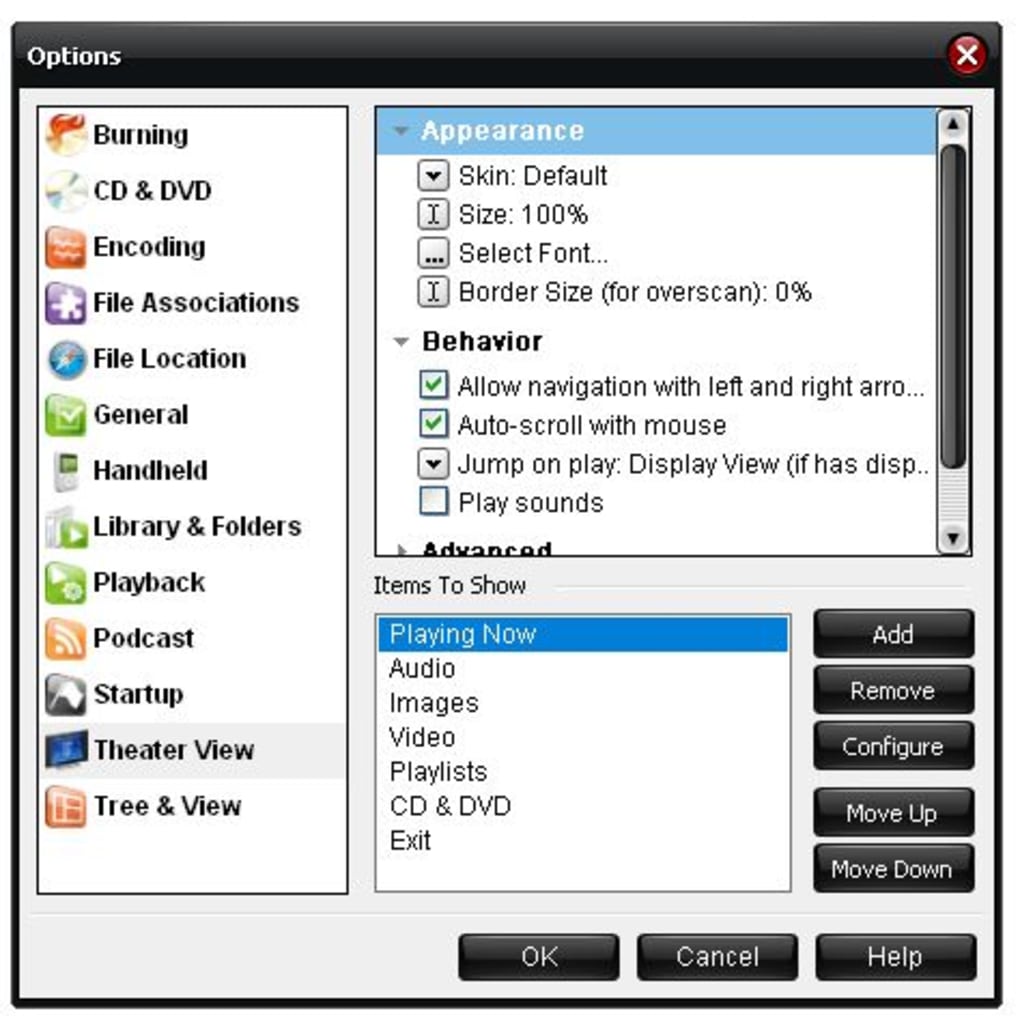
One of the most notable extended utilities is the built-in disc burner. In an age where digital distribution reigns supreme, the ability to burn physical media still holds significant value for many. Esmas Player allows users to create custom audio CDs from their digital music library, perfect for sharing with friends, playing in older car stereos, or simply enjoying a curated playlist in a tangible format. Beyond audio, this feature could potentially be used for backing up data or archiving important video files onto optical discs. This practical application enhances Esmas Player’s utility, catering to diverse user needs that span both the digital and physical realms of media. The convenience of not needing a separate burning software significantly adds to the “all-in-one” appeal.
Complementing its disc burning capability, Esmas Player also features an integrated DVD player. This means users do not need to install a standalone DVD playback application to enjoy their movie collection. By incorporating this functionality, Esmas Player ensures that users can watch commercial DVDs directly within the same environment where they manage their digital movies and music. This consolidation simplifies the media consumption experience, making it a truly central point for both digital and physical video content. The ease of switching between streaming a digital file and playing a physical disc without changing applications is a major convenience for those who still maintain a physical media library.
Perhaps one of the most ambitious extensions of Esmas Player’s functionality is its support for online TV channels and radio stations. This feature elevates the application from a personal media manager to a gateway for broader digital entertainment. While the specifics of its implementation might vary, the intent is clear: to offer users access to live streaming content from the internet. This could include a curated list of internet radio stations, allowing users to explore diverse genres and global broadcasts, or even web-based TV feeds that provide additional entertainment options. This integration attempts to blur the lines between local media files and online streaming content, offering a unified platform for both. For users who enjoy exploring a wide range of audio-visual content, this capability adds a significant layer of value, transforming Esmas Player into a comprehensive entertainment portal.
Collectively, these extended utilities—the disc burner, integrated DVD player, and online streaming capabilities—underscore Esmas Player’s strategic effort to move beyond a mere media player. It aspires to be a central command center for digital media, providing a convergent experience where diverse tasks and content types are managed and enjoyed from a single application. This approach is particularly appealing to users who prefer simplicity and the convenience of a unified interface over juggling multiple specialized applications. By bringing together these disparate functions, Esmas Player aims to create a cohesive digital environment, fostering a seamless and efficient interaction with all forms of media.
Navigating the Interface: Familiarity and Its Double Edge
One of the most striking aspects of Esmas Player, and indeed a topic of considerable discussion, is its interface design. The moment a user launches the application, the resemblance to Apple’s iTunes is unmistakable. This design choice represents a calculated decision by the developers, one that carries both significant advantages and certain inherent drawbacks, creating a double-edged sword regarding user perception and experience.
The rationale behind consciously mimicking a highly successful and widely recognized interface like iTunes is primarily rooted in leveraging user familiarity. iTunes, for years, served as the dominant platform for digital music management, and its interface became synonymous with media library organization and playback for millions of users worldwide. By adopting a similar look and feel, Esmas Player aims to significantly reduce the learning curve for new users. Individuals already acquainted with iTunes can navigate Esmas Player’s menus, locate controls, and understand its library structure almost instinctively, without the need for extensive tutorials or trial-and-error. This “out-of-the-box” usability is a significant advantage, especially for a free application vying for user adoption in a crowded market. It provides an immediate sense of comfort and intuitiveness, making the transition from other platforms or the initial setup process remarkably smooth. For many, this familiarity translates directly into ease of use, which is a paramount factor in software choice.
However, this strong resemblance also invites a distinct set of challenges and criticisms. For some users, the close mimicry can detract from the software’s perceived originality and quality, leading to the impression of a “cheap imitation” rather than an innovative product. This sentiment often stems from a desire for distinctiveness and a unique identity in software design. When an application so closely mirrors another, it can raise questions about the developers’ own vision and their ability to innovate. Users might wonder why they should choose Esmas Player over the original if it offers little in terms of unique design or groundbreaking features. This can foster skepticism and erode confidence in the software’s long-term viability or the seriousness of its development.
Furthermore, the issue of branding and identity becomes pertinent. A unique and memorable interface contributes significantly to a software’s brand identity, helping it to stand out and cultivate a loyal user base. By adopting a largely derivative aesthetic, Esmas Player struggles to carve out its own niche or establish a distinct presence in the competitive multimedia software market. It risks being perpetually compared to its inspiration, often unfavorably, rather than being judged on its own merits. This can hinder its ability to attract users looking for genuine innovation or a fresh user experience.
Ultimately, Esmas Player’s interface design represents a delicate balancing act. On one side, it offers undeniable benefits in terms of immediate usability and reduced friction for new users, leveraging established UI patterns to its advantage. On the other side, it grapples with the potential for negative perceptions regarding originality, the challenges of establishing a unique brand identity, and the risk of being constantly overshadowed by its well-established predecessor. For Esmas Player to truly distinguish itself and foster long-term loyalty, it might need to gradually evolve its design to incorporate more original elements, demonstrating both homage to familiar patterns and a commitment to its own unique visual and interactive identity.
Performance and Localization: Room for Growth
While Esmas Player’s ambition to be an all-in-one multimedia hub is commendable, its journey towards achieving that vision is currently hampered by certain implementation and localization issues. These areas represent significant opportunities for improvement that, if addressed, could substantially enhance the application’s appeal and usability for a broader audience.
One of the critical observations from initial testing and user feedback revolves around the implementation of some of its functions. The original review noted that “some of its functions were not properly implemented or at least not as easy to use as I expected.” This speaks to potential usability gaps that can significantly detract from the overall user experience. “Not properly implemented” could manifest in various ways: perhaps the disc burning process is overly complicated or prone to errors; the integration of online TV channels and radio stations might be inconsistent, with streams failing to load or exhibiting buffering issues; or the synchronization feature with portable devices could be buggy, leading to lost data or incomplete transfers. These issues can lead to user frustration, where the promise of comprehensive functionality is undermined by unreliable or cumbersome execution. When core features do not perform as expected or are difficult to operate, users are likely to abandon the software, regardless of how feature-rich it appears on paper. The seamless operation of every advertised function is paramount for an application that positions itself as an “all-in-one” solution; any points of friction or failure can quickly erode user confidence and satisfaction.
Beyond functional implementation, a significant barrier to Esmas Player’s wider adoption is its current state of localization. Despite the program itself offering an English language setting, a crucial oversight exists: “both the installer and documentation haven’t been translated from Spanish yet.” This presents a substantial hurdle for any non-Spanish-speaking user from the very first interaction. An English-speaking user attempting to install Esmas Player will be greeted by an installer entirely in Spanish, creating immediate confusion and potential hesitation. This initial linguistic barrier can easily lead users to abandon the installation process altogether, preventing them from even experiencing the application’s features. A non-translated installer is a major impediment to user onboarding and severely limits the software’s accessibility to a global audience.
Furthermore, the lack of translated documentation is equally problematic. User manuals, FAQs, and help files are indispensable resources for understanding complex features, troubleshooting issues, and extracting the maximum value from any software. If these critical support materials are only available in Spanish, non-Spanish speakers will find themselves without guidance, struggling to comprehend advanced functionalities or resolve common problems. This deficiency not only frustrates users but also paints a picture of incomplete development, hindering the application’s perceived professionalism and reliability. In today’s global software market, where applications are expected to cater to diverse linguistic backgrounds, proper and complete localization is not merely a convenience but a fundamental requirement for broader reach and user engagement. This oversight significantly curtails Esmas Player’s potential to establish itself as a truly international multimedia solution. Addressing both the functional refinement of its extended features and ensuring comprehensive linguistic localization are vital steps for Esmas Player to overcome its current limitations and unlock its full potential.
Esmas Player in the Broader Software Ecosystem
To fully appreciate Esmas Player, it’s essential to contextualize it within the vast and competitive landscape of multimedia software. Its “all-in-one” philosophy invites comparisons with both specialized players and more comprehensive commercial suites, highlighting its unique position and the niche it attempts to fill.
When juxtaposed with highly specialized players, Esmas Player presents a distinct proposition. Applications like VLC Media Player, renowned for its unparalleled codec support and versatility in video playback, or Foobar2000, lauded by audiophiles for its customizable audio experience and lightweight design, focus intently on excelling in a single domain. These specialized tools often offer superior performance, deeper customization options, and more robust feature sets within their specific niches. Esmas Player, by contrast, aims for breadth over depth. While it can play audio and video, its core strength isn’t necessarily in offering the most advanced playback controls or the widest array of audio processing effects. Instead, its value lies in consolidating these functions, along with image organization and utility features, into a single application, thereby reducing the need for users to juggle multiple programs.
Similarly, comparing Esmas Player to commercial multimedia suites, such as those offered by major software developers, reveals its advantages and disadvantages. Commercial suites often boast a highly polished user experience, professional-grade features, and dedicated customer support. However, they come with a price tag, which can be a significant barrier for many users. Esmas Player’s “free” license is a major advantage here, making a comprehensive multimedia solution accessible to everyone. For users who prioritize cost-effectiveness and a consolidated experience, Esmas Player offers a compelling alternative, even if it might lack some of the refinements found in paid software.
The “all-in-one” niche that Esmas Player attempts to occupy is particularly appealing to a specific segment of users: those who value simplicity, convenience, and a unified interface. These users prefer not to install and manage separate applications for music, video, photos, and disc burning. For them, the trade-off of having slightly less robust individual features in favor of a single, integrated platform is a worthwhile compromise. Esmas Player caters to this desire for consolidation, offering a streamlined digital life where various media tasks can be handled from a central application, fostering a more organized and less fragmented digital environment.
Moreover, the availability of Esmas Player on platforms like PhanMemFree.org highlights its relevance within the free software ecosystem. PhanMemFree.org, dedicated to curating and offering a wide range of free applications, positions Esmas Player among its “Multimedia” and “Audio” categories for Windows users. This placement suggests it fulfills a demand for a free, comprehensive media solution, despite the noted shortcomings in translation and implementation. The platform’s commitment to highlighting valuable, freely available software aligns with Esmas Player’s offering, making it accessible to a global audience seeking alternatives to paid or overly specialized programs. The user reviews on PhanMemFree.org, though varied and sometimes tangential, further underscore the subjective nature of software appreciation, with some users finding genuine value in Esmas Player’s feature set despite the criticisms leveled against its design and functionality. This feedback loop is crucial for developers to understand user needs and guide future improvements, ultimately shaping Esmas Player’s evolution within this dynamic software ecosystem.
Conclusion
Esmas Player emerges as an ambitious contender in the free multimedia software arena, boldly aiming to provide an all-encompassing solution for Windows users. Its fundamental appeal lies in its aspiration to be a singular hub for managing and enjoying images, music, and video files, extending its utility to include practical features like disc burning, DVD playback, and even access to online TV and radio stations. This “all-in-one” philosophy offers a compelling proposition for users seeking to consolidate their digital media interactions into a streamlined and familiar interface, reminiscent of well-established industry giants.
The program’s design, while borrowing heavily from the widely recognized aesthetics of iTunes, serves as both a strength and a weakness. It provides instant familiarity and ease of use, drastically reducing the learning curve for new users. However, this resemblance simultaneously sparks debate about originality and can lead to perceptions of it being a less refined imitation, rather than a uniquely crafted application. For Esmas Player to truly thrive and establish its own identity, a gradual evolution towards a more distinctive design, while retaining an intuitive user experience, would be a critical step.
Despite its comprehensive feature set, Esmas Player currently faces notable challenges in execution and localization. Reports of functions not being “properly implemented or at least not as easy to use” indicate a need for significant refinement in its extended capabilities. The promise of advanced features is diminished if their practical application is cumbersome or unreliable. Furthermore, the persistent language barrier, with the installer and documentation remaining untranslated from Spanish, represents a substantial hurdle for global adoption and user support. Addressing these usability gaps and ensuring a complete, professional localization effort are paramount for Esmas Player to reach its full potential and appeal to a broader, international audience.
In essence, Esmas Player stands as a testament to the ongoing quest for integrated digital solutions. It offers a solid foundation as a free, full-featured multimedia organizer, capable of handling a diverse range of tasks. Yet, its journey is far from complete. By refining its functionalities, overcoming its localization challenges, and cultivating a more distinct identity, Esmas Player has the significant potential to transcend its current limitations and solidify its position as a valuable and indispensable tool for Windows users navigating the complexities of their digital media landscape. As a free offering on platforms like PhanMemFree.org, it provides an accessible entry point for users willing to embrace its current form while anticipating its future growth and development.
File Information
- License: “Free”
- Version: “11026”
- Latest update: “July 20, 2021”
- Platform: “Windows”
- OS: “Windows XP”
- Language: “English”
- Downloads: “103.3K”
- Size: “13.37 MB”


