
Evidence Eliminator was a powerful hard drive cleaning application designed to thoroughly erase data from a computer, leaving minimal traces behind. While no longer available for download, its features and capabilities offer a compelling case study in the evolution of data security software. This article examines its functionalities, strengths, weaknesses, and the reasons behind its eventual disappearance from the market.
Comprehensive Data Elimination: Features and Capabilities
Evidence Eliminator aimed to provide users with the most comprehensive hard drive cleaning solution available. Unlike simpler tools that only cleared temporary files and browser history, it purported to delve much deeper, eliminating data that more sophisticated forensic methods might uncover. Its key features included:
-
Extensive Cleaning Options: The software targeted various data repositories across the system, including the Start menu, email clients (though with potential for accidental data loss, as discussed later), external drives, and chat applications. This broad approach aimed to eradicate digital fingerprints from multiple avenues of user activity. This level of comprehensiveness wasn’t commonly seen in competing software at the time.
-
Deep System Purging: Evidence Eliminator went beyond superficial cleaning. It targeted less obvious areas like slack space (the unused space between files on a hard drive), deleted registry entries, and modified file timestamps. These details, often overlooked by less powerful cleaners, could still contain remnants of deleted files or user activity.
-
Advanced Techniques Claimed: The software made bold claims about its capabilities, asserting the use of methods to prevent detection even by electron microscopes often employed by government agencies in investigations. While the specifics of this “magnetic resonance” claim remain unclear and unverified, it highlights the software’s ambitious aim for ultimate data security.
-
Modular Approach with Plug-ins: While specifics are limited in available information, the presence of plug-in modules suggests an architecture designed to adapt to new applications and data formats over time, expanding its cleaning capabilities to encompass the ever-evolving digital landscape. This allowed for potential updates and expansion of the target data types cleaned by the program, addressing emerging security concerns and applications.
User Experience and Potential Pitfalls
Despite its powerful features, Evidence Eliminator wasn’t without its drawbacks. The user interface, while straightforward in its initial wizard-guided setup, presented a steeper learning curve for users who needed to delve into more advanced configurations. This complex configuration made it crucial for users to have a solid understanding of their system’s file structure and the software’s settings to avoid accidental data loss.
The software’s aggressive cleaning approach, if not carefully managed, could potentially lead to unintended consequences. The default settings, for instance, were reported to automatically delete Outlook Express folders. This oversight highlighted the importance of thorough documentation and understanding of the software’s behavior, which thankfully, was supported by a comprehensive online help file. While this help file mitigated some of the risks, the potential for catastrophic data loss underscores the necessity of caution and thorough understanding before employing such a potent cleaning tool.
Comparing Evidence Eliminator to Alternatives
The original review compared Evidence Eliminator to “similar products,” noting that it offered more comprehensive cleaning options, particularly regarding email clients and chat applications. However, the review did not specify which alternative software it was comparing against. To fully understand its position in the market, it’s necessary to consider the general landscape of data wiping and security software that existed at the time of its release.
Other software available at the time likely offered varying degrees of data erasure capabilities. Some may have focused primarily on securely deleting individual files, while others may have provided more general system cleaning, like removing temporary files and browsing history. Evidence Eliminator’s strength lay in its claim of far more exhaustive data purging, extending to areas that other solutions might overlook. The crucial distinction lay in the depth and breadth of its cleaning capabilities, aiming for comprehensive data eradication beyond standard cleanup utilities. This aggressive approach, however, came with the increased risk of accidental data loss if not used with meticulous attention to detail.
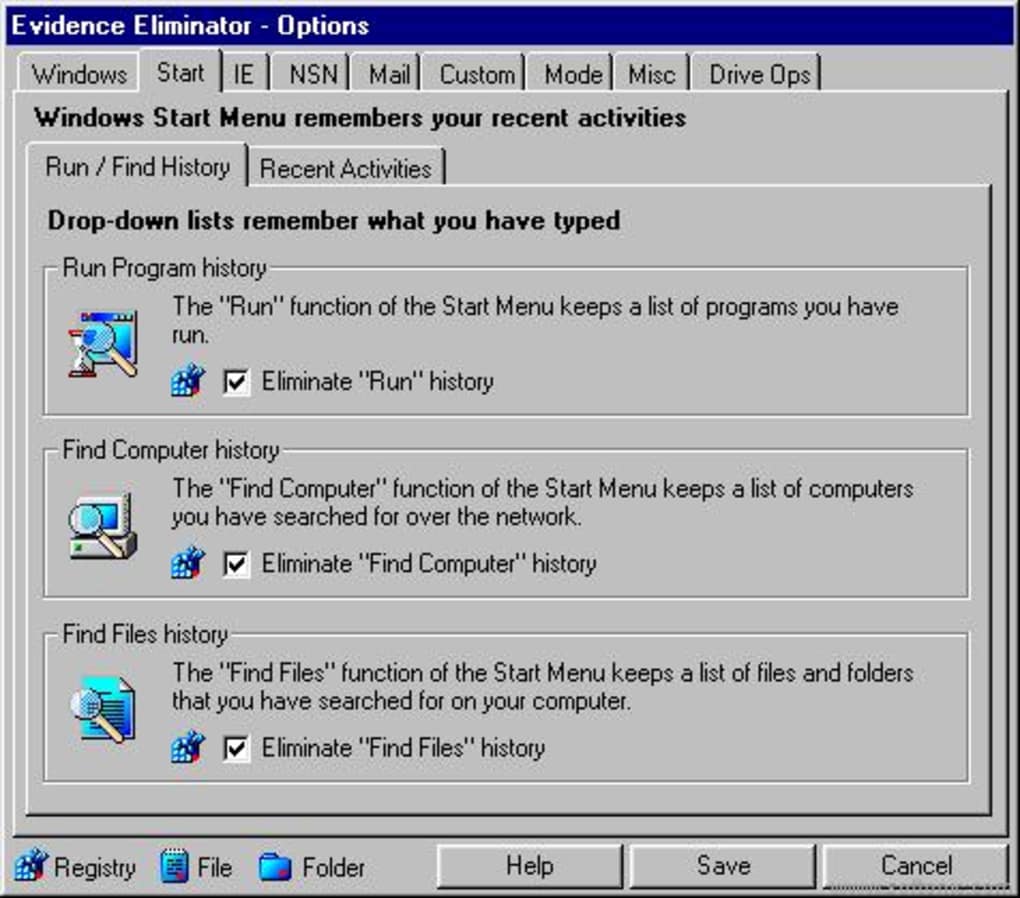
Today, comparable software exists with greater user-friendliness and safety mechanisms. Many modern tools incorporate sophisticated wiping algorithms and enhanced user interfaces, minimizing the risk of accidental data deletion while still providing a high level of data security.
Why Evidence Eliminator is No Longer Available
The reasons behind the disappearance of Evidence Eliminator from the market are not explicitly stated. However, several plausible factors might contribute:
-
Technical Obstacles and Maintenance: Maintaining and updating a sophisticated tool like Evidence Eliminator, especially given its purported reliance on advanced techniques, could prove challenging and resource-intensive. Keeping up with evolving operating systems, file formats, and security threats would require significant ongoing development and testing, which may have become unsustainable for the developers.
-
Legal and Ethical Concerns: The aggressive nature of the software and its potential for misuse could have created legal and ethical concerns for the developers. The possibility of assisting individuals in concealing incriminating evidence could have exposed them to legal liability.
-
Market Saturation and Competition: Over time, the market for data wiping software may have become saturated, with competitors offering increasingly sophisticated and user-friendly alternatives. Evidence Eliminator’s steeper learning curve and potential for misuse could have made it less competitive in a market demanding improved usability and safety features.
- Changing Technological Landscape: The advancements in data recovery techniques might have rendered some of Evidence Eliminator’s purported methods less effective. The software’s claim to evade electron microscope detection, while never independently verified, could have been challenged by evolving forensic capabilities.
Lessons Learned and Implications for Modern Data Security
Evidence Eliminator’s legacy serves as a valuable reminder of the ongoing arms race between data security software and forensic techniques. While its aggressive approach aimed for ultimate data elimination, it also highlighted the potential for misuse and the importance of user expertise. Modern data security software strives to strike a balance between powerful data erasure capabilities and ease of use, minimizing the risk of unintended consequences. The increased focus on user-friendliness and safety measures underscores the lessons learned from tools like Evidence Eliminator, demonstrating a shift towards making powerful data security tools more accessible while reducing the risk of accidental or malicious data removal.
Furthermore, the need for reliable and secure data management practices continues to grow in our increasingly digital world. Users should prioritize selecting data security software from reputable vendors with a proven track record of security and ethical practices. It’s also essential to educate oneself on the specific functionalities of the software being used, ensuring a complete understanding of its capabilities and limitations before employing it. Thorough research and responsible use are crucial for maximizing the benefits of data security tools while minimizing the risks. This case study of Evidence Eliminator serves as a clear example of the importance of this balance, reminding us of the potential power — and potential pitfalls — of advanced data erasure tools.
File Information
- License: “Trial version”
- Version: “5.0.58”
- Latest update: “November 8, 2006”
- Platform: “Windows”
- OS: “Windows 98”
- Language: “English”
- Downloads: “13.6K”
- Size: “4.85 MB”


