
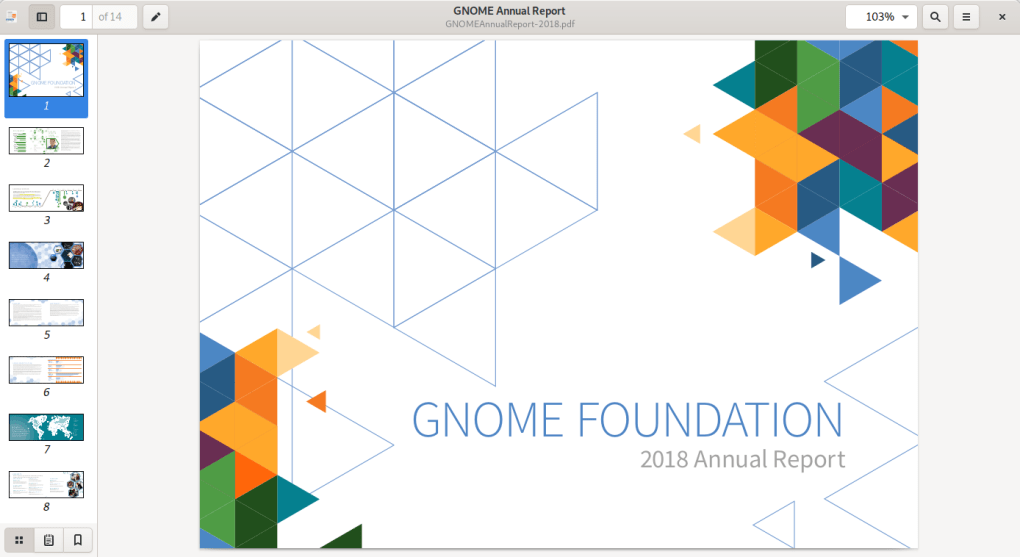
Evince is a versatile and free, open-source document reader primarily designed for GNOME desktop environments. However, its cross-platform compatibility and ease of use make it a viable option for a broader audience. This review delves into Evince’s features, strengths, weaknesses, and overall usability, comparing it to other popular document readers on the market. We’ll examine its strengths as a lightweight yet powerful tool and consider its limitations in the context of more feature-rich commercial alternatives.
Feature Set and Functionality
Evince boasts a robust feature set for a free and open-source application. Its core functionality centers around the ability to open and display a wide range of document formats. This includes common file types such as PDF (Portable Document Format), DOC (Microsoft Word), ODT (OpenDocument Text), and many others. Beyond these standard formats, Evince also supports less common types like CBR (Comic Book Reader) files, making it a surprisingly flexible option for diverse document needs.
Beyond simple viewing, Evince offers several essential features that enhance the user experience. These include:
-
Text Selection and Search: Users can easily select and copy text within documents, a fundamental feature for any document reader. The built-in search functionality allows for quick navigation within lengthy documents, significantly improving efficiency.
-
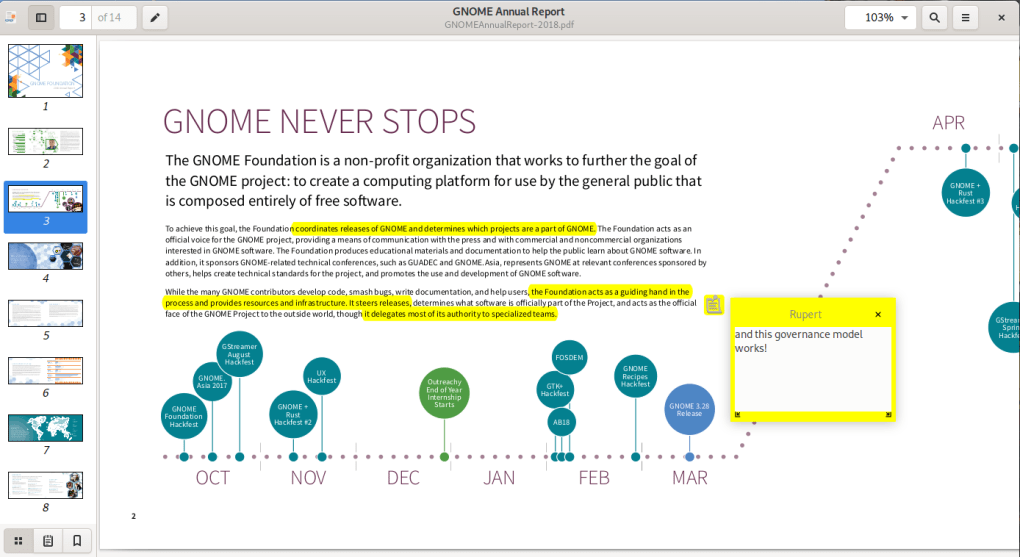
Annotation Capabilities: While not as sophisticated as dedicated annotation tools, Evince allows users to add basic annotations, such as highlighting and comments. This is helpful for reviewing and marking up documents, although the user interface for annotations could benefit from some improvements in terms of intuitive design and ease of use. Many users find the annotation workflow somewhat clunky compared to more polished alternatives.
-
Multiple Display Formats: Evince provides options for customizing the display layout, allowing users to adjust settings to optimize their reading experience. This may include changing zoom levels, page orientation, and other visual preferences.
-
Keyboard and Mouse Support: The application is fully compatible with standard keyboard shortcuts and mouse interactions, offering a familiar and intuitive user interface for most users. The inclusion of touchpad support further enhances its versatility across various input devices.
-
Clipboard Integration: Seamless integration with the system clipboard allows for effortless transfer of text and other data between Evince and other applications, improving workflow efficiency.
Strengths and Weaknesses of Evince
Evince’s greatest strength lies in its simplicity and ease of use. It’s a lightweight application that doesn’t demand excessive system resources, making it ideal for older machines or those with limited processing power. Its intuitive interface and straightforward functionality make it accessible to users with varying levels of technical expertise. The wide range of supported file formats is another key advantage, catering to a diverse user base with varying document needs. The open-source nature of Evince ensures community support and continuous development, leading to ongoing improvements and bug fixes. Finally, the fact that it’s free eliminates any cost barrier to access.
However, Evince is not without its weaknesses. As mentioned earlier, the annotation tools are relatively basic and could benefit from significant improvements in terms of both functionality and user interface design. The scrolling, while functional, isn’t always the smoothest, which can be a minor annoyance during extended reading sessions. Compared to some commercial alternatives, Evince lacks advanced features such as advanced editing capabilities, digital signature support, and sophisticated form filling tools. While sufficient for basic document viewing and annotation, power users requiring advanced functionalities might find Evince’s feature set limited. The integration with the GNOME desktop environment, while beneficial for GNOME users, can limit its seamless integration into other desktop environments.
Comparison with Alternative Document Readers
When comparing Evince to other document readers, it’s crucial to consider the target audience and their specific needs. For casual users who primarily need a simple, lightweight, and free document viewer, Evince is an excellent choice. Its simplicity outweighs its limitations for those who only require basic functionalities.
However, for users requiring advanced features such as robust annotation tools, form filling capabilities, digital signature support, or advanced editing options, commercial alternatives like Adobe Acrobat Reader or Foxit Reader offer a more comprehensive solution. These applications often come with a price tag, but the enhanced features justify the cost for professional users or those with demanding document management needs.
Other free alternatives, such as Sumatra PDF, offer a good balance between functionality and simplicity. Sumatra PDF, for example, is known for its speed and lightweight nature, while still offering a more polished user experience than Evince. The choice between Evince and alternatives depends heavily on individual needs and priorities.
User Reviews and Feedback
User reviews of Evince reflect a general consensus regarding its strengths and weaknesses. Many users praise its simplicity, ease of use, and wide range of supported file formats. Positive reviews consistently highlight its lightweight nature and its suitability for users who prioritize speed and efficiency over advanced features.
However, some criticisms consistently emerge regarding the annotation features, with users expressing frustration with the less-than-intuitive interface and limited functionality. The scrolling performance also draws occasional complaints, indicating a potential area for improvement in future versions. The lack of advanced features compared to commercial alternatives is also a common point of discussion, reminding us of the trade-off between functionality and simplicity that Evince represents.
Overall, user feedback demonstrates that Evince effectively serves its intended purpose as a lightweight and accessible document reader for users with basic needs. However, users requiring advanced features should explore alternative solutions.
Conclusion: Who is Evince For?
Evince is a solid choice for users who require a simple, free, and open-source document reader with a wide range of format support. Its lightweight nature makes it ideal for older systems or those with limited resources. Its straightforward interface makes it accessible to all users, regardless of their technical skills. The open-source nature guarantees ongoing community support and development, ensuring bug fixes and potential feature improvements over time.
However, it’s crucial to acknowledge Evince’s limitations. If you require advanced features like sophisticated annotation, form filling, or powerful editing capabilities, then Evince is likely not the best option. Commercial solutions offer a broader range of capabilities and more polished user experiences, often justified by the cost for professional or demanding users. Ultimately, the best document reader depends on individual needs and priorities. If your needs are basic and you value simplicity, speed, and accessibility above all else, then Evince might be the perfect document reader for you. If your requirements extend beyond the basics, then exploring alternative options is recommended.
File Information
- License: “Free”
- Latest update: “May 23, 2023”
- Platform: “Windows”
- OS: “Windows 2003”
- Language: “English”
- Downloads: “34.8K”
- Size: “33.13 MB”


