
Excel Online, a free web application from Microsoft, provides a browser-based alternative to the desktop version of Microsoft Excel. This review delves into its features, benefits, drawbacks, and overall usability, comparing it to competitors like Google Sheets. This cloud-based solution offers a compelling option for users who need spreadsheet functionality without the need for a full software installation.
Accessing the Power of Excel Without Installation
Excel Online’s primary strength lies in its accessibility. Unlike its desktop counterpart, it doesn’t require a download or installation. This makes it readily available on any device with a web browser and an internet connection, providing unparalleled convenience for users on the go or those working across multiple devices. The application seamlessly integrates with other Microsoft 365 applications, offering a cohesive workflow for users already invested in the Microsoft ecosystem. This ease of access extends beyond just personal use; businesses can benefit from its streamlined deployment and accessibility for employees, eliminating the need for individual software licenses and installations on every machine.
The interface mirrors the familiar layout of the desktop Excel program, ensuring a smooth transition for existing users. The core functionality is largely retained, including the creation and editing of spreadsheets, the use of formulas and functions, chart creation, data analysis tools, and the ability to format cells and worksheets. This familiar environment reduces the learning curve for those migrating from the desktop application, allowing users to maintain their productivity without needing to master a new interface. The intuitive design also makes it accessible to beginners, eliminating the steep learning curve often associated with spreadsheet software.
Collaboration and Sharing Capabilities
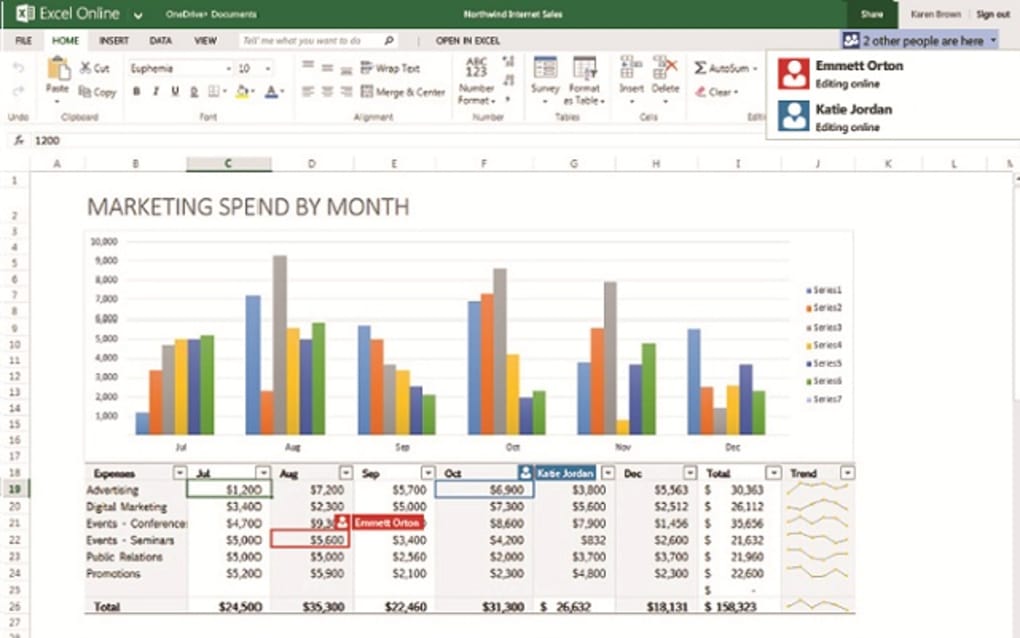
Excel Online’s collaborative features enhance its utility, particularly in team environments. Multiple users can simultaneously work on the same spreadsheet, making it a highly effective tool for projects requiring joint effort. The real-time collaboration allows for immediate feedback, faster iteration cycles, and more efficient teamwork. Built-in features for commenting and version history further enhance collaboration, enabling users to leave feedback and track changes effortlessly. This reduces the risk of version control issues and allows for easy tracking of contributions, facilitating smooth and efficient collaboration. The sharing capabilities allow for easy distribution of spreadsheets, fostering transparency and efficient communication. The ability to control access levels ensures data security and confidentiality, customizing the sharing options according to specific project requirements.
Beyond collaboration, the application allows for seamless sharing of spreadsheets via email, links, or direct integration with other Microsoft services like OneDrive and Teams. This streamlined sharing process facilitates efficient information dissemination, whether sharing reports with colleagues, presenting findings to clients, or collaborating on projects with external partners. The integration with other Microsoft services enhances workflow efficiency and reduces the need for cumbersome file transfers, improving overall productivity.
Advanced Features and AI Integration with Microsoft 365 Copilot
Excel Online isn’t simply a stripped-down version of its desktop counterpart; it incorporates many advanced features, including a powerful array of formulas and functions, sophisticated charting capabilities, and robust data analysis tools. These tools empower users to perform complex calculations, visualize data effectively, and draw meaningful insights from their spreadsheets. The application also offers pre-built templates for common tasks such as budgeting, expense tracking, and personal finance management, further simplifying the user experience and reducing the time required to set up spreadsheets for various purposes. These templates provide a solid foundation, allowing users to quickly populate data and begin analysis rather than starting from a blank sheet.
A notable addition to Excel Online is the integration of Microsoft 365 Copilot, an AI-powered productivity tool. Copilot leverages artificial intelligence to enhance user efficiency and productivity within Microsoft 365 applications, including Excel Online. This AI assistant can analyze data, suggest formulas, generate charts and visualizations, highlight key trends, and filter data, making complex tasks significantly easier. Copilot’s ability to automate routine tasks frees up users to focus on higher-level analysis and decision-making, optimizing the overall workflow and reducing the time spent on repetitive tasks. This integration represents a significant step forward in simplifying data analysis and enabling users to extract more valuable information from their spreadsheets.
Limitations and Potential Drawbacks
While Excel Online offers considerable benefits, it’s not without its limitations. The primary drawback is its reliance on a stable internet connection. Offline access is not available, limiting its use in environments with unreliable internet connectivity. This dependence on internet access can impact productivity and create workflow disruptions in areas with limited or intermittent internet service. This reliance also poses a concern for users focused on data security and privacy, particularly those dealing with sensitive information, as all data is stored and processed on Microsoft servers.
Furthermore, some advanced features present in the desktop version of Excel may be absent or limited in the online version. While the core functionality remains largely intact, certain specialized tools or add-ins may not be available, impacting users heavily reliant on these features. While Microsoft strives to maintain feature parity, some discrepancies are bound to exist between the online and desktop versions. Users who rely on these specific features should carefully compare the available functionalities before migrating to Excel Online.
Another potential issue is performance. While generally responsive, Excel Online’s performance can be affected by the size and complexity of the spreadsheet, as well as the network connection speed. Large or complex spreadsheets may take longer to load and process, potentially impacting productivity. This performance variability underscores the importance of a consistently strong internet connection for optimal performance of the application. This is in contrast to the desktop version where the processing is handled locally, offering more consistent and independent performance.
Comparison to Google Sheets
Excel Online’s primary competitor is Google Sheets. Both applications offer comparable core functionalities, including spreadsheet creation, editing, formula usage, chart generation, and collaboration features. However, they differ in several key aspects. Google Sheets offers a more robust platform for collaboration and integration with other Google Workspace services, while Excel Online provides tighter integration with other Microsoft 365 apps. The choice between the two often depends on the user’s existing technology ecosystem and their preference for specific features. Both offer free tiers of service, making them accessible alternatives to full-fledged desktop spreadsheet software.
Conclusion
Excel Online is a powerful and versatile online spreadsheet application that offers many of the features and benefits of its desktop counterpart without the need for installation. Its accessibility, collaborative capabilities, and integration with Microsoft 365 make it an excellent choice for individuals and businesses alike. While some limitations exist regarding offline access and performance, the benefits of its ease of use, collaborative functionality, and AI-powered assistance outweigh these drawbacks for a significant portion of users. It serves as a convenient and efficient alternative for users who require spreadsheet functionality on the go or in collaborative environments, providing a compelling solution for managing and analyzing data in a cloud-based environment. The integration of Microsoft 365 Copilot positions Excel Online as a leader in leveraging AI to improve productivity and unlock insights within spreadsheets. The app’s user-friendliness coupled with its powerful features positions it firmly as a leading choice among online spreadsheet applications.
File Information
- License: “Free”
- Version: “varies-with-device”
- Latest update: “February 19, 2025”
- Platform: “Windows”
- OS: “Windows XP”
- Language: “English”
- Downloads: “455K”


