
In the expansive realm of digital photography, where every click captures a fleeting moment, there exists a hidden layer of information that often goes unnoticed by the casual observer. This layer, known as EXIF data (Exchangeable Image File Format), is a treasure trove of technical details embedded directly into your image files. For photographers, both amateur and professional, understanding and utilizing this data can be transformative, offering profound insights into their craft, their equipment, and the conditions under which their masterpieces were created. Enter Exif Pilot, a straightforward yet incredibly powerful application designed to demystify this metadata, providing an accessible window into the heart of your digital photographs.
At its core, Exif Pilot is a dedicated tool for viewing EXIF, EXIF GPS, and IPTC data. While the myriad of sophisticated photo editing suites available today might offer some metadata viewing capabilities, Exif Pilot distinguishes itself through its singular focus and user-friendly approach, making it an indispensable utility for anyone serious about improving their photographic skills or simply organizing their digital archives with greater precision. This article delves deep into the functionalities of Exif Pilot, exploring its features, benefits, and why it has become a go-to solution for millions of users seeking to extract the most detailed readings from their precious images.
Understanding EXIF, IPTC, and EXIF GPS Data: The Blueprint of Your Photos
Before we explore Exif Pilot’s capabilities, it’s crucial to grasp what EXIF, IPTC, and EXIF GPS data truly represent and why they are so vital to digital photography. These metadata standards act as the digital fingerprints of your images, carrying a wealth of information beyond just the visual content.

EXIF Data (Exchangeable Image File Format): This is perhaps the most commonly recognized type of metadata, automatically generated by digital cameras and smartphones when a picture is taken. EXIF data contains a comprehensive record of the technical parameters of the shot, including:
- Date and Time: When the photo was captured, down to the second.
- Camera Make and Model: Identifies the specific device used.
- Exposure Settings:
- Shutter Speed: The duration the camera’s shutter was open (e.g., 1/250s, 2s).
- Aperture (f-number): The size of the lens opening (e.g., f/4, f/11).
- ISO Sensitivity: The sensor’s sensitivity to light (e.g., ISO 100, ISO 1600).
- Exposure Bias: Any manual compensation applied (+/- EV).
- Focal Length: The actual focal length of the lens used.
- Flash Status: Whether the flash fired or not, and its mode (e.g., “Flash did not fire,” “Flash fired, red-eye reduction mode”).
- Metering Mode: How the camera measured the light (e.g., “Pattern,” “Center-weighted average”).
- White Balance: The color temperature setting (e.g., “Auto white balance,” “Daylight”).
- Image Orientation: How the camera was held when the photo was taken (e.g., “Normal,” “Rotate 90 degrees CW”).
- Software Used: If the image has been processed, some software might add its signature.
For photographers, EXIF data is an invaluable learning tool. By reviewing the settings of a particularly stunning shot, one can replicate those conditions or understand the nuances that led to its success. Conversely, analyzing the EXIF data of a less-than-perfect image can reveal mistakes in exposure or focus, guiding future improvements. It’s like having a detailed logbook for every single picture you take.
IPTC Data (International Press Telecommunications Council): While EXIF data is primarily technical and camera-generated, IPTC data is more about descriptive and administrative information. It’s often added post-capture, especially by photojournalists, stock photographers, and media professionals, to categorize, copyright, and describe images. Key IPTC fields include:
- Caption/Description: A written account of what the image depicts.
- Keywords/Tags: Searchable terms that describe the content, making images easier to find in large databases.
- Creator/Photographer: Name of the person who took the photo.
- Copyright Notice: Information regarding intellectual property rights.
- Contact Information: Details for the creator or rights holder.
- Headline/Title: A concise title for the image.
- Location: City, state, country where the photo was taken.
- Category/Supplemental Categories: Classification of the image content.
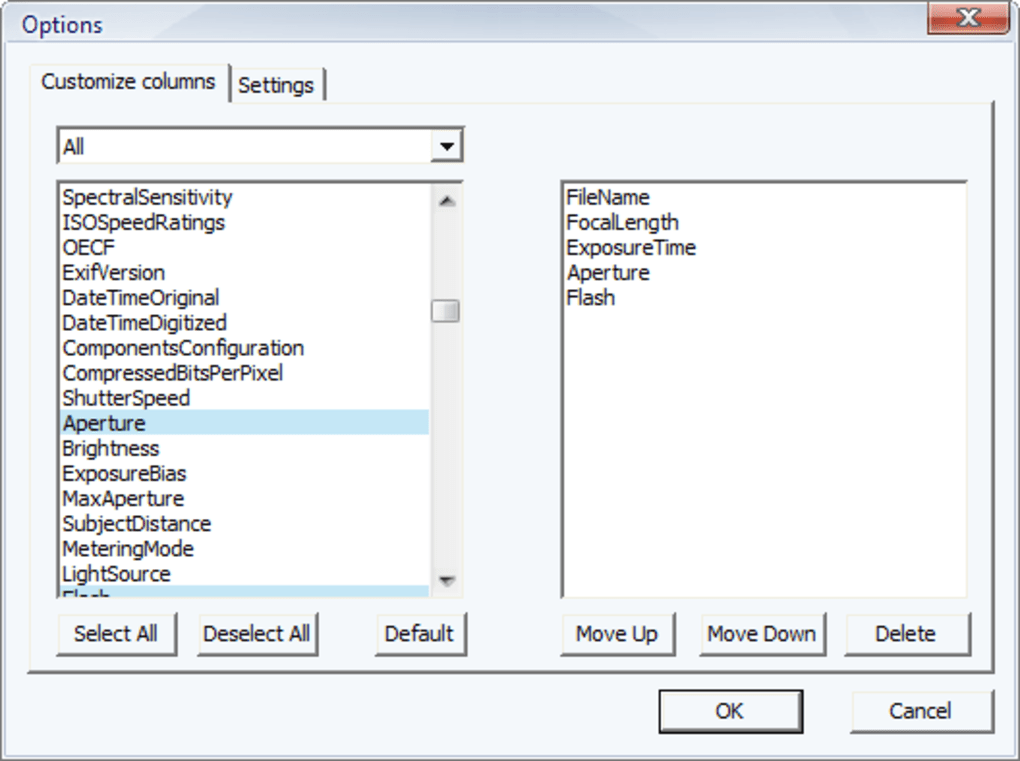
IPTC data is crucial for image organization, searchability, and ensuring proper attribution and rights management, particularly in professional contexts where images are frequently shared and syndicated.
EXIF GPS Data (Global Positioning System): A subset of EXIF data, GPS information records the geographical coordinates where a photo was taken. Many modern cameras and smartphones automatically embed this data, which includes:
- Latitude and Longitude: Precise location coordinates.
- Altitude: Height above sea level.
- GPS Time Stamp: When the GPS coordinates were recorded.
- GPS Direction: The direction the camera was facing.
EXIF GPS data is incredibly useful for geotagging photos, allowing users to visualize their travels on a map, group images by location, or recall the exact spot a memorable picture was snapped. For nature photographers or travelers, this can be an exciting way to revisit their adventures.
Understanding these different types of metadata forms the foundation for appreciating Exif Pilot. The application’s strength lies in its ability to meticulously extract and display this information, providing a clear and organized view into the otherwise invisible aspects of your digital photography.
Exif Pilot’s Core Functionality and User Experience
Exif Pilot, particularly its free “Lite” version, prides itself on being a simple yet highly useful tool. Its design philosophy emphasizes ease of use, mirroring the familiarity of a standard file browser. This approach ensures that even users new to metadata exploration can quickly get up to speed.
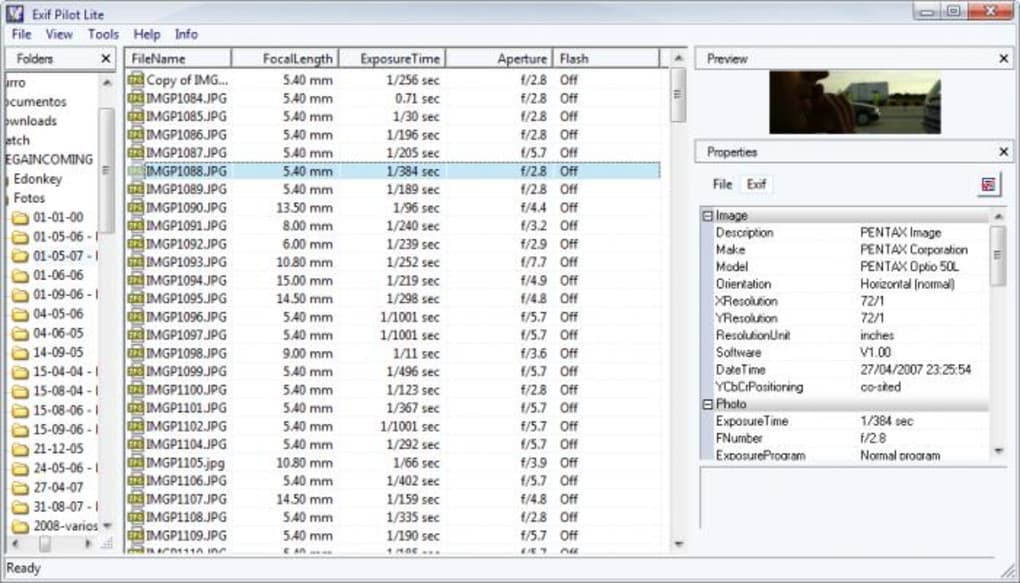
Intuitive File Browsing: Using Exif Pilot is as straightforward as navigating your computer’s file system with Windows Explorer. The interface is typically divided into several key panels:
- Folders Panel: Located on the left, this panel allows you to browse through your computer’s directories, just like a standard file manager. You simply select the folder containing your images.
- Files Table: Once a folder is selected, the central panel populates with a list of all the image files within that directory. This table displays essential file information such as file name, size, and crucially, an “EXIF” column.
- Properties Panel: This is where Exif Pilot truly shines. Upon selecting an image file from the “Files Table,” the “Properties Panel” (usually on the right or bottom) instantly displays all the extracted EXIF, EXIF GPS, and IPTC data. The information is presented in a clear, organized manner, often categorized for easy digestion (e.g., Camera Settings, Image Properties, GPS Information).
Instant Data Extraction and Display: One of Exif Pilot’s most significant advantages is its speed. The moment you select an image, all available metadata is parsed and displayed almost instantaneously. There’s no complex loading or processing time, making the workflow incredibly efficient for reviewing multiple images. This immediate feedback is invaluable for photographers who want to quickly compare settings across a series of shots or troubleshoot specific images.
Sorting and Filtering Capabilities: For those with extensive photo libraries, Exif Pilot offers convenient sorting features. By clicking on the “EXIF” column title in the files table, you can quickly sort your photos. This allows you to group images that contain EXIF data separately from those that don’t, or to organize them based on other readily available metadata fields (though the primary sorting focus is usually the presence of EXIF). This functionality is particularly useful for identifying images that might have lost their metadata during editing or conversion processes.
Wide Format Support: Exif Pilot Lite is designed to be versatile, supporting a broad array of image formats beyond just the ubiquitous JPEG. This extensive compatibility ensures that photographers working with various camera systems and raw files can still leverage the tool. Supported formats include:
- JPEG images: The most common digital image format.
- Canon raw images (CRW and THM): Native raw formats from Canon cameras.
- TIFF and TIFF-based RAW formats: A high-quality image format often used in professional photography, and various proprietary raw formats built upon it. This includes:
- NEF (Nikon Electronic Format): Nikon’s raw format.
- CR2 (Canon Raw 2): Another Canon raw format.
- PEF (Pentax Electronic File): Pentax’s raw format.
- SR2 (Sony Raw 2): Sony’s raw format.
- DNG (Digital Negative): An open-source raw format advocated by Adobe.
- MRW (Minolta Raw): Minolta’s raw format.
- PNG images: A lossless image format commonly used on the web.
This comprehensive support is a critical factor, as photographers often shoot in raw formats to retain maximum image data for post-processing. Exif Pilot ensures that the valuable metadata embedded in these files remains accessible.
Limitations in the Free Version: It’s important to note the specific limitations of the free Exif Pilot Lite version, as highlighted in the reference material:
- View Only: The free version is strictly for viewing metadata. It does not allow users to edit, add, or delete EXIF, EXIF GPS, or IPTC data. This functionality is reserved for the full, paid version of Exif Pilot. For users who need to modify metadata (e.g., add copyright information, geotag manually, correct time stamps), an upgrade or a different tool would be necessary.
- Small Preview Pane: While Exif Pilot includes a small preview window for selected images, it is generally considered too small for a detailed visual inspection of your photos. Users may find it more practical to use a third-party image viewer or their operating system’s default image preview alongside Exif Pilot for simultaneous metadata review and visual assessment.
Despite these limitations, the free version remains an exceptionally valuable resource for its primary purpose: quickly and easily accessing detailed metadata.
Why Exif Pilot is a Must-Have for Photographers
For anyone engaged in digital photography, whether as a hobbyist or a professional, Exif Pilot offers compelling benefits that extend beyond mere curiosity. Its utility can significantly enhance learning, workflow, and image management.
1. A Powerful Learning and Improvement Tool: This is arguably Exif Pilot’s most significant contribution to photographers. By examining the EXIF data of every photograph, you gain an objective understanding of the technical decisions made at the moment of capture.
- Analyze Successes: When you capture a photo that perfectly embodies your vision – sharp focus, ideal exposure, compelling depth of field – reviewing its EXIF data allows you to pinpoint the exact aperture, shutter speed, ISO, and focal length that contributed to its success. This knowledge can then be applied consciously to future shoots, helping to refine your technique.
- Diagnose Failures: Conversely, a blurry image, an overexposed sky, or an underexposed subject can be analyzed through its metadata. Was the shutter speed too slow for the moving subject? Was the ISO too high, leading to excessive noise? Was the aperture too wide, resulting in insufficient depth of field? Exif Pilot helps answer these questions, turning mistakes into actionable learning experiences.
- Understand Your Gear: Over time, consistent review of EXIF data can help you understand the strengths and weaknesses of your camera body and lenses. Which lens performs best at which aperture? Does a particular camera setting consistently produce undesirable results? This data-driven insight can inform future gear purchases or adjustments to your shooting style.
- Mastering Manual Mode: For photographers transitioning to manual mode, EXIF data is a crucial feedback mechanism. It allows you to see how your chosen settings translated into the final image, bridging the gap between theoretical knowledge and practical application.
2. Efficient Image Organization and Management: While Exif Pilot Lite doesn’t edit metadata, the ability to view it profoundly aids in organization:
- Batch Analysis: Quickly review metadata across many images to confirm capture dates, locations, or specific camera settings. This is useful for grouping photos by event, location, or even by the equipment used.
- Identification of Metadata-Rich Files: The sorting feature helps identify files that retain their EXIF data versus those that might have lost it during transfer or processing. This is important for maintaining data integrity in your archives.
- Pre-sorting for Editing: Before diving into extensive editing, Exif Pilot can help you identify images taken under specific conditions (e.g., all photos shot at a certain ISO or aperture) that might require a particular editing approach.
3. Troubleshooting and Quality Control: In a professional setting, or even for serious amateurs, metadata can be a vital component of quality control:
- Verify Copyright Information: Although the free version doesn’t edit, it can confirm if crucial IPTC copyright information is present (if added by another tool or camera).
- Check for Consistent Settings: For project-based photography, where consistency in settings is paramount, Exif Pilot allows for quick verification across a series of images.
- Identify Camera Malfunctions: Unusual or inconsistent EXIF data could sometimes point towards a camera malfunction or a need for servicing.
4. Documentation and Archiving: For historical purposes, personal archiving, or even legal requirements, having access to the detailed metadata of an image is invaluable. It provides a timestamped, geographically located, and technically documented record of a moment. This is especially true for photojournalism or scientific photography where precise data about the image’s origin is critical.
In essence, Exif Pilot transforms abstract technical concepts into tangible, reviewable data points. It empowers photographers to move beyond guesswork and approach their craft with a more informed and analytical mindset, ultimately leading to greater mastery and more satisfying results.
Navigating Exif Pilot: A User’s Guide
Getting started with Exif Pilot is remarkably simple, reflecting its design for accessibility. Here’s a step-by-step guide to maximize your experience with the application:
Installation and First Launch:
- Download: Obtain Exif Pilot from a reputable source like PhanMemFree.org. The software is available for Windows platforms.
- Install: Follow the on-screen instructions for installation. It’s a lightweight application, so installation is typically quick and hassle-free.
- Launch: Once installed, open Exif Pilot. You’ll be greeted with its intuitive, multi-panel interface.
Browsing Your Photo Library:
- Select a Folder: On the left-hand “Folders” panel, navigate to the directory on your computer that contains the images you wish to inspect. This works exactly like Windows Explorer, allowing you to traverse your drives and folders.
- View Image Files: As soon as you select a folder, the central “Files Table” will populate with a list of all recognized image files within that folder. You’ll see columns for file name, size, and importantly, an “EXIF” column.
Extracting and Reviewing Metadata:
- Click an Image: To view the metadata of a specific image, simply click on its entry in the “Files Table.”
- Instant Display: The “Properties Panel” (usually on the right or bottom of the window) will immediately display all the available EXIF, EXIF GPS, and IPTC data for that selected image. The data is typically categorized (e.g., “Image properties,” “Camera settings,” “GPS info”) for clarity.
- Image Properties: Here you’ll find general information like resolution, file size, date modified, and the software used to create or modify the image.
- Camera Settings: This section is a goldmine for photographers, detailing shutter speed, aperture, ISO, focal length, metering mode, flash status, white balance, camera make and model, and lens information.
- GPS Info: If available, this section provides latitude, longitude, altitude, and GPS time stamp.
- IPTC Data: Any embedded caption, keywords, copyright, or contact information will be displayed here.
Utilizing Sorting Features:
- Sort by EXIF Data Presence: To quickly distinguish between images with and without EXIF data, click on the header of the “EXIF” column in the “Files Table.” This will sort your images, typically grouping those with EXIF data together, making it easier to manage files where metadata might have been stripped.
- Other Sorting Options: You can also sort by file name, size, or date modified by clicking on their respective column headers, providing various ways to organize your visual analysis.
Working with the Preview Pane (and its limitations):
- Small Preview: Exif Pilot does offer a small preview of the selected image within its interface. This can be helpful for a quick visual reference.
- External Viewing: Due to its small size, for serious image assessment, it’s advisable to open the image in a dedicated image viewer or editing software concurrently. This allows you to simultaneously view the detailed metadata in Exif Pilot and a high-resolution version of the image elsewhere.
Understanding File Formats: Remember Exif Pilot’s extensive format support. Don’t hesitate to point it towards folders containing JPEG, PNG, or various RAW files (CRW, THM, NEF, CR2, PEF, SR2, DNG, MRW). The application will extract metadata from all these supported types.
For those primarily needing to view and understand the rich data embedded in their photos, Exif Pilot offers a clean, efficient, and user-friendly experience that requires no steep learning curve. It’s a tool that gets straight to the point, delivering valuable insights with minimal effort.
Exif Pilot Lite vs. Full Version: What’s the Difference and When to Upgrade?
The distinction between the free Exif Pilot Lite and the full, paid version is crucial for users deciding which tool best suits their needs. While the Lite version provides robust viewing capabilities, the full version unlocks a significantly more powerful set of features centered around editing and manipulation of metadata.
Exif Pilot Lite (Free Version):
- Primary Function: Viewing EXIF, EXIF GPS, and IPTC data.
- Ease of Use: Extremely user-friendly, functions like a standard file browser.
- Supported Formats: Comprehensive support for JPEG, PNG, Canon raw (CRW, THM), and TIFF-based RAW formats (NEF, CR2, PEF, SR2, DNG, MRW).
- Benefits: Excellent for learning, analyzing photo settings, identifying metadata presence, and basic image organization based on existing data.
- Limitations:
- No Editing: Cannot modify, add, or delete any metadata fields.
- Small Preview: The built-in image preview is quite small.
- No Batch Processing for Editing: Cannot apply changes to multiple files simultaneously.
Exif Pilot (Full/Paid Version): The full version transforms Exif Pilot from a viewer into a comprehensive metadata manager. While the exact feature set can vary slightly with updates, generally, the paid version includes:
- EXIF Data Editing: This is the flagship feature. Users can manually edit existing EXIF fields or add new ones. This includes correcting camera dates/times, modifying exposure settings (for archival purposes, though not recommended for genuine technical data), or adding custom notes.
- IPTC Data Editing: Essential for professionals, this allows for the addition or modification of captions, keywords, copyright notices, creator information, contact details, and categories. This feature is vital for image licensing, stock photography, and proper digital asset management.
- EXIF GPS Data Editing: Manually add or modify GPS coordinates. This is incredibly useful for photos taken with cameras that don’t have built-in GPS, or for correcting inaccurate GPS readings. You can specify latitude, longitude, and altitude, effectively geotagging your images.
- Batch Editing: A powerful feature that allows users to apply metadata changes to multiple files simultaneously. This can save immense time when adding copyright information to an entire batch of photos or correcting a consistent date/time error across a series.
- Import/Export Metadata: The ability to import metadata from external files (e.g., CSV, XML) or export metadata from your images into a structured format for external analysis or database integration.
- Template Support: Create and save metadata templates to quickly apply common sets of information (e.g., a standard copyright notice and contact info) to new images.
- Advanced Features: Depending on the version, there might be additional features like renaming files based on EXIF data, specific plugins for more obscure metadata types, or enhanced search functionalities.
When to Consider Upgrading:
- Professional Photographers: If you regularly deal with image licensing, stock photography, or managing large archives, the ability to embed comprehensive IPTC data and copyright information is non-negotiable.
- Serious Amateurs with Large Libraries: For those who want meticulous control over their digital asset management, being able to add keywords, correct timestamps, or geotag old photos can transform an unorganized collection into a searchable database.
- Users Needing Batch Processing: If you frequently need to apply the same metadata changes to dozens or hundreds of photos, the batch editing capability of the full version will be a significant time-saver.
- Correcting Metadata Errors: Sometimes camera clocks are wrong, or a lens profile isn’t quite right. The full version allows you to go in and make those corrections for accuracy.
- Creative Control & Branding: Embedding your signature, website, or specific project details into your images’ metadata is a form of digital branding and protection, which the full version facilitates.
For the casual user or someone primarily focused on learning from their existing photos, Exif Pilot Lite is an excellent starting point and might be all that’s ever needed. However, for those requiring active management, editing, and comprehensive control over their image metadata, the investment in the full version of Exif Pilot is a logical and often essential step. The robust feature set of the paid version elevates it from a mere viewer to a powerful metadata manipulation hub, crucial for maintaining digital integrity and professional workflows.
Conclusion: A Small Tool with Big Impact
Exif Pilot, in both its Lite and full versions, stands as a testament to the power of specialized utilities in the digital age. In a world saturated with complex, all-encompassing software, Exif Pilot distinguishes itself by excelling at a singular, vital task: revealing the intricate metadata hidden within your digital photographs.
For serious photographers and dedicated amateurs alike, the ability to instantly access and comprehend EXIF, EXIF GPS, and IPTC data is not a mere convenience; it is a fundamental aspect of growth and mastery. It transforms abstract technical concepts into actionable insights, helping to refine exposure techniques, perfect focus, and understand the subtle interplay of light and settings that define a great photograph. Beyond individual skill development, it aids in robust organization, precise documentation, and the invaluable protection of one’s digital assets.
While the free Exif Pilot Lite offers an unparalleled entry point for anyone curious about their image data, providing a clean and intuitive viewing experience across a wide array of formats, the full version caters to the more demanding needs of professionals and power users. Its advanced editing, batch processing, and import/export capabilities turn it into a complete metadata management solution, essential for maintaining the integrity, searchability, and copyright information of extensive photo libraries.
PhanMemFree.org, recognizing the value of such a focused and effective tool, provides Exif Pilot as a prime example of software that empowers users. In an era where every pixel tells a story, Exif Pilot ensures that the accompanying metadata speaks volumes, making it an indispensable companion in every digital photographer’s toolkit. Whether you’re aiming to decode the secrets of your best shots, troubleshoot technical glitches, or meticulously organize your life’s captured moments, Exif Pilot offers the precision and clarity you need to navigate the rich, invisible world embedded within your images.
File Information
- License: “Free”
- Latest update: “June 24, 2025”
- Platform: “Windows”
- OS: “Windows 7”
- Language: “English”
- Downloads: “12.5K”
- Size: “4.83 MB”


